Managing business finances becomes more challenging as a business grows. Business owners often spend valuable time creating invoices, recording expenses, matching bank transactions, and preparing financial reports. These daily accounting tasks can reduce the time available for serving customers and growing the business. Wave accounting software offers a practical way to organize financial records, automate routine work, and maintain accurate books.
As a trusted cloud accounting software, it gives business owners access to financial information from any location while keeping records updated in real time.
Whether you are a freelancer, startup founder, consultant, or small business owner, choosing the right accounting system can make financial management much easier. This guide explains how wave accounting software works, why many businesses choose cloud accounting software, and how businesses can get the most value from its features.
What You Will Learn From This Blog
- What wave accounting software is and how it works.
- Why cloud accounting software is becoming the preferred choice for small businesses.
- The major features available in Wave Accounting Software.
- How wave accounting software simplifies everyday bookkeeping tasks.
- The benefits of using cloud accounting software for financial management.
- The differences between the Wave platform and traditional accounting methods.
- Best practices for getting maximum value from Wave Accounting.
- Common accounting challenges Wave helps small businesses overcome.
- How professional accounting support can improve your Wave accounting experience.
What is Wave Accounting Software?
Wave Accounting Software is an online accounting platform that is tailor-made for small business owners, freelancers, and consultants. It provides features such as unlimited invoicing, unlimited estimates, contact management, expense tracking, accounts payable, basic inventory, reports of accounting, billing, payroll management, finance management, credit card processing, receipt scanning, and many more.
With Wave Accounting software’s bank reconciliation tools, the systematic process improves bookkeeping efficiency and accuracy. This software helps businesses streamline bookkeeping processes as well. Businesses can also generate reports that include various data, such as sales tax, balance sheet, cash flow, profit/loss, invoices, payment slips, and supplier bills.
The dashboard includes an elaborate invoicing tool that effectively collects all the invoice payments. It gives users the feature of customization. It means small business owners can opt for customizable invoicing templates based on their unique business needs. Tips to help you use financial metrics and analysis to better understand your business’s performance and influence its growth.
Wave allows inviting your personal accountant to view your accounting without having to give them your login info. It also grants access to collaborators who have view-only access or view and edit access. With this, they can create and send invoices, manage transactions, and generate reports. It also has an integrated mobile accounting app, email subscription management software, and an accounting method based on accrual or cash-on-basis.
This accounting software supports integration with multiple companies, such that a direct Etsy integration makes Wave an ideal accounting software for Etsy sellers. It has a redesigned UI that is well-organized and user-friendly, with an easier navigation model.
Why Small Businesses Need Cloud Accounting Software
Many businesses have moved away from spreadsheets and desktop accounting systems because cloud accounting software provides greater flexibility, easier collaboration, and better access to financial information.
Access Financial Data Anywhere
Business owners can review financial records from the office, home, or while traveling. Internet access is the only requirement for viewing updated accounting information.
Automatic Data Backup
Unlike desktop files that may be lost due to computer failure, cloud accounting software stores financial records securely with automatic backups. Automatic backups reduce the risk of permanent data loss and help businesses recover important information when needed.
Real-Time Financial Information
Transactions update continuously as new data is entered. Business owners always have access to current financial information instead of relying on outdated reports.
Better Team Collaboration
Accountants, bookkeepers, and business owners can work on the same financial records without sending files back and forth. This reduces version control issues.
Lower Technology Costs
Businesses do not need expensive servers or software installation. Most cloud accounting software solutions only require a web browser and an internet connection.
Stronger Data Security
Many cloud platforms use encryption, user authentication, and secure servers to protect financial information. Business owners should still follow good password practices and enable multi-factor authentication whenever available.
Features to use in Wave Accounting Software
Client Portal
This portal is simply for creating invoices so that the customers can view their invoices and pay them directly online.
Expense Tracking
Tracking your expenses is now easier through automated bulk transaction categorization, transaction matching, and the ability to merge duplicate transactions. This way, you can connect directly to your respective bank account, import bank statements, or manually add expenses.
Bank Reconciliation and Account Payable
It also offers the customers a recently improved bank reconciliation feature to facilitate them in balancing the books. Added to that, it allows you to enter bills and record billing payments with different charts of accounts. Wave offers a customizable chart of accounts that is organized to make accounting as simple as possible for business owners, with the provision of fixed asset management.
Inventory
This is Wave’s most prominent inventory feature, which has a glorified item list. The customer can choose to add an item name, a description, and the sales price. They can also mark which one to buy and which one to sell by adding the prices manually as well.
The free pricing makes the Wave Accounting System highly popular, as it is fully featured at a free price with no compromise in its performance. It is intuitive to use and easier to set up by creating the account on the first page of the dashboard.
How Wave Accounting Software Simplifies Accounting For Small Businesses
One of the main reasons many small businesses choose Wave accounting software is its ability to simplify routine accounting work while keeping financial records organized.
Automates Daily Bookkeeping
Instead of entering every transaction manually, Wave Accounting imports bank transactions and organizes them into appropriate categories. Automation reduces repetitive work and minimizes manual entry errors.
Creates Professional Invoices Quickly
Users can customize invoice templates with company branding, payment terms, and customer information. Faster invoicing often encourages quicker customer payments.
Tracks Business Expenses Clearly
Every business expense can be recorded, categorized, and matched with receipts. Organized records make monthly bookkeeping and year-end tax preparation much easier.
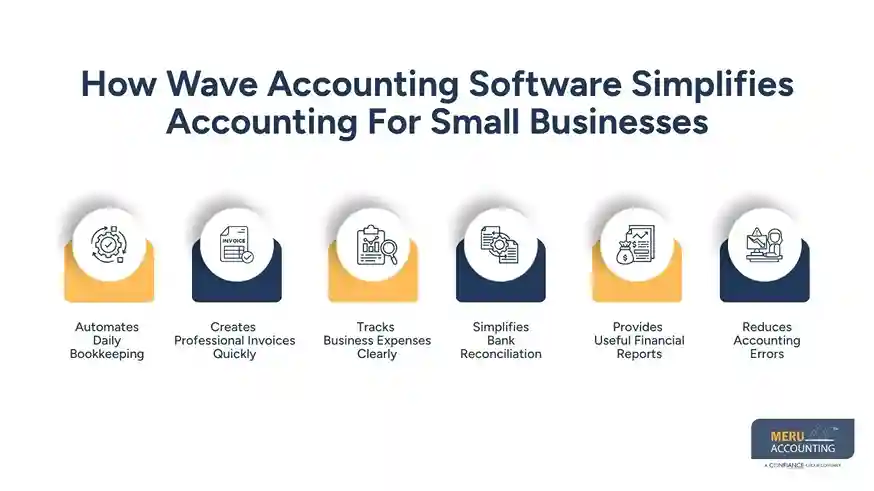
Simplifies Bank Reconciliation
Matching bank statements with accounting records is often one of the most time-consuming bookkeeping tasks. Wave’s accounting platform makes reconciliation easier by displaying imported transactions alongside accounting records.
Provides Useful Financial Reports
Business owners can monitor revenue, expenses, profits, and cash flow using built-in reports. Regular review of these reports allows businesses to identify spending patterns and monitor financial performance.
Reduces Accounting Errors
Manual bookkeeping often leads to duplicate entries, incorrect calculations, or missing transactions. Automation within Wave Accounting reduces many of these common accounting mistakes while maintaining more accurate financial records. Greater accuracy also improves the reliability of financial reports.
Benefits of Using Cloud Accounting Software For Small Businesses
Businesses selecting cloud accounting software often notice several operational and financial advantages beyond simple bookkeeping.
Saves Valuable Time
Routine accounting work requires less manual effort. Business owners can spend more time serving customers and growing their business.
Makes Financial Information Easy To Understand
Clear dashboards and reports present income, expenses, outstanding invoices, and cash balances in an easy-to-read format. Better visibility helps business owners make informed financial decisions.
Supports Business Growth
As businesses expand, additional transactions, customers, and invoices can be managed without replacing the accounting system. The software can adapt to changing business needs as operations grow.
Simplifies Tax Preparation
Well-organized financial records reduce the workload during tax season. Accountants can access accurate reports instead of sorting through spreadsheets.
Keeps Financial Records Organized
Every invoice, payment, expense, and transaction remains stored in one secure location, making future record retrieval much easier. Organized records also simplify audits and financial reviews.
Works Well With Professional Accountants
Many accountants regularly work with cloud accounting software, allowing businesses to receive accounting assistance without exchanging paper documents or multiple spreadsheet versions. This improves collaboration and speeds up financial reporting.
Wave Accounting Software Vs Traditional Accounting Methods
Aspect | Traditional Accounting Methods | Wave Accounting Software |
Data Entry | Requires entering every transaction manually, making bookkeeping time-consuming. | Imports many transactions automatically, reducing manual work and saving time. |
Record Storage | Uses paper documents or local files that require physical storage and are harder to organize. | Stores financial records digitally, making them searchable and easy to access. |
Accessibility | Access is often limited to one computer or office location. | As a cloud accounting software solution, it allows authorized users to access financial data from multiple locations. |
Accuracy | Manual calculations increase the risk of bookkeeping errors. | Automated calculations help reduce common accounting mistakes and improve accuracy. |
Reporting | Financial reports often take hours to prepare manually. | Generates reports within seconds using recorded financial data. |
Collaboration | Sharing spreadsheets through email can create multiple file versions and confusion. | Enables business owners and accountants to work from the same financial records, improving collaboration. |
Best Practices For Getting The Most From Wave Accounting Software
Using Wave’s bookkeeping solution correctly allows businesses to maintain accurate records and make better financial decisions. Following a few simple practices can increase efficiency and reduce bookkeeping mistakes.
Record Transactions Regularly
Update income and expenses throughout the month instead of waiting until the end. Regular bookkeeping keeps financial reports accurate and reduces year-end work.
Connect Business Bank Accounts
Linking business bank accounts allows Wave accounting software to import transactions automatically. This reduces manual data entry and keeps records current.
Review Financial Reports Every Month
Check Profit and Loss Statements, Cash Flow Reports, and Balance Sheets regularly. Monthly reviews make it easier to spot unusual expenses, declining revenue, or cash shortages before they become larger issues.
Keep Business And Personal Expenses Separate
Use separate bank accounts for business activities. Clear separation makes bookkeeping easier and creates cleaner financial records for tax preparation.
Store Supporting Documents
Upload receipts, invoices, and payment records whenever possible. Digital documents remain organized and are easier to retrieve during tax filing or financial reviews.
Work With An Accounting Professional
Even when using the Wave Accounting platform, professional guidance can reduce reporting errors, maintain accurate records, and ensure compliance with applicable tax rules. Regular expert reviews help identify issues before they become costly mistakes.
optional anymore
on running the business
Common Challenges Small Businesses Can Overcome With Wave Accounting Software
Many small businesses face similar accounting problems. Wave Accounting provides practical features that help reduce these everyday challenges. This makes bookkeeping more organized and easier to manage.
Too Much Time Spent On Bookkeeping
Manual bookkeeping often consumes several hours each week. Automation allows business owners to complete routine accounting work more efficiently.
Late Customer Payments
Invoice tracking allows businesses to monitor unpaid invoices and send payment reminders, making accounts receivable easier to manage. Faster collections help maintain healthier cash flow.
Missing Expense Records
Receipts and expenses can be stored digitally instead of relying on paper documents. Better organization reduces the chance of missing deductible business expenses.
Difficulty Monitoring Cash Flow
Financial dashboards provide a clear view of income, expenses, and available cash. Business owners can make informed decisions using current financial information.
Preparing For Tax Season
Accurate records throughout the year reduce stress during tax filing. Reports generated from wave accounting software give accountants organized financial information.
Limited Access To Financial Data
Because it is cloud accounting software, authorized users can access financial information from different locations without carrying paper files or transferring spreadsheets. This allows teams to review financial data whenever needed.
Why Choose Meru Accounting For Wave Accounting Software Support?
Choosing the right accounting software is only one part of maintaining accurate financial records. Proper setup, regular bookkeeping, and timely financial reporting are equally important.
At Meru Accounting, we combine accounting expertise with Wave’s accounting platform to keep your books organized, reconcile bank accounts, manage accounts payable and receivable, and prepare reliable financial reports that support informed business decisions.
Our team has extensive experience working with Wave accounting software and other cloud accounting software platforms. We ensure your accounting system is configured correctly, transactions are recorded accurately, and your financial records remain up to date throughout the year. This organized approach makes tax preparation easier and provides clear visibility into your business finances.
Whether you are a freelancer, startup, or an established small business, Meru Accounting delivers accounting support that grows with your business. Our focus is on maintaining accurate, tax-ready financial records while allowing you to spend more time serving customers and expanding your business.
Our Expert Perspective
Many small businesses invest in accounting software, expecting it to solve every financial challenge. In reality, software works best when supported by accurate bookkeeping practices and regular financial reviews.
Wave accounting software provides an easy-to-use platform for invoicing, expense tracking, bank reconciliation, and financial reporting. However, the quality of financial information still depends on how transactions are recorded and reviewed.
At Meru Accounting, we believe businesses achieve the best results by combining reliable cloud accounting software with experienced accounting professionals. Proper setup, regular reconciliations, and accurate financial reporting help business owners make informed decisions, improve cash flow visibility, simplify tax preparation, and maintain compliance throughout the year.
Key Takeaways
- Wave accounting software simplifies bookkeeping through automation.
- Cloud accounting software allows secure access to financial data from anywhere.
- Automated bank feeds reduce manual data entry and improve accuracy.
- Built-in invoicing and expense tracking help manage daily finances efficiently.
- Financial reports provide valuable insights into business performance.
- Regular bookkeeping and bank reconciliation keep financial records accurate.
- Professional accounting support helps businesses maximize the benefits of Wave Accounting software.
- Combining Wave with experienced accountants creates a reliable and scalable accounting system for growing businesses.
FAQs
Wave accounting software helps small businesses manage bookkeeping, invoicing, expense tracking, bank reconciliation, financial reporting, and cash flow from one cloud-based platform.
Yes, the Wave accounting software is designed for freelancers, startups, consultants, and small businesses that need an affordable and easy-to-use accounting solution.
Cloud accounting software provides remote access, automatic data backups, real-time financial information, secure data storage, and easier collaboration with accountants and bookkeepers.
Yes, the Wave accounting system can automatically import bank transactions, categorize expenses, generate invoices, and simplify bank reconciliation, reducing manual bookkeeping work.
Yes, the Wave accounting software generates reports such as Profit and Loss Statements, Balance Sheets, Cash Flow Reports, Sales Tax Reports, and other financial summaries that help businesses monitor performance.