



Tired of using spreadsheets to track your business money? This blog will show you a better way. Sage bookkeeping software is a smart tool to help you handle business finances easily. No matter if you run a small startup or a large firm, Sage can be your finance partner. Say goodbye to old spreadsheet work and switch to Sage bookkeeping software.
In this Sage software review, we look at its features, benefits, ease of use, setup process, common issues, and overall suitability for small businesses. This will help you decide if Sage is the right fit for your bookkeeping needs.
What You Will Learn
- What Sage bookkeeping software is and how it works
- The key features and benefits of Sage bookkeeping software for small businesses
- The pros and cons to consider before choosing Sage
- How easy Sage is to set up and use for daily bookkeeping
- Who is Sage software best suited for?
- Common Sage bookkeeping problems and how to fix them
- Whether Sage bookkeeping software for small business is worth
Sage Bookkeeping Software Review: What is Sage Bookkeeping Software?
Sage bookkeeping software makes financial work simple for those new to bookkeeping. It runs in the cloud and offers tools like a general ledger and accounts receivable. It is perfect for small businesses that want smart bookkeeping without high costs or outside help.
From a beginner’s point of view, Sage stands out for its straightforward approach to everyday bookkeeping tasks. However, the right Sage solution depends on your business size, accounting needs, and the features you require.
Our Quick Review of Sage Bookkeeping Software
Before looking at each feature in detail, here is a quick overview of what Sage bookkeeping software offers:
Review Factor | Our Take |
Ease of use | Beginner-friendly for common bookkeeping tasks |
Features | Covers core bookkeeping and business finance needs |
Automation | Helps reduce manual calculations and repetitive work |
Reporting | Provides useful financial and business reports |
Scalability | Can support businesses as their needs grow |
Security | Uses cloud-based security measures |
Support | Customer support is available when users need help |
Best suited for | Small businesses and users looking for simpler bookkeeping |
Our overall view: Sage bookkeeping software can be a useful option for small businesses that want to move away from spreadsheets and manage everyday financial tasks in one place. However, businesses with more complex accounting, industry-specific needs, or extensive customization may need to look closely at the specific Sage product and plan they choose.
Why Choose Sage Bookkeeping Software?
- Sage bookkeeping software gives you easy tools to handle your money.
- It keeps your financial info neat and all in one place.
- By automating calculations, it cuts down on errors.
- The software makes clear reports that help you track your business finances.
- Sage Bookkeeping works with many currencies, which is handy if you deal with clients worldwide.
- Plus, Sage has helpful customer support when you need help.
From a review perspective, these benefits make Sage worth considering for businesses that value ease of use and centralized financial management. Still, businesses should compare the available features and plans with their specific needs before choosing the software.
Pros and Cons of Sage Bookkeeping Software
A good software review should look at both strengths and limitations. Here are some key points to consider:
Pros
- Easy for beginners to learn.
- Brings key bookkeeping tasks into one system.
- Automates several routine financial tasks.
- Provides financial and business reports.
- Supports businesses as their needs change.
- Offers customer support and guidance.
- Can be useful for businesses working with multiple currencies.
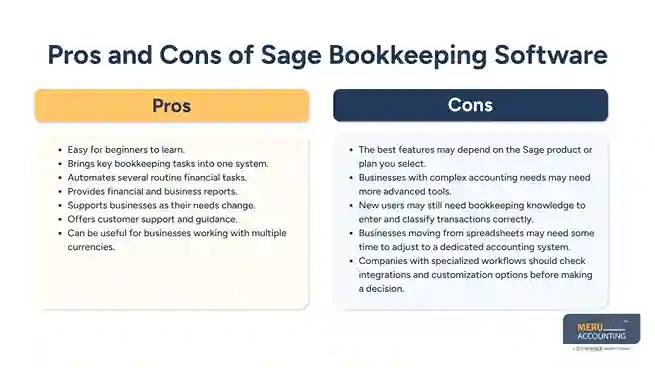
Cons
- The best features may depend on the Sage product or plan you select.
- Businesses with complex accounting needs may need more advanced tools.
- New users may still need bookkeeping knowledge to enter and classify transactions correctly.
- Businesses moving from spreadsheets may need some time to adjust to a dedicated accounting system.
- Companies with specialized workflows should check integrations and customization options before making a decision.
Key Benefits of Sage Bookkeeping Software for Small Businesses
- Easy to Use
Simple for new users with clear steps. The clean design helps you get started fast with no fuss. - Cost-Effective
Saves both time and money for small firms. Cuts down the need for extra staff or costly errors. - Time-Saving
Automates bills, payments, and reports. This lets you spend more time on what matters most. - Flexible
Grows as your business grows. You can add features or users with no trouble at all. - Secure
Keeps your data safe with strong tech. Regular updates protect you from loss and hacks. - Accurate
Stops mistakes with smart checks. Your books stay right, so tax time is quick and calm. - Supportive
Offers help when you need it most. Guides and service make using the software a breeze. - Customizable
Adjusts to your needs with ease. Set up your reports and forms just how you want.
Key Features of Sage Bookkeeping Software for Small Businesses
Sage bookkeeping software is a strong tool for all business sizes. Some features include:
- General Ledger & Accounts
Track income, costs, and record key tasks. Create clear reports to guide smart moves. - Inventory Management
Watch stock levels and reorder with ease. Stay in control of items at all times. - CRM Tools
Save buyer info and sales history. Help build strong and lasting client links. - HR & Payroll
Manage staff data and pay jobs with ease. Cut down time spent on each task. - Reports & Business Data
View trends and firm growth with ease. Use reports to plan your next steps fast.
How Do These Features Perform for Small Businesses?
For small businesses, the main value of Sage software is having core financial tasks in one place. General ledger tools, transaction tracking, invoicing, reconciliation, and reporting can reduce the need to manage separate spreadsheets and records.
However, businesses should review the exact features included in their chosen Sage product before subscribing. Not every Sage product is designed for the same business size or accounting requirement.
How Sage Bookkeeping Software Works
1. Set Up Your Account
- Start by entering your business details.
- Add your bank accounts and payment methods.
2. Enter Your Transactions
- Add all sales and purchase records.
- Record expenses like bills and salaries.
3. Create and Send Invoices
- Use the software to prepare invoices.
- Send invoices directly from Sage Bookkeeping.
4. Reconcile Your Bank Account
- Import bank statements.
- Match transactions to keep records accurate.
5. Run Financial Reports
- Check your financial health.
- Use reports to make business decisions.
Is Sage Bookkeeping Software Easy to Set Up?
If you are new, follow these steps:
- Visit Sage’s site and create your account. Use a real email to get updates.
- Download the software from the site. Choose the right version for your device.
- Install it by following the on-screen guide. It won’t take long to finish.
- Open the software and add your business details. Check that all info is correct.
- Start tracking your money right away. You can add more data as you go.
For beginners, the setup process is relatively straightforward. However, the exact steps can vary based on the Sage product you use and whether you choose a cloud-based or desktop solution.
How to Record Transactions in Sage Bookkeeping Software
To record transactions, do this:
- Log in to your Sage bookkeeping account. Keep your login info safe.
- Click the “Customers” tab to add or update clients. This helps keep things neat.
- Enter customer info like name, phone, and email. Make sure it’s up to date.
- Save the customer and open the “Invoices” tab next.
- Create a new invoice with date, number, services, and amount. Double-check all details.
- Save the invoice, then go to “Payments” to enter any payments received.
- Record payment details, like method and date, to keep your books current.
How to Fix Common Sage Bookkeeping Problems
If you find problems, try these tips:
- Make sure your software is up to date. Updates often fix bugs fast.
- Check your data for entry mistakes. Even small errors can cause issues.
- Verify the format of the data if you import files. Wrong formats can lead to errors.
- If problems persist, contact Sage support or a bookkeeping expert. They can help quickly.
- Restart the software or your device as a simple fix before seeking help.
Is Sage Bookkeeping Software for Small Businesses Worth It?
For those new to bookkeeping, Sage bookkeeping software for small businesses is a smart and easy tool. It helps track income, costs, and other records without needing great skills. With tools like invoice setup, bank match, and tax help, it makes money tasks simple. By choosing Sage Bookkeeping, new users save time, cut down on mistakes, and get more control of their money.
Whether you run a small shop, freelance service, or growing firm, Sage can grow with you.
Sage bookkeeping software is worth considering if you want an easier way to manage everyday financial tasks and move away from spreadsheets. Its combination of bookkeeping features, reporting, automation, and support makes it a practical choice for many small businesses.
However, it may not be the best fit for every business. Companies with complex accounting requirements should compare Sage’s available products, features, integrations, and pricing with their needs before making a final decision.
Who Should Consider Sage Bookkeeping Software?
Sage bookkeeping software may be a good option for:
- Small business owners are moving away from spreadsheets.
- Freelancers who need a simple way to track business finances.
- Startups that want centralized bookkeeping tools.
- Businesses that need invoicing and financial reporting.
- Companies that want cloud-based access to financial information.
- Businesses that need bookkeeping software that can support growth.
It may be less suitable for businesses that require highly specialized accounting workflows or extensive customization. In such cases, comparing Sage with other accounting solutions can help you find a better fit.
Sage Bookkeeping Software vs. Hiring a Professional Bookkeeper
Sage bookkeeping software can simplify financial tasks, but software does not replace professional bookkeeping knowledge in every situation.
A business owner may be able to use Sage for routine tasks such as recording transactions, creating invoices, and checking reports. However, complex reconciliations, financial reviews, tax preparation, cleanup work, and accounting decisions may still require professional support.
This is where outsourcing can provide additional value.
Meru Accounting offers expert bookkeeping and accounting using Sage software. Outsourcing your work to us can make managing money easy. Sage’s easy design fits well with Meru’s goal to provide quick and clear financial help.
Meru Accounting offers top bookkeeping services using Sage to enhance workflows. We have many clients who are happy to have Sage software for their business with our support.
Final Verdict: Is Sage Bookkeeping Platform a Good Choice?
Sage bookkeeping platform offers a practical combination of bookkeeping tools, automation, reporting, and business finance features. Its beginner-friendly approach can make it easier for small businesses to move away from spreadsheets and gain better visibility into their finances.
The main strengths are its ease of use, range of financial tools, reporting capabilities, and ability to support routine bookkeeping tasks. The main consideration is whether the specific Sage product and plan provide all the features your business requires.
Our verdict: Sage bookkeeping software is worth considering for small businesses and beginners who want a structured way to manage their finances. Before choosing it, compare the features, plan options, integrations, and support available for your specific business needs.
If you already use Sage but find bookkeeping difficult to manage, professional support can help you get more value from the software while keeping your records accurate.


