




Managing business finances can feel overwhelming without the right structure and tools. Many small businesses and accounting professionals rely on QuickBooks to simplify bookkeeping, invoicing, reporting, and financial tracking. However, even with a powerful platform, users often make avoidable errors that can affect accuracy, reporting, and compliance. This blog shares practical QuickBooks tips to help you avoid common pitfalls, improve efficiency, and maintain clean financial records.
You will also learn essential tips and tricks that can streamline daily operations and support better decision making in QuickBooks. By the end of this blog, you will have a clear understanding of how to use QuickBooks effectively, reduce errors, and follow proven best practices for long term success.
What You Will Learn From This Blog
In this blog, you will discover:
- The most common mistakes users make while using QuickBooks
- Practical QuickBooks tips to improve accuracy in bookkeeping
- Useful tips and tricks to save time and effort while using QuickBooks
- Best practices for maintaining organized financial records
- Solutions to frequently encountered QuickBooks challenges
- How professional services can enhance your QuickBooks experience
Top QuickBooks Mistakes to Avoid
Even experienced users can make mistakes that lead to inaccurate financial data. Below are some of the most common issues and how to avoid them.
Ignoring Regular Reconciliation
One of the most overlooked QuickBooks tips is reconciling accounts regularly. Failing to match bank statements with QuickBooks records can lead to discrepancies that are difficult to identify later.
Improper Chart of Accounts Setup
A poorly structured chart of accounts can create confusion and reporting errors. Many users skip planning and end up with duplicate or incorrectly categorized accounts.
Mixing Personal and Business Expenses
Another frequent mistake is combining personal and business transactions. This not only complicates bookkeeping but also affects financial reporting and tax preparation.
Not Categorizing Transactions Correctly
Incorrect categorization can distort financial reports. Following proper tips and tricks for categorization ensures that expenses and income are recorded accurately.
Skipping Data Backups
Although QuickBooks provides cloud options, not maintaining backups can still be risky. Data loss can disrupt operations and require time-consuming recovery.
Delaying Data Entry
Waiting too long to enter transactions often leads to missed entries or errors. One of the most practical tips for QuickBooks is to record transactions in real time or daily.
Overlooking Software Updates
Ignoring updates may prevent access to new features and security improvements. Keeping QuickBooks updated ensures optimal performance.
QuickBooks Tips for Accurate Bookkeeping
Maintaining accurate books is essential for financial clarity and compliance. Here are some essential QuickBooks tips to help you stay on track.
Maintain Consistent Record Keeping
Consistency is key when entering transactions. Make it a habit to record every transaction promptly and accurately.
Use Bank Feeds Efficiently
Bank feeds automatically import transactions into QuickBooks. One of the most effective QuickBooks tips and tricks is to review and categorize these transactions regularly to reduce manual effort.
Reconcile Accounts Monthly
Monthly reconciliation ensures that your records match bank statements. This helps identify discrepancies early and maintain clean books.
Standardize Categorization Rules
Create rules for recurring transactions to automate categorization. This saves time and improves accuracy.
Review Financial Reports Frequently
Generate and review reports such as profit and loss statements and balance sheets. These reports provide insights into business performance.
Avoid Duplicate Entries
Duplicate entries can inflate expenses or income incorrectly. Double check before saving transactions to prevent duplication.
Use Classes and Locations (If Applicable)
For businesses with multiple departments or locations, using classes and locations helps track performance separately. This is one of the advanced tips that enhances reporting clarity.
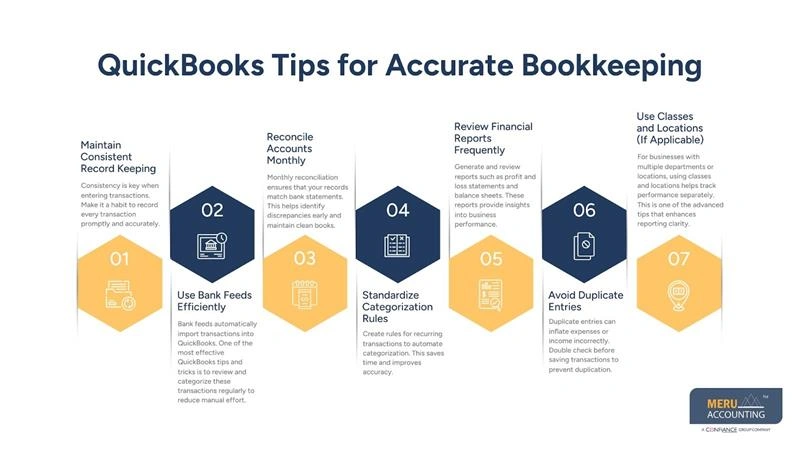
QuickBooks Tips for Accurate Bookkeeping
Efficiency is crucial when managing bookkeeping tasks. Implementing smart workflows and automation can significantly reduce workload.
Automate Recurring Transactions
Set up recurring invoices, bills, and journal entries. This ensures consistency and reduces manual input. It also minimizes the chances of missing repetitive transactions and helps maintain a predictable bookkeeping routine.
Utilize Keyboard Shortcuts
Learning shortcuts is one of the most practical QuickBooks tips and tricks to speed up navigation and data entry. It helps reduce the time spent on repetitive clicks and improves overall workflow speed when handling multiple tasks.
Customize Dashboard Views
QuickBooks allows you to customize dashboards based on your preferences. This helps you access important data quickly. A well-organized dashboard also allows you to focus on the most relevant financial metrics without distractions.
Use Memorized Reports
Save frequently used reports for quick access. This eliminates the need to recreate reports repeatedly. It also ensures consistency in reporting formats, making comparisons across periods much easier.
Integrate Third Party Apps
QuickBooks integrates with various applications for payroll, inventory, and CRM systems. Leveraging integrations improves workflow efficiency. It also helps centralize data across platforms, reducing the need for manual data transfers.
Schedule Automatic Invoices and Payments
Automating billing and reminders reduces delays in payments and improves cash flow management. This also enhances client communication by ensuring invoices are sent on time without manual intervention.
Enable Alerts and Notifications
Set up alerts for overdue invoices, low balances, and unusual activity. This helps you stay proactive. Timely notifications also allow you to address potential issues before they impact your financial records.
Take Advantage of Mobile Access
Using the QuickBooks mobile app allows you to manage finances on the go. This is especially helpful for small business owners who travel frequently. It also enables you to capture receipts, send invoices, and monitor transactions in real time from anywhere.
Best Practices for QuickBooks Success
Following structured practices ensures long term success with QuickBooks.
Keep Personal and Business Finances Separate
Maintain separate bank accounts and credit cards for business transactions. This simplifies bookkeeping and improves clarity. It also makes tax preparation easier and reduces the risk of mixing unrelated expenses in financial reports.
Establish a Routine
Consistency is one of the most important QuickBooks tips. Set aside time daily or weekly to update and review records. Following a routine also helps you catch errors early and keeps your books organized throughout the year.
Maintain Clean Data Entry
Ensure that all entries are accurate, complete, and properly categorized. Clean data leads to reliable reports. It also improves decision making by ensuring that financial insights are based on correct and up to date information.
Train Team Members Properly
If multiple users access QuickBooks, ensure they are trained on proper procedures and best practices. Proper training also reduces mistakes and ensures everyone follows a consistent bookkeeping process.
Limit User Access
Assign roles and permissions based on responsibility. This reduces the risk of unauthorized changes. It also enhances data security by ensuring only authorized personnel can modify sensitive financial information.
Monitor Cash Flow Regularly
Track inflows and outflows to maintain a healthy financial position. QuickBooks reports can help monitor cash flow trends. Regular monitoring also helps anticipate shortages and plan expenses more effectively.
Review Audit Logs
Audit logs help track changes made within the system. Reviewing logs can help identify errors or unauthorized actions. This practice also improves accountability by providing a clear record of user activity within QuickBooks.
Stay Updated with Features
QuickBooks frequently introduces new features. Staying informed allows you to take advantage of improvements and new QuickBooks tips and tricks. Keeping up with updates also ensures better performance, security, and access to enhanced functionalities.
Service Promotion: Professional QuickBooks Support
Managing QuickBooks effectively requires both technical understanding and consistent attention to detail. Many businesses prefer professional assistance to avoid errors and optimize their financial systems.
Meru Accounting offers specialized QuickBooks services designed to help businesses maintain accurate books, streamline workflows, and improve financial visibility. Their team assists with setup, data management, reconciliation, reporting, and ongoing support.
By leveraging expert guidance, businesses can implement the right QuickBooks tips, adopt effective QuickBooks tips and tricks, and ensure compliance while focusing on growth. Professional support also reduces manual workload and minimizes the risk of costly mistakes.
Meru Accounting CPA Tax Return Services
For firms and businesses looking for expert support beyond software, professional services play a vital role in ensuring accuracy and compliance. Meru Accounting offers specialized CPA tax return services designed to assist CPAs and businesses in managing complex tax requirements efficiently.
Their team focuses on delivering accurate, timely, and well structured CPA tax return solutions tailored to client needs. By combining professional expertise with structured processes, Meru Accounting helps streamline tax preparation, reduce workload, and improve overall financial reporting quality.
Whether you are a growing firm or an established practice, contact Meru Accounting, it can complement your use of tax return software for CPA and enhance overall efficiency.
Key Takeaways
- Avoid common errors such as poor categorization, delayed entries, and skipped reconciliations
- Follow consistent bookkeeping routines for better accuracy
- Use automation and integrations to improve efficiency
- Apply practical QuickBooks tips to maintain clean financial records
- Implement tips and tricks to streamline workflows in QuickBooks
- Regularly review reports and audit logs for better control
- Consider professional services for enhanced accuracy and support
FAQs
Inaccurate reports are often caused by incorrect categorization, missing transactions, or un-reconciled accounts. Reviewing and correcting entries regularly can resolve this issue.
It is recommended to reconcile accounts at least once a month to ensure accuracy and avoid discrepancies.
Identify and delete or merge duplicates carefully. Always verify before removing entries to avoid data loss.
Yes, QuickBooks supports multi-user access with role-based permissions. This allows teams to collaborate efficiently.
Applying structured QuickBooks tips, automating repetitive tasks, and using integrations can significantly improve workflow efficiency.


