




QuickBooks has become one of the most trusted accounting software solutions for businesses of all sizes. Knowing effective QuickBooks tips and tricks can save you hours in bookkeeping and make reporting more accurate.
Whether you are a small business owner or an accountant, mastering these tips can significantly improve your workflow and financial visibility. By applying these QuickBooks tips and tricks, you can simplify complex accounting tasks, reduce errors, and gain faster access to key financial insights.
From automating routine entries to generating precise reports, QuickBooks empowers you to stay organized and make informed business decisions without spending hours on manual bookkeeping.
What You Will Learn From This Blog
- How to make your bookkeeping process faster using QuickBooks.
- Simple ways to create accurate reports without errors.
- Methods to avoid common QuickBooks mistakes that slow down work.
- How to integrate QuickBooks with other software for better performance.
- Ways to use hidden features and shortcuts to save time.
Understanding the Importance of QuickBooks for Efficient Bookkeeping
Simplifies Daily Accounting Tasks
QuickBooks organizes your income and expenses efficiently, reducing manual calculations and errors. Using QuickBooks tips and tricks, you can further prevent mistakes that often occur with manual bookkeeping.
Provides Accurate Financial Insights
With proper bookkeeping in QuickBooks, you can track your profits, losses, and cash flow with ease.
Combine these practices with QuickBooks tips and tricks to gain deeper financial insights. This ensures you always have a clear view of your business’s financial health.
Saves Time for Small Businesses
By automating routine entries, QuickBooks allows business owners to focus on growth rather than data entry. Time saved on bookkeeping can be redirected to strategic business planning.
Enhances Tax Preparation
QuickBooks keeps all your transactions in order, making tax season less stressful. Use QuickBooks tips and tricks to streamline report generation and tax filing.
Supports Multiple Users
QuickBooks enables multiple team members to work simultaneously without data conflicts. User permissions ensure that sensitive data remains secure while collaborating.
Improves Decision-Making
With real-time financial data, businesses can make informed decisions quickly. Access to accurate reports helps identify opportunities and avoid potential financial issues.
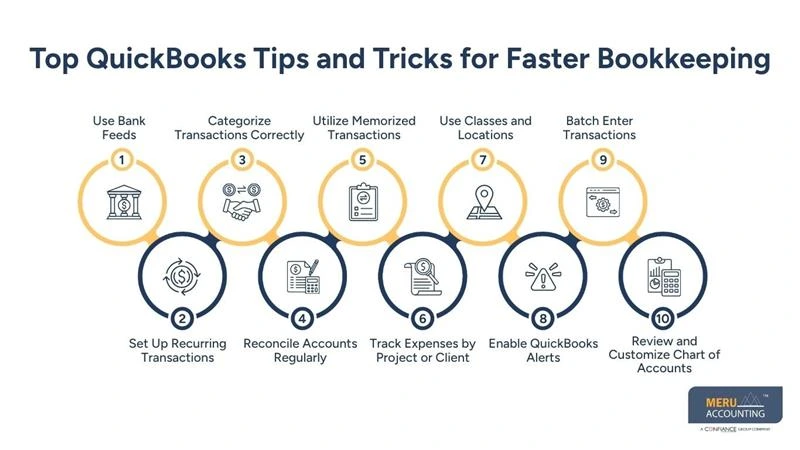
Top QuickBooks Tips and Tricks for Faster Bookkeeping
Use Bank Feeds
Connect your bank to QuickBooks to automatically import transactions, saving manual entry time. Learn these QuickBooks tips and tricks to make bank feeds even more efficient.
Set Up Recurring Transactions
Automate invoices and bills that occur regularly to reduce repetitive tasks. Recurring entries also help maintain consistent cash flow tracking.
Categorize Transactions Correctly
Assign categories consistently to maintain accurate financial statements and avoid errors. Proper categorization makes reporting and tax filing much easier.
Reconcile Accounts Regularly
Check bank and credit card statements against QuickBooks entries to spot discrepancies quickly. Regular reconciliation prevents small errors from becoming major issues.
Utilize Memorized Transactions
QuickBooks allows you to save commonly used entries for quick reuse, reducing repetitive work. This ensures consistency in transaction entries across your books.
Track Expenses by Project or Client
Segmenting costs improves reporting accuracy and helps monitor project profitability. It also makes it easier to identify profitable projects or clients.
Use Classes and Locations
Organize your transactions by class or location for detailed reporting. This helps analyze performance across different departments or regions.
Enable QuickBooks Alerts
Set up alerts for overdue invoices, bills, or low account balances. Alerts prevent missed payments and improve financial control.
Batch Enter Transactions
Enter multiple similar transactions at once to save time. Batch processing reduces repetitive work and speeds up bookkeeping.
Review and Customize Chart of Accounts
Regularly update your chart of accounts to fit your business needs. A clean chart of accounts ensures accurate reporting and easier audits.
QuickBooks Tips and Tricks for Streamlined Reporting
Customize Reports
Adjust columns, filters, and date ranges to get reports that are meaningful for your business. Apply QuickBooks tips and tricks to make report customization faster and more effective.
Use Report Groups
Combine multiple reports in one view for easier analysis and comparison. Report groups save time when reviewing multiple aspects of your finances.
Export to Excel
Export reports to Excel to manipulate data further or create charts for presentations. Use QuickBooks tips and tricks to make data export and analysis seamless.
Schedule Automatic Reports
Send key financial reports automatically to stakeholders to save time. Scheduled reports ensure everyone has up-to-date information without manual effort.
Highlight Key Metrics
Use QuickBooks reporting features to track KPIs like sales growth and cash flow trends. Highlighting metrics helps identify trends and make faster decisions.
Set Up Dashboard Widgets
QuickBooks dashboards display real-time financial data for quick review and decision-making. Dashboard widgets make it easy to monitor performance at a glance.
Compare Periods
Run reports comparing different time periods to see growth or decline trends. Use QuickBooks tips and tricks to quickly compare periods and spot trends effectively.
Filter by Customer, Project, or Department
Use filters to analyze performance across clients, projects, or departments. This provides more granular insights for better strategic planning.
Use Summary and Detail Reports
Switch between summary and detailed views to get high-level and in-depth information. Detailed reports help investigate specific transactions behind key numbers.
Automate Report Delivery via Email
QuickBooks can automatically email reports to designated recipients. Use QuickBooks tips and tricks to automate report delivery efficiently and save time.
What Common QuickBooks Errors to Avoid and How to Fix Them
Duplicate Transactions
Regularly check for duplicates in bank feeds and invoices to prevent errors. Follow QuickBooks tips and tricks to quickly spot and fix duplicates.
Misclassified Accounts
Double-check categories to ensure accurate reporting and compliance. Proper classification ensures correct financial statements and tax filings.
Outdated Software
Keep QuickBooks updated to avoid bugs and security issues. Updates also provide new features that can improve efficiency.
Incorrect Reconciliations
Verify your reconciliations monthly to maintain accuracy. Mistakes in reconciliation can lead to misreported balances and errors in decision-making.
Overlooked Backups
Always back up QuickBooks files to prevent data loss. Regular backups protect your data from accidental deletion or system failures.
Ignoring User Permissions
Limit sensitive access to prevent accidental changes or errors. Setting proper permissions safeguards your financial data and maintains accountability.
Why Integrating QuickBooks with Other Software Improves Reporting
Connect Payment Gateways
Integrate payment platforms for automatic transaction updates. This ensures that all sales and receipts are recorded in real time.
Sync CRM Tools
Align customer data for accurate sales and revenue reporting. It also helps track customer transactions and payment history easily.
Integrate Inventory Systems
Keep product data synchronized to reduce stock discrepancies. Accurate inventory data improves cost tracking and reporting accuracy.
Use Payroll Software Integration
Combine payroll and accounting to track expenses automatically. This reduces manual entry and ensures accurate employee cost records.
Link Project Management Tools
Monitor project costs and profitability in one platform. It helps in tracking budgets and avoiding project overspending.
Automate Data Entry
Integration reduces manual work and the chances of human errors. Implement QuickBooks tips and tricks to automate data entry and maintain error-free books.
How to Enhance Team Collaboration and User Management in QuickBooks
Assign Roles Based on Responsibility
Control who can view, edit, or approve transactions for security.
Clear role assignment reduces errors and improves accountability.
Enable Multi-User Mode
Allow multiple team members to work on QuickBooks simultaneously.
This improves productivity and speeds up bookkeeping tasks.
Monitor Activity Logs
Track changes to maintain accountability and transparency.
Logs help identify errors and understand who made specific updates.
Use Notes and Comments
Communicate directly within QuickBooks for faster decision-making.
Notes provide context for transactions and reduce confusion.
Set Up Approval Workflows
Ensure critical transactions are reviewed before posting.
Approval workflows reduce the risk of incorrect entries.
Share Custom Reports
Provide team members with access to the information they need without sharing sensitive data.
This keeps everyone informed while maintaining data security.
What Are the Key Ways to Monitor Cash Flow and Business Performance
Create Cash Flow Forecasts
Predict future inflows and outflows to avoid cash shortages. Forecasting helps in planning expenses and managing funds effectively.
Track Accounts Receivable and Payable
Monitor payments due and outstanding bills to manage liquidity. This ensures timely collections and avoids late payment penalties.
Analyze Profit Margins
Use QuickBooks reports to evaluate product or service profitability. Understanding margins helps in pricing and cost control decisions.
Review Expense Trends
Identify high-cost areas and find opportunities to reduce spending. Regular reviews help improve overall financial efficiency.
Monitor Bank Balances
Regularly review balances to ensure sufficient funds for operations. Follow QuickBooks tips and tricks to monitor bank balances more efficiently and avoid surprises.
Compare Periods
Track performance over months or years to spot growth patterns and challenges. Comparisons help measure progress and guide future planning.
How to Use QuickBooks Shortcuts and Hidden Features for Efficiency
Keyboard Shortcuts
Use keys like Ctrl + I for invoices or Ctrl + W for writing checks to save time. Shortcuts reduce navigation time and speed up daily tasks.
Memorized Reports
Save frequently used report settings to quickly generate updates. This ensures consistency in reporting without repeated setup.
Batch Emailing
Send multiple invoices or statements at once to reduce repetitive tasks. Batch emailing improves communication and saves valuable time.
Quick Find Transactions
Use search options to locate records without navigating menus. This helps quickly access data when reviewing or correcting entries.
Conditional Formatting in Reports
Highlight numbers that meet specific conditions to spot trends or issues. Use QuickBooks tips and tricks to visually track KPIs and trends easily.
Custom Templates
Create invoice and report templates that match your business style and requirements. Templates ensure consistency and present a professional image.
How Meru Accounting Supports Your QuickBooks Success
- Meru Accounting provides customized QuickBooks setups tailored to your business.
- We train your staff to use QuickBooks tips and tricks for maximum efficiency.
- We ensure smooth integration with your other software systems for better reporting.
- Our experts perform regular audits to prevent errors and improve accuracy.
- We offer ongoing support to help your bookkeeping run faster and more effectively.
- We assist with troubleshooting common QuickBooks errors to minimize downtime.
- We provide guidance on generating meaningful reports to make better business decisions.
Take your bookkeeping to the next level with Meru Accounting’s QuickBooks expertise. Contact us today to streamline your accounting and boost your business efficiency.
Key Takeaways
- QuickBooks tips and tricks save time, reduce errors, and improve reporting.
- Automating recurring tasks allows more focus on business growth.
- Proper categorization and reconciliations ensure accurate financial statements.
- Integrating QuickBooks with other software enhances efficiency.
- Using shortcuts and advanced features can make your team more productive.
- Partnering with professionals like Meru Accounting ensures smooth QuickBooks use.
FAQs
Start with bank feeds, recurring transactions, proper categorization, and memorized entries to make bookkeeping faster.
Customize reports, use report groups, schedule automatic reports, and export to Excel for quicker insights.
Yes, you can integrate QuickBooks with payment gateways, CRM, inventory, payroll, and project management tools.
Duplicate transactions, misclassified accounts, incorrect reconciliations, and outdated software are frequent issues to watch for.
Yes, using keyboard shortcuts, memorized reports, batch emailing, and quick search features can make bookkeeping much faster.


