


Xero Bookkeeping: A Step-by-Step Guide to Using Xero Accounting Software
Xero bookkeeping has improved how small businesses manage their daily accounts. With its easy design and strong tools, it helps manage day-to-day finance tasks. If you’re new to Xero or if you’re looking to improve your records, this guide will help.
Bookkeeping is key to business health. When done right, it shows your money flow, profits, and losses. Xero bookkeeping makes this work smoother and faster. You can track cash, send bills, and see reports with a few clicks. This guide will show you how to start, what to expect, and how to get the most out of Xero.
Why Choose Bookkeeping with Xero Accounting Software
Bookkeeping with Xero Accounting Software gives your business a clear and simple way to handle finances. Xero is cloud-based, so you can work from any location. It offers tools that save time and reduce mistakes. You can link your bank account, track expenses, and send invoices in just a few steps. Its smart features help you follow tax rules and reduce the stress of reporting.
With real-time data, you can view your income, costs, and cash flow at any moment. Xero also allows you to share access with your accountant or team members while keeping full control. This makes it easy to get help when needed and work as a team. Bookkeeping becomes smooth, fast, and less of a burden when you use Xero.
Getting Started: Setting Up Your Xero Account
To enjoy Xero’s features, first you must set it upright. Starting your Xero bookkeeping journey is simple if you follow the setup path.
Create and Verify Your Account
Sign up on Xero’s website, input your business details, and verify your email. Once done, you can begin adding vital information about your business to ensure accurate records.
Add Your Business Details
After setting up, include your logo, contact info, and tax settings. These will show on your invoices and other reports, keeping things neat and professional.
Link Your Bank Account
Select your bank from Xero’s list and log in securely. This allows real-time syncing, so you don’t need to enter each transaction by hand.
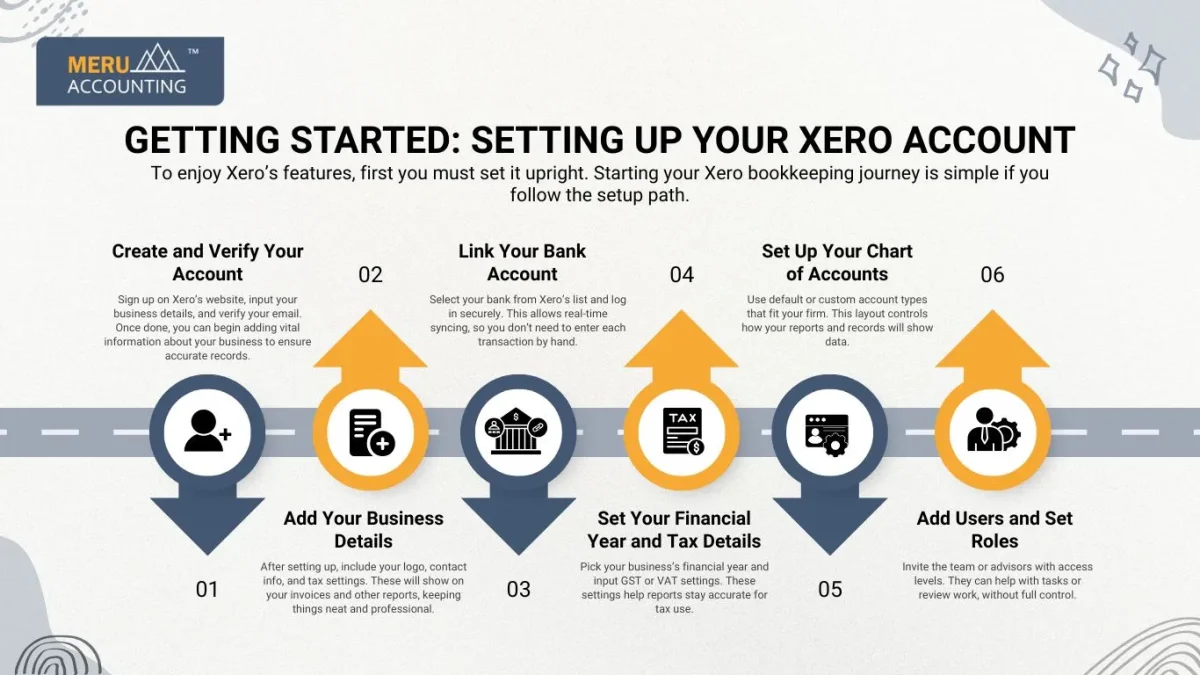
Set Your Financial Year and Tax Details
Pick your business’s financial year and input GST or VAT settings. These settings help reports stay accurate for tax use.
Set Up Your Chart of Accounts
Use default or custom account types that fit your firm. This layout controls how your reports and records will show data.
Add Users and Set Roles
Invite the team or advisors with access levels. They can help with tasks or review work, without full control.
Benefits of Bookkeeping with Xero Accounting Software
Using Xero for your books gives you control and peace of mind. It cuts time on routine tasks and boosts accuracy.
Real-Time Financial View
Xero lets you view your financial data as it happens. This real-time access helps make faster and better decisions based on your business performance.
Simple Tax Reporting
With Xero, preparing tax reports becomes easy. It gathers your GST data and other figures, reducing the chance of errors during the filing season.
Smooth Team Access
You can invite team members or your bookkeeper to your Xero account. Each person can get their login with the access you allow.
Core Features of Xero for Bookkeeping
Xero has many built-in tools to help with daily record-keeping. These features make bookkeeping with Xero Accounting Software both quick and safe.
Bank Feeds and Reconciliation
Once your bank is linked, transactions appear daily. You can match them to invoices or receipts, making your books up-to-date with little effort.
Invoicing and Billing
Xero lets you create invoices quickly, add due dates, and track payments. You can even set reminders for overdue bills to stay on top of your money.
Expense Tracking
Tracking costs in Xero is easy. You can upload receipts, tag spending by type or job, and monitor where your money goes in real-time.
Payroll and Employee Records
Xero helps manage staff pay and leave. It keeps details like tax info, wages, and time-off requests all in one easy-to-use place.
Inventory Management
You can manage products, set stock levels, and track inventory. This helps control what’s on hand and what needs restocking.
Financial Reporting
Xero offers live reports on profits, losses, and cash flow. These reports help track trends and plan smart moves.
Mobile App Access
Xero’s mobile app lets you check finances on the go. You can scan bills, view data, and send invoices from your phone.
Challenges to Avoid in Bookkeeping with Xero
Even the best tools need smart use. Bookkeeping with Xero Accounting Software is easy, but mistakes can happen.
Not Reconciling Often
If you delay checking your records, errors may build up. Reconciling often keeps your financial data clean and correct.
Wrong Account Setup
If you set up the wrong account types, your reports will not reflect the real business status. Take time to match your chart of accounts to your needs.
Ignoring Reports
Xero gives useful reports, but many users don’t check them. These reports highlight trends and risks and help you plan your next steps.
Delayed Data Entry
Late updates lead to poor reports. Entering data on time helps keep a real view of your business.
Poor Access Control
Giving too much access can risk errors. Set roles wisely for safety and good records.
No Backup of Documents
Though Xero is cloud-based, storing key files helps. Save digital receipts and contracts to avoid missing proof.
Tips for Efficient Bookkeeping with Xero Accounting Software
To get the most from your Xero bookkeeping, use the software in smart ways. These tips help reduce time and boost results.
Use Bank Rules
Set up Xero to auto-match common payments with rules. This small step saves time and improves bookkeeping speed and accuracy.
Automate Recurring Tasks
Use repeating invoices and bills in Xero for services you pay for or provide each month. It lowers the chance of forgetting something important.
Check Reports Often
Xero’s live reports give insight into profits, cash flow, and trends. Checking them often lets you react early to any signs of trouble.
Keep It Updated
Don’t let records pile up. Enter data as it happens. Updated books give a clear view of your current finances and prevent errors later.
Meru Accounting offers full support for your Xero account, including setup, entry, review, and reporting. We help you use every feature and avoid costly mistakes. When we manage your books, you stay free to grow your business. Our Xero bookkeeping services help you follow rules and stay audit-ready all year.
FAQs
- What is Xero bookkeeping?
Xero bookkeeping is the use of Xero software to manage daily business finances like bills, income, and expenses. - Is Xero good for small businesses?
Yes, Xero works well for small and growing firms. It is simple, smart, and cloud-based. - How safe is my data on Xero?
Xero uses strong online security. Your data stays safe with backup and encryption. - Can I use Xero without a bookkeeper?
Yes, but a bookkeeper helps you get the most out of it and avoid costly errors. - Can Xero manage employee payroll?
Yes. Xero tracks pay, leave, and super, all in one easy place.


