




Billing errors can waste money and hurt client trust. Small mistakes can grow into bigger problems fast. A Sage Timeslips Bookkeeper checks each entry and keeps the work correct. Using Timeslips Sage software, firms can track hours, costs, and bills clearly.
Many firms do not see how errors come from manual work. Lost hours, double entries, or wrong labels cause trouble. Using a skilled bookkeeper with Timeslips Sage software keeps mistakes low. Firms can spend time on clients and growth instead of fixing errors.
Even small billing errors may hurt cash flow. A Sage Timeslips Bookkeeper acts as a guard. Timeslips software adds rules to stop human mistakes before they happen.
What You Will Learn From This Blog
- How a Sage Timeslips Bookkeeper can cut billing errors.
- Key benefits of using a skilled bookkeeper.
- Steps to track hours and bills with Timeslips Sage Software.
- Common billing problems and ways to fix them.
- How our team helps your firm keep billing correct.
- Ways to build client trust and save time.
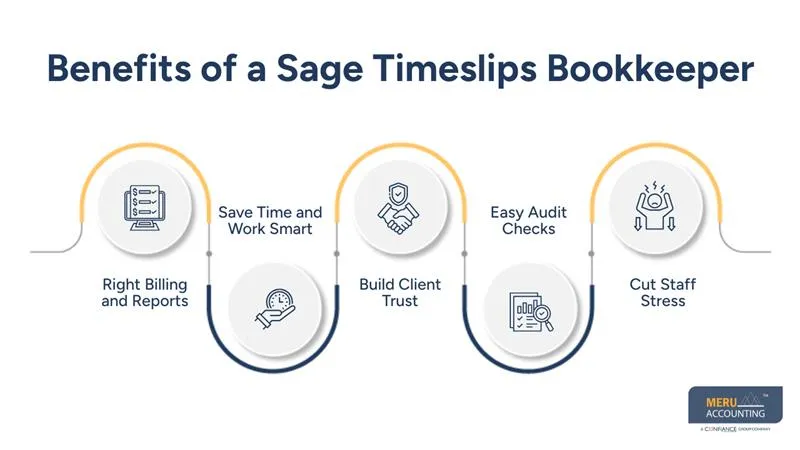
Benefits of a Sage Timeslips Bookkeeper
Right Billing and Reports
- A Sage Timeslips Bookkeeper makes sure each bill matches work done. Errors are fixed before bills go out.
- Timeslips Sage Software tracks hours and shows clear bills. This stops disputes and cuts the need to fix mistakes.
Save Time and Work Smart
- Bookkeepers save managers hours of checks. Using Timeslips software, staff can work on tasks that matter.
- Reports, billing, and checks take less time. Deadlines are easier to meet with expert help.
Build Client Trust
- Clients like bills that are right and easy to read. A Sage Timeslips Bookkeeper stops any charges from being wrong.
- Clear bills help to build trust with every client quickly. Clients know their accounts are safe and under full control.
Easy Audit Checks
- Audits need clear work. Timeslips Sage Software keeps logs for each transaction. Auditors can check quickly.
- A Sage Timeslips Bookkeeper keeps files ready, saving stress.
Cut Staff Stress
- Manual billing can tire staff. Errors cause stress and late work.
- A Sage Timeslips Bookkeeper handles work correctly. Teams can focus on key tasks and feel less stress.
Common Types of Billing Errors
Billing mistakes can happen in any firm. Small slips may grow into big problems. A Sage Timeslips Bookkeeper helps stop these mistakes. Using Timeslips Sage software, firms track hours, costs, and charges correctly.
Missed Hours
Missing hours is a frequent error. Staff may forget to log time. A Sage Timeslips Bookkeeper adds all hours using Timeslips software.
Double Entries
Same hours or costs may be logged twice. This can upset clients and waste time. Bookkeepers find and fix repeats in Timeslips Sage software.
Wrong Client Codes
Work may be billed to the wrong client. This makes invoices wrong and slows payment. Bookkeepers check all codes with Timeslips software.
Wrong Rates
Wrong rates can charge clients too much or too little. New staff or multi-rate jobs may cause this. Bookkeepers check rates in Timeslips software.
Missing Costs
Travel, materials, or other costs may be missed. Missing costs cut profit and may upset clients. Bookkeepers log all costs in Timeslips software.
Wrong Task Category
Tasks may be put under the wrong group. This makes reports and bills wrong. A Sage Timeslips Bookkeeper puts each task in the right group using Timeslips software.
Late Billing
Late entries make invoices arrive late. This may slow revenue and confuse clients. Bookkeepers track all work and bill on time using Timeslips software.
How It Works: Steps to Reduce Billing Errors
Step 1: Track All Billable Work
All hours, costs, and work go into the Timeslips Sage tool. No hours or charges are missed in any record here. Correct checks and logs start with each line of work.
Step 2: Check Each Entry
A Sage Timeslips Bookkeeper reviews work and hours. Errors and duplicates are fixed before billing.
Step 3: Make Invoices
Invoices are made fast by the Timeslips Sage tool each time. All sums match the work that is logged for each client. Mistakes by humans are cut down with each bill sent.
Step 4: Review Before Sending
Bookkeepers check each line to make sure all is right. Client names, hours, and costs are all checked each time. Any mistakes are fixed before the bill goes to clients.
Step 5: Monitor Reports
Reports show missed hours, odd trends, or late entries. Firms can act fast to stop problems.
Step 6: Improve Each Day
Bookkeepers improve rules and checks. Timeslips Sage software is set to stop repeat errors. Billing works better each day.
Common Challenges and How to Fix Them
Missed Time Entries
Staff may forget to log hours. Real-time tracking in Timeslips Sage Software keeps records right.
Double or Skipped Entries
Mistakes occur if work is added twice or missed. A Sage Timeslips Bookkeeper checks entries carefully.
Complex Billing Rules
Projects with different rates confuse staff. Timeslips software is set to track rates and rules. Automation helps keep bills correct.
Client Disputes
Small errors may cause disputes. Correct bills from a Sage Timeslips Bookkeeper show proof to clear conflicts.
Wrong Software Use
Staff may enter data wrong in Timeslips software. Training and supervision prevent mistakes.
Data Safety
Billing work is kept safe as it is very private. Bookkeepers use rules and logs to keep data secure.
ROI of Hiring a Skilled Sage Timeslips Bookkeeper
Accurate billing saves money and stops client disputes. Firms get more of the money they earn.
For example, a firm lost 50 hours per month in missed work. With a Sage Timeslips Bookkeeper, all hours were logged. Using Timeslips Sage software, the firm recovered lost revenue quickly.
The cost of mistakes is often higher than hiring a bookkeeper. Errors can waste time, hurt trust, and slow payments. A skilled Sage Timeslips Bookkeeper reduces these losses and saves money over time.
Hiring a professional gives a clear financial gain. Firms see faster payments, fewer disputes, and better cash flow. Using Timeslips software, the bookkeeper tracks all hours and costs for accurate billing.
Real-Life Example: Law Firm
A law firm had many billing errors and lost money. Hours were missed, work was double-logged, and clients complained. A Sage Timeslips Bookkeeper fixed all work.
The firm used Timeslips Sage software to automate common tasks. Mistakes dropped by 90 percent in six months. Clients were happy, revenue rose, and staff stress fell. Reports helped managers make smart choices. Good bookkeeping boosted profit, client trust, and efficiency.
Key Services Provided by Meru Accounting Using Timeslips Sage Software
At Meru Accounting, we provide professional accounting and bookkeeping services using Timeslips Sage software. Our team ensures all billing, hours, and costs are tracked accurately. By using the software, we reduce mistakes and make financial management simple and clear for your firm. We focus on precision and provide support for smooth financial operations.
Daily Billing Checks
We check client bills each day to catch all mistakes. This stops missed charges and keeps all accounts up to date.
Automated Invoice Creation
Invoices are made with Timeslips software fast and right. Clients get clear bills that are easy to read and trust.
Regular Error Checks and Audits
We look at all entries to make sure all is right. Any mistakes are fixed fast before they cause more trouble.
Financial Reports for Managers
Reports help managers see costs, profits, and work trends. They show which projects do well and which need more care.
At Meru Accounting, we help your firm keep all records right. We make billing smooth, work clear, and support your growth.
Keep your billing safe now by working with Meru Accounting. Our trained team gives Sage Timeslips Bookkeeper service each day. Use Timeslips Sage software to track work and stop all errors. Contact us to keep billing right and smooth each day.
Key Takeaways
- A Sage Timeslips Bookkeeper cuts billing mistakes.
- Timeslips Sage Software tracks hours, costs, and bills well.
- Correct bills keep clients happy and reduce disputes.
- Skilled bookkeeping helps with audits and rules.
FAQs
They check each entry before making client invoices. They also fix mistakes quickly to keep accounts accurate.
Yes, it tracks multiple rates and rules for work.
It also manages blended fees and special client requests easily.
Daily checks by a Sage Timeslips Bookkeeper keep errors low. Regular reviews catch missing hours and prevent late client disputes.
Yes, training helps staff enter work correctly each day. Proper guidance reduces mistakes and ensures faster, smoother billing tasks.
Yes, the right bills prevent disputes and show care for clients. Accurate invoices build confidence and strengthen long-term client relationships.


