




Many firms waste time because they track hours by hand. A Sage Timeslips Bookkeeper can make tracking fast and right. Using Timeslips Sage Software keeps bills correct for each client.
Errors in bills can delay cash and upset your clients.
Time tracking may seem simple, but it brings hidden work and loss. Skilled bookkeepers save lost hours and wrong billing every day.
Clients trust firms more when bills are always clear and right. A Sage Timeslips Bookkeeper logs every hour without missed tasks.
With a Sage Timeslips Bookkeeper, firms see work clearly each day. Managers know which jobs take the most time or need more help. This helps plan tasks, assign work, and cut wasted hours. Using Timeslips Sage Software, all data stays neat and easy.
What You Will Learn From This Blog
- This blog shows how a Sage Timeslips Bookkeeper helps firms.
- Using Timeslips Sage Software makes tracking hours fast and easy.
- You will learn steps to improve billing and reduce mistakes.
- Benefits, challenges, and steps are explained clearly for all readers.
- By reading this blog, you can improve your money and workflow.
Why Businesses Need a Sage Timeslips Bookkeeper
A Sage Timeslips Bookkeeper gives many clear benefits to firms:
Save Time and Cash
A Sage Timeslips Bookkeeper helps firms save time and cash. Teams can focus on work while bookkeepers track all hours.
Track Hours Right
They track hours for each client and job each day. No hour is lost or counted wrong in any case.
Keep Bills Correct
Using Timeslips Sage Software keeps all rates and bills right. Clients get bills that show exactly the work done.
Manage Costs and Invoices
Bookkeepers track costs and make bills for every client. All costs are logged correctly for each job and client.
Avoid Lost Money
Without help, firms may lose money from wrong bills. Mistakes in bills can cost cash and hurt client trust.
Reduce Mistakes and Build Trust
Bookkeepers keep logs right and stop mistakes every day. The right logs make clients trust the firm more each time.
Benefits of Sage Timeslips Bookkeeper Services
Accurate Time Tracking
- A Sage Timeslips Bookkeeper logs every hour correctly each day. Manual entry can miss hours or add wrong numbers, often
- Using Timeslips Sage Software tracks tasks, projects, and client hours. Costs can also be tracked for correct billing per project
- Skilled oversight reduces mistakes that cause disputes and late bills.
Faster Billing Process
- Delays in billing can hurt money flow and client trust. A Sage Timeslips Bookkeeper uses Timeslips Sage Software to run invoices.
- Bills are made and sent to clients fast every month. Client rates are applied right in each bill at all times. Auto billing helps firms get payments without delays or errors.
Clear Reports and Analysis
- Reports help track hours, costs, and project progress clearly. A Sage Timeslips Bookkeeper makes simple reports for clients and managers.
- Using Timeslips Sage Software, reports are right, clear, and fast. Reports show costs, worker hours, and income trends each week. This information helps managers plan work and assign jobs better.
Reduce Client Disputes
- Disputes happen when bills are wrong or hard to read. A Sage Timeslips Bookkeeper makes hours and costs clear each time.
- Using Timeslips Sage Software, bills show all work done correctly. Clients get consistent bills that reduce mix-ups and complaints fast.
- Right billing builds trust and strengthens long-term client relationships.
Cost Savings
- Outsourcing bookkeeping cuts staff time spent on manual work. Wrong billing often leads to lost money and wasted work.
- A Sage Timeslips Bookkeeper makes bills right every single time. Using Timeslips Sage Software, bookkeeping runs fast, smooth, and simple.
- Firms save money by fixing errors and getting payments faster.
Tips for Choosing the Right Sage Timeslips Bookkeeper
Choosing the right bookkeeper helps track time and money well.
Here are simple tips to help you pick the best:
Look for Work Experience
Check if the bookkeeper has worked in similar firms. Use Timeslips Sage Software experience for smooth and accurate tracking. Bookkeepers who know your field handle client tasks the best.
Check References
Ask past clients how they handle time and bills. References show how the bookkeeper tracks hours and invoices. Good feedback proves they do work right every single day.
Ask About Error Checks
Ask how they stop mistakes in hours or bills. Bookkeepers use checks, cross-checks, and simple software steps. This stops wrong invoices and keeps clients happy all the time.
Review Reporting and Invoices
Make sure they can make clear bills and reports. Reports must be easy to read for staff and clients. Fast and right bills keep money flowing every single month.
Check Multi-Project Tracking
See if they can track many projects for clients. Good tracking stops lost hours or missed billable work. Bookkeepers must track tasks, hours, and costs for all projects.
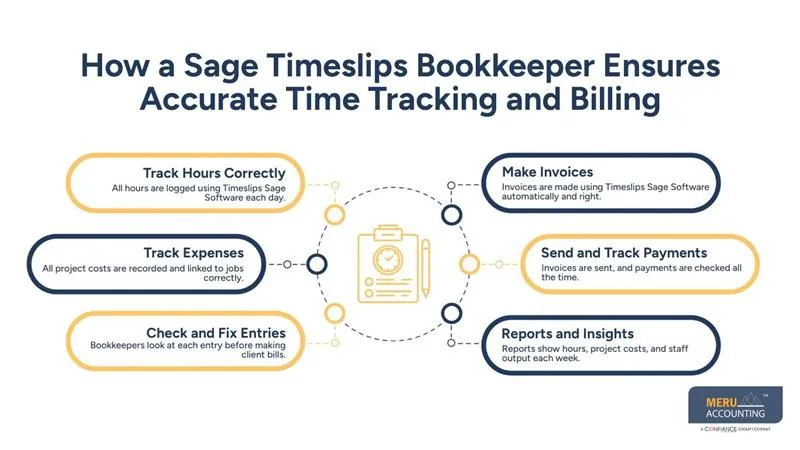
How a Sage Timeslips Bookkeeper Ensures Accurate Time Tracking and Billing
Bookkeepers follow clear steps to track hours and billing correctly.
Step 1: Track Hours Correctly
All hours are logged using Timeslips Sage Software each day. Tasks are linked to clients and projects to prevent mistakes. Bookkeepers check entries so no hour is missed by error.
Step 2: Track Expenses
All project costs are recorded and linked to jobs correctly. This includes materials, travel, and other costs for each client. Bookkeepers make sure all costs are logged for proper billing.
Step 3: Check and Fix Entries
Bookkeepers look at each entry before making client bills. Wrong hours or rates are fixed fast every single day. This step stops mistakes that often cause disputes or delays.
Step 4: Make Invoices
Invoices are made using Timeslips Sage Software automatically and right. Each invoice follows the client’s rules for rates and billing carefully. Bookkeepers make invoices clear and easy for clients to read.
Step 5: Send and Track Payments
Invoices are sent, and payments are checked all the time. Bookkeepers follow up on unpaid bills politely and quickly each time. Software helps track all invoices until the money is fully received.
Step 6: Reports and Insights
Reports show hours, project costs, and staff output each week. Reports help managers see problems and plan work better and faster. A Sage Timeslips Bookkeeper turns hours and costs into insight quickly.
Common Challenges and Solutions
Even with software, firms face billing problems every day. Here are common issues and ways to fix them:
Missed Hours
Daily checks and alerts stop hours from being lost fast. Bookkeepers also scan timesheets to catch errors before bills.
Wrong Rates
Updated charts keep all bills correct every single time. They double-check client fees to avoid mistakes in invoices.
Late Billing
Auto invoice schedules make sure bills go out on time. Follow-ups help clients pay quickly and avoid slow payments.
Data Mistakes
Bookkeepers check and fix all entries to stop errors. Backups and checks keep records safe and prevent lost data.
Client Complaints
Reports from Timeslips Sage Software show hours and costs clearly. Simple notes to clients cut confusion and build trust fast.
Skilled bookkeepers stop errors and make billing smooth and sure. This saves time, boosts cash flow, and keeps clients happy.
Real-Life Example
- A small law firm had many errors in hours and bills. Hiring a Sage Timeslips Bookkeeper made tracking and billing fast.
- Using Timeslips Sage Software, bills were made faster and correct. Billable hours rose by 18 percent in three months reliably.
- Client complaints dropped by 35 percent, and money came faster. Work ran smoothly, and income grew due to proper time tracking.
Why Choose Meru Accounting for Sage Timeslips
At Meru Accounting, we give expert accounting and bookkeeping help. We also provide Sage Timeslips Bookkeeper support for all firms.
Customized Software Setup
We set up Timeslips Sage Software for each firm. This setup keeps work smooth and avoids errors from the start.
Accurate Time and Expense Tracking
Our bookkeepers track hours and costs daily. This helps ensure all client bills are correct each time.
Professional Invoices and Reports
We make clear invoices and easy reports. Reports show managers project costs and work done simply.
Full Accounting and Bookkeeping Services
We handle all daily bookkeeping tasks. We also do monthly checks to keep accounts fully correct.
Time and Cost Savings
Firms save time and avoid mistakes by working with us. This lets teams focus on growth and serve clients well.
Smooth Billing and Client Relations
We keep billing right and clients happy.
Clear invoices and open communication help build trust with clients.
By choosing Meru Accounting, businesses get full bookkeeping help and accurate billing. We work to give clients peace of mind and full support.
Contact Meru Accounting today for expert Sage Timeslips Bookkeeper help. We help firms track hours, billing, and reports every day. Get the right invoices, fast payments, and smooth client work today.
Key Takeaways
- A Sage Timeslips Bookkeeper keeps billing right and clear daily.
- Timeslips Sage Software makes tracking, invoicing, and reports simple.
- Skilled bookkeeping reduces mistakes, saves time, and improves work.
- Right time tracking builds trust and lowers client complaints.
FAQs
A person who tracks hours and bills clients correctly. They also make sure all client bills go out on time.
It logs time, makes bills, and keeps reports fast. The tool also groups projects and tracks each client well.
It shows hours, costs, bills, and project work done. Reports also show work done and tasks that need checking.
Check entries each day or each week to avoid mistakes. This keeps all hours correct and helps bills go right.
You can reach firms that offer trained bookkeepers fast. Make sure they know your type of work and tasks.


