A busy Friday can tell you a lot about a restaurant’s books. Sales may be high, but so can tips, extra hours, wage costs, and taxes due. One wrong pay code can then flow into the wrong General Ledger (GL) account. This is where restaurant accounting and payroll software can make a real difference.
The goal is not to make payroll look fancy. The goal is to make each pay run clear from start to end. Payroll software for small restaurants should show who was paid, why they were paid, how much the firm owes in tax, and how the cost hits the books. This guide looks at what to check, which tools may fit, what they may cost, and how to set them up.
What You Will Learn From This Blog
- How pay data moves from payroll to the General Ledger (GL) and where errors can occur.
- Why tips, overtime, and extra hours need careful checks before payroll is finalized.
- Which payroll and accounting tools matter most for a small restaurant.
- How to compare restaurant accounting and payroll software based on features, integrations, reporting, and restaurant needs.
- Which fees and add-ons can increase the total cost of payroll software.
- The key steps for setting up payroll and General Ledger (GL) connections.
What is Restaurant Accounting and Payroll Software?
Payroll and Book Data in One Flow
Think of one pay run as a chain. Staff hours go in, pay is worked out, tax is set aside, and the final cost goes to the books. Restaurant accounting and payroll software can link these steps so the same data does not need to be typed more than once.
Payroll Journal Entries
A pay run does more than pay staff. It can also create wage cost, tax debt, benefit cost, and other pay entries. Restaurant accounting and payroll software can send these lines to the right GL accounts when the setup is done well.
Tip and Wage Records
Tips can make a pay run hard to check. A staff member may have base pay, tips, and extra hours in the same week. The right payroll system keeps each type of pay separate and easier to review.
Time and Attendance Data
A time clock may show that one worker had 46 hours for the week. Payroll then needs to use the right pay rule for those hours. Restaurant accounting and payroll software can bring time data into the pay run, but the hours should still be checked first.
Reports For Accounting
A pay slip tells a worker what they got. It does not tell the book team all it needs to know. Restaurant accounting and payroll software should also show wage cost, tax, tips, and pay debt so the GL can be checked.
Payroll and GL Connection
This is where the two sides meet. If payroll says wage cost is $18,000, but the GL shows $16,500, the gap needs an answer. A good setup makes that check much easier.
Why Small Restaurants Need Payroll and GL Management in One System
Less Double Data Entry
Picture a small team that types hours into a timesheet, then types them into payroll, and finally enters the pay total into the books. Each extra step adds a chance for an error. An integrated payroll system can cut much of that repetitive work and reduce duplicate data entry.
Clear Labor Cost
A $10,000 wage bill may not be the full labor cost. Employer taxes, benefits, and other pay costs can add more. Restaurant accounting and payroll software can put these costs into the right GL lines.
Better Tip Control
Tips should not vanish into one large wage number. Payroll software for small restaurants should let the team see tip data and check it before the pay run. The book team can then see how the tip data affects the records.
Site-Level Labor Cost
Now take a firm with two sites. Site A may have high sales but also high staff cost. Site B may have lower sales and lower staff cost. Restaurant accounting and payroll software can tag pay by site and make this view much easier.
Easier Month-End Review
Month-end should not feel like a hunt for missing numbers. The team can check the payroll report, GL, bank pay, and tax debt in one set of checks. Restaurant accounting and payroll software can give the team the data it needs for this work.
Fewer Unclear Differences
Small gaps can grow if no one checks them. A $200 gap in wage cost may seem small, but many such gaps can change the books. A clear pay-to-GL link makes it easier to find where the gap began.
Key Features to Look for in Restaurant Accounting and Payroll Software
Payroll Processing and Tax Calculations
The core tool must run pay with the right wage, tax, and deduction data. When you compare restaurant accounting and payroll software, check the tax work, pay cycle, state reach, and filing tools in the plan you may buy.
Tip, Wage, and Overtime Tracking
A food firm may have tips, hourly pay, more than one rate, and extra hours. The system should keep these pay types apart. Gusto, for example, lists tips, overtime, more than one pay rate, and more than one site in its food firm plan.
Payroll-To-GL Integration
A link is not enough. You need to know what the link sends. Restaurant accounting and payroll software should let you map wage, tax, benefit, and pay debt lines to the right GL codes.
Labor Cost and Payroll Reports
Look for reports that show wage cost, tips, overtime, tax, and total pay cost. These can give the owner a quick way to check if labor cost is in line with the plan for the month.
Multi-Location Payroll Management
More sites mean more pay data. Check if the tool can tag hours and pay by site. This can help the owner see which site has high labor costs and which site needs a closer look.
Employee and Payroll Records
Staff data can include pay rate, tax data, bank data, and pay history. The tool should keep this data in one safe place and let only the right users make key changes.
How to Choose Payroll Software for Small Restaurants
Start With Your Pay Setup
Do not start with the brand name. Start with your staff. Count workers, pay types, pay dates, sites, tips, and overtime needs. Then see which payroll software for small restaurants can match that setup.
Check Your POS and Time Clock
Your POS may hold tip data. Your time clock may hold hours. Ask how these tools send data to payroll. Restaurant accounting and payroll software should fit the tools you already use when a safe link is on offer.
Review the GL Map
Ask to see a sample GL entry. Check where wage cost, tax, tips, and other pay lines will go. Toast, for example, has a payroll accounting sync that can map payroll data to QuickBooks Online GL codes.
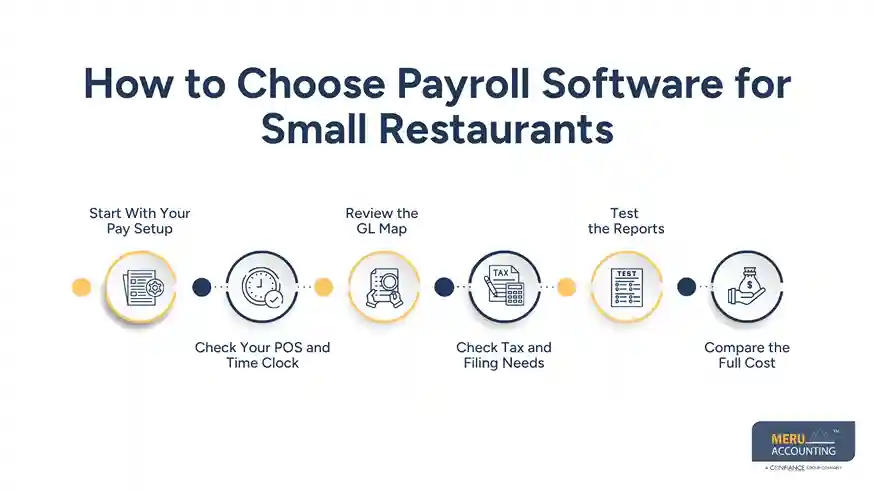
Check Tax and Filing Needs
Do not assume that one plan covers all tax work. Check the states and local areas where your staff work. Payroll software for small restaurants should fit the tax needs of your firm, not just its staff count.
Test the Reports
Ask one simple test: “Can I see my full labor cost for last week?” If the answer takes many steps, the tool may not fit your needs. Good restaurant accounting and payroll software should make key pay data easy to find.
Compare the Full Cost
Look past the base fee. Add worker fees, tax fees, time tools, POS links, setup, and book work. A low base price may not be low once all the tools are added.
optional anymore
on running the business
Restaurant Accounting and Payroll Software: Comparison of Top Picks
Software | Key Features | Good Fit If |
Toast Payroll | Payroll, POS, time tracking, GL mapping | You already use Toast |
Gusto | Payroll, tips, overtime, time tracking | You need simple payroll tools |
QuickBooks Payroll | Payroll, account mapping, tax tools | Your books run on QuickBooks |
Square Payroll | Payroll, time, tips, staff records | You already use Square |
Restaurant365 | Accounting, payroll, labor, food cost | You manage multiple locations |
ADP | Payroll, tax, time, HR tools | You need broader payroll support |
Paychex Flex | Payroll, HR, time tracking | You need payroll and HR together |
Rippling | Payroll, HR, benefits, workforce tools | You want payroll and HR in one system |
Sling | Scheduling, time tracking, labor tools | Staff scheduling is a major need |
7shifts | Scheduling, labor, time tracking | You want stronger labor management |
Xero + Payroll Apps | Accounting, payroll integrations, reporting | You already use Xero for accounting |
Which One Fits Best?
No single restaurant accounting and payroll software is best for every restaurant or food firm. Toast may suit a restaurant that already uses Toast. Gusto can work well for a small team, while QuickBooks Payroll fits firms that use QuickBooks. Square Payroll may suit Square users, and Restaurant365 can fit firms that need more tools for books and reports. ADP, Paychex Flex, Rippling, Sling, and 7shifts can also suit firms with needs in payroll, HR, staff shifts, or labor costs.
The best restaurant accounting and payroll software depends on the tools you use, your payroll needs, the number of sites, and how much work your books need.
How Much Does Payroll Software for Small Restaurants Cost?
Base Payroll Fee
Some plans use a base fee plus a fee for each worker. Others use a larger plan with more tools in one price. Use your real staff count when you compare payroll software for small restaurants.
Tax Filing Fees
Tax work may be part of the plan or may cost more. Read what the fee covers before you pick restaurant accounting and payroll software, as filing needs can vary by state and local area.
Time and Attendance Fees
A time clock can be a key part of food firm pay. If it costs more, add that fee to your full pay cost. Do not judge the plan on payroll alone.
POS and Accounting Links
Some links are part of the plan, while some may need an add-on. Ask what data can move from the POS to payroll and from payroll to the GL.
Setup Cost
Setup can take time. Staff data, pay codes, tax data, GL maps, and test runs all need care. Add this work when you work out the first-year cost.
Manual Work Cost
A low fee can look good until staff spends hours fixing data each month. Restaurant accounting and payroll software should cut repeat work while still giving the book team a way to check the data.
How to Set Up Payroll and GL Management for a Small Restaurant
Set the Chart of Accounts
Start with the books. Set clear GL accounts for wages, overtime, employer tax, benefits, and pay debt. A clean chart makes the payroll link much easier to test.
Clean Employee Data
Check each worker’s name, pay rate, job, tax data, bank data, and site. A bad staff record can lead to a bad pay run, so this step should not be rushed.
Create Pay Codes
Set codes for regular pay, overtime, tips, bonus pay, and other pay types. Each code should point to the right GL account.
Connect Time and POS Data
Test the link with a few staff records first. Check hours and tips from the source, then check what reaches payroll. This is a key test for restaurant accounting and payroll software.
Run a Test Payroll
Before the first live run, compare the test pay with the pay you expect. Then check the tax, net pay, and GL entry. Fix the map before live pay starts.
Reconcile Each Pay Run
After pay is sent, match the payroll report with the GL and bank. Check wage cost, tax debt, net pay, and tips. This check should be part of each pay cycle, not just a year-end task.
Why Choose Meru Accounting for Payroll Accounting Services
Payroll-To-GL Review
Meru Accounting reviews payroll data and its effect on the GL. We check wage costs, taxes, benefits, and payables against the payroll report.
Payroll Reconciliation
Our payroll reconciliation work matches payroll reports with book and bank data. This can bring out gaps before they affect the next close.
Labor Cost Review
Labor costs from restaurant accounting and payroll software can be reviewed by site, pay type, or month when the needed data is in the books. This gives owners a clearer view of where pay costs are going.
Month-End Payroll Work
We can include payroll checks in month-end book work. The review can cover wage costs, payables, tax balances, and payroll entries.
Payroll Reports
Meru Accounting can check payroll reports against the book data used for the month. This can be useful when a firm has tips, extra hours, more than one rate, or more than one site.
Our Expert Perspective
A good restaurant accounting and payroll software pick should pass a simple test: can you trace a staff member’s hours to pay, then trace that pay to the GL?
If the answer is yes, the tool is doing its core job well. More tools do not always mean a better fit. A small food firm may gain more from a clean pay-to-GL flow than from a long list of tools it will never use.
Key Takeaways
- Restaurant accounting and payroll software should link pay data with the GL.
- Check wage, tip, overtime, tax, and labor cost tools.
- Test the payroll-to-GL map before live pay starts.
- Check how the POS and time clock send data to payroll.
- Look at the full cost, not just the base fee.
- Check payroll against the GL and bank after each pay run.
- Payroll software for small restaurants should fit the staff count and pay setup.
- The software still needs a human check.
FAQs
The best payroll software for small restaurants depends on staff count, tips, overtime, POS, accounting software, and the number of sites.
Toast, Gusto, Square Payroll, and Restaurant365 can track tips, pay, and extra hours, based on the plan and setup.
Yes. Some restaurant payroll software can send pay, tax, benefit, and other payroll data to General Ledger (GL) accounts through payroll entries or links with accounting tools.
The cost can vary by the base payroll fee, staff count, tax work, time tracking, POS and accounting links, setup, and other add-ons.
Yes. Some restaurant accounting and payroll software can link with restaurant POS systems to move staff hours, tips, and other payroll data, based on the software and its links.
optional anymore
on running the business