Your bank balance may tell you how much cash you have, but it does not tell you whether your books are right. Wave accounting software for small business can help you track sales, expenses, payments, and bank activity so you have a clearer view of where your business stands.
But using Wave well takes more than entering transactions. You need to set up your accounts correctly, categorize transactions with care, reconcile your bank and credit card accounts, and review your books each month. In this blog, we’ll walk through how to use Wave for day-to-day bookkeeping and keep your records accurate as your business grows.
What You Will Learn From This Blog
- What Wave can do for small firms
- How to set up your books in Wave
- How to log and sort each deal
- How to check bank and card data
- How to keep your books up to date
- When outsourced bookkeeping support may make sense
What Is Wave Accounting Software for Small Business?
Wave accounting software for small business is a cloud-based tool built to help small firms track their day-to-day money data. It can help you keep sales, costs, bills, bank data, and reports in one place.
For a small firm, the main goal is not just to enter data. The goal is to keep the books true to what took place in the firm. That means each sale, cost, fee, and bank move must land in the right account.
A good setup can help you see key data such as income, costs, cash, and profit. It can also make it much easier to spot gaps in your books.
The exact tools and plan options can vary. So, check the Wave plan you use to see what is in your account.
What Can You Manage With Wave Business Accounting?
Wave business accounting can help small firms with many core bookkeeping tasks. The key is to use each tool as part of a set bookkeeping process.
Income and sales
You can log sales and keep a clear view of money earned. This can help you track income by date, client, or type of sale.
Costs and bills
You can sort costs by the right account. This helps keep your profit view more accurate and can make tax prep less hard.
Bank data
Bank data can help you match cash in and cash out to the right book entry. This is key for clean books.
Reports
Wave accounting software for small business can give you key reports that help you view income, costs, cash, and profit. These reports can also help spot odd items that need a check.
Cash flow
Wave business accounting can help you see how cash moves in and out. A cash view can help an owner plan for bills, pay, tax, and other near-term needs.
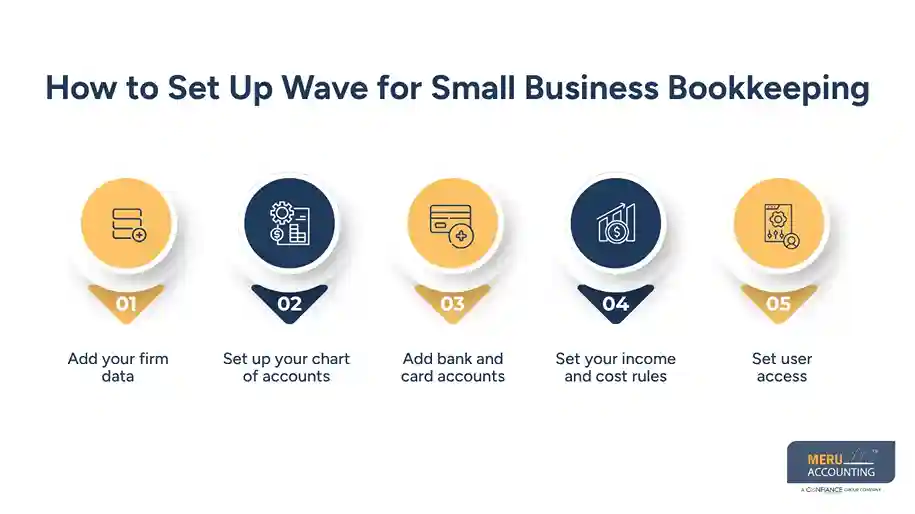
How to Set Up Wave for Small Business Bookkeeping
A sound setup can save time later. Before you start logging lots of data, set the base rules for your books.
1. Add your firm data
Start with your firm name and core data. Check that the tax and bank data tied to your firm are correct.
2. Set up your chart of accounts
Your chart of accounts is the base of your books. It groups sales, costs, assets, debts, and owner equity.
Do not add a new account for each small type of cost. Use a clear set of accounts that fits how your firm runs.
3. Add bank and card accounts
Link or add the bank and card accounts used by the firm. Check the start date and opening data with care.
4. Set your income and cost rules
Know where key sales and costs should go. For some firms, this may mean setting rules for sales, bank fees, ads, rent, tools, travel, and other costs.
5. Set user access
If more than one person will work in the books, give each user only the level of access they need.
A clean setup makes Wave accounting software for small business much more useful. It also cuts the risk of bad data from day one.
How to Record and Categorize Business Transactions
Once the setup is done, the next step is to keep each deal in the right place.
Start with the source data. Use sales records, bills, receipts, bank data, card data, and other proof to check each item.
For each deal, ask:
- What took place?
- Was it income, a cost, a transfer, an asset, or debt?
- Which account should hold it?
- Was tax part of the deal?
- Has the same item been logged more than once?
Do not treat every bank deposit as sales. A bank deposit may be a sale, a loan, an owner payment, or a transfer from one account to the next.
The same rule applies to cash paid out. A card payment may be a cost, a debt paydown, a fee, or a transfer.
This is where Wave business accounting needs care. A tool can help sort data, but the book owner still needs to know what each deal means.
For example, if a client pays $1,000 for a job, the bank may show a $1,000 deposit. That does not mean every bank deposit should be marked as sales. The book entry should tie to the sale and the right income account.
optional anymore
on running the business
How to Reconcile Bank and Credit Card Accounts
Bank and card checks are a key part of Wave accounting software for small business use.
A book may look full and clean yet still be wrong if bank data is not checked. Reconciliation helps you compare what is in the books with what the bank or card firm says took place.
Follow this basic flow:
- Get the bank or card statement.
- Check the start and end dates.
- Compare the book balance with the statement.
- Match each payment, sale, fee, and other item.
- Find items that are not in the books.
- Check for duplicate entries.
- Fix wrong dates, amounts, or account codes.
- Review the final balance.
If the book balance does not match, do not add a made-up entry just to make the two sides agree. Find the cause first.
Common causes include a missed sale, a fee that was not logged, a duplicate item, a wrong amount, or a bank transfer that was coded as income.
For Wave business accounting, this check should be part of the set month-end work, not a task saved for year-end.
How to Keep Your Wave Books Accurate Each Month
Using Wave accounting software for small business works best when you follow the same process each month.
Review all bank and card data
Make sure all key accounts are up to date. Review items that are not matched or that need more detail.
Check income
Compare sales in Wave with your sales source. Look for missing sales, double entries, refunds, and odd changes.
Review costs
Look at high or new costs. Check that each one is in the right account.
Check unpaid items
Review open bills and client balances. Old items may need action or a note.
Review key reports
Run core reports and look for large changes from prior months. A big shift in sales, costs, debt, or cash can be a sign that an entry needs a check.
Make month-end adjustments
Some firms need entries for items such as fixed assets, loans, accrued costs, or other book items. These should be made based on the firm’s facts and tax or book needs.
Keep support files
Keep bills, receipts, bank data, and other proof with your books. Good records make it much easier to check a past entry.
A set close plan helps turn Wave business accounting from a data-entry task into a useful book process.
Meru Accounting's Wave Business Accounting Services
Wave can keep your books organized, but the quality of your records still depends on how transactions are reviewed, coded, and reconciled. At Meru Accounting, we help small businesses keep their Wave business accounting accurate and ready for month-end and tax work.
Our services include:
- Transaction review and coding for income, expenses, transfers, and fees
- Bank and credit card reconciliation to catch missing or duplicate entries
- Accounts payable and receivable tracking and review
- Monthly bookkeeping and financial report review
- Cleanup and catch-up bookkeeping for past or outdated records
- Tax-ready bookkeeping and year-end record support
- Workflow support within your existing Wave setup
Our team looks beyond individual transactions. We check how sales, payments, expenses, transfers, and bank activity flow through the books. This helps us catch issues such as a transfer recorded as income or a card payment recorded as a new expense.
Whether you need ongoing bookkeeping or help cleaning up your existing records, we can work with your current Wave workflow and provide support based on your business needs.
Our Expert Insight
One issue we often see is a bookkeeping process that worked for a small business but no longer fits as the business grows. More transactions, new payment methods, or added bank accounts can quickly make the books harder to manage.
In our experience, the answer is not always new software. Clear account rules, consistent coding, and timely reconciliations often make a bigger difference. We look for these gaps early so the books stay useful for real business decisions, not just tax filing.
Key Takeaways
- Wave accounting software for small business can help track key money data in one place.
- A clear chart of accounts is the base of good books.
- Do not treat all bank deposits as sales.
- Reconcile bank and card accounts each month.
- Review sales, costs, open items, and key reports before you close the month.
- Keep proof for key book entries.
- Get book help when the data is hard to keep up with or needs cleanup.
FAQs
Yes. Wave can work well for small businesses that need to manage basic bookkeeping, income, expenses, bank activity, and financial reports.
Wave can help import and organize bank transactions, but you should still review categories and confirm that each transaction is recorded correctly.
Yes. You can record and categorize business expenses in Wave, then review them in your financial records and reports.
Wave can provide financial reports that may help with tax preparation. Your tax professional can use these records along with other business and tax data.
Consider bookkeeping help when transactions become hard to keep up with, accounts stay unreconciled, or you need regular cleanup and month-end support.
optional anymore
on running the business