Your bookkeeping may start out simple: a few invoices, some business expenses, and a bank account to keep an eye on. But as sales pick up, keeping track of every payment and expense can get harder. That is when Wave free accounting software may seem like an easy way to bring your books into one place without adding another monthly cost.
Wave can handle common small-business tasks such as invoicing, expense tracking, bills, and financial reports. But free software is not automatically the right fit for every business. Your transaction volume, reporting needs, and bookkeeping setup all play a part.
So, is Wave a good choice for your business? This blog looks at what Wave can do, where it may fall short, and when you may need more support as your business grows.
What You Will Learn From This Blog
In this blog, you will learn:
- What Wave does for small firms
- What you can do with the free plan
- Which Wave tools may have extra fees
- What types of firms may fit Wave well
- How to use Wave for day-to-day bookkeeping
- When you may need help from a bookkeeper
- How to decide if Wave fits your needs
What Is Wave Free Accounting Software?
Wave free accounting software is a cloud-based tool made for small firms and self-employed users. It can help you keep track of sales, costs, bills, invoices, and other basic bookkeeping data.
Wave’s current Starter plan costs $0 and lets users create unlimited estimates, invoices, bills, and bookkeeping records. It also includes a mobile app and a cash flow and customer view.
This makes Wave a useful option for a firm that needs basic books but does not want to pay for a full accounting suite.
Still, a free plan does not mean that every Wave feature is free. Some tools are paid or use a fee per use. For example, online payment processing has its own fees, while bank data import and some other tools are part of Wave Pro.
That means you should look at both your current needs and your likely needs as the firm grows.
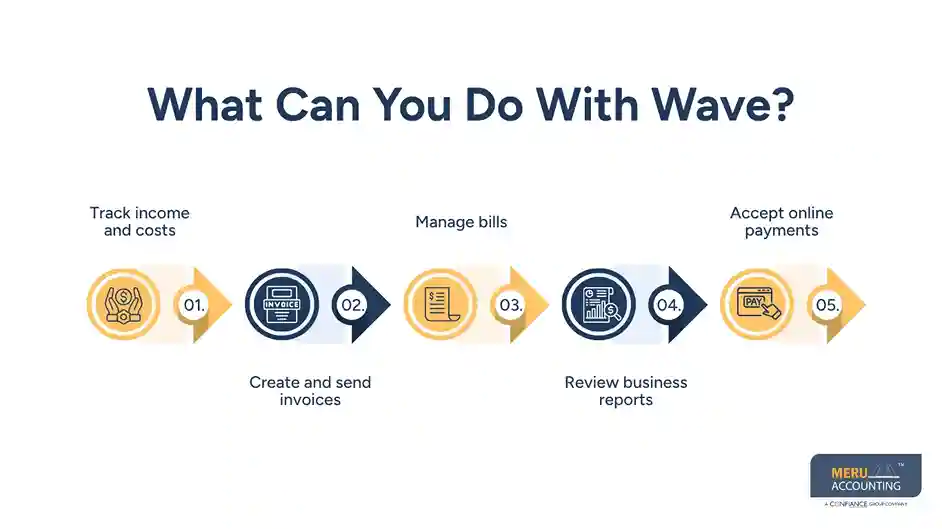
What Can You Do With Wave?
Wave can cover many day-to-day tasks for a small firm. The exact tools you can use may depend on the plan and the service you choose.
Track income and costs
You can use Wave to keep a record of money earned and costs paid by the firm. This gives you a base for key reports and helps you see where cash is going.
Create and send invoices
Wave lets users create and send invoices and estimates. Its invoicing tools can also link invoice and payment data with the accounting side of the account.
This can help a service firm keep sales and client bills in one place.
Manage bills
The Starter plan includes bills, so small firms can use Wave to keep a record of amounts owed to vendors.
Review business reports
Wave provides access to reports such as profit and loss statements. These reports can help an owner review sales, costs, and the overall health of the firm.
Accept online payments
Wave also lets firms accept online payments. But payment processing is not the same as free accounting. Payment fees can apply based on the type of payment and plan.
So, Wave free accounting software can be a useful base for small business books, but you should know which tools are free and which have a cost.
Is Wave Free Accounting Software Really Free?
Yes, but there is an important detail.
Wave states that its accounting and invoicing features are free, with no trial or subscription fee for those core tools. It also offers paid features, such as online payment processing, payroll, and bookkeeping help.
The current Starter plan is $0. It includes unlimited estimates, invoices, bills, and bookkeeping records. Online payments can be used with the plan, but payment fees apply.
Wave Pro adds tools such as automatic bank imports, transaction matching and coding, receipt capture, and late payment reminders. The current listed U.S. price is $19 per month when billed monthly, with an annual option also shown by Wave.
So, the better way to view Wave free accounting software is this:
The core accounting plan is free, but some features and services cost extra.
That distinction matters when you compare your full bookkeeping cost.
optional anymore
on running the business
Who Is Wave a Good Fit For?
Wave free accounting software may work well for firms with simple books and a small number of moving parts.
It can be a good fit for:
- Freelancers
- Consultants
- Small service firms
- Solo business owners
- New firms with basic book needs
- Owners who want to handle their own books
For these firms, Wave may provide enough tools to track sales, costs, invoices, bills, and basic reports.
But Wave may not be the best fit when your books become more complex. A firm with large transaction volume, complex inventory, many accounts, detailed job costing, or more advanced reporting may need a stronger setup.
Your own skill also matters. Accounting software can record data, but it cannot always tell you if a transaction was coded to the wrong account. A report can look neat while the books behind it still need work.
That is one reason firms should review their needs before choosing Wave free accounting software as their long-term book system.
How to Use Wave for Small Business Bookkeeping
Good results depend on how you set up and manage the books. Using Wave free accounting software does not remove the need for sound bookkeeping steps.
1. Set up your accounts
Start with a chart of accounts that fits your firm. Use clear income, cost, asset, debt, and equity accounts. Do not add a large number of accounts if you do not need them.
2. Enter or import transactions
Record sales, costs, bills, and other business activity. If you use bank feeds, review the data before you accept each entry. Wave Pro includes automatic bank import and transaction coding tools.
3. Check each transaction
Do not assume that an auto-coded item is right. A bank charge may be a software cost, bank fee, owner draw, or another type of item. The right code depends on what the payment was for.
4. Reconcile your accounts
Compare the book balance with your bank and card statements. This step can help find missed items, duplicate entries, wrong dates, and other gaps.
5. Review reports
Check your profit and loss, balance sheet, and other key reports on a set cycle. Look for large swings or items that do not make sense.
6. Keep records ready for tax work
Save bills, receipts, invoices, and other key records. Clean books make it easier to give your tax pro the data they need.
The goal is not just to have transactions inside Wave. The goal is to have books that you can trust.
Meru Accounting's Wave Accounting Solutions
Wave can handle the software side of your books, but keeping everything accurate and up to date still takes time. Meru Accounting’s Wave accounting solutions give small businesses experienced bookkeeping support while letting them keep using the Wave system they already know.
Our team can help with:
- Monthly bookkeeping and transaction review
- Bank and credit card reconciliation
- Income and expense tracking
- Accounts payable and accounts receivable
- Invoice and payment tracking
- Monthly financial reports
- Cleanup and catch-up bookkeeping
- Tax-ready financial records
We review your books, catch issues that may be easy to miss, and keep your records ready for tax work and business decisions. With Meru Accounting handling the bookkeeping, you can spend less time working in Wave and more time running your business.
Our Expert Insight
When we review small-business books, we look beyond whether transactions are entered. We check whether the account balances make sense at month-end.
For example, an open invoice may still show as unpaid even though the customer has already paid. The payment may have been posted to the wrong account or left unmatched. A quick review of accounts receivable and bank activity can catch this before it affects financial reports.
That is why we recommend a month-end review when using Wave free accounting software. Good bookkeeping is not just about entering data. It is about making sure the numbers tell the right story.
Key Takeaways
- Wave free accounting software can be a good choice for many small firms with simple bookkeeping needs.
- The $0 Starter plan includes core tools such as invoices, bills, estimates, and bookkeeping records.
- Some Wave tools, such as online payments, payroll, and Pro features, can have extra costs.
- Free software does not replace good bookkeeping.
- Bank data should be checked and reconciled, not just imported.
- Firms with more complex needs may need more tools or professional help.
- Professional Wave accounting solutions can help owners keep their Wave books clean without doing all the work themselves.
- The right choice depends on your transaction volume, book needs, reporting needs, and plans for growth.
FAQs
Yes. Wave offers a free Starter plan for core accounting and invoicing. Payroll is a separate service with its own pricing.
It is better to keep business and personal spending separate. A dedicated business account makes reconciliation easier and keeps your financial records cleaner.
Monthly reconciliation is a good practice for most small businesses. It helps catch missing transactions, duplicate entries, and other errors before they build up.
Yes. Wave includes invoicing tools that let businesses create and send invoices and track customer payments. Payment processing fees may apply.
Wave accounting solutions can include bookkeeping, account reconciliation, transaction review, cleanup work, and monthly reporting. The exact service can be tailored to the business and its bookkeeping needs.
optional anymore
on running the business