
Payroll in a law firm isn’t always as simple as paying employees a fixed salary every two weeks. An associate may earn a base salary plus a bonus, a paralegal may be paid by the hour, and support staff may have different pay rates and benefit plans. As the firm grows, keeping every payment, deduction, and tax record in order takes more time. This is where payroll software for law firm operations can make a real difference.
The challenge isn’t just getting everyone paid on time. It’s making sure each person is paid correctly, tax rules are followed, and payroll records match the firm’s books. The right system can bring these tasks together, reduce manual work, and give law firm owners better control over payroll without adding more admin work.
What You Will Learn From This Blog
- Why payroll accuracy and compliance matter to law firms.
- Common payroll issues that affect attorneys and legal staff.
- How payroll software for law firm teams can reduce errors.
- Key features to check before you pick a payroll tool.
- Best ways to keep payroll records right and meet key rules.
- When to seek expert help with law firm payroll.
Why Payroll Accuracy and Compliance Matter for Law Firms
Accurate payroll helps a law firm pay each worker the right amount on time. It also helps the firm meet tax, wage, and recordkeeping rules. A sound payroll process has a direct impact on staff trust, cash flow, and day-to-day work.
Here are four key reasons to make payroll a top task:
1. Meet tax and labor rules
Law firms must follow rules on tax withholdings, wage payments, overtime, and staff records. The rules can vary by state and by worker type. A missed tax deposit or wrong wage rate can lead to extra costs and legal risk.
2. Build staff trust
Attorneys and support staff rely on their pay being right and on time. Errors in salary, bonus, leave, or overtime can cause stress and lower trust in the firm. A clear review process helps avoid such issues.
3. Keep a clear view of costs
Payroll is a major cost for most law firms. Accurate records help partners track staff costs, plan cash flow, and set budgets. They also help show how much the firm spends on each team or office.
4. Keep records ready for review
Firms may need payroll data for tax filings, audits, loan checks, or internal reviews. Clear records make it easier to check past pay runs, trace changes, and answer staff questions.
Common Payroll Challenges Faced by Law Firms
Law firm payroll has needs that may not arise in other types of firms. Different pay plans, work hours, and staff roles can make each pay run more complex.
Different pay plans for attorneys and staff
Some attorneys earn a fixed salary, while others may get a bonus based on set goals or firm policy. Paralegals, legal assistants, and admin staff may earn hourly wages or fixed pay. Firms need clear rules for each role to avoid incorrect pay.
Tracking hours and overtime
Hourly staff may work extra hours during trials, case deadlines, or busy periods. Firms must track these hours and apply the right pay rules. Poor time records can lead to missed overtime or wrong wage amounts.
Handling bonuses and other pay
Bonuses may depend on firm results, case work, or set goals. The firm must track the reason, amount, and pay date for each bonus. It must also apply the right tax rules.
Managing staff in more than one state
Law firms with staff in many states may need to follow more than one set of tax and wage rules. State tax rates, pay dates, leave laws, and final pay rules can differ. This adds work to each pay run.
Keeping staff data up to date
A change in pay rate, home address, tax form, or bank details can affect payroll. If the firm does not update its records on time, it may pay the wrong amount or use the wrong tax data.
How Payroll Software for Law Firm Operations Improves Payroll Accuracy
A good payroll system can help law firms reduce manual work and keep pay data in one place. It can also help staff spot errors before they affect paychecks. Here is how the right payroll software for law firm teams can improve daily payroll work.
1. Automates pay calculations
Payroll tools can use set pay rates, hours, and approved bonuses to work out gross pay. This helps reduce errors from manual math. Staff can also set pay rules for hourly and salaried workers.
2. Reduces manual data entry
When staff enter the same data in more than one place, the risk of errors goes up. Payroll software can link with time and accounting tools to share key data. This cuts repeat work and helps keep records in sync.
3. Tracks work hours and leave
A payroll system can track hours, overtime, paid time off, and leave balances. It can also flag missing time entries or hours that need review. This helps firms check work hours before they run payroll.
4. Helps manage payroll tax data
Many payroll tools can work out tax withholdings based on staff data and current tax tables. Some can also help prepare tax forms, file returns, and make tax deposits. Still, firms should check that the tool supports the states where they have staff.
5. Keeps payroll records in one place
A central system can store pay rates, tax forms, pay stubs, and past pay runs. This makes it easier to find data when staff have pay questions or the firm needs to review its records.
Essential Features to Look for in Payroll Software for Law Firms
Not all payroll tools offer the same features. A law firm should choose a tool that fits its staff size, pay plans, office setup, and tax needs. The goal is to make each pay run clear, safe, and easy to check.
Here are the key features to look for:
1. Automated tax calculations and filings
Look for tools that can work out federal, state, and local tax withholdings. Some tools also support tax deposits and filings. Check what the vendor handles and what your firm must still do.
2. Time and attendance tracking
The tool should track staff hours, overtime, leave, and paid time off. It should also let the right person review and approve time records before payroll runs.
3. Support for more than one state
If your firm has staff in more than one state, check that the tool can handle each state’s tax and wage rules. It should also support the right pay dates and tax reports for each work site.
4. Role-based access and data security
Payroll data includes pay rates, tax IDs, bank details, and other private staff data. Look for role-based access, secure sign-in, data encryption, and clear access logs. Only staff who need payroll data should be able to view or change it.
5. Clear payroll reports and audit trails
Reports should show gross pay, tax withholdings, employer taxes, net pay, and any changes made to a pay run. An audit trail can help the firm see who made a change and when it took place.
6. Links with accounting tools
Payroll data should flow into the firm’s books with little manual work. Check if the tool can link with your accounting system and if it can map wages, tax costs, and benefits to the right accounts.
7. Easy use and vendor support
A tool should be easy for staff to learn and use. Check the quality of help, how fast the vendor replies, and how often it updates tax rules. Good support can help solve issues before the next pay date.
optional anymore
on running the business
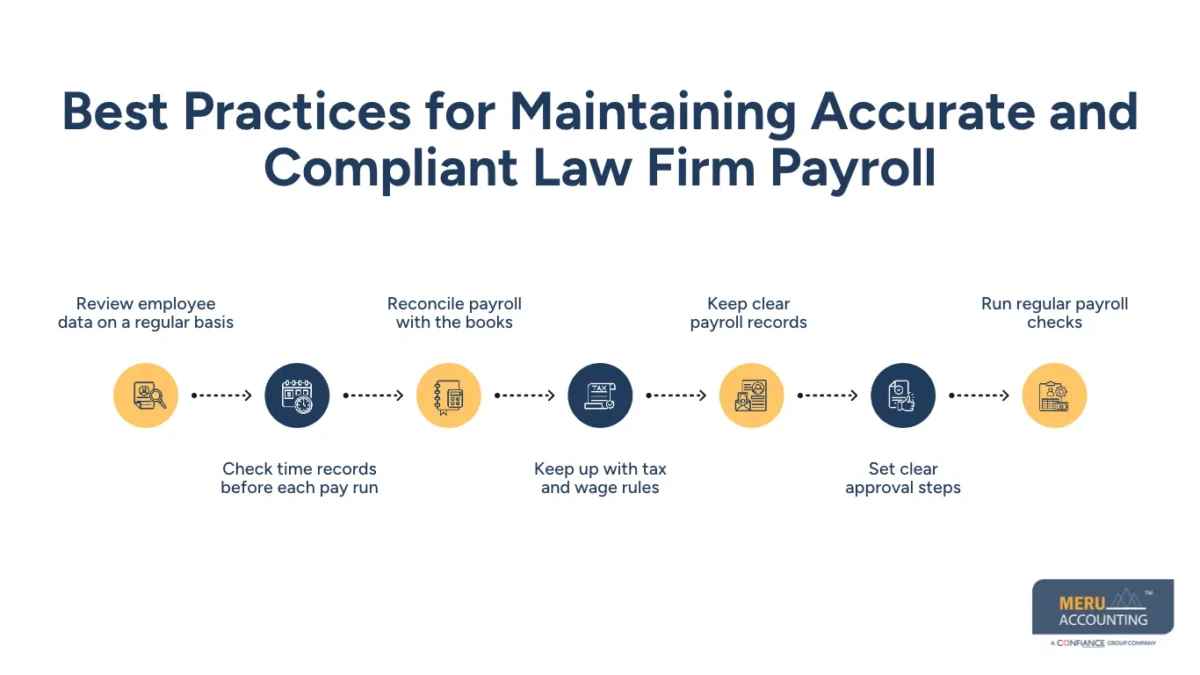
Best Practices for Maintaining Accurate and Compliant Law Firm Payroll
Even the best payroll software for law firm use needs good data and sound checks. Firms should set clear steps for each pay run and give each task to the right person.
1. Review employee data on a regular basis
Check each worker’s name, address, tax forms, pay rate, job title, and bank details. Update records when staff join, leave, or change roles. Ask staff to report any change in their tax or bank data at once.
2. Check time records before each pay run
Review work hours, overtime, leave, and missed entries. Ask team leads to approve time records before they go to payroll. Do not change time data just to fit a budget or a set pay amount.
3. Reconcile payroll with the books
Compare payroll reports with the wage, tax, and benefit accounts in your books. Check that the amounts paid match the payroll run and bank data. Look into any gap before you close the month.
4. Keep up with tax and wage rules
Review federal, state, and local rules that apply to your firm. The IRS sets rules for tax withholdings, deposits, and reports. The Fair Labor Standards Act (FLSA) sets key rules on minimum wage, overtime, and records for covered staff. State and local laws may set higher pay rates or extra rules.
5. Keep clear payroll records
Keep records of hours, pay rates, gross pay, overtime, deductions, and pay dates. Under the FLSA, covered employers must keep certain records for nonexempt staff. The DOL says payroll records should generally be kept for at least three years, while records used to work out wages should be kept for two years. Check other tax and state rules too.
6. Set clear approval steps
Have one person prepare payroll and another review it when possible. The reviewer should check unusual pay changes, bonuses, new hires, final pay, and tax amounts. Keep proof of approval for each pay run.
7. Run regular payroll checks
Review payroll reports each month or quarter. Look for duplicate payments, odd changes in pay, missed hours, and tax gaps. Fix errors as soon as you find them and keep a note of what changed.
Law Firms Payroll Solutions by Meru Accounting
A law firm’s payroll records should tell a clear story: who was paid, for what work period, how bonuses were handled, what taxes were withheld, and whether the amounts match the books. Keeping these details in order requires more than processing paychecks. It calls for careful payroll handling and sound accounting practices.
Our services for law firms include:
- Attorney and Staff Payroll Processing: Process salaries, hourly wages, approved bonuses, and other employee payments based on the firm’s pay structure.
- Payroll Tax Support: Assist with tax calculations, withholding records, payroll tax reports, and related filing tasks.
- Time and Leave Record Management: Organize approved work hours, overtime, paid time off, and leave records for payroll processing.
- Payroll Reconciliation: Match payroll reports with bank payments and accounting entries to identify missing or incorrect amounts.
- Payroll Reporting: Prepare payroll summaries, wage reports, and related financial records for review.
- Accounting and Bookkeeping Support: Record payroll expenses, employee-related costs, and tax liabilities in the firm’s books.
Whether your firm has a small legal team or multiple offices with different pay structures, Meru can provide dedicated accounting professionals and structured review support to handle these tasks. This helps keep payroll records consistent and gives partners and administrators a clearer view of employee costs.
Our Expert Insight
One detail law firms should watch is how payroll changes are handled after a pay run is approved. A late bonus approval, a corrected time entry, or a change in an employee’s pay rate can affect more than one pay period. If these changes aren’t tracked well, payroll reports may no longer match the firm’s books.
We recommend keeping a clear record of every adjustment, including its reason, approval date, effective date, and impact on gross pay and tax withholdings. This creates a reliable trail for future reviews and makes it easier to explain differences in payroll costs from one month to the next.
The key is to treat payroll adjustments as controlled accounting entries, not just routine corrections. This small change in process can make a meaningful difference during month-end reviews and tax preparation.
Key Takeaways
- Use payroll software to reduce manual work and pay errors.
- Set clear pay rules for attorneys and support staff.
- Review work hours, overtime, bonuses, and leave each pay run.
- Keep up with federal, state, and local payroll rules.
- Reconcile payroll reports with accounting records on a set basis.
- Use clear approval steps and regular payroll reviews.
- Seek expert help when payroll rules or staff pay plans become hard to manage.
FAQs
The best option depends on your firm’s size and payroll needs. Look for features such as tax filing, time tracking, bonus management, multi-state payroll, and accounting integrations.
It helps calculate wages and tax withholdings, track overtime, and maintain payroll records. Many tools also support tax filings and reminders for key deadlines.
Yes, many systems can process attorney bonuses and other forms of employee pay. However, equity partner compensation often requires separate accounting and tax treatment.
Yes. Payroll software can help small firms manage employee pay, tax withholdings, and payroll records without relying on spreadsheets or manual calculations.
In-house payroll gives firms more direct control, while outsourcing provides access to payroll professionals. The right choice depends on the firm’s budget, staff, and payroll complexity. Expertise or need more support. The right choice depends on cost, staff size, and the level of control the firm wants.
optional anymore
on running the business