

A truck reaches the plant at 9 a.m. The receiving team checks the goods, records the receipt, and moves the material to the store. Two days later, the vendor sends an invoice. The AP team now has to answer a simple question: Does this bill match what the company ordered and what it actually received? This is where accounts payable automation for manufacturing becomes useful. Instead of checking the purchase order, receipt, and invoice one by one, the AP process can bring these records together and flag gaps.
The same process can also track goods received before an invoice arrives, which is often where GRNI or GRIR items start to build up. For a manufacturing firm, the real value is not just in getting invoices into a system faster. It is in knowing what was ordered, what came in, what was billed, and what still needs action.
What You Will Learn From This Blog
- How accounts payable automation for manufacturing connects invoices, purchase orders POs, and goods receipts.
- Why three-way matching matters when a plant receives goods in parts or over several dates.
- How GRNI and GRIR items are created and why they can stay open.
- How manufacturing accounts payable solutions can identify price, quantity, and receipt gaps.
- Which AP measures can show whether automation is working as planned.
- How Meru Accounting can support AP review, reconciliation, reporting, and exception work.
What is Accounts Payable Automation for Manufacturing?
Invoice Data Capture
An invoice often contains many fields that AP staff need to check before posting it. Accounts payable automation for manufacturing can capture details such as vendor name, invoice number, PO number, date, quantity, tax, and amount.
Instead of entering each field by hand, the AP team can focus more time on invoices that need a closer look.
Purchase Order Check
The purchase order sets the base for the transaction. It shows what the company agreed to buy, from whom, at what price, and in what quantity.
The system can compare invoice details with the PO and flag a mismatch. Manufacturing accounts payable solutions can make this check part of the normal invoice flow rather than a separate manual task.
Goods Receipt Check
The PO alone does not prove that the goods reached the plant. The goods receipt provides that missing piece.
For example, if a PO is for 1,000 units but the plant has received only 700, an invoice for all 1,000 units needs attention. Accounts payable automation for manufacturing can bring that difference to the reviewer’s notice.
Approval Rules
A $500 invoice and a $500,000 invoice may not need the same approval path. Firms can set rules based on invoice value, vendor, department, PO, or variance.
Manufacturing accounts payable solutions can route invoices based on these rules, while unusual or high-value items can go to the right person for review.
ERP Link
AP does not work alone. PO data may sit in an ERP, receipt data may come from the warehouse, and invoices may arrive through email or another channel.
A connected process brings these records together. This gives the AP team a clearer view before an invoice is posted or paid.
Why Manufacturing Needs Accounts Payable Automation
High Invoice Volume
Imagine a plant receiving hundreds of invoices in a week. Even if each invoice takes only a few minutes to check, the total time can be large.
Accounts payable automation for manufacturing can handle routine data checks at scale. This leaves AP staff with more time for invoices where a real business decision is needed.
Partial Deliveries
Manufacturing orders rarely follow one simple pattern. A vendor may send 300 units today, 400 next week, and the rest later.
Manufacturing accounts payable solutions can match invoice lines with available receipt data. This matters when one PO has several deliveries and several invoices.
Price Differences
A PO may show a price of $18 per unit, while an invoice shows $19. The difference could be due to an approved price change, freight, tax, or a billing error.
The important point is that the difference should be visible. Accounts payable automation for manufacturing can flag the variance instead of letting it pass without review.
Month-End Work
Month-end can expose issues that were easy to miss during the month. A receipt may be posted with no invoice, or an invoice may be sitting without a matching receipt.
Manufacturing accounts payable solutions can provide lists of open and unmatched items, giving finance teams a clearer starting point for the close.
Better Control
AP automation is also about control. Duplicate invoices, unusual amounts, missing receipts, and approval gaps can create financial risk.
Rules can flag these issues before payment. Accounts payable automation for manufacturing can also keep a record of what was checked and what action followed.
How Three-Way Matching Works in Accounts Payable Automation for Manufacturing
Review the PO
Start with the order. If the PO says 2,000 units at $10 each, that is the agreed base unless an approved change was made. Accounts payable automation for manufacturing can pull these details into the invoice check so the AP team does not have to search for them each time.
Review the Receipt
Next comes the question: How much did the plant actually receive?
Suppose the plant received 1,800 of the 2,000 units. If the vendor sends a bill for the full 2,000, the 200-unit gap needs to be reviewed before the invoice is cleared.
Review the Invoice
The invoice completes the three-way check. The system compares the vendor bill with the PO and receipt.
This gives AP three related answers: what was ordered, what was received, and what the vendor is asking to be paid for.
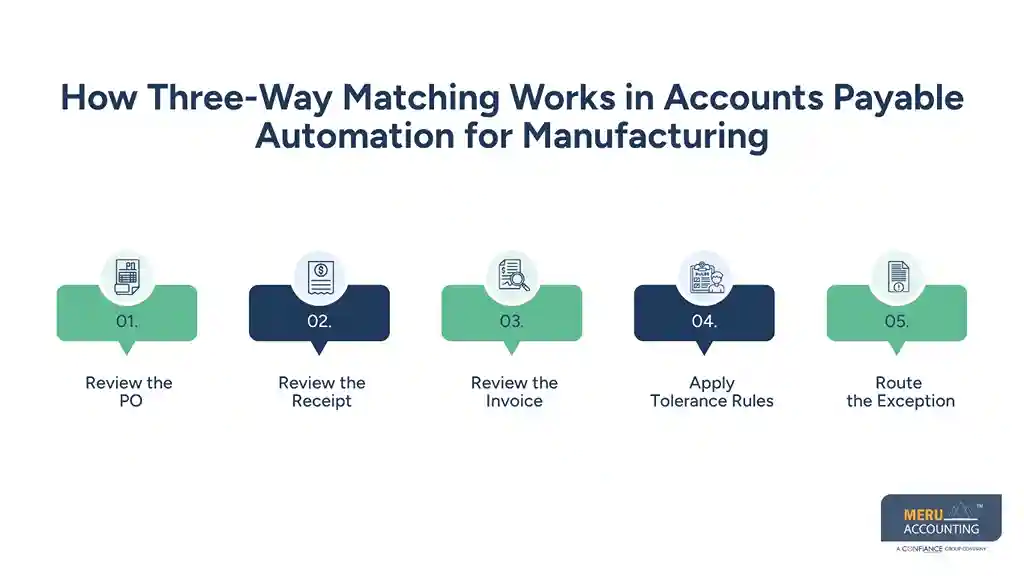
Apply Tolerance Rules
Not every difference means there is an error. A small price variance may fall within an approved limit, while a large gap may require buyer approval.
Manufacturing accounts payable solutions can apply these tolerance rules before sending an invoice to a person for review.
Route the Exception
An invoice that passes the required checks can continue through the AP process. One that does not can be sent to AP, procurement, receiving, or another owner.
This is an important part of accounts payable automation for manufacturing because the system does not need to solve every exception. It needs to show the exception clearly and send it to the right person.
How Accounts Payable Automation for Manufacturing Handles GRNI/GRIR Reconciliation
What GRNI and GRIR Mean
GRNI means Goods Received Not Invoiced. GRIR is also used for a clearing account that tracks goods received and invoices that have not yet been matched.
The basic situation is easy to understand: the plant has received the goods, but AP has not yet received or posted the related bill.
Why Open Items Arise
A shipment may arrive on March 28, while the invoice arrives on April 3. The goods are already in the plant, but the bill is not yet in AP.
Accounts payable automation for manufacturing can track this gap instead of leaving the item hidden in a long list of open transactions.
Receipt and Invoice Match
Once the invoice arrives, the system can compare it with the receipt and PO. Quantity, price, vendor, and other fields can be checked.
Manufacturing accounts payable solutions can then show whether the item can be cleared or whether someone needs to investigate a difference.
Old GRNI Items
A GRNI item that remains open for a few days may be normal. One that stays open for months needs a closer look.
It could be caused by a missing invoice, incorrect receipt, wrong PO, partial delivery, or another issue. Accounts payable automation for manufacturing can sort these items by age and value to make the review more focused.
Month-End Reconciliation
At close, finance needs to know which goods have been received but not billed and which invoices still lack a receipt.
Manufacturing accounts payable solutions can create reports around these open items. This gives the finance team a clearer list for follow-up and review.
optional anymore
on running the business
How AP Automation Improves Invoice Accuracy and Processing Time
Less Data Entry
Every manual entry creates another point where an error can occur. A wrong PO number or amount can send an invoice down the wrong path.
Accounts payable automation for manufacturing can capture key invoice data and compare it with existing records before the bill moves forward.
Faster Matching
A person may need several screens or files to compare one invoice with its PO and receipt. A system can bring the same data together and run the defined checks.
This makes the matching step quicker, especially when invoice volume is high.
Fewer Repeat Checks
AP staff should not have to search for the same information again and again. Once the PO and receipt are linked to the invoice, the relevant data can be available during review.
Manufacturing accounts payable solutions can reduce this repeat work and give the reviewer more context in one place.
Clear Exception Queues
A failed match should not simply become another item in an inbox. It should show what went wrong.
For example, the exception may say that the invoice quantity is higher than the received quantity. Accounts payable automation for manufacturing can route that case to the right team instead of leaving AP to find the cause on its own.
Common Accounts Payable Challenges In Manufacturing
Missing Goods Receipts
Sometimes the goods are sitting in the plant, but the receipt has not been entered into the system. The invoice may then look like a mismatch even though the goods have arrived.
Accounts payable automation for manufacturing can flag the missing receipt and keep the invoice visible until the issue is resolved.
Partial Shipments
A vendor may send one PO across several shipments. AP then has to work out which quantity has arrived and which quantity is still pending.
Manufacturing accounts payable solutions can use receipt data to make these partial delivery checks easier to manage.
Price Variance
Price changes are another common source of exceptions. A vendor may use a new rate while the old PO still shows the previous price.
The system can flag the difference, but the buyer or AP team still needs to confirm why the price changed.
Duplicate Invoices
A vendor may send the same invoice twice, perhaps once by email and again through another channel. Without a duplicate check, both could enter the AP process.
Accounts payable automation for manufacturing can compare invoice numbers, vendors, dates, amounts, and other fields to identify possible duplicates.
Old GRNI or GRIR
An old GRNI or GRIR item is more than a number on a report. It can point to a process issue that has not been closed.
Manufacturing accounts payable solutions can group these items by vendor, age, PO, or value so the finance team can decide what needs to happen next.
How to Measure Accounts Payable Automation Performance
Invoice Cycle Time
How long does an invoice take from receipt to posting or approval?
This measure can show whether the new AP process is cutting wait time. It is more useful when tracked over time rather than viewed as a single number.
First-Pass Match Rate
This shows how many invoices pass the match without manual correction.
If the rate is low, the issue may not be the AP team. It could point to poor PO data, late receipts, price changes, or invoice quality.
Exception Rate
The exception rate shows how many invoices need human review.
Accounts payable automation for manufacturing should not aim for zero exceptions. Some invoices will always need a person because the business situation itself needs a decision.
GRNI/GRIR Aging
Age is key when reviewing GRNI or GRIR. A list can show how many items are open for 0–30 days, 31–60 days, 61–90 days, or longer.
Manufacturing accounts payable solutions can make this type of review easier by grouping open items by age, vendor, and value.
Cost Per Invoice
Cost per invoice gives finance a way to compare the old process with the new one.
The calculation can include staff time, data entry, exception review, rework, and other known AP costs. The result is more useful when the same cost method is used before and after automation.
How Meru Accounting Can Support Manufacturing AP Work
AP Process Review
Meru Accounting can review how invoices move from receipt to posting and payment. This can include PO checks, receipt checks, approvals, exceptions, and month-end work.
The goal is to identify where manual steps can be reduced and where stronger review rules may be needed.
Invoice and PO Checks
Our team can work with agreed AP rules for invoice and PO checks. Accounts payable automation for manufacturing can then fit into a defined review process rather than operate as a separate task.
GRNI and GRIR Review
GRNI and GRIR can become difficult to manage when open items keep rolling from one month to the next.
Meru Accounting can review these items by age, vendor, PO, value, and issue type so the finance team has a clearer list for follow-up.
Exception Review
Not every invoice should be treated as an error just because it fails a match.
Manufacturing accounts payable solutions can flag the difference, while the AP team can review the reason. Meru Accounting can work on agreed exception types such as price gaps, quantity gaps, missing receipts, and unmatched invoices.
AP Reporting
A useful AP report should answer more than “How many invoices are open?”
It should show where work is stuck, how old the items are, which vendors have repeat issues, and how many invoices need manual review within the accounts payable automation for manufacturing workflow.
Our Expert Perspective
The most useful AP automation setup is not the one that tries to remove every human decision. It is the one that makes routine checks quick and makes unusual cases easy to spot.
For manufacturing firms, this distinction matters. A 2,000-unit PO, a 1,800-unit receipt, and a 2,000-unit invoice are not just three numbers. They tell a story about what was ordered, what arrived, and what the vendor wants to be paid. Accounts payable automation for manufacturing can bring that story together before the payment decision is made.
Key Takeaways
- Accounts payable automation for manufacturing connects purchase orders, receipts, invoices, and approval steps.
- Three-way matching checks what was ordered, what was received, and what was billed.
- A key part of accounts payable automation for manufacturing is reconciling GRNI and GRIR for goods that have been received but are not yet matched with invoices.
- Manufacturing accounts payable solutions can flag price gaps, quantity gaps, missing receipts, and duplicate invoices.
- A failed match does not always mean an error; it may need a business reason or approval.
- AP teams should track invoice cycle time, first-pass match rate, exception rate, and GRNI/GRIR aging.
- Automation works best when routine checks are handled by rules and real exceptions are sent to the right person.
- Clear PO and receipt data remains important even when much of the AP process is automated.
FAQs
Accounts payable automation for manufacturing uses software to capture, match, approve, and process invoices against purchase orders and goods receipts.
Three-way matching compares the purchase order, goods receipt, and vendor invoice to check whether the billed price and quantity match the order and receipt.
GRNI and GRIR reconciliation checks goods received but not yet invoiced and identifies open items that need matching, review, or follow-up.
AP automation links purchase orders, goods receipts, and invoices to identify unmatched GRNI or GRIR items and route them for review.
Manufacturing accounts payable solutions can flag price differences, quantity gaps, missing receipts, and duplicate invoices before payment.
optional anymore
on running the business



