
Running payroll for one firm can take time. Running it for many clients can be much harder. Each client may have its own pay dates, staff, pay rates, tax setup, benefits, and work rules. A small error can also lead to a wrong pay run, a bad report, or a mismatch in the books.
This is where payroll software for accounting firms can help. It gives firms a way to keep client payroll data in one workflow, cut repeat work, and keep key payroll records in order. It can also help accountants check pay data before and after each run.
For firms that serve many clients, the right payroll management software for accountants can make day-to-day work clearer and easier to track. Still, software does not remove the need for review. Accountants must check the data, reports, tax items, and links to the books.
What You Will Learn From This Blog
In this guide, you will learn:
- What payroll software does for an accounting firm
- Why client payroll can be hard to manage at scale
- How payroll software for accounting firms can cut manual work
- Which tools and features matter most
- How software compares with manual payroll work
- Where accountant review still plays a key role
- How Meru Accounting can help with payroll and payroll books
What Is Payroll Software for Accounting Firms?
Payroll software helps firms process and track pay for their own staff or for clients. It may help with pay data, wages, tax items, deductions, payroll reports, and payroll records.
For an accounting firm, the key point is that the firm may need to manage payroll for many separate clients. Payroll software for accounting firms can help keep each client’s data separate while giving the firm one place to handle its work.
Good payroll management software for accountants may also link payroll work with the firm’s accounting process. For example, payroll data can be used to help post wage costs, employer tax costs, and payroll debts to the books.
The exact tools can vary by plan and system. Some tools may also support tax pay and tax file work. Accountants should check what each plan does before they pick a system.
Why Managing Payroll for Multiple Clients Is Challenging
Payroll gets more complex as a firm adds clients. Each client can have a different pay cycle, staff mix, pay rules, and set of benefits.
A firm may need to track:
- Hourly and salary pay
- Overtime and bonus pay
- Tax withholdings
- Benefit and other deductions
- Employer tax costs
- Paid time off
- Payroll dates
- Payroll reports
- Payroll debts and payouts
The risk of error can also grow when data is moved by hand. A rate may be typed wrong. A pay item may be missed. A report may not match the bank payout. One small error can take more time to find when the firm has many client files.
Client privacy is also a key part of payroll work. Staff should only have the access they need. Clear client files and user rights can help reduce the risk of data being used by the wrong person.
This is why many firms look for payroll software for accounting firms that can help them set a clear workflow for each client.
How Payroll Software Helps Accounting Firms Manage Multiple Clients
It keeps client payroll data separate
Each client needs its own payroll setup and records. Payroll software for accounting firms can help keep pay data, staff records, tax data, and reports tied to the right client.
This can make it easier for a firm to move from one client to the next without mixing records.
It cuts repeat data work
Manual entry can take a large share of payroll time. Software can store key data and use it in later pay runs. This can cut the need to enter the same details again and again.
It helps with payroll checks
Accountants can use reports to review pay, tax items, deductions, and other payroll data. A good check can help spot a gap before the books are closed.
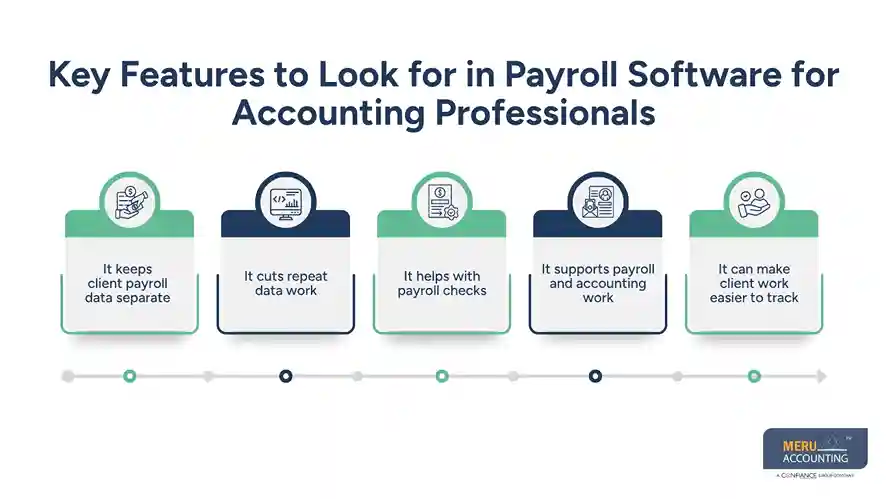
It supports payroll and accounting work
Payroll does not end when staff gets paid. The pay run must also fit the books. Payroll management software for accountants can help firms move payroll data into the right accounting workflow.
For example, an accountant may check gross pay, employer tax costs, benefit costs, and payroll debts before the month is closed.
It can make client work easier to track
When a firm has many payroll clients, due dates can be hard to track. A clear workflow can help staff know which pay run is due, what data is needed, and what checks are still open.
optional anymore
on running the business
Key Features to Look for in Payroll Software for Accounting Firms
The best system will depend on the firm’s size and client mix. Still, some features can be useful across many firms.
Multi-client support
The system should let the firm handle many client accounts without mixing their data. This is one of the main reasons firms seek payroll software for accounting firms rather than a tool made only for one business.
Payroll reports
Reports should give the firm a clear view of wages, taxes, deductions, and other pay data. They can also help with month-end checks and client review.
Tax and liability tracking
Payroll creates debts that must be paid or tracked. The system should help the firm see what is due and what has been paid. The exact tax tools will depend on the system and plan.
Accounting links
Payroll data should fit with the client’s books. Payroll management software for accountants can be useful when it helps move or map payroll data into the accounting system.
User access
Firms often have more than one person working on client payroll. User roles and access rules can help limit who can view or change client data.
Audit and record tools
A good system should make it easy to review past payroll data and reports. This can help when a client asks about an old pay run or when an accountant needs to check a past entry.
Support for different client needs
Not all clients use the same pay setup. Firms may need to work with hourly staff, salaried staff, benefits, deductions, and different pay dates. Payroll software for accounting firms should fit the firm’s client mix.
Payroll Software vs. Manual Payroll Management for Accounting Firms
Manual payroll may work for a small client base. But it can become hard to scale as the firm adds more clients.
With manual work, staff may need to enter data, check pay, build reports, track payroll debts, and match payments by hand. This can take more time and raise the risk of data entry errors.
Software can automate parts of this work and keep more data in one place. Payroll management software for accountants can also help staff use the same review steps across many client files.
Still, software is not a full replacement for an accountant. A pay run can be processed in the system and still have a bad input. Accountants need to review key data, check reports, and make sure payroll entries fit the books.
The best approach is often a mix of software and skilled review. Payroll software for accounting firms can handle repeat tasks, while accountants focus on checks, client needs, and book work.
Meru Accounting's Payroll Management Services
Payroll does not end when employees get paid. The payroll data still needs to be recorded, payroll liabilities need to be checked, and payments need to match the books. This is where strong payroll accounting support can help keep client records accurate and up to date.
Meru Accounting supports the accounting work that follows each payroll run, including:
- Payroll review: Check wages, benefits, deductions, and payroll reports
- Journal entries: Record payroll costs and related entries
- Tax and liabilities: Review payroll tax and liability balances
- Payment matching: Match payroll payments with bank records
- Month-end review: Check payroll accounts as part of the close
- Cleanup and catch-up: Fix gaps and bring past payroll records up to date
- Tax-ready records: Keep payroll data organized for tax and year-end work
- Software support: Work with the client’s existing payroll and accounting software
Our team also looks beyond the payroll report. For example, if a payroll liability does not match the payment record or payroll costs change sharply from one month to the next, we review the related entries to find the cause. This helps keep payroll, payments, and the general ledger in sync.
Our Expert Insight
For multi-client payroll, we find that exceptions matter more than volume. An accountant does not need to review every payroll item in the same way. The focus should be on entries that do not match the bank, general ledger, prior period, or expected payroll activity.
For example, if payroll costs rise sharply from one month to the next, the cause may be overtime, a bonus, a new hire, or a posting error. Checking the reason before the books are closed can prevent a small issue from carrying into later periods.
That is where payroll management software for accountants can support the process. It can make the data easier to review, while the accountant applies judgment to items that need a closer look.
Key Takeaways
- Payroll software for accounting firms can help manage payroll for many clients.
- It can cut repeat data entry and help keep client records separate.
- Payroll reports can help accountants review wages, taxes, and deductions.
- Payroll management software for accountants can help link payroll work with accounting tasks.
- Software does not remove the need for payroll and book review.
- A clear workflow can help firms manage client payroll with less repeat work.
FAQs
There is no single setup that fits every firm. The right choice depends on client count, payroll volume, tax needs, accounting systems, and how much work the firm handles in-house. A firm should also check user access and client data controls.
Start with the payroll report, then compare wages, taxes, benefits, and deductions with the general ledger and payment records. Large changes from the prior period should also be reviewed before the month is closed.
Responsibility depends on the agreement between the firm and its client. The engagement should clearly state who enters payroll data, approves payroll, handles tax filings, and reviews the final records.
Yes. An accounting firm may handle payroll accounting, reconciliations, and reporting while the client or a payroll provider handles tax payments and filings. The division of work should be clear from the start.
It can give accountants a more consistent way to manage client payroll data, reports, and records. The main gain is better control over repetitive work, while accountant review remains important for unusual items and book-to-payroll differences.
optional anymore
on running the business
