A homeowner pays monthly dues, a maintenance vendor sends an invoice, and the association needs money for a roof repair. Each transaction affects the HOA’s financial position, but recording them in different places can make it hard to know how much money is available. QuickBooks for HOA accounting brings these transactions into an organized accounting system.
The software can record assessments, track vendor bills, reconcile bank accounts, and prepare financial reports. However, an HOA has financial needs that go beyond routine bookkeeping. It must also track unpaid dues, separate operating and reserve funds, and present clear financial details to board members.
QuickBooks for HOA can manage many of these tasks, but its general accounting design has certain limits. This article examines its features, actual accounting workflows, setup requirements, and areas where additional processes may be needed.
What You Will Learn From This Blog
- Which QuickBooks features are useful for HOA financial management.
- How to organize homeowner accounts, assessments, and fund records when using QuickBooks for HOA accounting.
- How to handle common accounting transactions.
- Where QuickBooks may fall short for an HOA.
- Which accounting practices can keep HOA financial records accurate when using QuickBooks for HOA accounting.
Introduction to QuickBooks for HOA Accounting
Consider an association with 100 units, monthly dues of $200 per unit, and several maintenance vendors. It must track $20,000 in monthly assessments, identify unpaid dues, and record every payment made for shared services.
QuickBooks provides accounting tools to manage these transactions. HOA Accounting in QuickBooks requires a suitable account structure and accurate unit-level records. However, using QuickBooks for HOA accounting requires the association to decide how to handle fund restrictions, late fees, and reports specific to its governing rules.
optional anymore
on running the business
Key Accounting Features of QuickBooks for HOA
Chart of Accounts for HOA Financial Management
A well-planned chart of accounts in QuickBooks for HOA shows where association money comes from and where it goes. HOAs can create categories for monthly dues, special assessments, repairs, insurance, utilities, and administrative costs. This makes it easier to identify which expenses are taking up the largest share of the budget.
Homeowner Assessment and Dues Tracking
QuickBooks for HOA allows each homeowner or unit to have a separate customer record. When a resident pays monthly dues, the amount can be linked to that account. For example, a $200 payment can be matched against the correct unit instead of being recorded only as general income.
Accounts Payable and Vendor Expense Management
A maintenance invoice should not disappear into a pile of paperwork. HOA Accounting in QuickBooks allows associations to record vendor bills, payment dates, and outstanding amounts. A $1,200 plumbing invoice, for instance, can be assigned to repairs and tracked until payment is complete.
Bank Reconciliation and Transaction Tracking
A bank balance and an accounting balance may not always match. Bank reconciliation compares both records to find missing entries, duplicate payments, and bank charges. Regular checks give the board a more reliable view of the association’s available cash.
Operating and Reserve Fund Tracking
Money collected for daily costs should not be confused with funds set aside for major repairs. QuickBooks for HOA can maintain separate bank and ledger accounts for operating and reserve funds. This distinction is important when an association plans a roof replacement or other major project.
Financial Reporting and Budget Management
QuickBooks can prepare income statements, balance sheets, and cash flow reports. An HOA can compare actual expenses with its approved budget and identify areas where costs have exceeded expectations. These reports give board members useful information before approving further spending.
Invoice Generation and Payment Recording
Associations can create assessment invoices and record payments against them, depending on the software plan and configuration. This creates a record of what each homeowner owes and what has been received. Correct invoice settings are important to avoid duplicate charges.
How to Set Up HOA Accounting in QuickBooks
Creating an HOA-Specific Chart of Accounts
When configuring QuickBooks for HOA, start with accounts for assessment income, special assessments, maintenance, insurance, utilities, and administrative expenses. Add asset and liability categories based on the association’s financial structure. Avoid creating several accounts for the same expense.
Setting Up Homeowner Accounts and Assessment Categories
Create customer records for individual homeowners or units. Set up separate categories for regular dues, special assessments, and other approved charges. This makes it easier to trace a payment back to the correct unit.
Configuring Operating and Reserve Fund Accounts
While setting up QuickBooks for HOA, create distinct bank and ledger accounts for operating and reserve funds. Record transfers between these accounts correctly. A transfer of $3,000 into reserves should not be counted as a new expense or a second income entry.
Organizing Income and Expense Transactions
Assign each transaction to its correct category when entering it. For example, a security contract should be recorded under security expenses rather than general maintenance. Consistent classification makes later reviews more useful.
Establishing Financial Reporting Categories
Decide which figures the board needs to review, such as collected dues, unpaid assessments, operating expenses, and reserve balances. Use consistent categories so monthly and annual reports can be compared.
Common HOA Accounting Workflows in QuickBooks
Recording Monthly Homeowner Assessments
Using QuickBooks for HOA, record the amount due from each unit through invoices or suitable recurring transactions. If 100 homeowners owe $200 each, the total monthly assessment due is $20,000. Payments should be matched to the correct homeowner accounts.
Tracking Overdue Dues and Outstanding Balances
In HOA Accounting in QuickBooks, review customer balances and accounts receivable reports to find unpaid assessments. For example, two missed monthly payments of $200 create an outstanding balance of $400. Any late fee must follow the association’s approved rules.
Recording Vendor Invoices and Payments
Enter vendor invoices with the correct amount, date, due date, and expense category. Once payment is made, link it to the recorded bill. This gives the association a clear record and reduces duplicate entries.
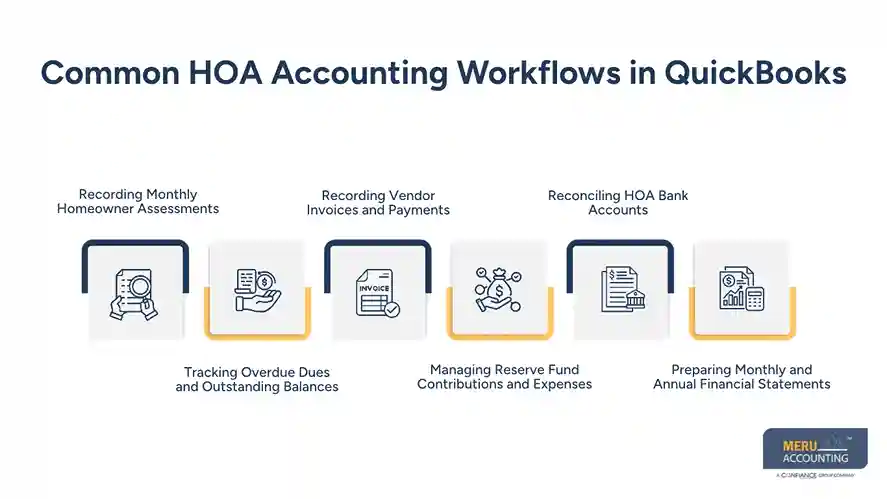
Managing Reserve Fund Contributions and Expenses
Record reserve contributions and withdrawals separately from daily operating costs. If an association sets aside $2,500 each month for future repairs, each transfer should be recorded correctly and checked against its reserve records.
Reconciling HOA Bank Accounts
For accurate HOA accounting in QuickBooks, compare recorded transactions with bank statements every month. Check deposits, vendor payments, transfers, and bank charges. Investigate differences before completing reconciliation rather than carrying unexplained errors into the next month.
Preparing Monthly and Annual Financial Statements
Review collected assessments, unpaid dues, expenses, bank balances, and reserve funds. Monthly reports show current financial activity, while annual statements provide a wider view of the association’s finances and budget performance.
Limitations of Using QuickBooks for HOA Management
Limited Native Fund Accounting Capabilities
QuickBooks is general accounting software, not a dedicated HOA fund accounting platform. Separate accounts can track different funds, but complex reporting may require additional controls and manual checks.
Challenges in Tracking Homeowner Balances by Unit
Managing hundreds of units, ownership changes, and different assessment rates can become difficult in HOA Accounting in QuickBooks. Customer records must be updated regularly to ensure payments and outstanding dues remain linked to the right units.
Limited Automated Assessment and Late-Fee Management
In QuickBooks for HOA, recurring invoices may be available, but HOA-specific fee rules and payment schedules can need manual setup. Incorrect settings may result in charges that do not match the association’s approved policies.
Lack of Dedicated Homeowner Portals
QuickBooks does not replace a dedicated resident portal for maintenance requests, community notices, meeting updates, and document access. Associations may need another application for these activities.
Limitations in HOA-Specific Financial Reporting
Standard reports may not provide every detail required by the board, such as unit-wise dues, reserve summaries, and delinquency reports. Custom reports or manual records may be necessary.
Manual Processes for Association Management Activities
In QuickBooks for HOA, board meetings, resident complaints, maintenance schedules, and community records are not core accounting functions. QuickBooks cannot replace dedicated HOA management software for these activities.
Best Practices for Managing HOA Finances in QuickBooks
Maintain an Organized Chart of Accounts
Use clear account names and consistent categories for all financial transactions. Review the structure regularly to remove duplicate or unnecessary accounts.
Separate Operating and Reserve Fund Transactions
Keep operating and reserve records distinct. Record every contribution, transfer, and withdrawal correctly, with supporting details for major expenses.
Reconcile Bank Accounts Regularly
Complete reconciliation every month instead of waiting until year-end. Check unexplained differences, missing deposits, and duplicate payments before closing the period.
Maintain Accurate Homeowner and Vendor Records
Update unit ownership, homeowner details, payment history, vendor information, and invoice records. Limit access to financial information to authorized users.
Review Budgets and Financial Statements Monthly
Compare actual income and expenses with the approved budget. Investigate unusual spending and unpaid assessments before presenting reports to the board.
Maintain Supporting Documents for Financial Transactions
Keep invoices, receipts, contracts, bank statements, and payment approvals. These records provide evidence for financial reviews, audits, and year-end reporting.
HOA Accounting and Bookkeeping Services by Meru Accounting
Managing HOA finances involves more than recording homeowner dues and paying vendor invoices. Associations must maintain accurate financial records, monitor outstanding assessments, track operating and reserve funds, and prepare reports for board review.
Meru Accounting provides accounting and bookkeeping services, including accounts payable, accounts receivable, bank reconciliation, payroll, and financial reporting. For associations using QuickBooks for HOA accounting, these services can cover:
- Recording homeowner assessments and tracking outstanding balances.
- Managing vendor invoices, payments, and expense categories.
- Maintaining operating and reserve fund transaction records.
- Reconciling bank accounts and reviewing financial discrepancies.
- Preparing monthly financial statements and expense reports.
Our accounting team places importance on accurate transaction records, consistent account classification, and timely financial reporting. These practices give HOA board members a clearer view of collected income, spending, and available funds.
With organized bookkeeping and regular account reviews, associations can maintain reliable financial records and make informed decisions about routine expenses and future repair costs.
Our Expert Perspective
HOA boards should pay close attention to two areas: unpaid homeowner dues and reserve fund balances. Errors in either can affect spending decisions and future repair plans. Regular reviews of HOA Accounting in QuickBooks and proper transaction records give board members a clearer picture of the association’s finances.
Key Takeaways
- QuickBooks for HOA can record dues, vendor payments, and association expenses.
- A clear chart of accounts keeps financial records organized.
- Operating and reserve funds need separate records.
- Monthly reconciliation can identify missing or incorrect entries.
- HOA-specific reports and resident services may require additional software.
- Regular reviews and supporting documents are important for financial accuracy.
FAQs
QuickBooks records homeowner assessments, vendor payments, operating expenses, bank transactions, and financial reports for homeowners associations.
Set up an HOA-specific chart of accounts, homeowner records, assessment categories, operating funds, reserve accounts, and financial reports.
Yes, QuickBooks can track assessment invoices, received payments, and outstanding homeowner balances, while late fees may require manual setup.
Yes, QuickBooks can track operating and reserve funds through separate bank and ledger accounts with proper transaction records.
Dedicated HOA accounting software may be more suitable for associations that need automated dues collection, unit-level reporting, homeowner portals, and fund accounting.
optional anymore
on running the business