Running a small business can make bookkeeping feel like a task that keeps piling up. Sales come in, bills get paid, card charges add up, and bank activity grows fast. Wave for Small business can help bring these records into one place, so you can keep track of what comes in, what goes out, and where your business stands.
The setup matters, though. A messy chart of accounts or a missed bank entry can throw off your reports and make tax time harder. With the right setup, Wave can give you a simple way to manage day-to-day bookkeeping without adding more work to your plate.
In this blog, we’ll walk through how to set up Wave, what to have ready, how to use Wave free bookkeeping software well, and which common mistakes to avoid.
What You Will Learn From This Blog
In this blog, you will learn:
- What Wave for Small business can do for a small firm
- What to have ready before you set up your books
- How to set up your Wave account step by step
- How to track sales, costs, bills, and cash
- How to use Wave free bookkeeping software in a smart way
- Which setup errors can cause bad books
- When a bookkeeper can help
- How to keep your books clean each month
What Is Wave for Small Business?
Wave for Small business is an online tool made for small firms and self-run firms. It can help you track sales, costs, bills, cash, and client data.
Wave has a free plan for basic bookkeeping. It also has paid tools for firms that need more ways to bring in bank data and save time on bookkeeping tasks.
For a small firm, Wave free bookkeeping software can be a good way to start with basic books at no cost. You can use it to set up your chart of accounts, track sales and costs, and keep key book data in one place.
But the tool is only part of the job. You still need to know what each bank entry means. You also need to check for errors and keep your books up to date.
The goal is not just to post each sale or cost. The goal is to build books that give you a clear view of your firm.
What Do You Need Before Setting Up Wave?
Before you set up Wave for small business, get your key data in order. This can help you save time and avoid errors later.
1. Your business data
Have your firm name, type, tax data, and key firm info ready. If you are not sure how your firm should be set up, ask your CPA or bookkeeper first. It is much easier to fix the setup before you post months of data.
2. Your bank and card data
Get your most recent bank and card bills or files. You can use these to check the data that comes into Wave. Keep a copy of each bank and card bill for your records. This will also help when you check your books at the end of each month.
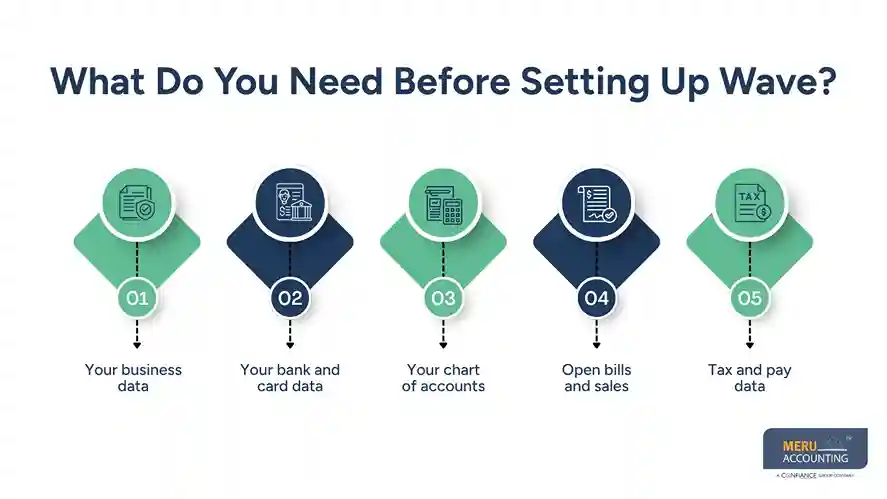
3. Your chart of accounts
Plan the main accounts you need before you start.
These may include:
- Sales or service income
- Bank accounts
- Credit cards
- Office costs
- Rent
- Software
- Ads
- Travel
- Insurance
- Payroll costs
- Owner draws
Do not make too many accounts. A long list can make your books hard to read and your reports hard to use.
4. Open bills and sales
If you are moving from a sheet or old book tool, list open bills and unpaid sales. You need a clear start date so old data does not get mixed with new data.
5. Tax and pay data
Keep your tax files, pay data, and old books near you. This can help you check past data as you set up your new books.
optional anymore
on running the business
How to Set Up Wave for Small Business Bookkeeping
Once your data is ready, you can set up Wave for Small business in a clear order.
Step 1: Create your Wave account
Start your Wave account and add your firm data. Use the name and data that match your tax and bank files.
Take your time with this step. A small error in your firm data can lead to more work down the road.
Step 2: Set your book year and basic data
Check your book year and other key settings. Make sure the dates fit your firm and tax needs.
If you are moving from an old book tool, pick a clear date for the move. Do not mix old and new books with no plan.
Step 3: Check your chart of accounts
Review the list of accounts before you add a lot of data.
Keep names clear and easy to read.
For example, you may use:
- Service Income
- Rent
- Office Costs
- Software
- Bank Fees
- Travel
This is much more useful than putting all costs in one account called “Costs.”
Step 4: Add your bank and card accounts
Add your firm’s bank and card data to Wave. If your bank can link to Wave, you may be able to bring in bank data with less manual work.
If you use Wave free bookkeeping software, you may need to use more manual steps based on the tools in your plan.
Keep your firm and home funds apart. If a home cost is paid from the firm bank, do not mark it as a firm cost just to make the bank match. Use the right owner or equity account.
Step 5: Add your clients
Add your key clients with the right names and contact data. This makes it easy to make and track bills.
Try to use one client record for each client. This can help stop split or odd client data.
Step 6: Set your sales and cost rules
Think about how each sale and cost should post.
For example:
- Service sales → Service Income
- Office rent → Rent
- Web tools → Software
- Bank fees → Bank Fees
- Work trips → Travel
Clear rules help keep each item in the right account.
Step 7: Make and send bills
Wave has tools that let you make and send bills to clients. You can then track what is due and what has been paid.
Use clear bill dates, due dates, terms, and client data.
If you bill the same client each month, use the same workflow each time. This can help keep bills from being missed.
Step 8: Add costs and bills
Add firm costs as they come up. Save bills and proof of payment with the right item when needed.
Do not wait until year-end to sort all costs. A short check each week or month is much easier.
Step 9: Match the books to the bank
This is a key step in Wave for Small business bookkeeping.
Match the Wave bank total to the bank bill. Check for:
- Missing items
- Double entries
- Wrong dates
- Wrong amounts
- Wrong account names
- Unclear pay
- Old items that need a check
A bank total that looks right does not mean the books are right.
Step 10: Check your reports
Check your profit and loss, cash flow, and other key reports each month.
Look for odd shifts. If a cost jumps from $300 to $3,000, find out why before you trust the report.
Reports are most useful when you use them to spot and fix book issues.
How to Use Wave Free Bookkeeping Software Effectively
Wave free bookkeeping software works best when you use it with a set book plan.
Start with clean data. Then keep that data clean.
Keep a set review plan
Pick one day each week or month for your books. Check new sales, costs, bills, pay, and bank data.
Use clear account names
Do not add a new account each time a new cost comes up. First check if an old account can fit.
Match pay to bills
If you use Wave to bill clients, match each payment to the right bill. This helps you see what is paid and what is still due.
Keep your proof
Keep bills, bank files, card bills, and other key records. Your book tool holds the data, but your source files still have value.
Check your reports each month
Look at your profit and loss, cash flow, and client balances when needed.
Use these reports to ask why a number went up or down. Do not just save the report and move on.
Common Wave Bookkeeping Setup Mistakes to Avoid
Even with Wave for Small business, poor setup can lead to poor books.
Mixing firm and home costs
This makes it hard to see the true cost of the firm. Keep firm funds and home funds apart.
Using too many accounts
A long chart of accounts may look neat, but it can make your books hard to use. Keep the list clean and simple.
Skipping bank checks
Do not assume bank data is right just because it came into Wave. Check it against the bank bill.
Posting a bank move as sales
A move from one firm bank account to the next is not new sales. It should not raise your sales total.
Posting loan cash as sales
A loan puts cash in the bank, but it is not sales. It also adds a debt to the books.
Leaving old items open
If you move to Wave with old bills, sales, or bank items, set them up with care. A clean start date can save a lot of time.
Waiting for tax time
Books that sit for months can take much more time to fix. A small check each month can help keep the work light.
Meru Accounting's Wave Accounting Services
Wave can handle the day-to-day side of bookkeeping, but someone still needs to make sure the numbers make sense. At Meru Accounting, we work with small and mid-size businesses to keep Wave books accurate, current, and ready for review. Our team can step in at setup, during month-end work, or when older books need to be fixed.
What We Handle
Our Wave accounting support can include:
- Wave setup: Account setup, chart of accounts, and opening balance review
- Daily bookkeeping: Sales, bills, costs, payments, and other bank activity
- Bank and card work: Bank and card account checks and matching
- A/R and A/P: Customer balances, unpaid bills, and payment tracking
- Month-end close: Account checks, report review, and needed book fixes
- Cleanup and catch-up: Finding old errors, missing entries, and items that need to be fixed
- Tax-ready books: Keeping income, costs, and key records in order for tax work
How We Work With Your Wave Setup
We do not ask every business to change the way it works. If you already use Wave, we can work within your current setup and review the account structure, bank flow, and book process before making changes. If you also use other tools, we can fit our work into that workflow.
Our focus is on more than entering numbers. We look at whether transactions are posted to the right accounts, whether bank and card balances tie out, and whether the reports make sense from month to month. This helps turn Wave into a useful book system rather than just a place to store transactions.
Our Expert Insight
One thing we often remind small business owners is that profit is not the same as cash.
For example, a business may show $20,000 in profit while $12,000 is still tied up in unpaid customer invoices. The business may look profitable on paper but still have less cash on hand than expected.
The opposite can happen, too. A loan can add cash to the bank without adding profit. That is why we look at both the profit and loss and the cash position when we review a client’s books. This gives the owner a clearer view of what the business earned and what it can actually spend.
Key Takeaways
- Wave for Small business can help small firms track sales, costs, bills, and cash.
- Start with clean firm data and a simple chart of accounts.
- Keep firm and home funds apart.
- Check each bank and card item before you mark it as done.
- Match your books to bank and card bills on a set plan.
- Use Wave free bookkeeping software for basic book needs if its free tools fit your firm.
- Check your reports each month.
- Get book help when setup, cleanup, or month-end work takes too much time.
FAQs
Start with your business details, chart of accounts, bank accounts, and opening balances.
Yes. You can move from a spreadsheet or another accounting system, but key balances and open items must be brought over correctly.
Monthly checks work well for many small businesses. High-volume firms may need to review them more often.
Missing, duplicate, or misposted transactions are common causes. Compare Wave with your bank statement to find the difference.
Yes. Many owners handle basic bookkeeping themselves, but a bookkeeper can help with cleanup, month-end work, and more complex entries.
optional anymore
on running the business