




An online store can have plenty of sales and still leave its owner wondering where the money actually went. A payout may look smaller than the day’s sales because it includes refunds, payment fees, marketplace charges, or other adjustments. This is where Xero for ecommerce becomes useful. Instead of looking at one bank deposit and assuming it represents revenue, sellers can use financial reports to understand what happened behind each figure.
Xero for ecommerce brings sales, expenses, tax information, cash movements, and other financial data into a structured accounting system. The value is not in generating dozens of reports. It is in knowing which numbers deserve attention when you want to understand revenue, product costs, fees, taxes, cash flow, and actual profit.
For Xero for ecommerce businesses, this becomes increasingly important as sales spread across Shopify, Amazon, a direct website, or multiple payment services.
Each platform can present transactions differently, making it easy for sales figures, fees, refunds, and payouts to appear disconnected. Xero for ecommerce businesses needs reporting that brings these figures together in a way that makes them easier to review and reconcile.
What You Will Learn From This Blog
- Which financial reports online sellers should check in Xero.
- How Xero for ecommerce can track sales, costs, fees, stock, and tax data.
- How multi-channel sales can be brought into one accounting system.
- How to read gross profit, margin, operating costs, and channel results.
- How cash flow reports can show when cash may be tight.
- What to check before using reports for tax or business decisions.
Which Financial Reports Should Ecommerce Sellers Track in Xero?
Profit and Loss Statement
A Profit and Loss statement shows income, cost of sales, and expenses for a set period. For Xero for ecommerce businesses, it can show if sales growth is also leading to real profit. Xero notes that the P&L answers the basic question: did the business make money during the period?
Balance Sheet
The Balance Sheet shows assets, debts, and owner equity at a set date. Stock, unpaid bills, cash, and amounts due from buyers can all affect this view, making it useful for checking the firm’s financial position.
Cash Flow Statement
The cash flow report shows cash that came in and cash that went out. This is vital for sellers who pay suppliers before marketplace payouts reach the bank. Xero notes that cash flow answers a different question from profit and loss: where did the cash go?
Accounts Receivable and Payable Reports
Receivable reports show money due from customers, while payable reports show bills due to suppliers and other vendors. These reports can flag late payments and upcoming cash needs before they put pressure on cash.
Sales and Expense Reports
Sales reports show income by account, item, or period, while expense reports show where funds are being spent. In Xero for ecommerce businesses, these views can expose high fees, ad costs, shipping costs, or other items that cut margin.
Xero for Ecommerce: Key Financial Reporting Features for Online Sellers
Sales and Revenue Reporting
Xero for ecommerce can bring sales data into the accounting file through direct links or third-party apps. Xero for ecommerce gives sellers a useful base for a monthly sales review when the data is mapped with care. The aim is to see gross sales, refunds, discounts, and net sales in a clear form.
Expense and Cost Tracking
Online sellers face payment fees, marketplace fees, ads, shipping, storage, software, and supplier costs. Xero can group these costs by account so the owner can see what is taking the largest share of sales. Xero for ecommerce can also make it easier to compare these costs over time.
Inventory and Cost of Goods Sold Reporting
Inventory data matters because a sale is not the same as profit. The cost of goods sold must be matched with sales to work out gross profit. Xero’s Inventory Plus can connect with Shopify and Amazon and show stock, sales orders, returns, and gross profit data.
For sellers with many products, this report view can show whether sales growth is also creating higher stock costs. It can also point to products where the sale price leaves too little room after product cost and selling fees.
Payment and Transaction Reconciliation
A payout may contain many sales, refunds, fees, and tax items. Xero for ecommerce businesses needs a clear match between the payout report and the bank deposit, so gross sales are not recorded as one net bank amount.
For example, a seller may make $5,000 in sales, receive $4,650 after fees and refunds, and see only $4,650 in the bank. The accounting record should still explain the full $5,000 sale and the items that reduced the payout.
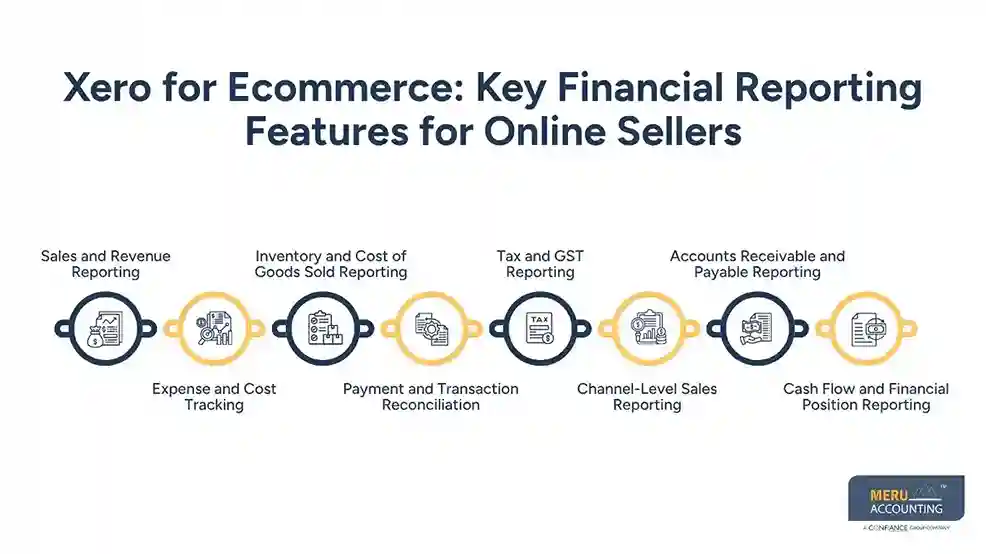
Tax and GST Reporting
Tax reports can show tax charged and tax paid based on the setup and tax rules that apply to the business. For US sellers, Xero states that sales tax reporting can be reviewed by tax rate and other tax details, while integrations such as Avalara can calculate rates across many US tax areas.
For GST-registered sellers, the same principle applies: tax amounts need to be mapped to the right tax codes and reviewed for the correct filing period. Tax reports should be checked against the rules that apply to the business.
Channel-Level Sales Reporting
Sales can be reviewed by store, marketplace, or other selling channel to understand where revenue is coming from. This makes it easier to compare sales patterns across different channels over a selected period.
Accounts Receivable and Payable Reporting
Receivable and payable reports show outstanding amounts owed by customers and amounts due to suppliers or vendors. Reviewing these figures helps sellers keep track of upcoming collections and payments.
Cash Flow and Financial Position Reporting
Cash flow reports show money coming into and leaving the business during a selected period. Financial position reports provide a broader view of cash, inventory, liabilities, and other business assets.
optional anymore
on running the business
How Xero for Ecommerce Businesses Handles Sales Across Multiple Channels
Shopify and Online Store Sales
Shopify can connect with Xero to send daily summaries or individual sales, including payouts, fees, refunds, and taxes for reconciliation. This lets sellers review online store activity in Xero, but sales and payment accounts should be mapped correctly.
Amazon and Marketplace Transactions
Amazon, eBay, Etsy, and Walmart can connect with Xero through supported ecommerce apps, but the data imported depends on the marketplace, integration, and settings you use.
Don’t treat the bank deposit as the full sale amount; compare marketplace settlement reports with Xero to check gross sales, refunds, marketplace fees, taxes, and the final amount deposited.
Payment Processor Payouts
PayPal, Stripe, and other processors often combine multiple orders, refunds, fees, and adjustments into a single payout, so the bank deposit alone doesn’t explain how the amount was calculated.
When you reconcile each payout, match the processor statement with Xero and separate sales, refunds, processing fees, and adjustments to identify missing, duplicate, or incorrectly recorded transactions.
Multiple Sales Channels in One Accounting System
Xero for ecommerce businesses can serve as the central accounting file while supported apps bring sales and payout data from different channels into one system. Xero for ecommerce gives sellers a combined view of financial data, although the exact information transferred depends on the selected app and setup.
How to Use Xero Reports to Track Ecommerce Profitability
Gross Profit and Gross Margin
Gross profit is sales minus the cost of goods sold, while gross margin shows gross profit as a percentage of sales.
These measures help sellers assess whether product pricing leaves enough room for selling fees and operating costs.
Operating Expenses
Review advertising, wages, rent, software, shipping, storage, and professional fees to see how operating costs affect net profit. Xero for ecommerce can make this review clearer when similar expenses are grouped into consistent and well-defined accounts.
Channel-Specific Profitability
Compare sales, refunds, fees, shipping, and product costs across Amazon, Shopify, and other channels to identify differences in profitability. Xero for ecommerce businesses can use supported apps to bring channel data into one accounting setup for consistent comparisons.
Product-Level Financial Insights
Product-level data can show top-selling items, gross profit, sales, and the impact of product costs across connected ecommerce channels. These insights can support pricing and stock reviews, but the results depend on accurate sales, inventory, and cost data.
How Xero for Ecommerce Businesses Supports Cash Flow Reporting
Cash flow is not the same as profit. A seller can show a profit while cash is tied up in stock, unpaid invoices, or a gap between a sale and a marketplace payout. Xero for ecommerce businesses should therefore be used with regular cash checks.
Start With Bank Feeds
Bank feeds bring bank transactions into Xero for review and matching. This gives the seller a current base for checking deposits, fees, supplier payments, and other cash moves.
Check Payout Timing
Marketplace and payment processor payouts may arrive days after the sale. Compare the sales date, payout date, fee date, and bank date so cash reports match the actual flow.
Watch Supplier Payments
Large stock orders can drain cash before the related goods are sold. Review supplier bills and due dates beside expected sales and payouts. This gives the owner a better view of cash needs in the near term.
Use Cash Flow Forecasts
A short-term cash flow view can show whether enough cash may be available for bills and planned spending. Xero also provides cash flow projection tools in its reporting and dashboard features.
How Meru Accounting Can Support Xero for Ecommerce Reporting
Managing ecommerce accounting involves more than connecting a store to Xero. Sales, refunds, payment fees, marketplace payouts, inventory costs, and tax data all need to be recorded under the right accounts. When these entries are not mapped correctly, financial reports may not show the actual performance of the business.
Meru Accounting provides ecommerce accounting and bookkeeping services for sellers using Xero across multiple sales channels. Our team can review how sales and payment data enters Xero, how fees and refunds are recorded, and how bank payouts are reconciled with source reports.
Review Sales and Payout Data
We can review ecommerce sales reports against payment processor and marketplace payout reports. This helps identify differences between gross sales and the amount deposited into the bank.
Reconcile Ecommerce Transactions
Payment fees, refunds, adjustments, and payout amounts need to be recorded separately. Meru Accounting can review these transactions and reconcile them with bank entries so the accounting records explain the movement of funds.
Track Ecommerce Costs
Product costs, shipping, advertising, software, marketplace fees, and other expenses can affect ecommerce margins. We can organize these costs into appropriate accounts so sellers can review where their revenue is being spent.
Prepare Clear Financial Reports
Meru Accounting can prepare and review reports such as Profit and Loss, Balance Sheet, cash flow reports, and sales reports. These reports can give ecommerce sellers a clearer view of revenue, costs, profitability, and cash movement.
Support Multi-Channel Ecommerce Accounting
When sales come from Shopify, Amazon, a website, or other channels, each source may have different payout and fee structures. Meru Accounting can review the accounting flow across these channels and help maintain consistent reporting in Xero.
A well-organized Xero setup gives ecommerce sellers financial information they can review each month. Meru Accounting can provide the accounting and bookkeeping work needed to keep sales, expenses, payouts, reconciliations, and reporting aligned with the underlying ecommerce data.
Our Expert Perspective
For Xero for ecommerce businesses, the strongest reporting setup is one that can be traced back to source data. We would check the store report, payout report, bank entry, fees, refunds, and stock cost before using a number to judge profit.
A report can look neat and still be wrong if the source mapping is wrong. With Xero for ecommerce, the report should be checked against the store and payout source before it is used for a key money decision.
At Meru Accounting, we provide ecommerce accounting and bookkeeping services that focus on sales, payout, expense, reconciliation, inventory, and tax data. Our team can review the accounting flow, check report mapping, and keep the data ready for review. This is useful when sales come from several channels or when monthly reporting needs a clear audit trail.
Key Takeaways
- Xero for ecommerce reporting should focus on sales, costs, stock, payouts, tax, and cash.
- Profit and Loss shows profit, while the Balance Sheet shows financial position.
- Cash flow reports show when money enters and leaves the business.
- Payment payouts should be split into sales, fees, refunds, and other items.
- Multi-channel sellers should compare channel fees and product costs, not just sales.
- Tax reports should be checked against the rules that apply to the seller’s location and sales model.
FAQs
Ecommerce businesses should review Profit and Loss, Balance Sheet, Cash Flow, sales, expense, inventory, and reconciliation reports in Xero.
Yes. Xero can record ecommerce sales and expenses through integrations, allowing sellers to review revenue, fees, refunds, operating costs, and other financial data.
Xero can connect with Shopify and supports apps that connect Amazon and other ecommerce marketplaces, allowing sellers to bring sales and payout data into their accounting system.
Match the marketplace or payment processor payout with the bank deposit and account for related sales, refunds, fees, taxes, and other adjustments.
Yes. Xero reports can help ecommerce businesses review revenue, costs, gross profit, operating expenses, and cash movements to understand financial performance and cash needs.
optional anymore
on running the business


