



A startup can close a big deal, collect the cash, and still have a different revenue number on its books. That’s common with annual subscriptions, retainers, and contracts that span several months. The right accounting software for startups can help keep those numbers in line by tracking when revenue is actually earned.
This matters as a startup grows. More customers and longer contracts can make it harder to track deferred revenue, billing dates, and revenue schedules by hand. A good system can take much of that work off your plate while giving your team a clearer view of monthly results.
But not every startup needs the same setup. A small consulting firm may need only basic tools, while a SaaS company may need stronger revenue recognition features and reporting. In this guide, we’ll cover what to look for, how startup bookkeeping software fits into the process, and when a more advanced system may make sense.
What You Will Learn From This Blog
- What revenue recognition means for a startup
- Why timing matters when recording startup revenue
- Which revenue recognition features to look for
- How deferred revenue works
- How to choose startup bookkeeping software
- When basic accounting tools may not be enough
- How an accounting team can help keep startup books ready for review
What Is Accounting Software for Startups With Revenue Recognition?
Accounting software for startups with revenue recognition features helps record income based on when it is earned, rather than only when cash hits the bank.
For example, say a startup sells a $12,000 annual software plan and gets paid on January 1. The cash comes in at once, but the service is provided over 12 months. Under accrual accounting, the full $12,000 would not normally be treated as earned revenue on January 1. Instead, the amount can sit as deferred revenue and move to revenue as the service is provided.
This is where startup bookkeeping software can play a key role. It gives the finance team a way to link invoices, payments, customer terms, and revenue schedules.
The level of support can vary by product and plan. QuickBooks Online Advanced, for example, lets users turn on revenue recognition, use templates, and set recognition periods and methods. More complex tools such as Sage Intacct offer revenue schedules, contract changes, deferred revenue workflows, and support for ASC 606 and IFRS 15.
Why Revenue Recognition Matters for Startups
Revenue timing affects more than the income statement. It can change how founders view growth, margins, cash use, and the results of each month.
A startup may have strong cash flow after collecting several large annual contracts. Yet that cash does not mean all of the related revenue has been earned. If the full amount is shown as current revenue, monthly results may look much stronger than the work completed in that period.
Good revenue records can help a startup:
- Show a more useful monthly profit and loss
- Track deferred revenue
- See earned revenue by period
- Compare results across months
- Support clean financial reports
- Give investors and lenders better data
- Make month-end close easier
Revenue recognition can matter even more as a startup grows. More customers, new plans, contract changes, refunds, upgrades, and longer terms can make manual work hard to manage.
That is why accounting software for startups should be checked against the way a company earns money, not just the way it sends invoices.
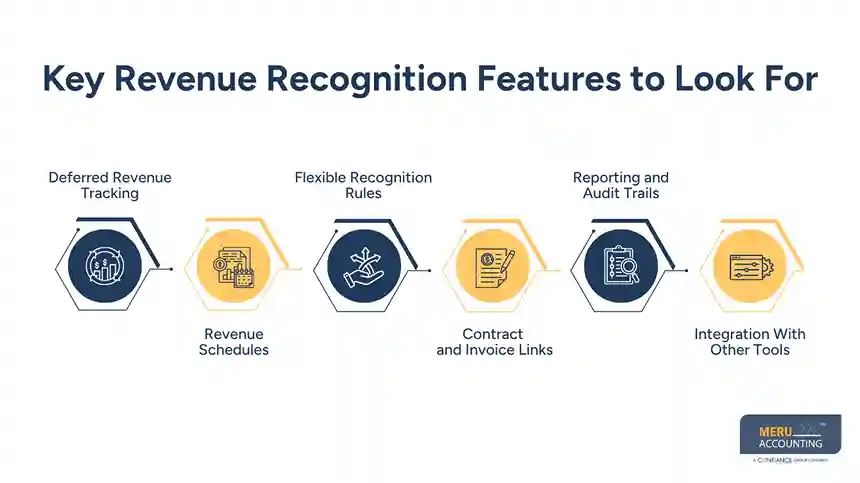
Key Revenue Recognition Features to Look For
When comparing accounting software for startups, look beyond the basic ability to create invoices. Check whether the system can support the full revenue cycle.
Deferred Revenue Tracking
The software should let you track money received before the related goods or services are delivered. Deferred revenue is generally shown as a liability until the business meets its obligation.
Revenue Schedules
Look for tools that can create a schedule based on the service term. A yearly plan may need 12 monthly entries, while a project may need a schedule based on milestones or work done.
Flexible Recognition Rules
Not every startup earns revenue in the same way. You may need straight-line recognition, milestone-based recognition, or another method based on the contract and accounting rules. QuickBooks Online Advanced supports straight-line schedules, while its Enterprise Suite also supports percentage and milestone methods.
Contract and Invoice Links
Good startup bookkeeping software should make it easy to trace a revenue entry back to its source. This can help when an invoice is changed, a contract is renewed, or a customer gets a refund.
Reporting and Audit Trails
Your system should make it easy to review recognized revenue, deferred revenue, and changes to schedules. This becomes more useful when your startup has outside investors, a CPA review, or an audit.
Integration With Other Tools
If sales data lives in a CRM and billing runs through another system, your accounting platform should connect with those tools or support a clean data flow. Sage Intacct, for example, supports links between revenue management, billing, and systems such as Salesforce.
How Revenue Recognition Works in Startup Accounting
The basic idea is simple: cash received and revenue earned are not always the same thing.
Imagine a startup sells a 12-month service for $12,000 and collects the full amount in January. If the service is provided evenly during the year, the accounting records may show $12,000 as deferred revenue at the start and then recognize $1,000 each month as the service is delivered.
This is different from cash accounting, where income is generally recorded when payment is received. Under accrual accounting, income is recorded when it is earned.
The exact treatment depends on the startup’s contracts, business model, and reporting needs. A SaaS company may have monthly or annual plans. A consulting firm may bill a retainer or use project milestones. An e-commerce business may receive payment before a product is delivered.
For this reason, accounting software for startups should be set up to match the actual way the business delivers its products or services. The software can help with the math and records, but it does not replace the need to set the right accounting rules.
optional anymore
on running the business
How to Choose the Right Startup Bookkeeping Software
The right startup bookkeeping software depends on what your startup sells and how it gets paid.
Start with these questions:
What is your revenue model?
Subscription, project, usage-based, product, retainer, and milestone billing can each create different needs. A simple service business may not need the same setup as a SaaS company with annual contracts.
How much revenue detail do you need?
If you only have a few simple invoices each month, basic tools may be enough. If you have hundreds of contracts, many plans, or frequent changes, you may need stronger revenue tools.
Does the software support your reporting needs?
Check for reports on recognized revenue, deferred revenue, accounts receivable, cash flow, and profit. You should also be able to trace key entries back to invoices or contracts.
Can it scale with you?
A system that works for ten customers may become hard to manage at 500 customers. Check whether the tool can handle more transactions, users, entities, currencies, and reporting needs as you grow.
Does it need an add-on?
Not every platform handles revenue recognition in the same way. Xero, for example, has third-party apps in its marketplace that support deferred revenue and revenue recognition workflows, including Flowrev and ScaleXP.
Does your team understand the setup?
Even good accounting software for startups can produce poor reports if the chart of accounts, revenue accounts, customer terms, or recognition schedules are set up wrong.
Meru Accounting's Startup Accounting Services
As a startup grows, keeping the books up to date can become harder to manage alongside sales, hiring, customer needs, and daily operations. Meru Accounting provides ongoing accounting support that covers the core financial work startups need without requiring a full in-house accounting team.
Our Startup Accounting Services
- Monthly bookkeeping and reconciliation
- Accounts payable and accounts receivable
- Bank and credit card reconciliation
- Payroll accounting support
- Monthly financial reporting
- Catch-up and cleanup bookkeeping
- Tax-ready financial records
- Support with your existing accounting software and workflow
Our team can work with the accounting software and processes your startup already uses, so you don’t have to change your entire setup just to keep the books current. As your business grows, we can continue handling the routine accounting work and keep your financial records organized and ready for review.
Our Expert Insight
One thing we’ve seen with startups is that revenue schedules can go off track when customer contracts change. A plan may be upgraded, a service term may change, or a credit may be issued. If the accounting records aren’t updated, the revenue schedule can stop matching the actual deal.
A simple monthly check can catch this early. Compare major contract changes, credits, refunds, and unusual shifts in deferred revenue against the related invoices and revenue entries. These exceptions often deserve more attention than simply checking whether the account totals match.
As the business adds new pricing plans or billing models, the accounting setup should be reviewed too. Startup bookkeeping software can automate the work, but the rules behind that automation still need to match how the startup earns its revenue.
Key Takeaways
- Accounting software for startups should fit the way the business earns revenue.
- Revenue is not always recognized when cash is received.
- Deferred revenue can help track cash received before services are delivered.
- Look for revenue schedules, flexible rules, reporting, and audit trails.
- Simple startups may need only basic tools, while SaaS or contract-heavy businesses may need stronger revenue features.
- Startup bookkeeping software works best when the underlying accounts and rules are set up correctly.
- Software can automate tasks, but accounting review is still needed.
FAQs
Revenue is generally recognized over the subscription period as the service is provided, rather than all at once when payment is received.
Deferred revenue is money received before the related product or service has been delivered. It is generally recorded as a liability until the revenue is earned.
Not always. The need depends on the number of contracts, billing models, pricing plans, and revenue rules involved.
Look for deferred revenue tracking, revenue schedules, recurring billing support, financial reporting, integrations, and audit trails.
Yes, some platforms can create revenue schedules and automate related entries once the recognition rules are properly set up.
optional anymore
on running the business


