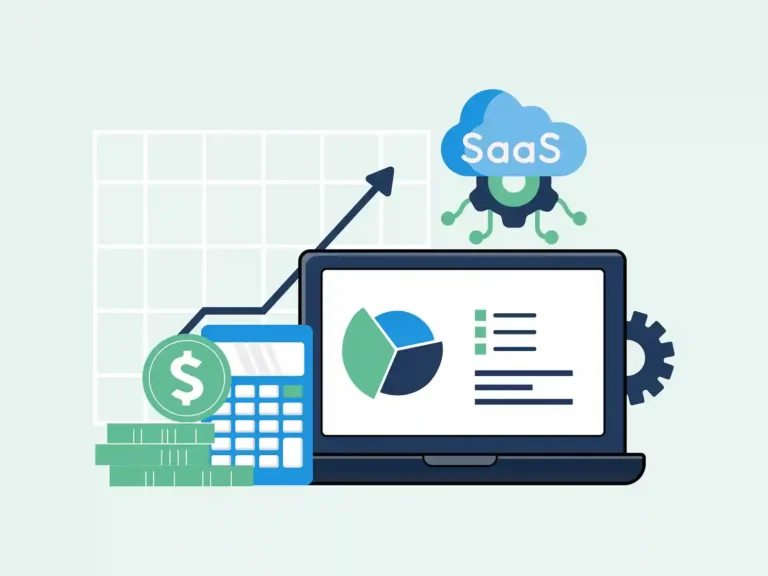
A SaaS company can have $50,000 in its bank account and still show a very different revenue figure in its books. A customer may pay for a full year, while the service is given over the next 12 months. This gap is one reason Xero SaaS accounting needs more care than just recording money as it enters the bank.
Xero SaaS accounting brings sales, costs, payments, bills, payroll, and reports into one clear process. But the software does not decide what a payment means. A Xero accounting system for SaaS still needs clear rules for sales, refunds, costs, and tax. When the setup fits the billing model, Xero accounting for SaaS businesses can give the finance team a clear view of what the business has earned and spent.
What You Will Learn From This Blog
- How Xero SaaS accounting fits the needs of SaaS firms.
- What sales, costs, payments, and debts SaaS firms should track.
- How to set up a Xero accounting system for SaaS.
- How month-to-month and year-long sales move through Xero SaaS accounting.
- Which tools can link with a Xero accounting system for SaaS.
- What common errors can affect SaaS books and data.
What is Xero SaaS Accounting?
SaaS Bookkeeping Basics
Xero SaaS accounting means using Xero to track the money flow of a SaaS firm. It can cover customer bills, plan payments, bills, pay, bank moves, refunds, tax items, and reports.
Cash is Not the Same as Revenue
Say a client pays $24,000 for a two-year plan. The bank shows $24,000 that day, but SaaS accounting with Xero may need to show the income over the time the plan runs, not as one month’s revenue.
Monthly Close Matters
Month-end is when the books get checked. A good SaaS accounting process with Xero checks bank moves, invoices, bills, pay, refunds, and deferred revenue before the reports are used.
Use Clear Account Names
A SaaS chart of accounts should make sense at a glance. A Xero accounting system for SaaS can separate subscription revenue, refunds, cloud costs, software, payroll, advertising, and other major costs.
Keep Source Data
The number in Xero is only part of the story. Contracts, invoices, payment records, bills, and refund details give Xero SaaS accounting entries the source data needed for review and later checks.
Why SaaS Businesses Use Xero for Accounting
Bank Feeds
A SaaS firm may have hundreds of bank transactions in a month. Xero SaaS accounting can bring bank data into the accounting file, where transactions can be reviewed and reconciled instead of entered one by one.
Online Invoices
Invoices connect the customer, amount, and sale. A Xero accounting system for SaaS can use Xero’s invoice tools to record and track customer charges and payments.
Bill Tracking
Cloud hosting may be billed each month, while software may renew once a year. A Xero-based accounting system can place these different costs into the same accounts payable process.
Financial Reports
A profit and loss report answers a different question from a balance sheet or cash flow report. A Xero accounting system for SaaS can use these reports to review income, costs, assets, liabilities, and cash.
Team and Accountant Access
A founder does not need to handle every accounting entry. Xero SaaS accounting can give finance staff and accountants access to the same records, with access set according to their roles.
What to Track in Xero SaaS Accounting
Recurring Subscription Revenue
Subscription sales can change every month. Accounting in Xero should capture new customers, renewals, upgrades, downgrades, cancellations, and plan changes so the books follow the billing activity.
Accounts Receivable and Deferred Revenue
Two customers may owe the same amount but create very different accounting entries. One may have an unpaid invoice, while another may have paid early for future service. Xero-based bookkeeping should keep these cases separate.
Operating Expenses
Rent and advertising are easy to spot, but SaaS firms also pay for legal work, insurance, travel, recruitment, and office costs. Accounting with Xero should place these costs into useful accounts instead of one broad expense bucket.
Payroll and Contractor Costs
People costs can take a large share of a SaaS budget. Xero financial records should record wages, payroll taxes, benefits, and contractor fees in the correct period.
Software and Cloud Infrastructure Costs
The tech stack can grow quietly. One tool becomes five, five become twenty, and cloud use may rise as customer numbers grow. Xero bookkeeping can group software and infrastructure costs so this increase is visible in the accounts.
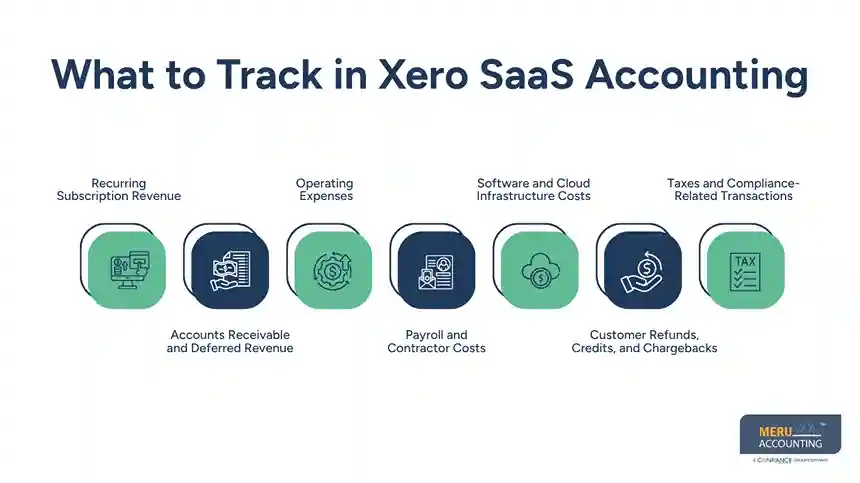
Customer Refunds, Credits, and Chargebacks
A customer may cancel after a sale, ask for a refund, get a credit, or dispute a card charge. These events can change the books, so Xero SaaS accounting should record them and not leave them as unclear bank moves.
Taxes and Compliance-Related Transactions
Sales tax, payroll tax, income tax, and tax refunds need clear records. A Xero accounting system for SaaS should post these items to the right accounts, while tax rules should be checked based on the laws that apply to the business.
Setting Up a Xero Accounting System for SaaS
Build the Chart of Accounts
Start with the way money actually moves through the business. A Xero accounting system for SaaS can include accounts for subscription revenue, refunds, receivables, deferred revenue, payroll, cloud costs, software, advertising, and tax.
Set Up Bank Accounts
Connect supported bank accounts and cards to Xero where possible. Xero SaaS accounting can then use imported bank data as part of the reconciliation process. When a direct feed is not available, Xero also provides ways to import bank data.
Set Tracking Rules
A SaaS company may want to compare products, regions, or teams. A Xero-based accounting setup can use tracking categories to add this detail without creating a separate general ledger account for every part of the business.
Set Revenue Rules
This is one of the key setup steps in SaaS accounting with Xero. Decide how invoices, payments, plan changes, cancellations, and future service periods will appear in the books before transaction volume becomes hard to manage.
Create a Close Process
A monthly accounting close in Xero can focus on bank reconciliation, open invoices, unpaid bills, payroll, refunds, deferred revenue, and tax entries. These checks create a repeatable path for month-end work.
optional anymore
on running the business
How to Handle SaaS Revenue in Xero
Start With the Customer Contract
The contract can tell the accounting team more than the bank feed. It may show the plan price, service term, start date, renewal terms, refund rules, and other details needed for Xero SaaS accounting.
Record the Invoice
The invoice should match the customer agreement. In a Xero accounting system for SaaS, check the customer, amount, date, tax, plan, and service period before the invoice is posted.
Check the Cash Receipt
Payment is the next part of the trail. Xero SaaS accounting can match the cash received to the correct invoice or payment record rather than leaving it as an unexplained bank transaction.
Track Deferred Revenue
Suppose a customer pays $12,000 for one year of service. The business has the cash now, but the service will be provided over 12 months. A Xero accounting system for SaaS should reflect the applicable revenue recognition rules rather than treating the full payment as one month’s earned income.
Review Revenue Each Month
A sales report alone may not reveal an accounting issue. Xero SaaS accounting should be checked against billing records to find missing invoices, duplicate entries, refunds, plan changes, and revenue posted in the wrong period.
Xero Integrations For SaaS Businesses
Payment Platforms
Payment platforms sit close to the customer transaction. Tools such as Stripe, Square, and PayPal are listed in the Xero App Store and can form part of a Xero accounting system for SaaS.
Payroll Systems
Payroll data can flow into the accounting system through linked tools. For Xero SaaS accounting, the key is to check that wages, taxes, benefits, and pay dates reach the right accounts and time spans.
Subscription Billing Platforms
The billing tool may have more data on the plan than the books. When it links to a Xero accounting system for SaaS, check how bills, renewals, refunds, credits, and failed payments get into Xero.
Expense Management Tools
Staff may buy software, travel, or office items before submitting receipts. Expense tools can capture these records and send approved data into Xero SaaS accounting, giving the finance team a clearer trail.
Reporting and Analytics Tools
Some SaaS firms need more than standard reports. Reporting tools can add views for budgets, forecasts, trends, or product analysis while still using the accounting data from Xero.
Common Xero SaaS Accounting Mistakes To Avoid
Treating All Cash as Revenue
This is an easy mistake when a SaaS company grows. Xero SaaS accounting can show a large cash receipt, but the related service may cover many future months.
Ignoring Failed Payments
A failed card payment does not always mean lost revenue. The customer may pay after a retry, leave an unpaid balance, or cancel the plan, and the accounting records in Xero should reflect what actually happened.
Mixing Personal and Business Costs
When personal and business spending share an account, the reports become harder to read. Keeping these transactions separate makes Xero bookkeeping cleaner and easier to review.
Forgetting Refunds
A payment platform may show a refund while the accounting file still shows the original sale. If the two systems are not checked, Xero financial records may no longer match actual customer activity.
Skipping Bank Reconciliation
Bank feeds bring data into Xero, but they do not prove that every entry is correct. Regular reconciliation is an important part of accounting with Xero because it can uncover duplicate, missing, or unmatched transactions.
Using too Many Apps
More software can mean more places where data can break. A Xero-based accounting setup should use integrations with a clear purpose, defined data flow, and regular checks.
Xero SaaS Accounting Services By Meru Accounting
SaaS firms need books that keep up with repeat sales, client changes, tech costs, and monthly pay. Meru Accounting provides accounting and bookkeeping services based on the firm’s data, workflow, and report needs.
- Meru Accounting records sales, bills, pay, refunds, and other sales data based on the firm’s books.
- Bank deals and account sums can be checked in the month-end close to spot lost, duplicate, or open items.
- Accounts receivable and deferred revenue can be booked based on the type of client payment and the right way to treat it.
- Software, cloud use, pay, worker costs, ads, and other SaaS costs can be booked in clear and useful accounts.
- Meru Accounting can work with the firm’s Xero books for bookkeeping, data entry, bank checks, and account review.
- Monthly finance reports can show sales, costs, receivables, debts, and other key sums for a finance check.
- Client upgrades, stops, refunds, new costs, and payment issues can be checked as part of the day-to-day book work.
A clear book process can keep Xero data close to the real sales and spend flow of a SaaS firm. Meru Accounting provides accounting and bookkeeping services based on the firm’s book needs and workflow.
Our Expert Perspective
One thing SaaS teams often miss is that the bank balance tells only part of the story. A customer may pay today for a service that runs for months, while refunds, plan changes, cloud costs, and failed payments can change the numbers along the way. From an accounting view, the key is to keep billing data, revenue timing, costs, and bank records tied together and review them each month. A Xero accounting system for SaaS works best when the team can trace a figure from the customer invoice or payment back to the related accounting entry and understand why it appears in the report.
Key Takeaways
- Xero SaaS accounting needs clear rules for revenue, costs, cash, refunds, and tax.
- Customer cash is not always the same as earned revenue.
- Accounts receivable and deferred revenue need separate attention.
- Payroll, contractor, software, and cloud costs should be tracked clearly.
- Billing and payment data should be checked against the accounting records.
- Xero integrations should have a clear purpose and review process.
- Monthly reconciliation is an important part of Xero SaaS accounting.
- A Xero accounting system for SaaS should make the path from billing activity to financial reports easy to follow.
FAQs
Xero SaaS accounting means using Xero to track subscription revenue, costs, payments, refunds, payroll, taxes, and other SaaS deals.
SaaS companies use Xero SaaS accounting to track bills, client payments, service terms, and deferred revenue for clear revenue records.
SaaS businesses should track subscription revenue, accounts receivable, deferred revenue, payroll, cloud costs, refunds, software costs, and taxes in Xero.
Yes, Xero can track bills and payments, while the business needs clear rules for sales, revenue timing, refunds, and deferred revenue.
A Xero accounting system for SaaS should have the right accounts, bank feeds, revenue rules, tracking categories, integrations, and a set month-end review.
optional anymore
on running the business