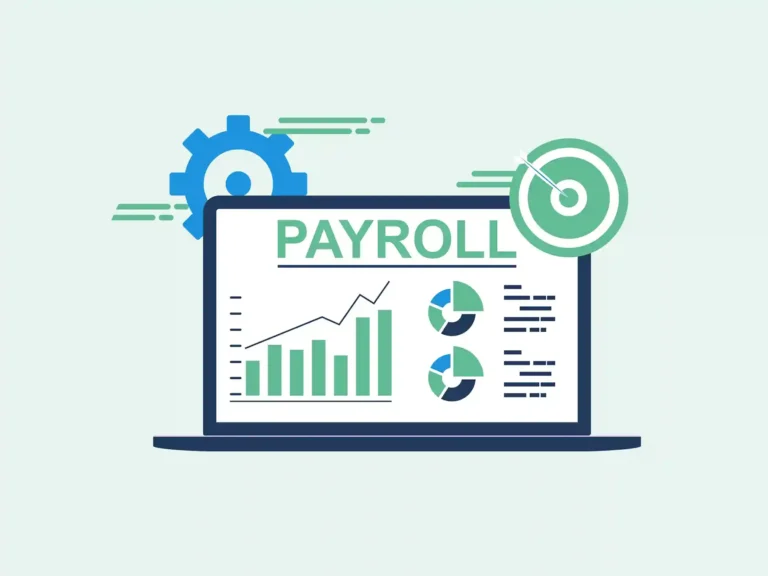
Choosing accounting and payroll software is not just about finding a tool that can run payroll. A good system should also keep books in order, link payroll costs to the right accounts, and make month-end close less hard. For firms that want one system for both tasks, accounting and payroll software can bring pay data and book data into one workflow.
The right choice will depend on your staff size, pay needs, tax rules, book setup, and close process. This blog shows what to check before you buy, how accounting software with payroll differs from a stand-alone payroll tool, and how the right setup can fit into your month-end close.
What You Will Learn From This Blog
- What accounting and payroll software does and why firms use it.
- The key tools to check before you pick a system.
- The main gap between one system and two separate tools.
- How payroll data can fit into the month-end close.
- What to check for tax, reports, data, and user access.
- Best ways to use accounting software with payroll in a daily workflow.
What is Accounting and Payroll Software?
Accounting and payroll software brings key accounting and payroll tasks into one system. It can cover income and costs, bills, bank feeds, pay runs, tax data, financial reports, and staff records.
When payroll data links with the main ledger, wage costs, payroll tax, and other pay entries can post to the right accounts without the need to enter the same data twice. This gives a clear link between payroll work and the financial records used for monthly reports.
This type of software can suit small and mid-sized firms with in-house staff and set pay cycles.
However, firms with complex pay rules, many staff, or payroll in more than one state may need more advanced payroll tools or a separate payroll system. The key point is whether the software can meet the firm’s payroll needs while keeping its books right and up to date.
Payroll data also needs a full check and good record-keeping. A late or wrong payroll entry can affect wage costs, payroll tax dues, cash flow data, and reported profit.
Firms should keep pay records, tax data, bank records, and other proof files for the time set by the rules that apply to them.
For US employers, the IRS states that work tax records must, in most cases, be kept for at least four years after the tax is due or paid, based on whichever date is later.
Key Features of Accounting and Payroll Software
Payroll Runs
Accounting and payroll software should let you set pay rates, pay dates, staff data, tax data, and wage types. It should also show a clear pay run report before final approval.
Tax Data
Look for tools that can track tax withholdings and payroll tax due. Tax rules can change, so check that the tool is kept up to date for the areas where you hire staff.
General Ledger Link
A strong link between pay and books can post wage costs, tax costs, and pay liabilities to set accounts. This can cut manual journal work during close.
Bank Reconciliation
Bank feeds and bank match tools can make it easier to check pay runs against cash out. Still, each match should be checked before it is marked as final.
Reports and Audit Trail
Look for wage reports, tax reports, ledger reports, and logs that show who made a change. The IRS says electronic records must still give a full and true record of business data.
User Access
Not every user needs full access to pay data. Use role-based access where available, as payroll files can hold private staff data.
Accounting Software With Payroll Vs. Separate Payroll Software
One Data Set
With accounting software with payroll, book and pay data can sit in one system. This can reduce duplicate entry when the setup is done well.
Two-System Setup
A separate payroll tool can give more pay-focused tools while the accounting system stays focused on books. Data must then move from one system to the other.
Data Sync
When comparing accounting and payroll software with separate systems, the key point is not just whether two tools can link. Check what data moves, how often it moves, which account it hits, and what happens when a pay run is changed.
Cost Check
Compare the full cost of both setups. Include user fees, payroll fees, tax filing fees, add-ons, data links, and the staff time needed to keep the systems in sync.
Control and Review
One system can reduce the number of data handoffs, but it does not remove the need for review. A wrong pay setup can still post wrong data to the books.
When Two Tools Fit
A separate payroll tool may fit firms with complex pay rules, many staff, many states, or special pay needs. In such cases, payroll depth may matter more than having one system.
How Accounting and Payroll Software Supports Month-End Close
Close the Pay Period
Start by making sure all pay for the month has been run and posted in your accounting and payroll software. Check that the pay date and work period are in the right month.
Match Wage Costs
Compare the payroll report with the wage accounts in the ledger. Any gap should be traced to a late post, wrong account, manual entry, or other cause.
Check Payroll Tax
Review tax liabilities and payments before close. For US firms, federal employment taxes include federal income tax, Social Security, Medicare, and federal unemployment tax.
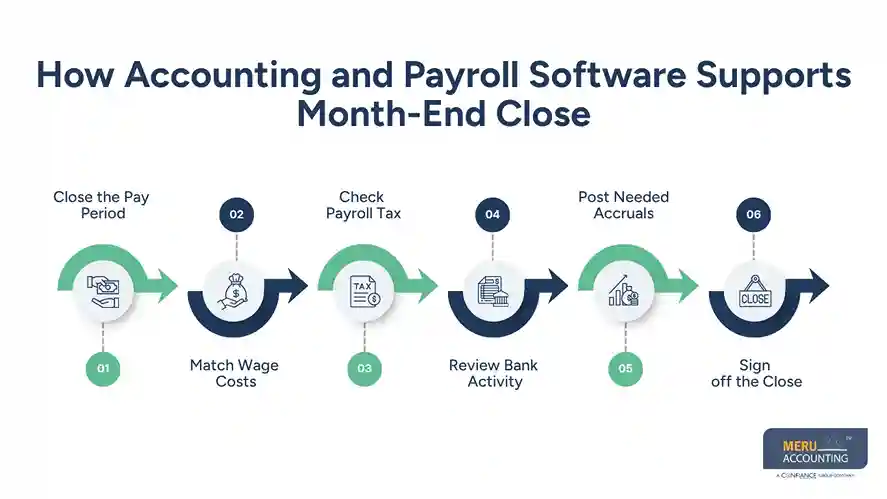
Review Bank Activity
Match payroll cash out with bank records. Check that the amount, date, and pay run agree before the account is closed.
Post Needed Accruals
If staff has earned pay that will be paid in the next month, the close team may need an accrual based on the firm’s accounting method and policy.
Sign off the Close
Keep a close list with the report used, person who checked it, date, and any open items. This gives the team a clear record for the next close.
optional anymore
on running the business
How To Compare Accounting and Payroll Software
Check Business Fit
Start with your staff count, pay cycle, states, worker types, and book needs. Do not choose a tool only because it has a long list of features.
Check Tax Coverage
When comparing accounting and payroll software, ask which federal, state, and local tax tasks the system can handle. Also ask who files the forms and who remains responsible for tax payments.
Check Accounting Depth
Review the chart of accounts, journal tools, bank feeds, reports, bill tools, and close workflow. Payroll should fit the books, not sit apart from them.
Check Data Control
Ask how the system backs up data, tracks edits, sets user rights, and exports reports. Payroll data should have tight access rules.
Check Total Cost
Look beyond the base plan. Add-ons, extra staff, filing fees, time tracking, links, and setup costs can change the real price.
Test With Real Cases
Before you buy, test a sample pay run and a sample month-end close. Use cases such as overtime, a new hire, a pay change, tax withholdings, and a correction.
Best Practices for Using Accounting and Payroll Software
Set Up Accounts With Care
Map wages, benefits, payroll taxes, and other pay costs to the right ledger accounts. A clean setup makes close work much easier.
Keep Staff Data Current
Review names, tax forms, pay rates, bank data, and worker status when changes take place. Do not wait for close to find old staff data.
Review Before Posting
Use a pre-pay report to check gross pay, deductions, taxes, and net pay. A short review before posting can stop errors from reaching the ledger.
Reconcile Each Month
Do not wait for year-end to compare payroll with the books. Monthly checks can find small gaps before they turn into large clean-up work.
Keep Source Records
Keep invoices, receipts, pay records, tax files, and bank proof in a clear file path. The IRS notes that supporting documents back up entries in the books and tax returns.
Review Tax Duties
Software can reduce manual work, but it does not shift all legal duties away from the employer. The IRS notes that an employer can remain liable for employment taxes even when a payroll service provider is used.
Why Businesses Choose Meru Accounting for Accounting and Payroll
- Meru Accounting provides bookkeeping services that keep income, expenses, bank activity, and ledger records organized for regular review and reporting.
- Payroll records can be reviewed to check wages, payroll taxes, benefits, and other pay costs and confirm that they are posted to the right accounts.
- Month-end close tasks can include payroll-to-ledger checks, bank reconciliation, account balance reviews, and checks of open items before monthly reports are prepared.
- Accounting workflows can be managed through platforms such as QuickBooks, Xero, Zoho Books, NetSuite, and Odoo, based on the software used by the business.
- Payroll and tax records can be organized and compared with accounting data to identify differences before financial reports are finalized.
- Financial reports can be prepared and reviewed using the data recorded in the accounting system, giving businesses a clear view of income, costs, balances, and other key figures.
Our Expert Perspective
A good system is only one part of a sound close process. In practice, the value comes from how well the firm sets up accounts, checks pay data, reviews tax items, and keeps source records.
For firms that use accounting and payroll software, we find that a simple monthly checklist can make the close clearer. Start with payroll, compare it with the ledger, check tax balances, match bank payments, and then review open items.
The right accounting software with payroll should fit the way your firm works. It should not force your team to build a hard process around the tool.
Key Takeaways
- Accounting and payroll software can bring pay and book data into one workflow.
- Check payroll, tax, ledger, bank, report, access, and audit tools before you pick a system.
- Accounting software with payroll may cut repeat data entry, but it still needs review.
- Separate payroll software may suit firms with more complex pay needs.
- Month-end close should include payroll-to-ledger checks, tax checks, bank matches, and needed accruals.
- Keep source records and payroll tax files in line with the rules that apply to your firm.
- Software can cut manual work, but the employer may still have tax duties and legal risk.
FAQs
Accounting and payroll software is a system that combines book tasks such as income and costs with payroll tasks such as pay runs, deductions, and payroll tax data.
Yes, accounting software with payroll can fit a small firm that wants one system for books, pay, reports, and basic month-end work.
Accounting and payroll software can link payroll costs to the ledger, which makes it easier to check wage costs, payroll tax, bank payments, and account balances.
They can be in the same system when the payroll needs are simple, and the accounting link is strong; firms with complex pay needs may need a separate payroll tool.
Check payroll tax coverage, accounting tools, reports, bank links, data access, audit logs, total cost, and how well the system fits your month-end close.
optional anymore
on running the business