
The first few months of a startup can get messy fast. One day, you are paying for software and equipment; the next, you are sending invoices, covering payroll, or putting more money into the business. QuickBooks for startups can help keep these transactions organized before small bookkeeping issues turn into bigger problems.
The challenge is not just entering transactions. You need to set up the chart of accounts, connect your bank accounts, track startup costs, and keep business and personal funds separate. You also need financial reports that give you a clear view of where the business stands.
This guide explains how to set up QuickBooks, manage day-to-day bookkeeping, track startup costs, review key reports, and build good bookkeeping habits from the start.
What You Will Learn From This Blog
This guide shows how to set up QuickBooks for startups, track early costs, manage day-to-day books, and use key reports. You will also learn:
- What to set up first in QuickBooks
- How startup costs should be tracked
- Which reports can help you track the firm
- Best ways to keep clean books
- When external help may be a good fit
QuickBooks for Startups: Is It a Good Fit for a New Business?
For many new firms, QuickBooks can be a good fit. It can track sales, costs, bills, bank data, and key reports in one place. This can make it easier to keep the books up to date as the firm grows.
The right setup still matters. A new firm may have few sales at first, but it can still have many costs. There may be legal fees, tools, rent, ads, gear, bank fees, and loan costs. If these items go to the wrong account, the reports may not give a clear view of the firm.
QuickBooks can also help new firms build a set bookkeeping flow. Bank feeds can bring in data, bills can be tracked, and key reports can be run each month. For a firm that plans to add staff, raise funds, or seek a loan, clean books can be a key asset.
That does not mean every startup needs the same setup. A firm with stock may need more work than a firm that sells time or skill. A firm with a loan or many owners may also need a more set chart of accounts.
What Should a Startup Set Up in QuickBooks First?
The first step in startup bookkeeping with QuickBooks is to build a clean base. Do not rush to link every bank feed before the key setup is done.
Start with these core tasks:
Set up the firm profile: Add the legal name, start date, tax setup, and other key firm data.
Build the chart of accounts: Set up the right income, cost, asset, debt, and equity accounts. Keep the list clear. Too many accounts can make the books hard to use.
Add bank and card accounts: Link the firm’s bank and card data when the chart is ready. This can help cut down on manual entry.
Add users and access: Give each team member only the access they need. This helps keep the books safe and clear.
Set up sales and bills: Add key clients, vendors, items, and terms. This helps keep sales and payables in one flow.
Set a bank match plan: Decide who will check bank data, how often it will be done, and who will review the work.
A good setup can save time later. It also helps make sure the data in the books can support tax work and key business calls.
optional anymore
on running the business
How to Set Up QuickBooks for a Startup
A sound setup is a key part of startup bookkeeping with QuickBooks. Once the base is set, work through the books in a set order.
Set the right start date
Use the date that fits the firm’s book start. If the firm was active before QuickBooks was set up, past data may need to be added.
Set up opening balances
Opening balances show what the firm had and owed when the books began. These may include cash, card debt, loans, assets, and owner equity. Do not add made-up balances just to make the books match.
Add income and cost accounts
Keep the list tied to how the firm earns and spends. For most new firms, a short and clear chart is easier to use than a long list of small accounts.
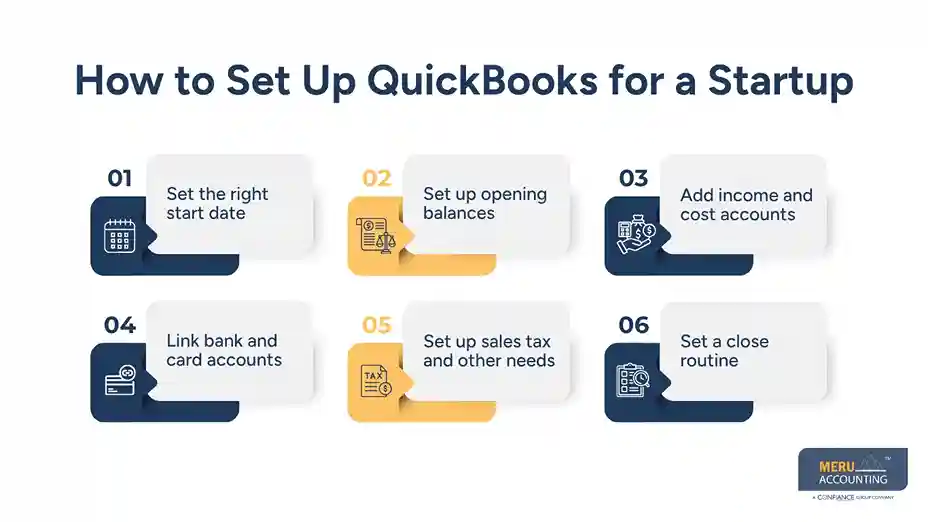
Link bank and card accounts
Once the setup is done, link the right business accounts. Review the first set of feed data with care. A bad match can lead to bad reports.
Set up sales tax and other needs
If the firm must charge sales tax, set up the right tax flow. Other needs may include payroll, loans, stock, or more than one business unit.
Set a close routine
A monthly close can help keep the books in shape. It may include bank checks, card checks, account review, and report review.
These steps form the base for QuickBooks for startups and can make later bookkeeping much less hard.
How to Track Startup Costs in QuickBooks
Startup costs need care because not all early costs are treated in the same way. Some may be normal costs. Some may be assets. Some may relate to loans or owner funds.
Common early costs may include:
- Legal and setup fees
- Marketing and ad costs
- Software and web tools
- Office rent and gear
- Laptop and other work tools
- Bank and card fees
- Stock and goods
- Licenses and permits
The key is to use the right account for each cost. For example, a laptop used for work may need asset treatment rather than being put in a basic office cost account.
Owner funds should also be kept apart from sales. If an owner puts cash into the firm, that does not mean the firm made a sale. A loan is not sales income, either. These items should be tracked in the right part of the books.
This is one area where startup bookkeeping with QuickBooks needs more than simple bank matching. Each item needs the right account and clear support.
Which QuickBooks Reports Should Startups Review?
Reports turn book data into useful facts. QuickBooks for startups can give a range of reports, but most new firms can start with a few key ones.
Profit and Loss
This report shows income, costs, and net profit or loss for a set time. It can help show if the firm is making money from its core work.
Balance Sheet
This shows what the firm owns, what it owes, and the owner’s equity at a point in time. It can help track cash, debt, assets, and other key items.
Statement of Cash Flows
Profit does not always mean cash is on hand. A cash flow report can help show where cash came from and where it went.
Accounts Receivable Aging
If the firm sells on terms, this report can show unpaid client bills by age. It can help the team spot late payments and take action.
Accounts Payable Aging
This report shows bills that the firm owes. It can help the owner plan cash use and avoid missed due dates.
Budget vs. Actual
Once the firm has a budget, this report can help show where real results are above or below plan.
A new firm does not need to check each report every day. A set monthly review is often more useful than a rushed daily check.
QuickBooks Best Practices for Startups
Good use of QuickBooks for startups is less about adding more data and more about keeping the data clean.
Keep business and personal funds apart: Use business bank and card accounts for business use. This makes the books much easier to track.
Reconcile accounts each month: Compare the books with bank and card records. This can help find missed items, wrong matches, and errors.
Review uncategorized items: Do not let unclear bank items pile up. Check what each item is and use the right account.
Save key records: Keep bills, receipts, invoices, loan papers, and other key files with the right book data when the system allows it.
Use a set close date: Pick a time each month to review the books. This can help keep old periods from being changed by mistake.
Review reports, not just bank data: Bank feeds show cash moves. They do not tell the full story of profit, debt, assets, or unpaid bills.
Keep the chart of accounts clean: Do not add a new account each time a new cost comes up. Check if an existing account fits first.
Match the books to the way the firm works: A service firm, online store, and tech firm may need very different book setups.
Meru Accounting's QuickBooks for Startups Services
Startups often outgrow a basic QuickBooks setup as transactions increase and new needs come up. Meru Accounting helps keep the books accurate and organized as the business grows. We can work with an existing QuickBooks file or set up a new one based on the way the business operates.
Our services include:
QuickBooks Setup & Cleanup
- Chart of accounts setup and review
- Opening balance checks
- Bank and credit card setup
- Cleanup and catch-up bookkeeping
Ongoing Bookkeeping
- Monthly bookkeeping and bank reconciliation
- Income and expense review
- Accounts payable and accounts receivable
- Payment and credit card reconciliation
- Owner funds and loan tracking
Reports & Month-End
- Profit and loss and balance sheet reports
- Account reconciliation
- Month-end close support
- Tax-ready financial records
We adjust the bookkeeping process to the startup. A service business may need a simple setup, while an Ecommerce or product business may need closer tracking of payment fees, inventory, and cost of goods sold. Our team reviews the existing workflow, fixes gaps, and keeps startup bookkeeping with QuickBooks on a clear monthly process.
Our Expert Insight
One issue we often see with startup books is that the numbers look fine at first glance, but key accounts have not been reviewed. A bank balance may match, for example, while unpaid bills, customer invoices, owner funds, or loan balances are still recorded incorrectly.
Before relying on QuickBooks reports, we recommend checking the bank and credit card reconciliations, open invoices, unpaid bills, owner or loan activity, and any large or unusual transactions. These checks can catch errors that a bank feed alone will not.
In our experience, startup bookkeeping with QuickBooks works best when the software is backed by regular review. The goal is not just to keep transactions entered, but to make sure the numbers reflect what is really happening in the business.
Key Takeaways
- QuickBooks for startups can help bring sales, costs, cash, bills, and reports into one place.
- Set up the chart of accounts before you start heavy data entry.
- Keep owner funds, loans, and sales in the right accounts.
- Track startup costs based on what each cost is and how it should be treated.
- Review the Profit and Loss, Balance Sheet, and cash flow reports on a set plan.
- Reconcile bank and card accounts each month.
- Clean books need review, not just bank feed automation.
- Professional help can be useful when startup books grow more complex.
FAQs
Yes. QuickBooks works well for many startups that need to track income, expenses, cash, bills, and financial reports.
Record each cost based on what it is, such as software, legal fees, advertising, or equipment. Some larger purchases may need to be recorded as assets.
Yes. QuickBooks can track startup funding and loans, but these amounts should not be recorded as sales income.
The Profit and Loss, Balance Sheet, and Statement of Cash Flows are key reports. Startups with unpaid bills or invoices may also need A/P and A/R reports.
Unreconciled transactions, duplicate entries, missing items, or wrong account coding can cause differences. A bank reconciliation can help find the issue.
optional anymore
on running the business