A few vendor bills are easy to manage. But as invoices pile up, it gets harder to track what is due, what has been approved, and what has already been paid. The right accounts payable software for small business can bring these tasks into one place and make it easier to keep bills, payments, and AP records in order.
But choosing AP software is not just about finding a tool with the most features. A small business needs software that fits its bill volume, approval process, accounting system, and budget. In this blog, we’ll cover what to look for, how AP software works, and how to choose a solution that fits your day-to-day accounting needs.
What You Will Learn From This Blog
- What AP software does for a small firm
- Which tools and key traits to look for
- How accounts payable management software fits into the AP flow
- How to check cost, fit, and ease of use
- What to ask before you pick a tool
- When AP help from an outside team may make sense
What Is Accounts Payable Software for Small Business?
Accounts payable software for small business is a tool used to track bills owed to vendors and help manage the steps from bill entry to payment. It may pull data from bills, store bill files, route bills for review, and track the date and way each bill is paid.
Some tools are built as part of a full book system. Others are made to sit on top of the firm’s current book setup. This makes it key to check how a tool will work with the rest of the books.
For a small firm, core AP tasks may include:
- Adding vendor bills
- Saving bill files and notes
- Setting due dates
- Sending bills for review
- Tracking open bills
- Marking bills as paid
- Matching pay data to bank data
- Pulling AP and cash flow reports
The tool should make these tasks clear, not add more work.
Why Small Businesses Use Accounts Payable Software
Many small firms start with email, paper bills, and a sheet in Excel. That can work at first. Yet this setup can get hard to run as bill count grows.
A good AP tool can help a firm:
Cut manual data work: Bill data can be read and sent to the right fields, which may cut key-in work.
Track due dates: A list of open bills can help the team see what is due soon and what is past due.
Keep a clear audit trail: The firm can keep the bill, review step, and payment record in one place.
Set up bill checks: Bills can go to the right person for review before they are paid.
Plan cash needs: Open bills give the owner a view of cash that may need to go out.
Cut repeat pay risk: Some tools can flag a bill that looks like one already in the system.
Still, software does not fix a weak AP process on its own. A firm still needs sound rules for who can add, check, approve, and pay bills.
What to Look for in Accounts Payable Software for Small Business
When you compare accounts payable software for small business, start with the tasks your team does now. Do not pick a tool based only on the size of its feature list.
1. Bill Capture and Data Entry
Look for ways to add bills with less key-in work. The tool may let you upload a file, read bill data, or add a bill from email.
Check how well it reads key fields such as the vendor name, bill date, due date, bill number, and total. A tool that saves time but adds many data errors may not be a good fit.
2. Bill Approval
A small firm may need one owner to check each bill. A larger small firm may have a team lead, owner, or job lead who must sign off.
Look for clear approval rules. You should be able to see who checked a bill and when. The system should also make it easy to spot bills that are still waiting for review.
3. Payment Tracking
The tool should show which bills are open, paid, or due soon. If it can help set a pay date, check the steps with care.
Do not pick a tool just because it can send a payment. The key is to keep the pay record in sync with the books and bank.
4. Vendor Records
Good vendor data can help keep AP clean. Check if the tool can store vendor names, bill terms, tax data, and key notes.
It should also make it easy to find old bills and pay records when you need to check a past cost.
5. Duplicate Bill Checks
A tool that can spot a likely repeat bill can help cut the risk of paying the same bill twice. Ask what fields it checks and how it flags a match.
No tool can spot each error with full skill, so staff review still has a role.
6. Reports and Book System Links
Your AP tool should work well with your book system. Check if it can send bill, vendor, and pay data to the right ledger fields.
Useful reports may show open AP, past-due bills, bills by vendor, and cash due by date.
7. User Access and Controls
Not every user should have the same rights. A person who adds a bill may not need the right to approve or pay it.
Look for role-based access and clear logs. These small checks can help keep AP safer as the team grows.
How Accounts Payable Management Software Works
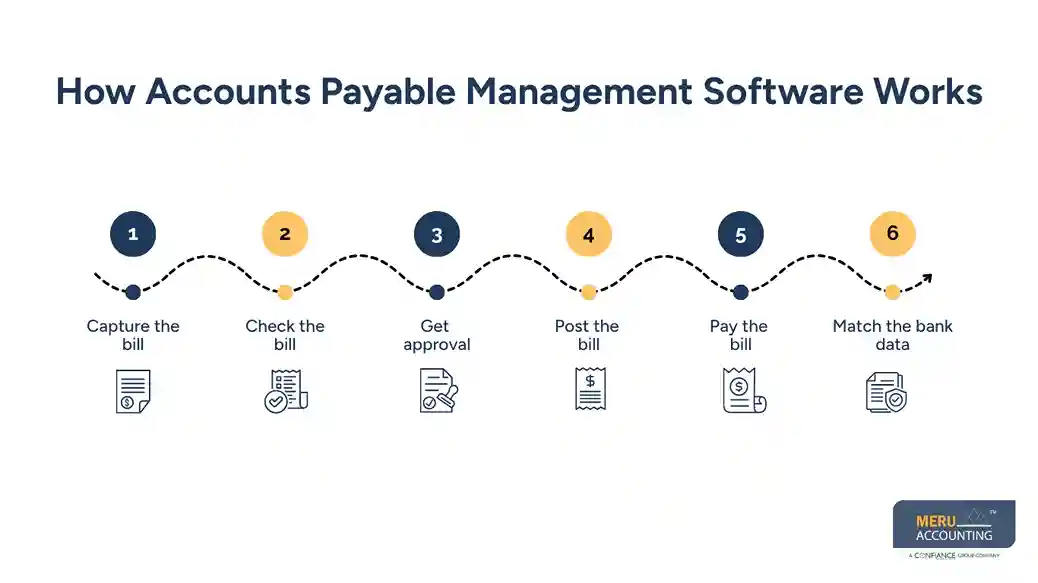
Accounts payable management software helps turn AP work into a set flow. While each tool is not the same, the core path often looks like this:
Step 1: Capture the bill
The bill is added to the tool by file, email, or direct entry.
Step 2: Check the bill
The team checks the vendor, date, amount, terms, and account or job code.
Step 3: Get approval
The bill goes to the right person for review. Any issue should be fixed before the bill moves to pay.
Step 4: Post the bill
The bill is sent to the book system or posted to the right AP account.
Step 5: Pay the bill
The team pays the bill by the set due date and keeps the pay record.
Step 6: Match the bank data
The bank feed or bank file is checked against the pay record. This helps keep the books in line with real cash flow.
This flow shows why accounts payable management software should not be viewed as just a bill pay tool. It can form a link between bill intake, review, the books, and cash.
optional anymore
on running the business
Choose Accounts Payable Software for Small Business
Choosing accounts payable software for small business starts with the firm’s needs, not the tool’s sales page.
Start With Your Current AP Flow
List each step from the time a bill comes in to the time it is paid and matched in the books. Note where work gets slow, or errors tend to occur.
If most bills are sent to one owner for review, you may not need a large approval setup. If bills go to many team leads, stronger approval rules may be worth the cost.
Check Your Book System
Make sure the AP tool works with your current book system. Ask how bill data, vendor data, payment data, and account codes move between the two systems.
A good link should cut duplicate work. It should not force the book team to fix data by hand each month.
Compare the Real Cost
Do not look only at the monthly fee. Check for costs tied to users, bills, payments, OCR, storage, or added tools.
Then compare that cost with the time your team may save. A low-cost tool is not a good deal if it takes more staff time to run.
Test the Full Bill Flow
Before you buy, test one real bill from start to end. Add it, check it, approve it, pay it, and match the payment to the bank.
This test can show gaps that are hard to spot in a demo.
Review Support and Data Access
Ask how you can get help when a sync fails or a bill is stuck. Also check how you can get your data if you leave the tool.
A good AP tool should make your work clearer, not lock your firm into a hard-to-use system.
Meru Accounting’s Accounts Payable Management Services
A good AP process should give you more than a list of unpaid bills. It should help you know what you owe, what is due next, and whether your AP records match your books. That is where Meru Accounting can help. Our team supports day-to-day AP work and the accounting checks behind it, so business owners have cleaner records without having to manage every bill themselves.
With our accounts payable management services, we can handle:
- Vendor bill entry and review
- Invoice and payment tracking
- Vendor balance and AP aging checks
- Payment and bank reconciliation
- Month-end AP review
- AP cleanup and catch-up
- Tax-ready AP records
We also work with the accounting systems your business already uses, including QuickBooks, Xero, and Zoho Books. If your team uses accounts payable management software, we can help review the AP data, resolve posting issues, and make sure payments and balances flow correctly into the books.
With Meru, you get hands-on AP support that fits into your existing accounting process—not another system for you to manage on your own.
Our Expert Insight
One AP check that is easy to miss is the month-end cutoff. A bill received in April may relate to work done in March. If it is posted in April, March expenses and accounts payable may be understated. Reviewing invoice dates, service dates, and open bills can help keep monthly reports accurate.
We also look beyond the total AP balance. A sudden rise in one vendor’s balance, several bills with the same amount, or an old unpaid invoice may point to a missed credit, duplicate entry, or coding error. These patterns take accounting judgment to spot and resolve. Software can flag some issues, but an experienced review helps determine what actually needs attention.
Key Takeaways
- Accounts payable software for small business can help track bills, approvals, payments, and AP records.
- Pick a tool that fits your bill flow and current book system.
- Check bill capture, approval rules, payment tracking, reports, and user access.
- Test the full flow before you buy.
- Look at the full cost, not just the monthly fee.
- Accounts payable management software works best when its data stays in line with the books and bank.
- Regular AP review is still needed even when much of the work is automated.
FAQs
It depends on the plan, number of users, bill volume, and payment features. Compare the full cost, including any add-ons or usage fees.
Yes. Many AP tools integrate with QuickBooks. Check what data syncs and how bills and payments are posted.
Common options include bill capture, data entry, approval routing, payment reminders, and payment tracking.
Not always. It may be useful when bill volume, vendors, or approval steps make manual AP hard to manage.
Check its accounting integrations, ease of use, approval controls, payment features, reporting, security, and total cost.
optional anymore
on running the business