A lease signed three years ago may still shape a property’s income today. Rent increases, renewal clauses, tenant changes, and shared costs all affect what a commercial property earns. Multiply that across an office park, a retail center, or a portfolio of rental buildings, and keeping every detail straight becomes a full-time job. Commercial real estate software helps bring these records together, so property teams can spend less time chasing information and more time making sound business decisions.
From tracking lease terms to reviewing rent rolls and operating costs, the right system can change how a real estate firm handles its portfolio. But the real value comes when property data and financial records work together. That’s also where real estate software outsourcing can help firms keep their books, payments, and reports in order without adding more work to their in-house team.
What You Will Learn From This Blog
- What commercial real estate software does and how it works.
- The key issues that come with managing many sites and leases.
- How one system can help track rent, costs, tenants, and lease dates.
- Which tools and features matter most when you pick a system.
- How to keep lease and finance records clear across a large portfolio.
- When real estate software outsourcing can help your team save time and keep books in order.
What Is Commercial Real Estate Software and How Does It Work?
Commercial real estate software is a tool that helps owners, landlords, and property teams run their sites and track key data. It can store lease terms, tenant data, rent rolls, bills, work orders, and finance reports in one system. This gives teams one clear view of each site and the full portfolio.
Most tools work through a shared data hub. Staff add lease terms, rent rates, due dates, tenant names, and site costs. The system then uses this data to track key tasks and make reports. Some tools can also link to bank feeds, payment apps, and accounting systems. This cuts down on repeat data entry and helps keep records in sync.
For firms with many sites, this can make a big change. A team can view rent due at one site, open lease dates at a second, and repair costs at a third, all from one screen. The goal is not just to store data. It is to help staff act on it with less delay.
Key Challenges of Managing Multiple Properties and Leases
As a real estate firm adds more sites, the work grows too. Each site may have many tenants, lease terms, rent rates, and cost types. If teams rely on manual files, key details can slip through the cracks.
Here are some common issues:
- Tracking lease dates: Each lease may have its own start date, end date, rent rise, and renewal terms. If a team misses a key date, it may lose a chance to plan a renewal or find a new tenant.
- Following up on rent: Some tenants pay on time, while others pay late or make part payments. Staff need a clear view of due rent, open bills, late fees, and past-due sums for each site.
- Keeping costs by site: A firm may pay for power, repairs, tax, cover, and upkeep at many sites. If costs are not tagged to the right site, it gets hard to see which ones earn well and which ones need a closer look.
- Keeping records in sync: Lease data, rent rolls, bank feeds, and books must match. If staff enter the same data in more than one place, errors and gaps can arise.
- Making clear reports: Owners and investors need to see rent income, costs, net income, and site-level results. When data sits in many files, it takes more time to build reports and check if they are right.
How Commercial Real Estate Software Simplifies Multi-Property Management
A good system can help teams handle daily tasks with less manual work. It also gives owners a clear view of each site and the full set of assets.
1. Centralized property and tenant data
Teams can keep site details, tenant records, lease files, rent terms, and contact data in one place. Staff do not need to search through emails or many sheets to find key facts. They can also sort data by site, tenant, or lease status.
2. Lease tracking and renewal alerts
The system can track lease start and end dates, rent rises, notice periods, and renewal terms. Alerts can help staff act well before a lease ends. This gives them time to talk with tenants, review rent rates, and plan for a new lease if needed.
3. Rent and payment tracking
Teams can use the system to track rent due, rent paid, open balances, and late fees. Some tools can send rent notices or link to online payment apps. This helps staff spot late payments and follow up with the right tenant.
4. Repair and upkeep tracking
A shared work order tool lets tenants or staff report a repair need. The team can assign the task, set a due date, track its status, and log the cost. This helps keep a clear record of site upkeep and makes it easier to spot repeat issues.
5. Budget and cost review
Teams can group costs by site, cost type, or time period. They can then compare actual costs with the budget. If repair or utility costs rise at one site, the team can review the cause and plan the next step.
6. Portfolio-wide reports
Instead of looking at each site one by one, teams can view key data across the full portfolio. Reports may show rent income, open balances, costs, lease dates, and net income. This helps owners see which sites meet their goals and where they may need to act.
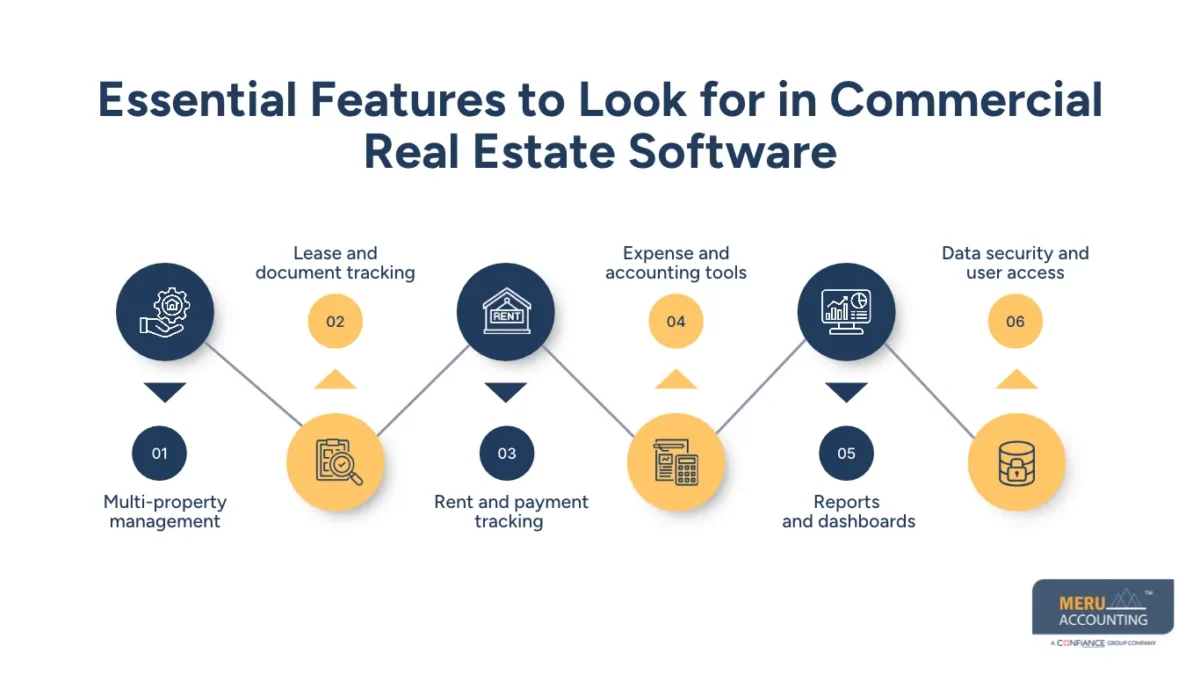
Essential Features to Look for in Commercial Real Estate Software
Not all systems offer the same tools. The right choice depends on the size of the portfolio, the type of leases, and the daily work your team needs to handle. Before you invest in commercial real estate software, check for these key features:
- Multi-property management: The system should let you add and track many sites under one account. It should also let you view data by site, owner, or portfolio.
- Lease and document tracking: Look for tools that store lease files, key dates, rent terms, renewal rules, and tenant details. Search and alert tools can help staff find key data with less effort.
- Rent and payment tracking: The system should show rent due, rent paid, late rent, and open balances. It should also let staff track fees and other tenant charges.
- Expense and accounting tools: Check if the system can track bills, site costs, bank feeds, and account data. It should also link with your accounting tools or let you export data for review.
- Reports and dashboards: Look for reports that show rent income, site costs, net income, open rent, and lease dates. The ability to filter reports by site and time period is also useful.
- Data security and user access: Property and tenant records can hold private data. Choose a system with user roles, access limits, data backup, and safe ways to store and share files.
Before you make a choice, ask for a demo and test it with real work cases. Check how easy it is to add a new lease, track a rent rise, post a bill, and run a site-level report. This can show if the tool fits your team’s needs.
optional anymore
on running the business
How to Manage Lease Accounting and Financial Records Across Multiple Properties
Good lease and finance records help owners see the true value of each site. They also help teams make sure that rent, costs, and tenant balances are in the right place. A system can make this work easier, but teams still need clear rules and regular checks.
Here are some key steps:
1. Record each lease in full
Keep a copy of each signed lease and enter its key terms in the system. These may include the tenant name, site, lease term, rent rate, due date, rent rise, and other charges. Also record any changes made during the lease. This helps keep the lease file and finance records in line.
2. Track rent income and tenant charges
Post rent based on the terms of each lease. Track base rent, parking fees, service charges, and other costs billed to tenants. Keep a clear view of what is due, what has been paid, and what is still open. This helps staff follow up on late rent and fix any billing gaps.
3. Track security deposits and prepaid rent
Security deposits and prepaid rent need the right account treatment. A deposit is not the same as rent income, and rent paid in advance may need to be held as a liability until it is earned. Keep these items clear in the books and match them to the right tenant and lease.
4. Record costs by property
Tag each bill to the site it relates to. This may include repairs, power, water, insurance, property tax, and other costs. For shared costs, use a fair and clear method to split them across sites. This gives owners a better view of the cost and net income of each asset.
5. Reconcile bank and tenant records
Match bank entries with rent receipts, bill payments, and other cash moves. Review open tenant balances and check for part payments, missed entries, or wrong charges. Do this each month so that small gaps do not build up over time.
6. Review lease data and reports each month
Run reports for rent due, rent paid, open balances, site costs, and net income. Check key lease dates and compare the data with signed lease files. For firms with leases that fall under ASC 842, make sure the right lease data is used for the required accounting work. A software report alone does not replace a review by a trained accounting team.
When these steps are part of a set monthly process, commercial real estate software can give owners a more clear view of their sites. It also helps keep lease data and books in sync.
How Meru Accounting Supports Commercial Real Estate Businesses
A portfolio with 20 commercial properties can have 20 different sets of rent schedules, vendor bills, tenant balances, and operating costs. The challenge is not just recording these transactions; it is making sure every entry belongs to the right property and shows up correctly in the financial reports. A missed tenant charge or a bill posted to the wrong property can distort the numbers used to assess a property’s performance.
Meru Accounting provides real estate software outsourcing and dedicated accounting support to help commercial property owners, managers, and real estate firms handle this work. Our team supports multi-property accounting workflows, works with your existing systems, and follows review processes to help maintain accurate and consistent financial records.
Our commercial real estate accounting services include:
- Property-Wise Bookkeeping: Recording rental income, tenant charges, vendor bills, repairs, utilities, insurance, and other operating costs under the correct property.
- Lease and Rent Accounting Support: Maintaining rent schedules, tracking rent adjustments, recording security deposits, and monitoring outstanding tenant balances.
- Accounts Payable Management: Processing property-related bills, tracking vendor payments, and keeping due dates and expense records in order.
- Accounts Receivable Management: Tracking rent collections, tenant invoices, partial payments, outstanding balances, and other amounts due.
- Property-Wise Bank Reconciliation: Matching rent receipts, vendor payments, and bank transactions with accounting records for each property.
- Financial Reporting: Preparing income and expense statements, balance sheets, and property-level reports to help owners review financial performance.
- Cleanup and Catch-Up Accounting: Reviewing past entries, correcting classification issues, and bringing delayed property accounts up to date.
Your property management system should tell you what is happening across your portfolio, and your accounting records should show what those activities mean financially. Meru Accounting helps bridge that gap through dedicated accounting support, without requiring you to build a larger in-house team.
Our Expert Insight
One detail that commercial property owners should watch is the difference between rent collected and rental income recorded in the books. These figures do not always match.
For example, if a tenant pays six months of rent upfront, the full payment appears in the bank account, but it should not all be recorded as income for that month. The advance rent must be recognized over the period it covers. Similar care is needed with rent-free periods, lease incentives, and tenant concessions.
Our advice is to look beyond rent collection reports when reviewing property performance. Compare lease terms, rent schedules, cash receipts, and recorded income. This helps avoid overstated revenue and gives owners a more accurate view of each property’s financial results.
Good software makes the data easier to track, but sound accounting ensures the numbers tell the right story.
Key Takeaways
- Commercial real estate software helps owners manage multiple sites, tenants, lease terms, rent dates, and operating costs from one place.
- Lease alerts help teams plan renewals, track rent changes, and avoid missed dates.
- Property-level reports help owners compare rent income, costs, and net income across their portfolio.
- Regular bank checks, cost reviews, and accurate lease data are vital for sound financial records.
- Real estate software outsourcing can help firms manage bookkeeping, bill payments, rent records, and financial reports.
- The best results come from using the right software with sound accounting processes and regular reviews.
FAQs
Look for multi-property tracking, lease management, rent schedules, expense tracking, financial reports, and accounting integrations. Also check whether the system can handle your portfolio size and reporting needs as your business grows.
Yes. Most property management systems let users record lease dates, renewal terms, rent escalation clauses, and notice periods. Some also send alerts before key dates so managers can plan renewals and rent changes.
They use property-level income statements, rent rolls, expense reports, and cash flow reports. Comparing these records helps owners identify high operating costs, unpaid rent, and properties that are not meeting their income targets.
Outsourcing may make sense when transaction volumes increase, monthly reports fall behind, or the in-house team struggles to keep up with property-level accounts. It can also help firms manage more properties without hiring a full accounting team.
Common tasks include property bookkeeping, rent and tenant balance tracking, accounts payable, accounts receivable, bank reconciliation, expense classification, and monthly financial reporting. The scope depends on the company’s needs and internal controls.
optional anymore
on running the business