A restaurant’s payroll can get messy fast. One server stays late, a cook picks up an extra shift, another employee swaps hours, and tips need to be split before payday. Multiply that by a full team, and keeping every dollar and every hour straight becomes a real task. That’s where restaurant payroll software can make a difference.
Beyond running payroll, the right system helps owners keep an eye on labor costs, track overtime, manage tip payouts, and catch errors before checks go out. It also gives managers better insight into staffing costs, so they can make smarter decisions without spending hours sorting through time sheets and pay records.
What You Will Learn From This Blog
- Why labor cost control and payroll accuracy matter for restaurants.
- What restaurant payroll software does and how it works.
- How payroll tools help track staff hours, overtime, and wage costs.
- Ways to reduce common payroll errors linked to tips, time, and pay rates.
- Which payroll tasks still need human review.
- How expert accounting and payroll support can help keep costs in check.
Why Labor Cost Control and Payroll Accuracy Matter for Restaurants
Restaurants often work with staff who have set shifts, split shifts, part-time hours, and varied pay rates. Some staff earn tips, while others may work late hours or take on extra shifts. This makes payroll more complex than it may seem.
Poor labor cost control can hurt profit in more than one way. For example, if too many staff are set for a slow shift, the restaurant may pay for more hours than it needs. On the other hand, if there are too few staff during peak hours, service may slow down and sales may suffer.
Payroll errors can add to these issues. A missed shift, wrong pay rate, or wrong tip share can lead to underpayment or overpayment. Repeated errors may also harm staff trust and raise the risk of wage claims or tax issues.
Accurate payroll records help owners see what they spend on labor and where costs may be too high. They also help managers plan shifts, review sales, and make sound choices about staff needs.
What Is Restaurant Payroll Software and How Does It Work?
Restaurant payroll software is a digital tool that helps owners and managers track staff hours, work out wages, process payroll, and keep pay records. It can bring time, pay, tax, and staff data into one system.
Most tools let staff clock in and out through a time clock, mobile app, or POS system. Managers can then review hours, check missed punches, and approve time sheets before payroll runs.
Once the hours are approved, the system uses each worker’s pay rate, overtime rules, and other pay details to work out gross pay. Some tools can also help track tips, service charges, and tip pools. Tax features may help work out payroll tax and prepare tax records, based on the system and plan.
Many tools also link with POS, timekeeping, and accounting systems. This can cut the need to enter the same data more than once. However, owners should check that each link works as needed and that the data is correct.
The main aim of restaurant payroll software is to make pay runs more clear, fast, and easy to review. It does not replace the need to check staff hours, pay rules, and tax data.
How Restaurant Payroll Software Helps Control Labor Costs
Labor costs can change from week to week due to sales, staff needs, busy days, and staff turnover. Payroll tools help owners track these changes and make better choices about labor spend.
1. Tracks Employee Hours and Wage Costs
A time clock or staff app can record when workers start and end their shifts. This gives managers a clear view of hours worked by each team member.
When time data is linked to pay rates, owners can review the wage cost of each shift or pay period. They can also spot staff who work more hours than planned.
For example, if a cook works two extra hours on most Friday shifts, the manager can review the shift plan and see if a change is needed. This helps keep labor spend close to the planned budget.
2. Helps Manage Overtime Costs
Overtime can raise labor costs, more so when extra hours are not planned. A good payroll system can track hours and flag staff who are close to overtime limits.
Managers can use these alerts to review shift plans and share work across the team. This may help avoid needless extra hours while still meeting staff needs.
However, overtime rules vary by state and worker type. Owners must set up the right rules and review them often to make sure pay is correct.
3. Compares Labor Costs With Restaurant Sales
Tracking wages alone does not show if labor spend is in line with sales. Owners also need to compare labor costs with the money the restaurant earns.
For example, a restaurant may spend $4,000 on labor in a week and earn $16,000 in sales. Its labor cost rate is 25%.
Labor Cost % = (Labor Cost / Sales) * 100
Some payroll and workforce tools can link with POS data to show sales and labor trends side by side. This helps managers see if labor spend is high during slow sales periods or if busy shifts need more staff.
4. Supports Better Staff Scheduling
Past payroll and time records can help managers plan future shifts. They can review which days need more staff and which shifts tend to have extra hours.
For example, a lunch shift may need fewer workers on a slow weekday than on a busy weekend. Better shift plans can help avoid overstaffing while keeping enough staff on hand to serve guests.
Some payroll tools have built-in shift plans, while others need a link to a separate staff scheduling tool. Owners should check this before they choose a system.
optional anymore
on running the business
How Restaurant Payroll Software Reduces Common Payroll Errors
Payroll errors often come from manual data entry, poor time records, or old pay details. A well-set-up system can cut many of these risks.
1. Reduces Errors in Wage and Overtime Calculations
Manual pay work can lead to errors when staff have varied pay rates, work extra hours, or change roles during a shift.
Payroll tools use saved pay rates and approved work hours to work out wages. They can also apply set overtime rules when the system is set up right.
This cuts the need for manual math and helps keep pay runs more steady. Managers should still review pay rates and hours before each pay run.
2. Helps Track Tips and Tip Sharing
Tips add a layer of work to restaurant payroll. Servers, bartenders, and other staff may earn tips in cash or through card payments. Some restaurants also use tip pools or share tips across roles.
Restaurant payroll software can help record tip amounts, track tip shares, and add the right data to payroll. This can help reduce errors when staff receive tips from more than one source.
Owners must set clear tip rules and check that the system follows federal and state laws. Tip credits, tip pools, and service charges can have their own rules, so these should not be set up without care.
3. Improves Time and Attendance Records
Missed clock-ins, wrong clock-outs, and late time sheet updates can affect pay. Digital time tools can flag missing punches and show hours that need review.
Managers can check these records before they approve payroll. This helps fix issues early rather than after staff have been paid.
4. Keeps Payroll Data in One Place
When staff details, pay rates, tax data, and work hours are kept in one system, there is less need to move data between files or enter it again.
This can cut data entry errors and make it easier to find past pay records. It also helps managers review changes, such as a new pay rate or a staff member who leaves the team.
Common Restaurant Payroll Mistakes Software Cannot Fix on Its Own
Even the best restaurant payroll software cannot fix every payroll issue. It works based on the data and rules that owners enter. If these are wrong, the pay results may also be wrong.
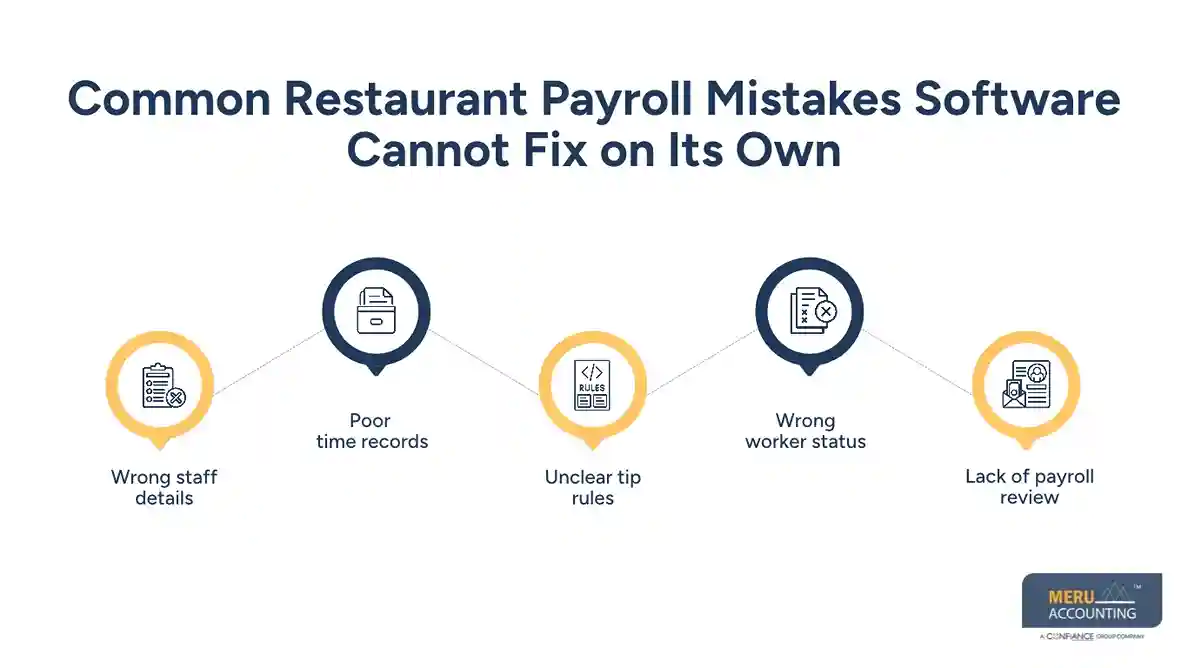
Some common issues include:
- Wrong staff details: Old tax forms, bank data, or pay rates can lead to wrong pay.
- Poor time records: If staff do not clock in or out as they should, the system may still show wrong hours.
- Unclear tip rules: A tool cannot decide the right tip pool split if the restaurant has not set clear rules.
- Wrong worker status: Treating an employee as an independent contractor without a valid basis can lead to tax and wage issues.
- Lack of payroll review: Owners who approve pay runs without checking reports may miss errors that the system has flagged.
For this reason, payroll needs both good tools and sound review steps. Managers should check hours, pay rates, tips, and tax data on a set basis.
Meru Accounting’s Restaurant Payroll Services
Payroll data tells a restaurant owner more than how much employees should be paid. It also shows how much each shift costs, where overtime is adding up, and whether labor expenses match the business’s sales. Meru Accounting helps restaurants manage these financial tasks through dedicated payroll and accounting support.
Our restaurant-focused services include:
- Restaurant Payroll Processing: Employee pay calculations, payroll runs, wage records, and payroll-related entries.
- Employee Hours and Overtime Review: Reviewing work hours, pay rates, and overtime records to help identify payroll discrepancies.
- Tip and Payroll Record Management: Organizing tip records, tip payouts, and related payroll data.
- Payroll Reconciliation: Checking payroll reports against bank records and accounting entries to identify gaps.
- Restaurant Bookkeeping: Tracking wages, payroll taxes, operating expenses, accounts payable, and accounts receivable.
- Labor Cost and Financial Reporting: Preparing reports that help owners review payroll expenses, labor costs, and overall business performance.
Whether you operate a single-location restaurant or manage a growing group of locations, we can provide dedicated accounting and payroll support at a fraction of the cost of maintaining an in-house team in the US.
Our Expert Insight
One issue we often see in restaurant accounting is the difference between payroll paid and payroll earned. For example, if employees work during the last few days of March but receive their pay in April, those wages still belong to March’s expenses. Recording them in April can understate March’s labor costs and overstate its profit.
We recommend reviewing payroll on an accrual basis and reconciling gross wages, employer payroll taxes, and payroll liabilities with the general ledger each month. Restaurant owners should also compare labor costs with sales by shift, not just by month.
Key Takeaways
- Labor costs can affect restaurant profit, so owners need to track hours and wages with care.
- Restaurant payroll software can help track work hours, tips, overtime, and wage costs.
- POS and timekeeping links can help compare labor spend with sales.
- Payroll tools can cut errors from manual math and data entry.
- Small restaurants should review system features, cost, tax support, and ease of use before they choose a tool.
- Software cannot replace clear pay rules, good records, or regular payroll checks.
- Expert accounting and payroll support can help keep pay records and books in line.
FAQs
Many restaurants aim for labor costs of around 25%–35% of sales, but the right range depends on the type of restaurant, service model, location, and staffing needs. Owners should compare their own costs over time rather than rely on one industry benchmark.
Yes. Many payroll platforms connect with POS systems to import employee hours, sales data, and tip records. This can reduce manual data entry and make it easier to review labor costs against sales.
Restaurants should review payroll every pay period and compare actual labor costs with sales at least monthly. Regular checks can help identify unusual overtime, changes in wage costs, and errors before they affect financial reports.
Yes. Under the Fair Labor Standards Act (FLSA), covered employers must keep records of employee hours, wages, and other payroll details. State laws may have additional requirements, so restaurants should follow the rules that apply to their location.
Outsourcing can be a good option for restaurants that lack dedicated payroll staff or struggle with complex pay rules, tip records, and tax filings. It gives owners access to payroll expertise without the cost of hiring a full-time payroll employee.
optional anymore
on running the business