A contractor may know exactly how much concrete, steel, and equipment a project needs, but can they say the same about labor costs? With crews moving between sites, work hours changing by the day, and pay rates varying by role, keeping payroll in line takes more than a spreadsheet. Construction payroll software helps bring these moving parts together, giving contractors a better way to track hours, process pay, and keep job costs in view.
The challenge is finding a payroll process that works as well on a busy job site as it does in the office. From tracking crew hours to handling overtime and wage rules, every detail matters. This guide looks at how contractors can manage payroll, avoid common errors, and keep labor costs under control without adding more work to their day.
What You Will Learn From This Blog
- What construction payroll software does and how it works.
- Why payroll is more complex for construction firms.
- How to manage payroll step by step.
- How payroll tools help track labor costs by job.
- Common payroll errors and ways to avoid them.
- When to use outside payroll support.
What Is Construction Payroll Software?
Construction payroll software is a tool that helps contractors track worker hours, work out wages, manage payroll taxes, and pay staff. It can also link each worker’s time and pay to a job, site, or cost code.
Unlike basic payroll tools, construction payroll software can support the needs of firms that run many jobs at once. For example, a worker may spend three days on one site and two days on another. The system can help split those hours so each job gets the right labor cost.
Key tasks it can help with include:
- Time and job tracking: Record hours by worker, site, and project.
- Wage and overtime checks: Apply set pay rates and overtime rules.
- Payroll tax tasks: Help work out tax withholdings and keep pay records.
- Union and wage rules: Track pay rates and job data where these rules apply.
- Payroll reports: Show gross pay, taxes, net pay, and labor costs.
The tool does not replace a sound payroll process. Contractors still need to check time records, worker status, pay rules, and tax data before they run payroll.
Why Is Payroll More Complex for Construction Companies?
Construction firms face payroll issues that many other firms do not. Their staff may work at more than one site, earn different rates, or move from one job to the next in the same pay period.
Here are some of the main issues:
- Multiple job sites: Workers may split their time across jobs, cities, or states. Payroll teams must record where the work took place and assign hours to the right job.
- Different pay rates: A worker may have one rate for a set task and a higher rate for other work. Union terms or job rules may also affect the rate.
- Overtime rules: Hours worked beyond set limits may call for overtime pay. Under the Fair Labor Standards Act, most covered nonexempt workers must get at least one and a half times their regular rate for hours over 40 in a workweek. Some pay plans need a weighted rate when a worker has more than one rate.
- Prevailing wage rules: Some public works jobs have set wage and benefit rates. Contractors must check the rules tied to each job and keep the right records.
- Worker types: A firm may have full-time staff, part-time staff, short-term hires, and subcontractors. Each group may need a different pay or record process. Worker status must be based on the facts of the work, not just the label in a contract.
These needs make it vital to use a clear process and the right construction payroll software for the size and type of work a firm does.
optional anymore
on running the business
How to Manage Construction Payroll Step by Step
A set payroll process helps contractors pay workers on time and keep job costs in check. Using construction payroll software can make each step easier, but the data must be correct before payroll is run.
Step 1: Collect Worker and Job Details
Start with the right details for each worker. Keep records of job titles, pay rates, tax forms, work status, and benefit plans. Also, note which job or site each worker is assigned to.
If workers move between sites, update their job details as needed. This helps avoid errors in pay and job cost reports.
Step 2: Track Work Hours
Use time sheets, time clocks, or mobile time tools to track hours worked. Each record should show the worker, date, hours, and job site.
For firms with many active jobs, construction payroll software can link time records to job codes. This helps the payroll team see where each hour was spent.
Review time sheets before each pay run. Check for missing hours, duplicate entries, and time records that do not match site logs.
Step 3: Check Pay Rates and Overtime
Review each worker’s pay rate and hours for the workweek. If a worker has more than one pay rate, check how the regular rate must be calculated for overtime.
Also, check for union terms, shift pay, bonuses, and other pay items that may affect wages. Do not use one flat rate for all workers if their pay terms differ.
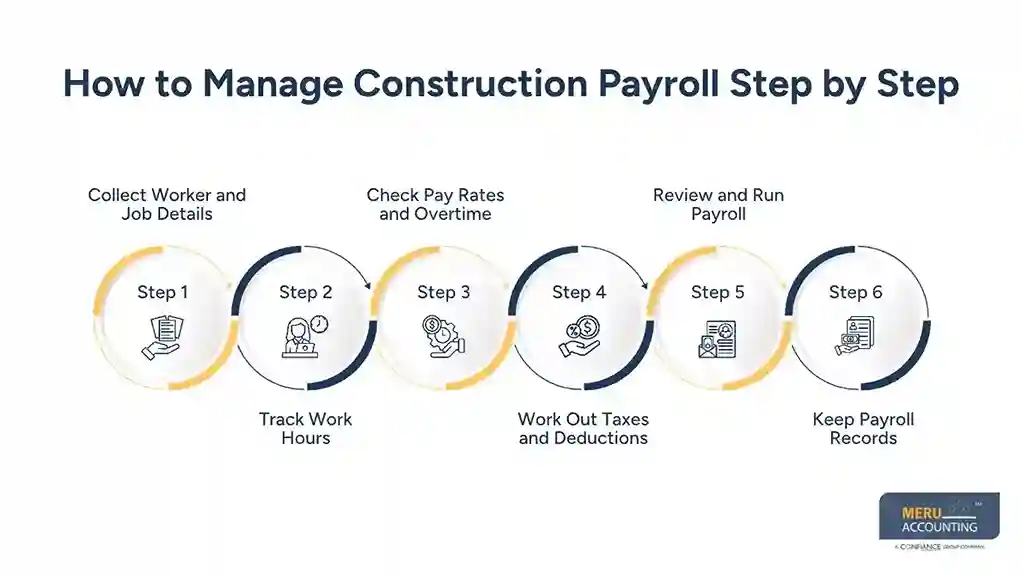
Step 4: Work Out Taxes and Deductions
Once hours and pay rates are set, work out gross pay, tax withholdings, and other deductions. These may include health plan costs, retirement plan amounts, or wage garnishments.
Check that each worker’s tax details are up to date. Also, use the right tax rules for the state where the work was done.
Step 5: Review and Run Payroll
Before you pay workers, review the payroll summary. Check gross pay, overtime, taxes, deductions, and net pay.
Look for large changes from the last pay run. A sudden rise in overtime or a sharp drop in pay may point to a wrong time entry or pay rate.
Once the review is done, approve payroll and send payments by direct deposit or check.
Step 6: Keep Payroll Records
Save time sheets, pay stubs, tax records, and wage reports. Keep job cost data and payroll reports in a format that is easy to find and review.
Good records help with tax filings, wage claims, audits, and project reviews. They also make it easier to fix errors if a worker’s pay needs to be checked later.
How Payroll Software for Construction Companies Helps Control Labor Costs
Labor is one of the main costs in a construction project. If hours are not tracked well, a job can go over budget before the firm sees the problem.
Payroll software for construction companies can link worker hours and wages to each job. This gives owners and project managers a better view of labor costs as work moves ahead.
Here are some ways it can help:
1. Track labor costs by job
Assign worker hours to the right job, phase, or cost code. This helps show how much each task costs and where labor money is being spent.
2. Compare planned and actual costs
Compare the labor budget with the cost of work done so far. If a job uses more hours than planned, the team can look into the cause and take action.
3. Spot high overtime costs
Payroll reports can show which jobs or teams have high overtime. Managers can then review work plans, shift times, and staff needs.
4. Improve project reports
When payroll data links with accounting tools, teams can view labor costs along with other job costs. This gives them a fuller view of project results.
Example: Tracking Labor Costs by Job
A contractor has set aside $12,000 for labor on a job. At the end of the month, the payroll report shows that labor costs have reached $9,500, while the job is only 60% complete.
Item | Amount |
Planned labor budget | $12,000 |
Labor cost to date | $9,500 |
Budget used | 79.2% |
Work completed | 60% |
This may be a sign that labor costs are rising faster than the work is being done. The contractor can review hours, overtime, and crew size before the job goes further over budget.
Illustrative figures. Actual job costs depend on the work, pay rates, and project terms.
Common Construction Payroll Mistakes and How to Avoid Them
Even with good tools, payroll errors can happen if records are not checked. Here are some common issues contractors should watch for.
Common mistake | How to avoid it |
Wrong job cost codes | Review job and cost codes before each pay run. |
Missing time sheets | Set clear deadlines for workers and site leads to send hours. |
Wrong overtime pay | Check hours by workweek and apply the right overtime rules. |
Wrong worker status | Review the facts of each work deal before classifying a worker. |
Missed tax dates | Keep a tax calendar and check filing and deposit dates. |
Poor payroll records | Store pay, tax, and time records in one secure place. |
Wrong pay rates | Update rates when job, union, or pay terms change. |
A key step is to review payroll data before payment. Fixing a wrong rate or time entry before payroll runs is much easier than making a pay fix later.
Construction Payroll Services by Meru Accounting
Construction businesses need payroll records that are ready for pay runs, tax reviews, and project accounts. Meru Accounting provides outsourced payroll support to help contractors manage these responsibilities without building a large in-house payroll team.
Our construction payroll services include:
- Payroll Preparation and Processing: Prepare employee pay runs based on approved payroll data, wage details, and pay schedules.
- Employee Payroll Administration: Maintain employee pay records, deductions, and payroll changes.
- Payroll Tax Assistance: Support payroll tax calculations, withholding records, and related reports.
- Certified Payroll Assistance: Organize payroll data and wage records for projects subject to certified payroll reporting.
- Payroll Reconciliation: Review payroll entries against accounting records and help resolve discrepancies.
- Construction Payroll Reporting: Prepare payroll summaries and reports for business and financial review.
We understand the importance of accurate payroll records and consistent financial reporting for businesses with industry-specific requirements.
With Meru Accounting, contractors can get dedicated payroll support that fits their business operations, whether they need help with regular payroll processing or ongoing payroll administration.
Our Expert Insight
One area contractors should watch is the difference between gross wages, net pay, and total payroll expense. These figures are not the same. Employer-paid Social Security and Medicare taxes, unemployment taxes, and certain employee benefits add to the cost of having a crew on the job.
For example, a contractor who budgets labor based only on hourly wages may underestimate the true cost of a project. Our recommendation is to include employer payroll taxes and applicable benefits in labor budgets and review these costs when estimating new jobs.
This gives contractors a more realistic view of labor expenses and helps prevent low-cost estimates from affecting project margins.
Key Takeaways
- Construction payroll involves more than wage payments. It also includes job costs, overtime, tax rules, and worker records.
- Construction payroll software helps track hours, pay rates, taxes, and labor costs across job sites.
- Contractors should review time sheets and pay rates before each pay run.
- Job cost reports help firms compare planned labor costs with actual costs.
- Clear worker records and the right pay rules help reduce payroll errors.
- Outsourced payroll support can help firms manage payroll tasks and save time.
FAQs
Look for job costing, time tracking, overtime calculations, multiple pay rates, tax support, and certified payroll reporting. Accounting software integration is also useful.
Many construction companies run payroll weekly or biweekly. Contractors must also follow state payday laws and any applicable union agreements.
Yes, but basic payroll tools may not support job costing, multiple pay rates, or certified payroll reports. Growing contractors may need more specialized features.
Certified payroll is a weekly wage report required for certain government-funded construction projects. It lists worker hours, pay rates, and fringe benefits.
Outsourcing can help contractors manage payroll processing, tax records, and reporting without hiring a full-time payroll team. It can be useful for businesses with complex payroll needs.
optional anymore
on running the business