Not every invoice that lands in your AP inbox should be paid right away. A vendor may bill for items that haven’t arrived, charge a rate that differs from the purchase order, or send a second copy of an invoice already in your system. These small gaps can turn into costly errors when bills move through approval without proper checks. NetSuite accounts payable automation helps finance teams bring more order to this process, but the setup matters just as much as the software.
The goal isn’t just to process bills faster. It’s to make sure the right person approves each bill, the charges match the order and receipt, and the books reflect the payments made. This guide covers practical ways to build those controls in NetSuite, from approval workflows and invoice matching to AP reconciliation.
What You Will Learn From This Blog
- What NetSuite accounts payable automation means and how it works.
- How AP automation can improve invoice and payment control.
- Best practices for setting up bill approval workflows.
- How to match vendor bills with purchase orders and receipts.
- Ways to improve AP reconciliation and fix common errors.
- When to consider outsourced NetSuite accounts payable services.
What Is NetSuite Accounts Payable Automation?
NetSuite accounts payable automation uses system tools and set workflows to manage tasks such as bill entry, invoice review, approval, payment, and recordkeeping. It helps finance teams cut down on manual work while keeping each AP task in a clear process.
For example, when a vendor sends an invoice, the AP team can enter the bill in NetSuite, link it to the right vendor and purchase order, and send it through the set approval path. Once approved, the bill can be added to the payment run based on its due date and the firm’s payment rules.
NetSuite also lets teams track open bills, vendor balances, credits, and payment records. With the right setup, finance staff can see which bills need review, which are approved, and which are ready for payment.
Some tasks may need extra setup, add-on tools, or links to other systems. So, businesses should check which features are part of their NetSuite setup before they plan an AP automation project.
How NetSuite Accounts Payable Automation Improves AP Operations
A well-planned AP process can improve speed, accuracy, and control. Here are some key ways it can help:
1. Speeds Up Invoice Processing
Manual bill entry and email-based review can slow down AP work. With NetSuite accounts payable automation, teams can use set steps to enter, review, and route bills. This helps cut delays and gives staff more time to deal with bills that need extra care.
2. Reduces Data Entry Errors
Manual entry can lead to wrong bill dates, amounts, vendor names, or account codes. Set fields, vendor records, and review rules help reduce such errors. Teams should still check key data before they approve a bill.
3. Improves Payment Control
AP teams can review bills by due date, approval status, and payment terms. This helps them plan cash needs and avoid late fees. It also lowers the risk of paying a bill before it has passed the right checks.
4. Gives Better AP Visibility
A clear AP record helps finance leads track open bills, past-due amounts, vendor credits, and payment status. This makes it easier to plan cash flow and answer vendor queries with the right data.
5. Supports Better Audit Trails
NetSuite can keep records of bill changes, approvals, and payment activity based on system setup and access rules. This helps teams trace who took action and when. It also makes it easier to find proof during an audit or month-end review.
How NetSuite Accounts Payable Automation Improves AP Operations
A well-planned AP process can improve speed, accuracy, and control. Here are some key ways it can help:
1. Speeds Up Invoice Processing
Manual bill entry and email-based review can slow down AP work. With NetSuite accounts payable automation, teams can use set steps to enter, review, and route bills. This helps cut delays and gives staff more time to deal with bills that need extra care.
2. Reduces Data Entry Errors
Manual entry can lead to wrong bill dates, amounts, vendor names, or account codes. Set fields, vendor records, and review rules help reduce such errors. Teams should still check key data before they approve a bill.
3. Improves Payment Control
AP teams can review bills by due date, approval status, and payment terms. This helps them plan cash needs and avoid late fees. It also lowers the risk of paying a bill before it has passed the right checks.
4. Gives Better AP Visibility
A clear AP record helps finance leads track open bills, past-due amounts, vendor credits, and payment status. This makes it easier to plan cash flow and answer vendor queries with the right data.
5. Supports Better Audit Trails
NetSuite can keep records of bill changes, approvals, and payment activity based on system setup and access rules. This helps teams trace who took action and when. It also makes it easier to find proof during an audit or month-end review.
Best Practices for Setting Up NetSuite AP Approval Workflows
A good approval workflow makes sure each bill is checked by the right person before payment. It also helps prevent missed approvals, excess spending, and payment errors. Businesses should set clear rules based on their size, team roles, and spending limits.
1. Set Approval Limits Based on Bill Value
Not every bill needs the same level of review. A low-value office supply bill may need one approval, while a large vendor bill may need review from a department head or finance lead.
Set approval limits based on:
- Bill value and spending limits.
- Department or cost center.
- Type of purchase.
- Budget owner or project lead.
This keeps small bills moving while giving high-value bills the right level of review.
2. Assign Clear Approval Roles
Each person in the workflow should know what they need to check. For example, a department head may confirm that goods or services were received, while an AP lead checks the bill amount, vendor details, and account code.
Avoid giving one person control over the full process. Where possible, separate bill entry, approval, and payment release to improve control over cash.
3. Set Up Approval Routing and Escalation Rules
Use NetSuite workflows to route bills to the right approver based on set rules. These may include bill value, department, vendor, or entity.
Also, set rules for bills that stay pending for too long. A reminder or escalation can help prevent delays when an approver is out of office or misses a request.
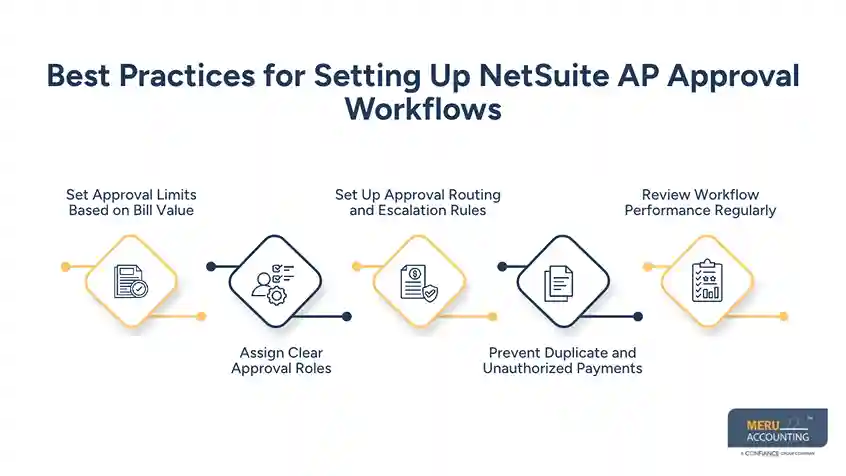
4. Prevent Duplicate and Unauthorized Payments
Set checks to flag bills with the same vendor, invoice number, date, or amount. These checks can help spot duplicate entries before payment.
Limit access based on job roles. Staff who enter bills should not have full control over vendor bank details or payment release. Review user access from time to time, too.
5. Review Workflow Performance Regularly
Approval rules may need changes as a business grows. Review pending bills, approval delays, and rejected invoices each month.
Look for bills that keep going to the wrong person or get held up due to missing data. Fix the cause rather than adding more steps to the workflow.
optional anymore
on running the business
Best Practices for Invoice Matching in NetSuite
Invoice matching helps confirm that a vendor bill is correct before it gets paid. It checks the bill against the related order and proof of receipt. This is key for firms that buy stock, raw goods, or services from many vendors.
1. Match Vendor Bills With Purchase Orders and Receipts
Before you approve a bill, check it against the purchase order (PO) and proof that the goods or services were received.
For example, if a PO lists 100 units but the vendor bill shows 120, the AP team should review the gap before approval. This can help catch billing errors, extra charges, or goods that were not received.
2. Use Two-Way and Three-Way Matching
The type of match depends on the way a business buys goods and services.
- Two-way matching: Compares the vendor bill with the PO to check price, quantity, and terms.
- Three-way matching: Compares the vendor bill, PO, and receipt record to confirm that the billed goods were ordered and received.
Three-way matching is useful for stock-based firms and businesses with a high volume of goods. Two-way matching may work for some service bills where a receipt record is not used.
3. Set Tolerance Limits for Price and Quantity Gaps
Small price or quantity gaps may occur due to tax, freight, or agreed rate changes. Set clear limits for such gaps based on vendor terms and company policy.
For example, a small freight charge may be within the allowed limit, while a large price gap should go to a manager for review. Do not let system rules approve gaps that have not been checked.
4. Manage Unmatched Bills and Exceptions
Not all bills will match on the first try. Some may have missing POs, wrong quantities, or rates that differ from the agreed terms.
Create a clear process to:
- Flag bills that fail a match.
- Assign each issue to the right staff member.
- Ask the buyer or vendor for missing details.
- Record why a bill was changed or approved.
- Keep proof of the final decision.
This helps teams resolve issues without losing track of bills or paying them too soon.
5. Keep Vendor and PO Records Up to Date
Poor vendor data can cause delays and errors. Check vendor names, tax details, payment terms, and bank data on a set basis. Also, close old POs and update open orders when terms change.
Clean records make matching more reliable and help prevent bills from being linked to the wrong vendor or order.
How to Improve Accounts Payable Reconciliation in NetSuite
AP reconciliation helps confirm that vendor balances and payment records match the books and source records. It is more than checking whether a bill shows as paid. Teams must also review credits, open bills, payment gaps, and old items.
1. Reconcile Vendor Statements With AP Records
Ask key vendors for monthly statements and compare them with the open bills in NetSuite. Check for bills that are missing, credits that have not been posted, and payments that the vendor has not yet applied.
A gap may point to a missed bill, a wrong payment, or a timing issue. Find the cause and keep proof of the fix.
2. Review Open Bills, Credits, and Payment Balances
Check the AP aging report to find past-due bills, old credits, and items that have stayed open for too long. Confirm that each balance is valid and belongs to the right vendor.
Do not write off old items just to clear the report. First, check the source bill, payment record, and vendor account.
3. Check for Duplicate Invoices and Payment Gaps
Review bills with the same invoice number or amount, as well as payments that do not link to the right bill. Also, check for part payments, voided payments, and bills that were paid outside the usual process.
These checks help find errors before they affect the month-end close.
4. Match Payment Records With Bank Transactions
Compare payment records in NetSuite with bank statements. Check payment dates, amounts, payees, and any voided or failed payments.
If a payment is missing from the bank record or has a different amount, find out why. It may be a timing gap, a bank fee, or an error that needs correction.
5. Keep Supporting Documents and Audit Trails
Save vendor bills, POs, receipt records, approval proof, and payment details with the right AP records. This gives the finance team a clear trail to follow when a question comes up.
Set a monthly close checklist and assign each review to a staff member. This makes it easier to track open issues and confirm that all key AP accounts have been checked.
Outsourced NetSuite Accounts Payable Services by Meru Accounting
A NetSuite AP workflow is only as reliable as the records and checks behind it. An invoice may be entered correctly but still need a PO check, a missing receipt, an approval follow-up, or a vendor balance review before it can be paid. These are the details that need consistent attention, especially when a business handles a large number of vendor bills.
At Meru Accounting, we help businesses manage these AP tasks through outsourced NetSuite accounts payable services. Our team supports the accounting work behind the system, from bill entry and invoice checks to payment reviews and account reconciliation.
Our NetSuite AP services include:
- Vendor bill processing: Enter and code vendor bills, check invoice details, and link bills to the right vendor records.
- PO and receipt matching: Compare bills with purchase orders and receipt records, and flag quantity or price differences for review.
- Invoice exception management: Follow up on missing documents, duplicate bills, incorrect charges, and other unresolved items.
- Approval workflow support: Monitor pending bills, track approval status, and follow up with the right stakeholders.
- Vendor account reconciliation: Compare vendor statements with NetSuite records and investigate missing bills, credits, and payment gaps.
- Payment review and tracking: Check due dates, payment status, and outstanding balances to support timely payments.
- Month-end AP close support: Review open bills, vendor balances, and unresolved AP items before the books are closed.
Whether you need help clearing an invoice backlog, keeping vendor accounts in order, or managing ongoing AP work in NetSuite, Meru Accounting can provide dedicated accounting support that fits your existing process.
Need support with your NetSuite AP operations? Talk to Meru Accounting to discuss your requirements.
Our Expert Insight
In our experience, AP automation works best when businesses review their vendor payment terms and cash flow needs together. For example, paying every approved bill as soon as it enters the payment queue may mean missing early-payment discounts or tying up cash before it’s needed.
We recommend reviewing payment terms, discount dates, due dates, and available cash before each payment run. Businesses should also review vendor records when payment terms change, rather than relying on old data.
Our view: Good AP management isn’t just about processing invoices faster. It’s about making sound payment decisions while keeping financial records accurate.
Key Takeaways
- NetSuite accounts payable automation helps reduce manual work and improve control over bills, approvals, and payments.
- Set approval limits based on bill value, department, and spending rules.
- Use two-way and three-way matching to check vendor bills against purchase orders and receipt records.
- Review unmatched bills, duplicate invoices, and payment gaps before releasing payments.
- Reconcile vendor statements, open bills, credits, and bank transactions on a regular basis.
- Consider outsourced NetSuite accounts payable services when your team needs help with invoice processing, vendor records, and AP reconciliation.
FAQs
Set up vendor records, bill approval rules, payment terms, and invoice matching. Test the workflows before using them for all vendor bills.
NetSuite can help flag duplicate bills based on invoice details. AP teams should still review vendor names, invoice numbers, and payment records before releasing payments.
Two-way matching compares a vendor bill with its purchase order. Three-way matching also checks the receiving record to confirm that the goods were delivered.
AP Aging, Open Bills, and Vendor Balance reports help track unpaid invoices, overdue bills, vendor credits, and outstanding balances.
Outsourcing makes sense when invoice backlogs grow, internal staff lack time, or vendor reconciliations fall behind. Outsourced NetSuite accounts payable services can help with bill entry, invoice review, payment tracking, and AP reconciliation.
optional anymore
on running the business