What happens when your sales report shows $500,000 in revenue, but your bank records tell a different story? The gap may come from payment fees, refunds, pending deposits, or entries posted to the wrong account. NetSuite account reconciliation helps finance teams trace these differences and make sure the numbers in their books hold up.
For businesses handling thousands of transactions, the real challenge is keeping every account in order without slowing down daily operations. From bulk payment entries to small balance differences, teams need a reliable way to review activity, clear open items, and keep financial records accurate.
This blog covers practical ways to manage high-volume transactions in NetSuite, improve reconciliation workflows, and decide when outsourced NetSuite reconciliation services make sense.
What You Will Learn From This Blog
- What NetSuite account reconciliation means and how it works.
- Why high transaction volumes make account reviews harder.
- Common issues that can slow down the reconciliation process.
- Seven ways to manage large transaction volumes in NetSuite.
- How to track the quality and speed of account reviews.
- When outsourced NetSuite reconciliation services can help your finance team.
What Is NetSuite Account Reconciliation?
NetSuite account reconciliation is the process of checking account balances and entries in NetSuite against bank records, third-party data, subledgers, and other source files. The goal is to confirm that each balance is correct and that all key entries are recorded in the right account.
For example, a business may compare its cash balance in NetSuite with its bank statement. If the two do not match, the finance team must find the cause. It could be a bank fee, a payment that has not cleared, a missing entry, or a duplicate record.
The same process applies to other accounts, such as:
- Bank and cash accounts: Check deposits, withdrawals, fees, and transfers against bank data.
- Accounts receivable: Match customer payments with open invoices and account balances.
- Accounts payable: Check vendor bills, payments, credits, and open balances.
- Credit card accounts: Compare card charges, refunds, and payments with card statements.
- General ledger accounts: Review account balances and entries to confirm that they are complete and correct.
NetSuite supports bank data imports, matching, and reconciliation workflows. Its exact features depend on the setup, enabled modules, and account settings. Finance teams must still review unmatched items and confirm that key balances are correct.
Why High-Volume Transactions Make Account Reconciliation Difficult
A higher transaction count means more data to check, match, and review. This can put pressure on finance teams, mainly when they use several payment tools, banks, sales channels, or business systems.
Here are some common reasons why high-volume transaction work gets harder:
- More data to review: A business with many sales and vendor payments may have thousands of entries to check each month. Even small gaps can take time to find.
- Data from many sources: Bank feeds, card tools, payment gateways, ecommerce sites, and ERP records may use different formats. Teams must make sure the data lines up before they can match entries.
- Timing gaps: A payment may show in NetSuite before it clears the bank. In other cases, a bank entry may appear before the related record is posted in the system.
- More risk of errors: Repeated entries, wrong dates, missing details, and incorrect amounts can lead to bad matches or open items.
- Month-end pressure: When teams wait until the end of the month to review all accounts, the workload can build up. This can delay reports and leave less time to check key balances.
Common NetSuite Account Reconciliation Challenges for High-Volume Businesses
Even with an ERP system in place, some issues can affect the speed and quality of NetSuite account reconciliation.
- Duplicate transactions: The same sale, payment, or bill may enter the system more than once due to repeat imports or data errors.
- Unmatched entries: A bank deposit may not match a single NetSuite record if it covers many customer payments.
- Missing data: A lack of invoice numbers, payment IDs, or clear notes can make it hard to link entries.
- Wrong account mapping: Entries may post to the wrong general ledger account due to poor setup or user error.
- Uncleared items: Checks, transfers, and card payments may remain open until the bank or payment provider clears them.
- Old open balances: Items that stay unresolved for weeks or months can make it harder to trust account balances.
These issues need a clear review process. A match should not be treated as correct just because two amounts are the same. The date, source, account, and payment details should also support the match.
7 Best Practices to Manage High-Volume Transactions in NetSuite
Managing large transaction volumes takes more than software. Finance teams need clear steps to keep records clean, spot errors, and close accounts on time. These best practices can make NetSuite account reconciliation more accurate and easier to manage.
1. Automate Transaction Matching Where Possible
Manual matching can take up a lot of time when a business handles thousands of entries. NetSuite bank matching tools can help compare imported bank data with records in the system.
Set up clear match rules based on key fields such as amount, date, reference number, and account. Use these rules for common payments and deposits that follow a set pattern.
Still, do not auto-match every entry. Keep a review step for large amounts, unusual items, and records with missing details. This helps prevent wrong matches from passing through without a check.
2. Set Up Clear Reconciliation Rules
Each account should have a set process for how and when it is checked. This helps all team members follow the same steps and reduces the risk of missed items.
Set rules for:
- Which source files must be used for each account.
- What fields are needed to match a record.
- Which items need a manual review.
- Who can approve key changes.
- How old open items must be tracked and cleared.
For example, a cash account may need a daily check, while some other balance sheet accounts may be reviewed each month. The right schedule depends on risk, value, and transaction volume.
3. Use Bank Feeds and Data Imports Effectively
Bank feeds and data imports can cut down on manual data entry. They help bring bank activity into NetSuite so teams can compare it with posted records.
Before you import data, check that the file has the right date range, account details, and amount fields. Also, review the import process to make sure the same file is not loaded twice.
For large data sets, use a clear file naming method and keep a record of each import. This makes it easier to trace errors and confirm that no data is missing.
4. Reconcile Accounts on a Regular Basis
Do not wait until month-end to review every account. A daily or weekly review can help teams find gaps while the source data is still easy to access.
For example, a retailer with high daily sales may review cash, card, and payment gateway activity each day. This helps the team spot a missing payout or a fee that was not posted.
Set the review cycle based on the number of entries and the risk of each account. High-volume accounts may need daily checks, while low-risk accounts may need less frequent reviews.
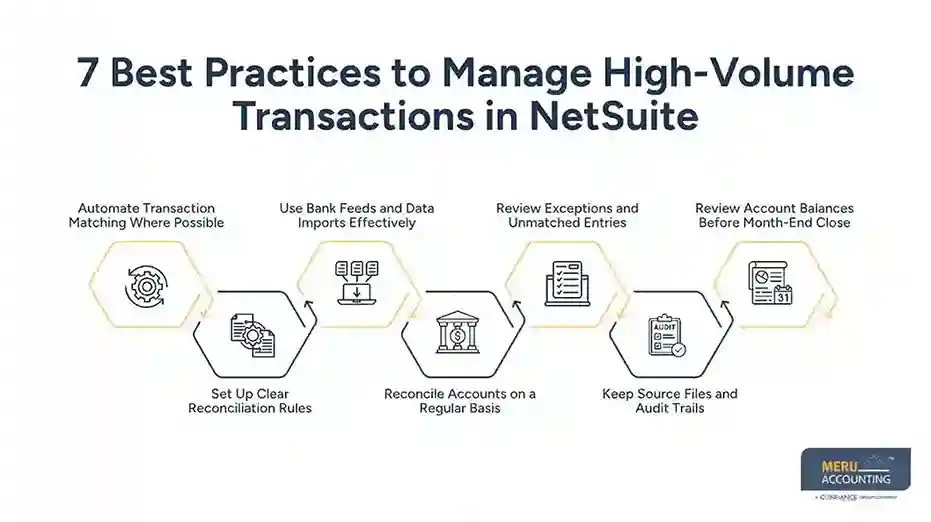
5. Review Exceptions and Unmatched Entries
Automated matching can save time, but some entries will still need a closer look. These may include partial payments, bank fees, refunds, split deposits, and timing gaps.
Create a list of open items and assign each one to a team member. Add a reason, owner, date, and next step for each item. This gives the team a clear view of what needs work.
During NetSuite account reconciliation, give priority to old items, large amounts, and entries that affect key reports. Do not use a journal entry just to force two balances to match. First, find the cause and keep proof of any change.
6. Keep Source Files and Audit Trails
Good records help teams explain each balance and show how they reached it. Keep bank statements, payment reports, vendor files, and other source data with the right account or close records.
Also, keep notes on key changes, write-offs, and manual entries. Each change should have a clear reason and the right approval.
This makes it easier to answer audit questions, check past work, and review issues that come up in later periods.
7. Review Account Balances Before Month-End Close
A final review can help catch errors before reports are sent to owners, lenders, or other users.
Check that key accounts have been reviewed, open items have an owner, and large gaps have been looked into. Also, compare current balances with past periods to spot changes that seem out of line.
A month-end checklist can help teams track each task and its status. It should show who did the work, who reviewed it, and what still needs to be done.
optional anymore
on running the business
How to Measure Account Reconciliation Performance
A fast process is not always a good one. Finance teams should track both speed and quality to see if their NetSuite account reconciliation process is working well.
Here are four useful measures:
Measure | What It Shows |
Reconciliation completion time | How long it takes to review and close each account. |
Unmatched transaction volume | How many entries still need a match or review. |
Exception resolution time | How long open issues take to resolve. |
Month-end close time | How many days the team needs to close the books. |
Review these measures each month and look for trends. For example, if the number of open items keeps rising, the team may need better match rules or cleaner source data.
You can also track how many items need manual review and how many are cleared on the first check. These figures can help show where the process needs work.
Outsourced NetSuite Reconciliation Services by Meru Accounting
A large transaction volume doesn’t always mean a business has poor financial controls. Often, the challenge lies in how transactions are grouped, imported, matched, and reviewed. For example, one bank deposit may cover hundreds of customer payments, while processing fees and refunds appear as separate entries. Tracing these items takes time and a clear understanding of how each account should balance.
Meru Accounting helps businesses manage this work through outsourced NetSuite reconciliation services tailored to their transaction volume and accounting needs. Our support includes:
- High-Volume Bank Reconciliation: Match bulk deposits, withdrawals, transfers, bank fees, and other cash movements with NetSuite records.
- Payment Gateway Reconciliation: Review payouts, processing fees, refunds, chargebacks, and settlement differences across payment platforms.
- Credit Card Reconciliation: Match card activity with statements and investigate missing, duplicate, or incorrect entries.
- Accounts Receivable Reconciliation: Trace customer payments, partial settlements, unapplied cash, and open invoice balances.
- Accounts Payable Reconciliation: Review vendor bills, payment records, credits, and outstanding balances.
- General Ledger Reconciliation: Review balance sheet accounts, investigate unusual balances, and clear old reconciling items.
- Month-End Reconciliation Support: Track pending reviews, resolve open items, and help prepare accounts for financial close.
Our accounting professionals bring multi-industry experience to complex reconciliation work. We focus on more than matching amounts: transaction references, dates, account mapping, supporting records, and unusual differences also need attention. Our review and quality-control process helps ensure that completed work is checked and unresolved items are clearly flagged.
Whether you need help with recurring monthly reconciliations or a backlog of high-volume transactions, Meru Accounting can provide dedicated accounting support that fits your NetSuite workflow.
Our Expert Insight
High transaction volume can hide patterns that are easy to miss during routine account reviews. For example, repeated small differences in payment fees, foreign exchange rates, or settlement amounts may point to a larger issue in how transactions are recorded.
Our recommendation is to look beyond individual account balances and review trends across reporting periods. Compare fee rates, settlement patterns, write-offs, and recurring adjustments. These trends can reveal issues with payment terms, system settings, or account mapping before they affect financial reports.
At Meru Accounting, we believe reconciliation should do more than support a clean month-end close. It should also help businesses spot changes in their financial data that deserve attention.
Key Takeaways
- NetSuite account reconciliation helps businesses check balances, match entries, and find errors in financial records.
- High transaction volumes can lead to duplicate entries, missing data, unmatched payments, and longer close times.
- Automated matching can save time, but unusual items and large gaps still need manual review.
- Daily or weekly checks can reduce the amount of work left for month-end.
- Clear rules, good source files, and audit trails help improve accuracy.
- Outsourced NetSuite reconciliation services can help businesses manage large workloads and keep account reviews on schedule.
FAQs
NetSuite account reconciliation compares bank statements and other financial records with entries in the system. Teams match transactions, investigate differences, and verify account balances.
Yes. NetSuite supports bank data imports and automated transaction matching. However, unmatched entries and unusual transactions still need manual review.
Use automated matching rules, regular data imports, and scheduled account reviews. Group transactions by account or source to make large reconciliation workloads easier to manage.
Common reasons include duplicate entries, missing reference numbers, incorrect amounts, timing differences, and incomplete payment data.
Outsourcing makes sense when transaction volumes exceed the in-house team’s capacity, reconciliation backlogs grow, or month-end close takes too long.
optional anymore
on running the business