Imagine processing payroll for 150 employees, only to find that the tax withheld from 12 employees is incorrect because their work locations were not updated. Now the payroll team must review employee records, correct tax amounts, and check whether any filings need changes. Problems like these show why payroll tax control needs more than a system that simply calculates salaries. Payroll tax management software brings employee tax details, withholding calculations, payment schedules, and filing records into one place.
However, not every provider offers the same level of tax coverage or migration service. Choosing a system that fits the business and transferring existing records correctly are equally important. This blog looks at what businesses should check before making that change.
What You Will Learn From This Blog
- The features that matter when selecting payroll tax management software.
- How to compare providers, service terms, and system security.
- How automated payroll tax management reduces repeated work and filing risks.
- Which employee and tax records must be checked before migration.
- How to transfer payroll information and test its accuracy.
- How to measure software performance after implementation.
Introduction to Payroll Tax Management Software and Its Role in Payroll Compliance
A change in an employee’s address, pay rate, or work location can affect payroll tax calculations. If that information does not reach the payroll system on time, the business may withhold the wrong amount or report incorrect wages. Payroll tax management software connects employee information with tax calculations, payment records, and filing schedules.
Consider a company with employees in California, Texas, and New York. Each location may have different state and local tax requirements. A suitable system applies the relevant settings to employee records and tracks the related tax duties. Automated payroll tax management can also reduce repeated entries, but payroll teams must still check the figures and confirm that payments and filings are complete.
Essential Features to Look for in Payroll Tax Management Software
Federal, State, and Local Tax Calculation
The system should calculate federal income tax withholding, Social Security, Medicare, and applicable state and local taxes. Check whether payroll tax management software covers every location where employees work and applies the correct tax rates.
Automated Tax Filing and Payment Processing
Look for features that prepare tax returns, schedule deposits, track filing status, and store payment confirmations. Filing and payment features should clearly show whether each tax task is completed, pending, or awaiting approval.
Tax Form Preparation and Year-End Reporting
The software should prepare W-2s, relevant 1099 forms, quarterly returns, and annual payroll reports. Check whether it can also prepare corrected forms when employee details or wage figures need changes.
Employee Tax Data Management and Recordkeeping
The system should store employee tax IDs, addresses, withholding choices, wage history, and relevant tax forms. Automated payroll tax management can reduce repeated entries when employee details move between HR and payroll records.
Compliance Alerts and Tax Law Updates
Choose a provider that sends alerts about revised tax rates, wage limits, and filing dates. Check whether payroll tax management software updates tax settings and tells users when new rules take effect.
Payroll Software Integration and Reporting Capabilities
Check whether the software connects with accounting, HR, time-tracking, and payment tools. Reports should show taxable wages, employer tax costs, withholding amounts, payment status, and pending filing tasks.
How to Evaluate and Choose the Right Payroll Tax Software Provider
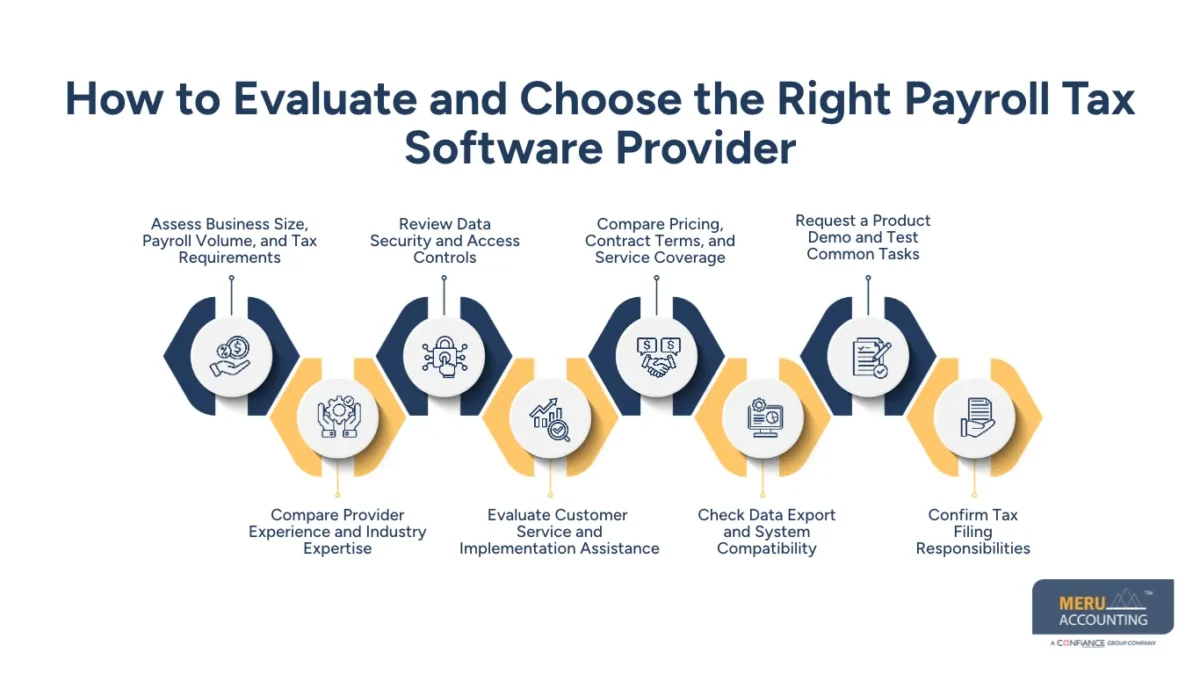
A provider may offer many features but still be unsuitable for a company’s actual payroll process. Compare its services against the work your team performs each month, the locations where employees work, and the records that need to be maintained.
Assess Business Size, Payroll Volume, and Tax Requirements
A business with 25 employees and one pay group has different needs from a company with 500 employees and several pay cycles. List employee numbers, work locations, pay groups, and tax duties before comparing providers. Payroll tax management software should fit the company’s actual workload.
Compare Provider Experience and Industry Expertise
Ask whether the provider has handled payroll for businesses with similar employee numbers and tax requirements. Its experience with multi-state payroll, bonuses, overtime, benefits, and year-end reporting can make a difference when payroll becomes more complex.
Review Data Security and Access Controls
Payroll records contain employee identification details and financial information that should not be available to every user. Review encryption, user permissions, login controls, audit logs, and backup policies before giving a provider access to payroll tax management software.
Evaluate Customer Service and Implementation Assistance
A provider’s service quality becomes clear when something goes wrong during a payroll run. Ask who will handle system setup, employee data transfer, tax configuration, and staff training. Also check support hours and the process for resolving filing or calculation issues.
Compare Pricing, Contract Terms, and Service Coverage
A low monthly fee may not include tax filing, year-end forms, migration, or extra employee records. Compare setup charges, monthly fees, filing costs, and additional service charges. Review the full contract before selecting payroll tax management software.
Check Data Export and System Compatibility
Before signing an agreement, ask how easily employee profiles, tax reports, and historical payroll records can be exported. Confirm that the new system can exchange data with existing accounting and HR tools without repeated manual entries.
Request a Product Demo and Test Common Tasks
Do not judge a system only by its sales presentation. Ask the provider to demonstrate employee setup, withholding changes, payroll approval, and tax report generation. Testing these tasks with sample records gives the payroll team a better idea of daily usability.
Confirm Tax Filing Responsibilities
Get written details of who calculates, approves, deposits, and files each tax amount. The IRS states that employers generally remain responsible for federal employment tax duties even when they hire a third-party payroll provider.
How Automated Payroll Tax Management Improves Accuracy and Compliance
A small error entered during employee setup can carry forward into several payroll runs. Automated payroll tax management reduces repeated manual work by using stored employee details and tax settings. However, the system still needs correct data and regular review by payroll staff.
Reduce Manual Tax Calculations and Filing Errors
When tax calculations depend on repeated manual entries, even a small typing error can affect an employee’s withholding. Payroll tax management software applies stored settings to each payroll run and can flag missing details or unusual amounts before approval.
Maintain Consistent Tax Payment Schedules
A missed deposit date can create penalties and extra work for the payroll team. A shared tax calendar shows filing deadlines, deposit dates, and pending payments. Automated payroll tax management can send reminders, while staff verifies that each payment reaches the correct agency.
Track Changing Federal and State Tax Requirements
Tax rules do not remain the same throughout the year. Changes in rates, wage limits, and filing rules may affect future payroll runs. Select a provider that updates its tax tables and explains when revised rules apply.
Improve Payroll Records and Audit Readiness
When an auditor asks for an earlier tax payment record, staff should not have to search through several spreadsheets and email folders. The system should retain tax returns, payment confirmations, wage reports, and employee changes for easy review.
optional anymore
on running the business
How to Prepare for Payroll Data Migration
The quality of the old payroll records determines how smoothly the new system can be set up. Moving incomplete information into new payroll tax management software will not correct existing errors. Businesses should review their records before transferring information to the new payroll tax management software.
Review Existing Payroll Systems and Employee Records
Start by checking where payroll information is stored. Employee files, tax forms, bank payment reports, and wage records may sit in different systems. Make a list of these sources before planning the transfer.
Identify Data Fields and Historical Payroll Information
Prepare a record of employee names, tax IDs, work locations, pay rates, deductions, and year-to-date wages. Also identify past tax returns and payment records required for reporting and future reviews.
Clean Duplicate, Outdated, and Incomplete Records
Two employee profiles for the same person can cause incorrect wage totals and tax reports. Remove duplicate entries, update old addresses, and correct missing tax details. Verify important changes against approved employee documents before entering the information into payroll tax management software.
Create a Payroll Data Backup Before Migration
A backup gives the business access to its old records if the transfer fails or some information does not appear in the new system. Save employee files, wage reports, tax forms, and payment history securely before making changes.
Establish Migration Responsibilities and Timelines
Decide who will review employee records, export files, check tax settings, and approve the transfer. Set deadlines for each task so that the migration does not interfere with the next scheduled payroll.
Step-by-Step Process to Migrate Payroll Data to a New System
Export Payroll and Employee Tax Information
Download employee profiles, wage history, withholding details, deductions, and payment records from the existing payroll tax management software. Check the exported files against the original records before sharing them with the new provider.
Map Existing Data Fields to the New Software
The same information may have different field names in two systems. Match each old field with its correct destination. Taxable wages, employee tax status, and work location must not be placed in unrelated fields.
Transfer Employee Details and Tax Withholding Records
Import employee names, tax IDs, addresses, pay rates, and withholding choices. Compare a sample of employee profiles with source records to find missing or misplaced information before completing the transfer.
Migrate Historical Payroll and Tax Filing Data
Move year-to-date wages, past payroll reports, tax deposits, and filing records where the new system permits. Retain secure copies of historical documents that cannot be imported.
Configure Tax Settings and Payroll Integrations
Set up federal, state, and local tax details, payment schedules, employee pay groups, and bank information in the new payroll tax management software. Test accounting and HR integrations to confirm that payroll figures reach the correct accounts.
Validate Migrated Data Before Going Live
Run a comparison between the old system and the new payroll tax management software. Check employee counts, gross wages, deductions, withholding, and year-to-date totals. Resolve differences before processing the first live payroll.
Common Payroll Data Migration Challenges and How to Address Them
Incomplete or Inconsistent Employee Records
Missing tax IDs, outdated addresses, and duplicate profiles can cause transfer errors. Review employee records against approved documents and correct incomplete details before importing them.
Incorrect Tax Withholding Configurations
An employee’s tax settings may change after a move or a new withholding form. Check tax forms, work locations, and withholding choices in the new payroll tax management software before approving the first payroll run.
Missing Historical Payroll Information
Some systems cannot import every old tax return or payroll report. Keep secure copies of past records and confirm that year-to-date wage totals match the original system.
Integration and Compatibility Issues
Old and new systems may use different file formats or field names. Test data transfers between payroll, HR, and accounting tools before moving all records.
Data Security Risks During Migration
Employee tax details should not pass through open email links or unsecured files. Use approved transfer methods, restrict access to authorised users, and remove temporary permissions after migration.
Measuring the Performance of Payroll Tax Management Software
Payroll Tax Calculation Accuracy
Compare tax calculations with approved payroll figures and relevant tax records. Track errors, corrections, and repeated differences across each payroll cycle to see whether the system is producing reliable results.
Tax Filing and Payment Timeliness
Review whether tax deposits and returns reach the correct agencies by their due dates. Retain payment confirmations and filing receipts so the payroll team can verify completed tasks.
Reduction in Manual Payroll Tasks
Track staff time spent on tax calculations, data entry, report checks, and filing work. Automated payroll tax management should reduce repeated tasks while keeping human review in place.
Compliance Reporting and Audit Documentation
Check whether payroll tax management software generates reports showing taxable wages, tax payments, filing dates, and employee record changes. Clear reports make it easier to review payroll activity and prepare documents when questions arise.
How Meru Accounting Provides Payroll and Accounting Services
Payroll expenses affect more than salary payments. They also form part of a company’s monthly financial reports, tax-related entries, and cash flow records. Meru Accounting provides payroll processing, bookkeeping, accounts payable, accounts receivable, and financial reporting services for businesses across the USA.
Businesses can include payroll-related accounting work in their agreed service scope to record salary expenses, tax-related entries, and other payroll costs. Meru Accounting also provides bookkeeping services that record business transactions and reconcile financial accounts.
For companies adopting payroll tax management software, accurate financial records matter during and after the transfer. Regular reviews of payroll expenses and related accounting entries can make month-end reporting more reliable and give management a clearer view of labour costs.
Our Expert Perspective
A software demo may show that every task can be completed in a few clicks, but that does not prove the system is ready for actual payroll work. The real test comes when employee details change, tax settings need review, or past records must be checked.
Before changing providers, test the new system with sample employee records and compare its tax results with the old system. Review payment duties, filing terms, and data export options in writing. Automated payroll tax management works best when correct software settings are combined with regular checks by trained staff.
Key Takeaways
- Choose payroll tax management software based on employee count, payroll volume, work locations, and tax duties.
- Evaluate whether the payroll tax management software offers accurate tax calculations, automated filing, payment processing, reporting, and system integrations.
- Review provider experience, data security, pricing, and implementation services.
- Clean employee records and create a secure backup before migration.
- Transfer employee tax details and historical payroll information in a planned order.
- Compare wages, deductions, withholding, and year-to-date totals before going live.
- Remember that employers generally retain responsibility for federal employment tax duties when using third-party providers.
FAQs
Key features include tax calculations, automated filing, payment tracking, employee tax records, compliance alerts, and payroll reporting.
Businesses should compare tax coverage, provider experience, data security, customer service, integration options, pricing, and migration services.
The process involves exporting payroll records, cleaning employee data, mapping fields, transferring tax details, and checking wage totals before launch.
Common challenges include duplicate employee records, incorrect tax settings, missing wage history, system compatibility issues, and data security risks.
Automated payroll tax management reduces manual calculations, tracks filing deadlines, records tax payments, and applies updated tax settings.
optional anymore
on running the business