NetSuite can handle a lot of the work behind running a business, from tracking sales and expenses to managing employee records and financial reports. But payroll is a different matter. If you’re planning to run your entire finance operation through one system, you may wonder: does NetSuite do payroll, or will you still need a separate payroll provider?
NetSuite offers SuitePeople U.S. Payroll, which covers key tasks such as pay calculations, tax filings, and employee payments. However, its features have limits, particularly for companies with employees outside the United States. Understanding what the system can handle—and where another solution may be needed—can help you choose the right payroll setup before making a costly change.
What You Will Learn From This Blog
- Whether NetSuite has built-in payroll and what it covers.
- How NetSuite payroll software works with employee and finance data.
- The main features of SuitePeople U.S. Payroll.
- Whether NetSuite supports payroll for staff in other countries.
- Key limits to review before choosing a payroll setup.
Does NetSuite Do Payroll? Understanding Its Payroll Capabilities
Yes, NetSuite offers payroll through SuitePeople U.S. Payroll. It is a full-service payroll solution that works within the NetSuite system. It can calculate employee earnings, taxes, deductions, and company contributions. It also helps with tax payments, tax forms, and direct deposits.
This means businesses do not always need a separate payroll system to pay their U.S. staff. They can use NetSuite to manage key payroll tasks and keep the data close to their finance records.
However, there is an important point to note: SuitePeople U.S. Payroll supports U.S. federal, state, and local payroll taxes. It is not a built-in global payroll tool. Businesses with staff in other countries may need a local payroll provider or a partner-built solution.
So, when asking does NetSuite do payroll, it is best to look at where your staff works, how many payroll rules apply, and what level of support your business needs.
NetSuite also offers the Paycheck Journal feature. This lets partners link external payroll systems or build custom payroll tools. It records the accounting impact of payroll in NetSuite but does not run payroll or issue paychecks on its own.
optional anymore
on running the business
How Does NetSuite Payroll Software Work?
NetSuite payroll software works by using employee, pay, tax, and work data to create payroll batches. Once the setup is in place, the payroll team can review the data, run the pay batch, check the results, and commit payroll.
Here is how the process works:
- Set up employee records: Add key details such as pay rate, tax status, home address, work location, and payment details.
- Set up payroll items: Define earnings, deductions, taxes, and other pay items that apply to each worker.
- Add time and pay data: Use approved work hours, salary data, commissions, and other pay inputs.
- Create a payroll batch: Group the employees who need to be paid for the same pay period.
- Review payroll results: Check gross pay, tax withholdings, deductions, and net pay before the batch is final.
- Commit payroll: Finalize the batch so payments and related records can be processed.
After payroll is committed, NetSuite records the related payroll data and tax liabilities. Direct deposit data can also be sent to an authorized third party for payment to employee bank accounts.
For example, say a company has $80,000 in gross wages for a pay period. It withholds $14,000 in employee taxes and other deductions. The net pay is $66,000. The business must also record its own payroll tax costs and any other employer-paid benefits.
The exact journal entries depend on the payroll items and accounts set up in NetSuite. A sound setup helps make sure wages, tax costs, and amounts owed are posted to the right accounts.
Key Features of NetSuite Payroll
NetSuite offers several features through SuitePeople U.S. Payroll. These help businesses manage pay runs and keep key payroll tasks in one system.
1. Automated Payroll Calculations
The system calculates employee earnings, taxes, deductions, and company contributions. It uses current tax data to help keep payroll calculations in line with tax rules.
This can reduce manual work and lower the risk of errors in pay runs. Still, payroll teams must keep employee data, tax status, work sites, and pay rules up to date.
2. Federal, State, and Local Tax Filing
SuitePeople U.S. Payroll supports federal, state, and local tax filing and payments. It can also process key year-end forms, such as W-2, W-2C, and 1099-NEC forms, based on the service rules.
This helps reduce the need to file each form by hand. Businesses must still review their tax setup and keep the right tax details on file.
3. Direct Deposit and Paychecks
NetSuite supports direct deposit through an authorized third party. It can also support service-printed checks, pay stubs, and vouchers.
This gives businesses more than one way to pay staff. The right choice may depend on employee needs and the firm’s pay policy.
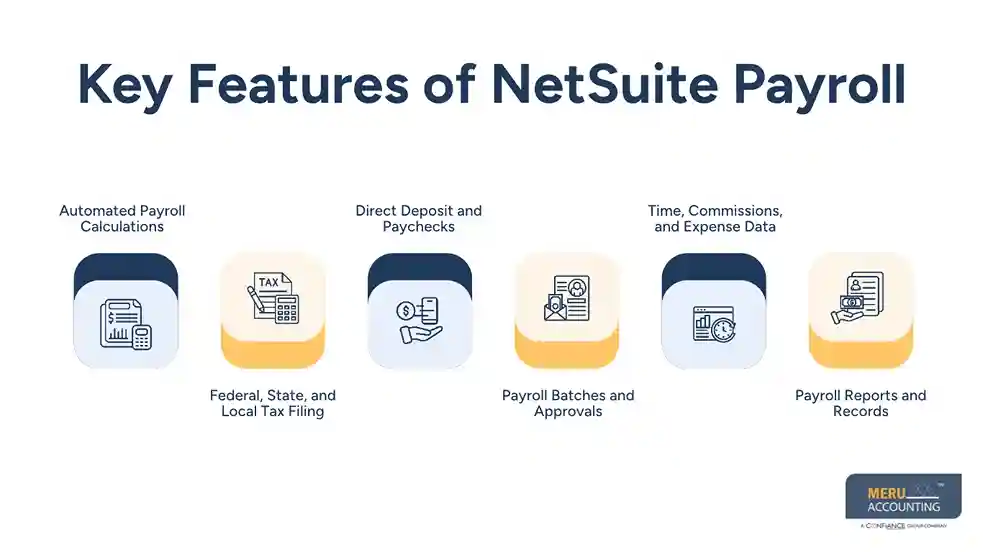
4. Payroll Batches and Approvals
Payroll batches let teams group pay data for a set period. They can review the batch before they commit it.
This step matters because a wrong pay rate, missed work hour, or bad tax detail can affect the full pay run. A clear review process can help catch these issues before payment.
5. Time, Commissions, and Expense Data
SuitePeople U.S. Payroll can work with time tracking, commissions, and expense management data. This helps teams bring key pay inputs into the payroll process.
For firms that pay hourly staff or sales teams, this can help link work data to employee pay. Teams should still check that each pay item is set up and mapped to the right account.
6. Payroll Reports and Records
NetSuite keeps payroll data in the same system as other finance records. Teams can review pay details, tax amounts, and payroll costs to support close and audit work.
This is one of the key reasons firms look at NetSuite payroll software. It can help link pay data with the wider finance process, rather than keep payroll records in a system with no clear link to the books.
Does NetSuite Support Payroll Outside the United States?
This is a key point for firms with staff in more than one country. SuitePeople U.S. Payroll is designed for U.S. payroll taxes. It does not offer the same built-in tax filing and pay services for every country.
For firms that use NetSuite OneWorld, SuitePeople U.S. Payroll can process payroll for eligible U.S. subsidiaries with their own Employer Identification Numbers (EINs). But non-U.S. staff may need a local payroll provider.
NetSuite offers the Paycheck Journal feature to help track payroll data from other countries. A NetSuite partner can use it to link an external payroll system or build a custom payroll solution. The journal records the accounting impact of pay data in NetSuite.
For example, a U.S. company may use SuitePeople U.S. Payroll for its U.S. team and a local payroll provider for staff in the UK or Canada. The external provider handles local pay and tax rules. Payroll data can then be sent to NetSuite so the finance team can record wages, tax costs, and amounts owed.
The key is to check local tax rules before choosing a setup. A payroll tool that works well in the U.S. may not meet the rules in another country.
NetSuite Payroll Limitations Businesses Should Know
Although NetSuite offers useful payroll tools, businesses should review a few limits before they choose it.
Area | What businesses should know |
Country support | SuitePeople U.S. Payroll supports U.S. federal, state, and local taxes. |
Global payroll | Non-U.S. payroll may need a local provider or partner-built tool. |
Benefit payments | NetSuite does not pay non-tax liabilities such as 401(k) and health insurance through SuitePeople U.S. Payroll. |
Setup time | Payroll setup can take 45–60 business days. |
Data quality | Wrong employee, pay, or tax data can lead to wrong payroll results. |
External systems | A third-party payroll setup needs clear data mapping and review controls. |
Another point is that the Paycheck Journal is not a payroll tool that customers can use on its own. It is made for use by NetSuite partners to build links or custom payroll solutions.
Businesses should also plan for setup well ahead of the first pay date. Oracle states that SuitePeople U.S. Payroll setup needs 45–60 business days and advises firms to start at least 60 business days before the first planned check date.
These limits do not mean NetSuite is a poor choice. They mean the right setup depends on staff location, pay rules, company size, and the need for local tax support.
NetSuite Payroll Services From Meru Accounting
A payroll run may be complete, but the accounting work doesn’t end there. Wages must be posted to the right expense accounts, tax withholdings must match payroll reports, and outstanding liabilities must be tracked until they’re paid. When payroll data comes from different providers, keeping these records in sync with NetSuite can become even more challenging.
Meru Accounting helps businesses manage the accounting work behind NetSuite payroll. Our services include:
- NetSuite payroll journal entries: Recording gross wages, employer payroll taxes, employee deductions, and benefit costs in the correct accounts.
- Payroll clearing account reconciliation: Matching payroll funding, bank withdrawals, and payment records to find missing or unmatched amounts.
- Payroll tax and liability reconciliation: Reviewing tax payable, benefit deductions, and other payroll liabilities against provider reports.
- Third-party payroll integration support: Helping map external payroll data to NetSuite accounts and review the resulting entries.
- Payroll expense reporting: Tracking labor costs by department, project, or entity to support better financial decisions.
- Month-end payroll reconciliation: Checking payroll balances and resolving differences before the books are closed.
Whether you run SuitePeople U.S. Payroll or use an external payroll provider connected to NetSuite, Meru Accounting can support the accounting, reconciliation, and reporting work that keeps your payroll records aligned with your books.
Our Expert Insight
One payroll issue that often goes unnoticed is the timing of wage expenses. For example, if a pay period ends on March 31 but employees receive their pay on April 5, the wages earned in March should still be recorded as March expenses. Recording them only when the payment is made can understate labor costs in March and overstate them in April.
For businesses using NetSuite, we recommend reviewing unpaid wages at each month-end and recording the required payroll accruals. Once the actual payroll is posted, those accruals should be cleared to avoid duplicate expenses. This helps keep labor costs accurate and gives management a more reliable view of monthly financial performance.
Key Takeaways
- NetSuite offers built-in payroll through SuitePeople U.S. Payroll.
- Its native payroll service supports U.S. federal, state, and local tax needs.
- NetSuite can calculate earnings, taxes, deductions, and company contributions.
- Direct deposit, payroll batches, tax filings, and year-end forms are part of the service.
- Global payroll may need a local provider or a partner-built solution.
- The Paycheck Journal helps record external payroll data but does not run payroll on its own.
- Good account mapping and regular checks help keep payroll records in line with the books.
FAQs
Yes. SuitePeople U.S. Payroll supports employee pay runs, tax deductions, and direct deposits for eligible U.S. businesses.
Yes. NetSuite supports payroll calculations for both hourly and salaried employees, based on their pay rates and approved work hours.
Yes. NetSuite can connect with ADP and other third-party payroll providers through integrations that transfer payroll data and accounting entries.
It can be, depending on the company’s payroll needs, budget, and implementation requirements. Small businesses should compare it with dedicated payroll solutions before choosing.
Not through SuitePeople U.S. Payroll alone. Businesses with international employees typically need local payroll providers and integrations to bring payroll data into NetSuite.
optional anymore
on running the business