Client portal software for accountants provides a secure online space to exchange financial documents, manage client requests, and track approvals. Accounting firms use it to collect bank statements, invoices, payroll records, tax documents, and other financial information.
Without a central system, employees may receive files through emails, messaging apps, and shared folders. This makes document tracking difficult and increases repeated communication. A dedicated portal keeps client records and requests organised.
An accounting client management platform may also include digital forms, electronic signatures, task management, and accounting software integrations. This blog covers its features, implementation, pricing, challenges, and business value.
What You Will Learn From This Blog
- The purpose of client portal software in accounting.
- Essential features for managing client records and communication.
- Eight steps for software implementation.
- Pricing models and popular software comparisons.
- Common implementation issues and their solutions.
- Methods to measure software ROI.
What Is Client Portal Software for Accountants?
Client portal software for accountants is an online system that allows firms and clients to exchange documents, submit information, review requests, and approve files. Each client receives authorised access to their own records.
For example, a bookkeeping firm can request bank statements, invoices, and payroll records through the portal. The accountant can review submissions and track missing documents.
An accounting client management platform may also include task tracking, automated reminders, and client onboarding. Its actual functions depend on the software plan.
optional anymore
on running the business
Why Accounting Firms Need an Accounting Client Management Platform
Centralised Client Information and Document Management
A central system stores client records, financial documents, and requests in organised folders. Employees can find bank statements and invoices without searching through separate email conversations.
Improved Client Communication and Collaboration
Client portal software for accountants provides one place for messages, document requests, and work updates. Employees can review earlier discussions and track unanswered client queries.
Secure Financial Document Exchange
Financial records contain sensitive business and personal information. Firms should select software with encryption, secure login, access controls, and activity records.
Reduced Administrative Work and Manual Follow-Ups
Automated reminders can notify clients about missing documents and pending approvals. Employees can review open requests instead of sending repeated emails.
Better Client Experience and Service Delivery
Clients can upload documents and check pending requests without visiting the accounting office. Clear instructions also reduce confusion during monthly document collection.
Essential Features to Look for in Client Portal Software for Accountants
Secure Document Sharing and File Storage
Look for encrypted file transfers, organised folders, controlled downloads, and suitable storage limits. Check backup policies and document export options.
Client Onboarding and Digital Forms
Client portal software for accountants should include digital forms to collect business details, contact information, and service requirements. Standard forms reduce repeated data entry during client registration.
Task Management and Workflow Automation
Task lists in an accounting client management platform show assigned work, due dates, and pending activities. Automated reminders can manage recurring requests for monthly bookkeeping and tax work.
E-Signature and Document Approval
Electronic signatures allow clients to sign engagement letters and consent forms online. Check signature records and applicable legal requirements.
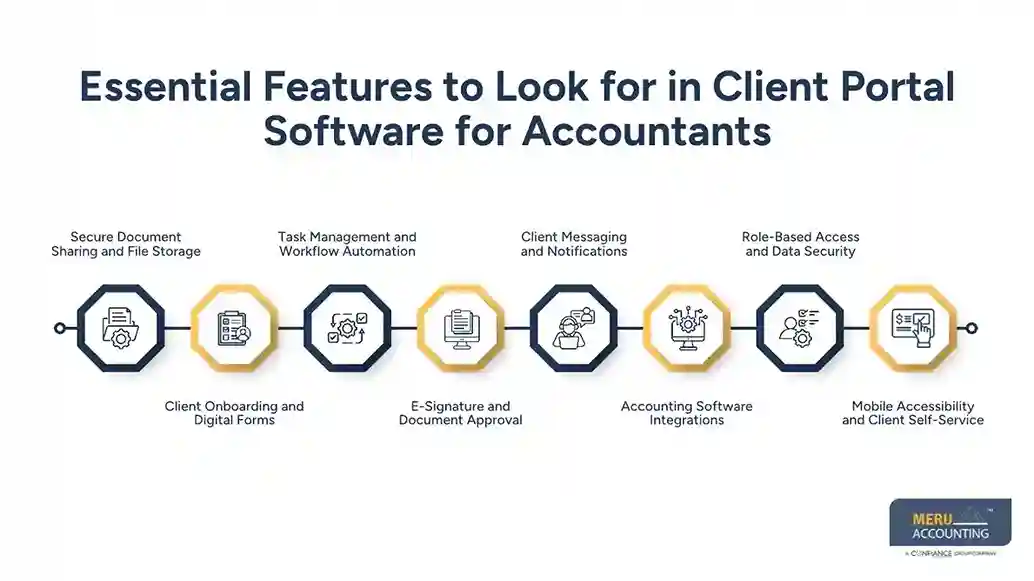
Client Messaging and Notifications
Built-in messaging keeps discussions connected to client accounts. Notifications inform users about new requests, replies, and pending approvals.
Accounting Software Integrations
Check whether the portal connects with existing accounting, payroll, and tax applications. Test data transfers before purchasing the subscription.
Role-Based Access and Data Security
Different permissions should be available for administrators, accountants, and clients. Multi-factor authentication and access logs are also important.
Mobile Accessibility and Client Self-Service
Mobile-friendly client portal software for accountants allows clients to upload invoices and review requests through their phones. Check whether its mobile version offers essential desktop features.
Client Portal Software for Accountants: Step-by-Step Implementation Guide
Step 1: Define Client Portal Requirements and Objectives
Identify requirements for client portal software for accountants by evaluating issues such as missing records, repeated reminders, and delayed approvals. Set measurable targets for document collection and task completion.
Step 2: Select the Right Client Portal Software
Compare client portal software and accounting client management platforms based on security, storage capacity, pricing, integrations, and user limits. Request a product demonstration before selecting a provider.
Step 3: Configure User Roles and Access Permissions
Configure client portal software for accountants by assigning permissions according to employee responsibilities. Confirm that clients can only view their own financial records.
Step 4: Organise Client Documents and Data
Create folders by client, service, and financial year. Remove duplicate files and verify records before migration.
Step 5: Integrate Accounting and Practice Management Tools
Connect the portal with existing software where required. Test document transfers and client data updates.
Step 6: Set Up Client Onboarding and Communication Workflows
Prepare welcome messages, digital forms, document lists, and reminder schedules. Assign employees to manage client requests.
Step 7: Test the Portal Before Firm-Wide Deployment
Test uploads, downloads, permissions, notifications, and signatures with a small client group. Resolve errors before full deployment.
Step 8: Train Employees and Introduce the Portal to Clients
Train employees on document review and task management. Give clients clear login instructions and upload guidance.
Client Portal Software Pricing Comparison: What Accounting Firms Should Expect
Monthly vs. Annual Subscription Pricing
Monthly plans offer shorter payment commitments, while annual plans may have lower monthly rates. Compare the full yearly cost and cancellation terms.
Per-User vs. Per-Client Pricing Models
Per-user plans charge according to employee accounts, while per-client plans consider the number of client accounts. Choose a model that matches the firm’s size.
Essential Features Included in Different Pricing Plans
Basic plans may include file sharing and client access. Advanced plans may include automation, electronic signatures, and additional integrations.
Additional Costs for Integrations, Storage and Automation
Extra storage, premium integrations, training, and automation in client portal software for accountants may increase the total cost. Include these expenses in the annual budget.
Pricing Comparison of Popular Accounting Client Portal Software
Software | Indicative starting price | Main purpose |
Financial Cents | $19/month | Client portal and workflows |
TaxDome | $800/user/year | Client and practice management |
Canopy | $74/user/month | Tax practice management |
Karbon | $59/user/month | Team workflow management |
Ignition | $39/month | Client agreements and billing |
Prices are indicative US dollar rates and may change. The products offer different features, so firms should compare current plans, user limits, and additional charges before purchasing.
Common Implementation Challenges and How to Avoid Them
Employee Resistance to New Software
Employees may prefer existing work methods. Provide practical training and establish clear portal usage rules.
Client Adoption and Portal Accessibility
Some clients may face login or upload issues. Provide simple instructions and a contact point for technical queries.
Data Migration and System Integration Issues
Old folders may contain duplicate or incomplete records. Review data and test integrations before migration.
Incorrect User Permissions and Security Risks
Incorrect settings in client portal software for accountants can expose private information. Review access permissions and remove inactive accounts regularly.
Incomplete Workflow Configuration
Missing task owners and deadlines can delay work. Assign responsibilities and test recurring workflows before launch.
Measuring the ROI of Client Portal Software for Accountants
Reduction in Administrative Hours
Compare employee hours spent on document collection and follow-ups before and after implementation.
Faster Document Collection and Approval
Measure the average time between sending a request and receiving the required document or approval.
Lower Manual Communication Costs
Track routine calls, emails, and reminders to identify changes in communication time.
Client Retention and Satisfaction
Review client feedback, renewal rates, and complaints about document submission and communication.
Overall Accounting Practice Efficiency
Compare overdue tasks, monthly completion rates, and financial reporting timelines within the accounting client management platform.
Meru Accounting's Approach to Client Accounting and Financial Record Management
Meru Accounting provides bookkeeping and accounting services for businesses. Our services cover the following areas:
- Transaction Recording: We record business income, expenses, sales, and purchase transactions with proper financial details.
- Bank Reconciliation: Comparing bank statements with recorded transactions to identify missing entries and differences.
- Accounts Payable and Receivable: Recording supplier invoices, customer invoices, outstanding payments, and payment status.
- Payroll Processing: Managing salary records, payroll entries, employee payment details, and related financial records.
- Financial Reporting: We prepare financial reports based on recorded transactions, reconciled balances, and reviewed accounting data.
Client portal software for accountants can organise these processes by providing a common place for clients to submit bank statements, invoices, payroll details, and other required documents.
At Meru Accounting, our approach focuses on organised financial records, defined accounting procedures, and regular review of submitted information. These practices allow our accounting teams to identify missing records and complete assigned work according to the reporting schedule.
Our Expert Perspective
Accounting firms should select software according to their actual client volume and monthly work requirements. Before purchasing client portal software for accountants, test document sharing, access permissions, integrations, and the complete annual cost. A suitable accounting client management platform should fit existing accounting processes rather than add unnecessary tasks.
Key Takeaways
- Client portal software centralises financial documents and client communication.
- Essential features include secure storage, forms, task tracking, and signatures.
- Firms should test their accounting client management platform before full implementation.
- Pricing depends on users, clients, storage, and additional features.
- ROI should be measured through time savings and faster document collection.
FAQs
The best client portal software depends on the firm’s size, budget, and service needs. Financial Cents, TaxDome, Canopy, and Karbon are options worth comparing.
Client portal software may cost from under $50 per month to several hundred dollars per user annually, depending on features, storage, and subscription terms.
Accounting firms should look for secure document sharing, client messaging, digital forms, e-signatures, task management, workflow automation, and accounting software integrations.
It centralises document collection, client requests, approvals, and communication, reducing repeated follow-ups and making pending accounting tasks easier to track.
Suitable software can protect financial documents through encryption, multi-factor authentication, role-based access, and activity logs, subject to proper configuration.
optional anymore
on running the business