
Payroll is one of those expenses that can look simple on paper but add up fast as a business grows. A few employees, a change in payroll plan, or an extra service can all affect the monthly bill. If you’re considering QuickBooks, understanding the QuickBooks payroll cost is a good place to start.
QuickBooks offers three payroll plans, but the cheapest option isn’t always the right fit. The best choice depends on how many people you pay, what payroll tasks you handle, and which features your team actually needs. Let’s look at the 2026 prices, compare the plans, and see what businesses can expect to pay.
What You Will Learn From This Blog
- How much QuickBooks Payroll costs in 2026.
- What each payroll plan offers and how the plans differ.
- Which extra fees may raise your monthly bill.
- How to work out payroll costs based on team size.
- What to check before choosing a payroll plan.
- How expert payroll support can help keep costs and records in check.
How Much Does QuickBooks Payroll Cost in 2026?
QuickBooks Workforce offers three main payroll plans in the US: Payroll, Premium, and Elite. Each has a base monthly fee and an added charge for each employee. The plan you choose will affect your total bill.
The list prices are:
Payroll Plan | Base Monthly Fee | Cost Per Employee |
Workforce Payroll | $50 | $7 |
Workforce Premium | $88 | $13 |
Workforce Elite | $134 | $17 |
These are standard list prices, not short-term sale rates. Intuit may offer a lower rate for new users for a set time. Once that offer ends, the bill moves to the regular rate. So, check the full price before you sign up.
For example, a firm with five employees on the Payroll plan would pay $85 per month before any extra fees. This includes the $50 base fee and $35 in employee fees.
The key point is that the QuickBooks payroll cost is not the same for every firm. Your team size, plan, and use of extra services all play a role.
optional anymore
on running the business
QuickBooks Online Payroll Pricing 2026: Plans and Features Compared
Each QuickBooks plan has tools to help firms pay staff and handle payroll tax tasks. But not all plans offer the same level of support. Here’s what you get with each option.
1. Workforce Payroll
The Payroll plan starts at $50 per month, plus $7 per employee. It is the base plan and may suit small firms that need core payroll tools.
Key features include:
- Full-service payroll.
- Payroll tax math, tax payments, and tax form filing for federal and state taxes.
- Auto payroll for eligible firms.
- Direct deposit.
- Employee access to pay stubs and tax forms.
- Payroll reports.
- 1099 e-file tools.
- Phone and chat product support.
This plan can work well if your payroll needs are simple and you do not need built-in time tracking or advanced HR tools.
2. Workforce Premium
The Premium plan starts at $88 per month, plus $13 per employee. It has all the core payroll tools, along with added time and team tools.
Key features include:
- All core payroll features.
- Time tracking through the Workforce app.
- Job and shift schedules.
- Expert review of payroll setup.
- Same-day direct deposit for eligible users.
- More employee data tools.
- Added HR and team tools.
This plan may suit firms that pay hourly staff or need to track work hours by job. It can also help reduce manual work when managers need to review staff time before each pay run.
3. Workforce Elite
The Elite plan starts at $134 per month, plus $17 per employee. It offers the most support and tools among the three plans.
Key features include:
- All Premium plan features.
- Expert payroll setup.
- Tax Penalty Protection, subject to terms.
- Personal HR support through Mineral.
- Advanced time and project tools.
- Geofencing and mileage tracking.
- More HR and staff management tools.
- Same-day direct deposit for eligible users.
Elite may be a good fit for firms with more complex payroll needs. Its expert setup and tax help can also be useful for owners who want more support.
Quick Comparison of the Plans
Feature | Payroll | Premium | Elite |
Full-service payroll | Yes | Yes | Yes |
Federal and state tax filing | Yes | Yes | Yes |
Auto payroll | Yes | Yes | Yes |
Time tracking | No | Yes | Yes |
Expert setup or review | No | Review | Full setup |
HR expert support | Paid add-on | Paid add-on | Included |
Tax Penalty Protection | No | No | Yes, terms apply |
The best plan depends on the work you need it to do. A firm that only needs pay runs may not need Elite. A firm with hourly staff, job costs, and HR needs may get more value from Premium or Elite.
What Additional Fees Can Increase QuickBooks Payroll Cost?
The base fee is only one part of the bill. Some services and tasks may add to the total amount you pay each month.
Here are some costs to check:
- Employee fees: Each active employee adds a set fee based on your plan. As your team grows, this part of the bill grows too.
- Extra state tax filing: The plan includes one state tax filing. Payroll and Premium users may pay $12 per month for each added state. Elite has no extra fee for added state tax filings under the listed terms.
- Contractor payments: Direct deposit payments to contractors may have added fees. Intuit lists fees of $7, $13, and $17 for Payroll, Premium, and Elite, based on the plan and payment terms.
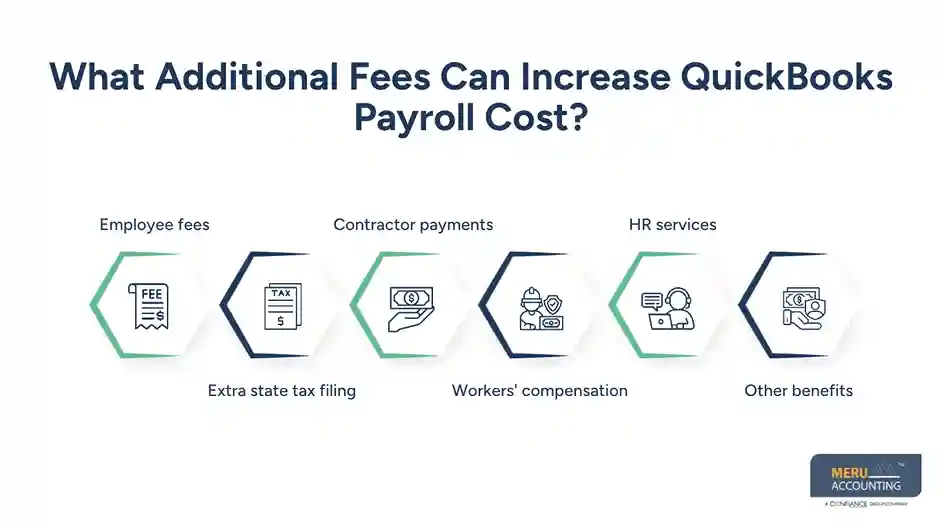
- Workers’ compensation: If you use a linked workers’ comp plan, extra fees apply. The cost can depend on the policy, payroll, and provider.
- HR services: Mineral HR tools and expert help may cost extra on some plans. Elite includes access to a personal HR advisor.
- Other benefits: Health plans, 401(k) plans, and some benefit services may have their own fees. These are not part of the basic payroll plan price.
Before you sign up, review the full fee list. This helps you avoid a gap between the price shown on the plan page and the bill you get each month.
How Much Does QuickBooks Payroll Cost for Different Business Sizes?
The QuickBooks payroll cost changes with the number of staff on your payroll. The examples below use standard monthly list prices. They do not include tax, add-ons, or short-term offers.
Number of Employees | Payroll | Premium | Elite |
5 employees | $85 | $153 | $219 |
10 employees | $120 | $218 | $304 |
15 employees | $155 | $283 | $389 |
25 employees | $225 | $413 | $559 |
50 employees | $400 | $738 | $984 |
For example, a firm with 10 staff on Premium would pay:
- Base monthly fee: $88
- Employee fees: 10 × $13 = $130
- Total monthly fee: $218
For a firm with 25 staff on Elite, the cost would be:
- Base monthly fee: $134
- Employee fees: 25 × $17 = $425
- Total monthly fee: $559
These figures show why it’s worth checking the fee per employee before you choose a plan. A low base fee may look good at first, but the total can rise as you hire more staff.
What Factors Affect QuickBooks Online Payroll Pricing?
Several factors can change your final bill. Keep these in mind when you review QuickBooks Online Payroll pricing 2026.
Number of employees: Each employee adds a fee to the base plan. A growing team can raise your monthly bill even if you stay on the same plan.
Plan features: Premium and Elite cost more because they offer extra tools. If you do not use time tracking, HR support, or expert setup, you may not need to pay for them.
Number of states: Firms with staff in more than one state may face extra state tax filing fees on some plans. This is worth checking if you hire remote staff.
Contractor payments: If you pay many contractors by direct deposit, check the related fees. These costs may add up over the year.
Optional services: Workers’ comp, health plans, 401(k) services, and paid HR tools can raise the total cost.
Promotional rates: New users may get a discount for a set time. Do not base your budget only on the sale price. Check the full rate that will apply after the offer ends.
A good way to assess QuickBooks Online Payroll pricing 2026 is to work out the cost for your current team and your likely team size over the next year.
How Meru Accounting Helps Businesses Manage QuickBooks Payroll
Choosing a QuickBooks Payroll plan is one part of payroll management. Getting employee data right, reviewing pay runs, tracking payroll expenses, and keeping tax records in order require consistent accounting work. A mismatch between payroll reports and the general ledger, for example, can affect wage expenses, tax liabilities, and month-end reports.
Meru Accounting helps businesses manage these tasks with hands-on QuickBooks Payroll and accounting support. Our services include:
- QuickBooks Payroll Setup: Set up employee profiles, pay rates, pay schedules, and payroll preferences.
- Payroll Processing: Process employee wages, overtime, deductions, bonuses, and other pay items.
- Payroll Tax Support: Maintain payroll tax records, review tax liabilities, and assist with payroll tax reporting.
- Payroll Reconciliation: Match payroll reports with bank records and general ledger entries to identify differences.
- Payroll Reporting: Prepare payroll summaries, wage reports, and labor cost reports for better financial review.
- QuickBooks Accounting Support: Record payroll expenses, track liabilities, and keep payroll entries aligned with the books.
Our team also helps review payroll data and resolve discrepancies before they affect financial reports. This gives business owners and accounting firms a more reliable view of payroll expenses while reducing the manual work involved in maintaining accurate records.
Our Expert Insight
One thing worth considering when reviewing payroll software is how well it handles changes in your business. A company may start with a few salaried employees but later hire hourly workers, add new locations, or bring on remote staff in different states. These changes can affect payroll workflows, tax filings, and the level of support needed.
We recommend reviewing your payroll setup whenever your workforce or pay structure changes. Don’t wait until year-end to find out that an old pay rate, incorrect tax setup, or outdated employee record has caused problems. A payroll system should support the way your business operates today while leaving room for future growth.
Key Takeaways
- QuickBooks offers three main US payroll plans: Payroll, Premium, and Elite.
- Base fees range from $50 to $134 per month, plus an added fee per employee.
- Premium adds time tracking and more team tools.
- Elite adds expert setup, HR support, and Tax Penalty Protection, subject to terms.
- Extra state filings, contractor payments, and benefit services may raise the bill.
- Compare the full monthly cost, not just the base fee, before you choose a plan.
FAQs
For 10 employees, Payroll costs $120 per month, Premium costs $218, and Elite costs $304 at standard list prices.
Yes. Payroll and Premium may charge $12 per month for each additional state tax filing. Elite includes this service under its listed terms.
No. QuickBooks Payroll is a separate subscription that you can add to your QuickBooks Online accounting plan.
The Basic Payroll plan works well for simple payroll needs. Premium adds time tracking, while Elite offers more HR and expert support.
Yes. Once the promotional period ends, your subscription typically renews at the regular price. Check the renewal rate before signing up.
optional anymore
on running the business