
Meru Accounting

Accounting Software for Attorneys: 10 Essential Features Every Law Firm Needs

Contents
Looking for Reliable Accounting Support?

Let our experts help you simplify accounting, manage compliance and focus on growing your business.


    Accounting Software for Attorneys: 10 Essential Features Every Law Firm Needs

    Not every dollar that comes into a law firm belongs to the firm. A client retainer, a settlement payment, and a fee for completed legal work all have different roles in the books. This is one reason accounting software for attorneys needs to handle more than routine income and expense tracking.

    From trust account records to client billing and case-related costs, the right software can make daily financial tasks easier to manage. But with so many tools on the market, knowing which features are worth paying for isn’t always clear. Let’s look at the 10 features that can help a law firm keep better books and run its finances with greater control.

    What You Will Learn From This Blog

    • What legal accounting tools do and why law firms need them.
    • Which 10 features matter most when choosing software.
    • How trust accounts, client funds, and legal bills should be tracked.
    • How software needs differ for solo attorneys and growing firms.
    • How expert accounting support can help keep law firm records in order.

    What Is Accounting Software for Attorneys?

    Accounting software for attorneys is a tool that helps law firms manage their books and track their money. It records client payments, legal fees, trust funds, staff costs, bills, and other day-to-day entries.

    Unlike basic accounting tools, legal-focused systems can link money records to clients and cases. This helps firms see what they earn from each matter, track funds held for clients, and keep trust and firm funds apart.

    Some tools also link with case management and time tracking apps. This can help legal teams move data from case work to billing and then to their books with less manual entry.

    A law firm may use a legal accounting tool to:

    • Track client payments and fees earned.
    • Record money held in trust for clients.
    • Send bills and track unpaid invoices.
    • Review income, costs, and cash flow.
    • Reconcile bank and trust accounts.
    • Create reports for partners and tax work.

    The goal is not just to record each sale or cost. It is to keep clear, correct books that help a firm make sound choices and meet its duties.

    Why Do Law Firms Need Specialized Accounting Software?

    Law firms deal with money that must be tracked with care. A client may pay a retainer before work starts. The firm may hold those funds in a trust account and move fees to its own account only after they are earned, based on the fee terms and rules that apply.

    A basic bookkeeping setup may not offer the checks needed to track each client’s trust balance. This can make it hard to spot errors or prove that the firm has kept client funds apart from its own funds.

    Accounting software for attorneys can help solve this by linking records to each client and matter. It can also help firms:

    • Keep trust funds apart: Track client money apart from firm income and costs.
    • Cut manual work: Reduce repeat data entry for bills, payments, and bank records.
    • Track legal fees: Review billable time, costs, payments, and unpaid bills.
    • Improve cash flow: See what clients owe and what the firm needs to pay.
    • Create clear reports: Give partners a better view of income, costs, and profit.
    • Support review: Keep a clear record of entries, edits, and account checks.

    The right system does not replace sound accounting or legal advice. It gives the firm better tools to keep records clear and spot issues early.

    Good financial management isn't
    optional anymore
    Meru Accounting handles the accuracy, so you can focus
    on running the business

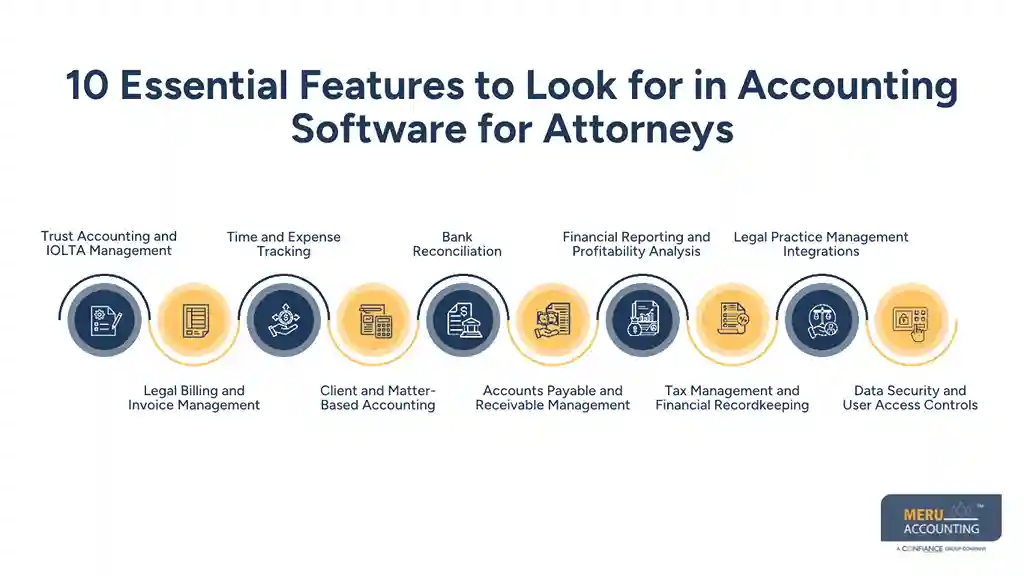
    10 Essential Features to Look for in Accounting Software for Attorneys

    Choosing the right system takes more than looking at price or ease of use. Law firms should check how well a tool handles client funds, legal bills, bank records, and financial reports.

    Here are 10 key features to consider when comparing options.

    1. Trust Accounting and IOLTA Management

    Trust accounting is one of the most important parts of legal finance. Law firms often hold money for clients, such as retainers, settlement funds, and other payments. These funds must stay apart from the firm’s own money until they are earned or due to the client.

    Look for accounting software for attorneys that can:

    • Track each client’s trust balance.
    • Keep a record of deposits and withdrawals.
    • Link trust entries to the right client and matter.
    • Create trust account reports.
    • Help with three-way trust account reconciliation.

    For firms that use IOLTA accounts, the system should support the records and checks needed under the rules in their state. Software alone does not ensure compliance. Firms must still review transactions and follow their state bar’s trust accounting rules.

    2. Legal Billing and Invoice Management

    Law firms may bill by the hour, use flat fees, or charge based on other fee terms. A good billing tool should support the firm’s billing model and make it easy to send clear bills.

    Look for features such as:

    • Custom invoices for each client.
    • Itemized legal fees and case costs.
    • Retainer use and balance tracking.
    • Recurring bills where needed.
    • Payment records and overdue bill alerts.

    Good billing tools also help firms track unpaid fees and follow up on late payments. This can improve cash flow and reduce time spent on billing tasks.

    3. Time and Expense Tracking

    Attorneys need a clear record of time spent on each case. Even a few missed billable hours can affect the firm’s income over time.

    Law practice accounting software should link time and expense records to the right client or matter. It should also let staff record work as it happens, rather than trying to recall it at the end of the week.

    For example, an attorney may record a 45-minute client call, while a paralegal logs time spent on case research. The system should keep these entries in one place and make them easy to review before billing.

    4. Client and Matter-Based Accounting

    Each case can have its own fees, costs, payments, and trust funds. A firm needs a way to view these records without mixing them with other matters.

    Look for software that lets you:

    • Link income and costs to each client.
    • Track case-related expenses.
    • View balances by matter.
    • Review fees earned on each case.
    • Run client-level financial reports.

    This feature helps partners see which matters bring in income and which ones have high costs. It also makes it easier to answer client questions about bills and payments.

    5. Bank Reconciliation

    Bank reconciliation helps a firm check whether its books match its bank records. It can reveal missing entries, duplicate payments, bank fees, and other errors.

    Good accounting software for attorneys should support bank feeds, match payments to entries, and flag items that need review.

    Trust accounts need extra care. Firms should check the bank balance, the trust ledger, and the total of all client trust balances. This three-way check helps confirm that the funds held in the account match the amounts owed to clients.
    10 Essential Features to Look for in Accounting Software for Attorneys

    6. Accounts Payable and Receivable Management

    Law firms have bills to pay and fees to collect. These may include rent, payroll, expert fees, court costs, and vendor bills. At the same time, clients may have unpaid invoices.

    The right system should help firms:

    • Record and sort vendor bills.
    • Set due dates and payment terms.
    • Track unpaid client invoices.
    • Send payment reminders.
    • Review bills due and money owed.

    These tools give partners a clearer view of what is coming in and going out. They also help the firm plan payments and avoid late fees.

    7. Financial Reporting and Profitability Analysis

    Financial reports help law firm owners and partners see how the business is doing. A good system should offer reports that are easy to read and based on current records.

    Key reports may include:

    • Profit and loss statements.
    • Balance sheets.
    • Cash flow reports.
    • Accounts receivable aging.
    • Expense reports.
    • Income by client or matter.

    Accounting software for attorneys should also help firms review income and costs over time. For example, partners can compare monthly revenue, check overhead costs, and see whether unpaid bills are rising.

    8. Tax Management and Financial Recordkeeping

    Law firms need clean records to prepare tax returns and respond to tax questions. Their tax needs may vary based on their legal structure, location, and type of income.

    Look for tools that can sort income and costs, store receipts, track payroll entries, and create reports for tax work. Some systems also link with tax prep tools, which can cut manual data entry.

    Keep in mind that software does not decide how each cost should be treated for tax purposes. A qualified tax professional should review the records and apply the right tax rules.

    9. Legal Practice Management Integrations

    Many law firms use separate tools for case records, client intake, time tracking, and billing. If these tools do not work well together, staff may need to enter the same data more than once.

    Law practice accounting software with good integrations can help link legal work with the firm’s books.

    Before you choose a system, check whether it can connect with your current tools. Review what data each link can share, how often it syncs, and whether staff must still enter some records by hand.

    10. Data Security and User Access Controls

    Law firms hold private client data and key financial records. A system must help keep this data safe and limit access to the right people.

    Look for:

    • Role-based access for partners and staff.
    • Multi-factor login.
    • Data encryption.
    • Audit trails for changes.
    • Secure data backup.
    • Clear rules for user access and removal.

    Not every staff member needs access to every account. For example, a billing clerk may need to view invoices but not change trust account records. Good access controls help lower the risk of errors and misuse.


    Accounting Software for Solo Attorneys vs. Growing Law Firms

    The right system depends on how a firm works. A solo attorney may need simple billing and expense tools, while a firm with many staff may need more control over trust funds, cases, and reports.

    Need

    Solo Attorneys

    Growing Law Firms

    Billing

    Simple invoices and payment tracking

    Multi-user billing and review

    Trust accounting

    Client-level trust records

    Trust ledgers and three-way checks

    Time tracking

    Basic time entry

    Time tracking across teams

    Reporting

    Basic income and cost reports

    Matter, team, and firm-level reports

    User access

    Few users

    Role-based access

    Integrations

    Core tools

    Case, billing, and payroll tools

    When reviewing accounting software for attorneys, solo firms should focus on ease of use, cost, and core accounting needs. Growing firms should also look at user access, data links, reporting, and review steps.

    A firm should not pay for tools it will not use. But it should also avoid a low-cost system that cannot support its needs as the team grows.

    Accounting Services for Attorneys and Law Firms by Meru Accounting

    Choosing the right software is one step; keeping the data in it accurate is another. Law firms need consistent accounting support to review financial entries, maintain records, and prepare reports that partners can rely on when making business decisions.

    Meru Accounting offers outsourced accounting support for attorneys and law firms, including:

    • Legal Practice Bookkeeping: Day-to-day recording and review of law firm financial transactions.
    • Client and Matter Accounting: Organizing financial records by client and legal matter.
    • Trust Fund Bookkeeping Support: Maintaining transaction records and assisting with trust account reviews.
    • Legal Expense Management: Recording case-related costs, vendor charges, and firm overhead.
    • Law Firm Financial Statements: Preparing monthly and annual financial reports for management review.
    • Accounting Cleanup: Reviewing historical entries and correcting incomplete or inconsistent records.
    • Payroll and Tax Preparation Support: Maintaining payroll records and organizing financial data for tax preparation.

    Our team can support your existing accounting setup, whether you need ongoing bookkeeping or help getting your firm’s financial records in order.

    Our Expert Insight

    When evaluating accounting software, law firm partners should pay close attention to how easily they can review financial performance by practice area, attorney, and client matter. Firm-wide revenue alone may not show which cases are profitable or where legal costs are running high.

    We recommend reviewing matter-level financial reports alongside monthly operating results. This gives partners a better basis for decisions about staffing, billing rates, case costs, and future growth. A system that turns accounting data into useful business insight is far more valuable than one that simply records transactions.

    Key Takeaways

    • Accounting software for attorneys should support legal billing, trust funds, and matter-based records.
    • Trust accounting tools should help track each client’s balance and support three-way reconciliation.
    • Time tracking, bank feeds, and invoice tools can cut manual work.
    • Reports help partners review income, costs, and cash flow.
    • Solo attorneys and growing firms may need different tools.
    • Good software still needs regular review by trained staff.
    • Outsourced accounting can help keep law firm books clear and up to date.

    FAQs

    The best choice depends on the attorney’s budget and daily workload. Solo practitioners should look for easy billing, expense tracking, trust account support, and simple financial reports without paying for features they won’t use.

    Yes. QuickBooks can handle general bookkeeping, payroll, and expense tracking. Firms may need separate legal software or added tools for trust accounting and client matter records.

    Some legal accounting systems offer IOLTA tracking, client ledgers, and trust account reports. Attorneys should confirm that the system supports their state’s recordkeeping requirements.

    Yes. Many legal accounting systems let firms assign fees, payments, and case costs to specific clients or matters. This helps partners review financial results for individual cases.

    A firm should consider switching when its current system causes frequent data entry errors, lacks key legal accounting features, or cannot keep up with a growing team and caseload.

    Good financial management isn't
    optional anymore
    Meru Accounting handles the accuracy, so you can focus
    on running the business