A hospital can have a full schedule, a busy ER, and a steady flow of patients, yet still struggle to keep its finances in order. Think about the number of transactions behind a single day of care: lab fees, surgery charges, insurance claims, drug purchases, staff wages, and payments to vendors. Each one needs to be recorded and accounted for correctly. That’s why accounting software for hospitals needs to do much more than track income and expenses.
The right system should give hospital administrators and finance teams a clear picture of their numbers, from department-wise spending to unpaid insurance claims. But with so many software options on the market, knowing which features are worth paying for can be difficult. Let’s look at the 10 features that deserve a place on your hospital’s checklist.
What You Will Learn From This Blog
- Why hospitals need tools built for their finance needs.
- 10 key features to look for in hospital accounting software.
- How to review hospital accounting solutions before you buy.
- Common mistakes to avoid during the selection process.
- How expert accounting support can help your hospital keep its books in order.
Why Do Hospitals Need Specialized Accounting Software?
Hospital finances are more complex than those of many other firms. A hospital may earn money from patient fees, health plans, lab tests, surgery, room stays, and other care. It also pays for staff, drugs, medical tools, power, rent, and other daily needs.
These costs and income streams must be tracked with care. For example, a bill sent to an insurer is not the same as cash received from that insurer. The finance team must track the claim, record any payment, review the amount still due, and post any write-off or change.
A basic tool may not give the team enough detail to do this well. It may lack links to billing systems, cost reports by unit, or clear ways to track open claims.
The right accounting software for hospitals helps bring key finance tasks into a clear process. It can cut manual work, make reports more useful, and help staff spot errors sooner.
It also helps hospital leaders review costs by unit, such as the ER, ICU, lab, pharmacy, and surgery. With clear data, they can see where costs are high and plan budgets with more care.
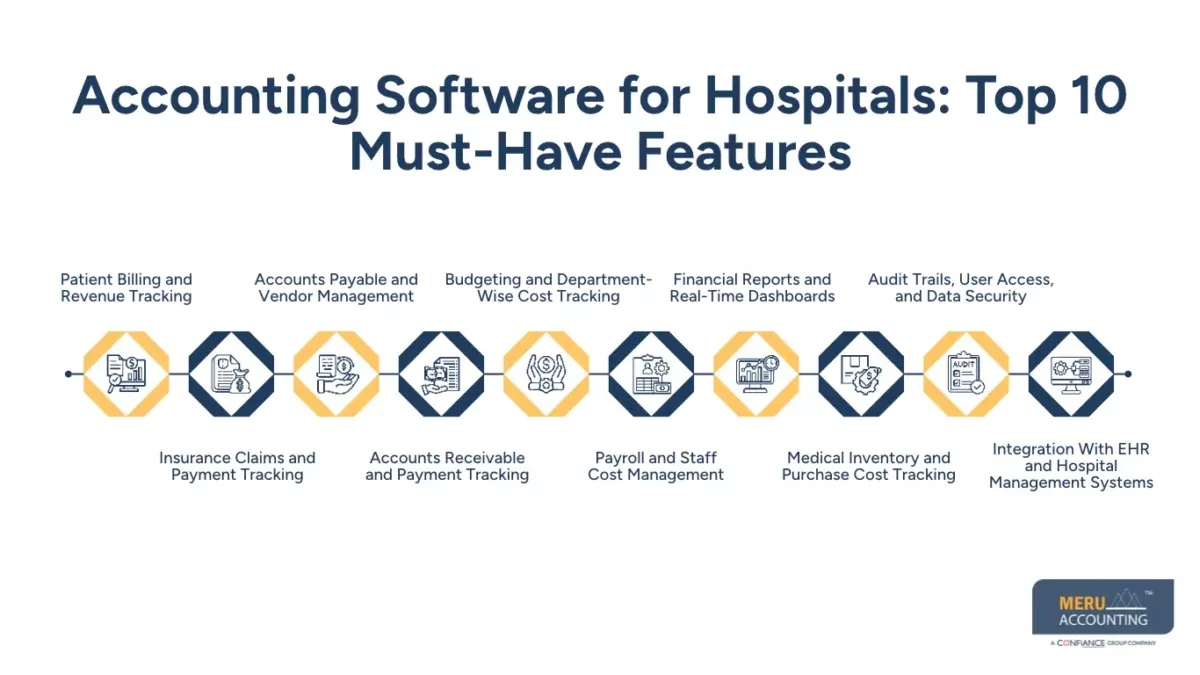
Accounting Software for Hospitals: Top 10 Must-Have Features
When you review software, focus on the tasks your team needs to do each day. These 10 features can help build a strong base for sound hospital finance work.
1. Patient Billing and Revenue Tracking
Patient billing is one of the key parts of hospital finance. The system should track bills for visits, tests, room stays, and care. It should also show the amount billed, the amount paid, and the balance due.
Look for tools that can link with the hospital’s billing system. This helps avoid the need to enter the same data twice. It also makes it easier to match bills with cash and card payments.
A clear billing trail helps the finance team find unpaid bills and fix errors. It also gives staff a better view of income by care type.
2. Insurance Claims and Payment Tracking
Hospitals often deal with many health plans, each with its own rules for claims and payment. A good system should help track claim amounts, payments, denials, and open balances.
It should let staff review the amount sent to the insurer against the amount paid. Any gap should be checked and, if needed, posted as a valid write-off or adjustment.
This feature can help the team find claims that need action. It also gives a clear view of how much money is due from each payer.
3. Accounts Payable and Vendor Management
Hospitals work with many vendors for drugs, lab tools, medical gear, food, and daily supplies. The software should help track vendor bills, due dates, payment terms, and open balances.
It should also support invoice checks and payment approval steps. For example, a bill for medical supplies should be checked against the order and the goods received before it is paid.
A good payables process can help stop duplicate bills and late fees. It also helps the hospital keep good vendor ties while making sure that each cost is backed by the right record.
4. Accounts Receivable and Payment Tracking
Accounts receivable (AR) refers to money that is due to the hospital but has not yet been paid. This may come from patients, health plans, or other payers.
The system should show open balances by payer, due date, and age. An AR aging report can help staff spot old dues and take action before they become hard to collect.
It should also help match cash received with the right bill or claim. This is key when a payer sends one bulk payment for many claims.
5. Budgeting and Department-Wise Cost Tracking
Each hospital unit has its own costs and needs. The ICU may need costly tools, while the lab may spend more on test kits and other supplies. The system should let leaders set budgets and track actual costs for each unit.
It should also show budget gaps and flag costs that are above plan. For example, if the pharmacy spends more than its set budget, the team can check if drug costs rose or stock use was higher than planned.
This type of cost view helps leaders make sound choices about staff, stock, and care needs. It also makes budget reviews more useful.
6. Payroll and Staff Cost Management
Staff costs are a major part of many hospital budgets. Hospitals may have full-time staff, part-time staff, nurses, doctors, and workers who take extra shifts.
The software should help track wages, tax withholdings, benefits, overtime, and paid time off. It should also link with the payroll system so that wage costs flow into the books with fewer manual entries.
For better cost control, look for reports that show staff costs by unit or cost center. This can help leaders review labor costs and plan shifts based on each unit’s needs.
7. Financial Reports and Real-Time Dashboards
Hospital leaders need clear data to make sound choices. The software should offer key reports, such as income statements, balance sheets, cash flow reports, AR aging, and budget vs. actual reports.
Dashboards can show key figures in one place. For example, a finance lead may want to track cash on hand, open claims, vendor dues, and monthly costs.
Look for reports that can be set by date, unit, and account type. The system should also let users export data for review and audit work.
Good reports help leaders spot trends, plan cash needs, and act before small issues grow.
8. Medical Inventory and Purchase Cost Tracking
Hospitals must track the cost of drugs, test kits, gloves, and other medical supplies. Poor stock control can lead to waste, high costs, or a lack of key items.
The accounting tool should link with the stock or purchase system. This lets the finance team track the cost of goods bought, stock use, and vendor bills.
It should also help match stock records with purchase costs. For example, if the cost of a drug rises, the team can review its effect on the pharmacy budget.
The tool may not need to manage each stock item on its own, but it should link with the system that does.
9. Audit Trails, User Access, and Data Security
Hospital finance records must be clear and safe. The software should keep a log of key actions, such as changes to bills, journal entries, and payment records.
An audit trail helps show who made a change, when it was made, and what was changed. This can make audit work easier and help the team review errors.
User access rules are also vital. A staff member who enters bills may not need the right to approve payments or change key account data.
If the system stores or handles patient data, the hospital should review its HIPAA needs and the vendor’s security controls. A tool alone does not ensure HIPAA compliance. The hospital must review how data is stored, shared, and used.
10. Integration With EHR and Hospital Management Systems
Hospitals use many tools for patient care and daily work. These may include electronic health records (EHR), billing, payroll, lab, and stock systems.
The accounting tool should link with the systems that feed it key data. For example, billing data can flow into the books, while payroll costs can post to the right cost center.
Good links help cut data entry and lower the risk of errors. They also help keep records in sync across teams.
Before you buy, ask which systems the tool can link with and how data moves between them. Check if the link works in real time or through set data uploads.
How to Evaluate Hospital Accounting Solutions Before Buying
Choosing software takes more than a review of its feature list. The best tool should fit your hospital’s size, work flow, budget, and plans for growth.
Use these points to guide your review:
- List your needs: Note the tasks your team needs to manage, such as billing, payroll, payables, and cost reports.
- Check system links: Make sure the tool can work with your EHR, billing, and stock systems.
- Review reports: Check if you can view costs by unit, payer, and account type.
- Test ease of use: Ask the finance team to test common tasks before you buy.
- Review data safety: Check user roles, audit logs, data backup, and access rules.
- Check total cost: Review setup fees, user fees, support costs, and fees for links to other tools.
- Ask about support: Find out how the vendor handles setup, staff training, updates, and tech issues.
A demo can help you see how the tool works in real tasks. Ask the vendor to show how it handles a vendor bill, an insurance payment, a bank match, and a monthly report.
Strong hospital accounting solutions should do more than store data. They should help your team keep clean books and get the right data at the right time.
Common Mistakes to Avoid When Choosing Hospital Accounting Software
A poor choice can add work rather than save time. Watch out for these common errors:
- Choosing based on price alone: A low-cost tool may lack key reports, links, or support. Review the full cost over time.
- Ignoring system links: If the tool cannot link with your billing or EHR system, staff may need to enter data by hand.
- Overlooking user needs: A system that is hard to use may slow down the team. Include staff in the demo and test phase.
- Not checking data safety: Weak access rules and poor audit logs can put key records at risk.
- Skipping a data review: Old or wrong data can lead to poor reports after a move to a new system. Clean up key records before the switch.
- Failing to plan for growth: A tool that works for one site may not meet the needs of a larger group of hospitals.
Take time to test the system with real work flows. This can help you avoid costly changes later.
optional anymore
on running the business
Hospital Accounting Solutions by Meru Accounting
A hospital’s books need to tell a clear story of its financial activity. Patient revenue, insurance payments, unpaid claims, medical supply costs, payroll, and department expenses must all be recorded and reviewed correctly. When these records don’t match, hospital administrators may struggle to assess cash flow, track operating costs, or prepare accurate financial reports.
Meru Accounting helps hospitals manage these financial tasks through dedicated accounting support, including:
- Hospital Bookkeeping: Record patient-related revenue, operating expenses, vendor bills, and other financial transactions.
- Accounts Receivable Management: Track outstanding patient balances, insurance receivables, payment records, and aging reports.
- Accounts Payable Management: Process vendor invoices, monitor payment due dates, and maintain accurate supplier balances.
- Bank and Account Reconciliation: Match bank activity, payment records, and ledger balances to identify errors and missing entries.
- Payroll Accounting: Record wages, overtime, benefits, payroll liabilities, and staff costs across departments.
- Financial Reporting: Prepare income statements, balance sheets, cash flow reports, and department-wise expense reports.
- Accounting Cleanup and Catch-Up: Review old entries, correct discrepancies, organize missing records, and bring overdue books up to date.
Our accounting professionals understand that hospital finances require careful attention to revenue records, payer balances, expense allocation, and month-end reporting. We follow structured review processes to help maintain accurate books and give hospital management dependable financial information.
Whether you need ongoing accounting support or help resolving gaps in your existing records, Meru Accounting can work with your current accounting software and financial workflows. Our focus is simple: accurate records, well-managed accounts, and financial reports your team can use to make informed decisions.
Our Expert Insight
One feature hospitals should not overlook is the ability to handle corrections without losing the original financial record. For example, a vendor may issue a credit after a hospital has closed its monthly books. If the adjustment is entered in the wrong period or the original bill is changed without a proper record, it can create problems during an audit and affect past financial reports.
We recommend choosing accounting software for hospitals that supports controlled journal entries, period locks, approval workflows, and a clear history of changes. These controls help finance teams correct errors while keeping prior records intact. This matters just as much as automation because reliable financial reporting depends on knowing not only what changed, but also when and why it changed.
Key Takeaways
- Hospital finance teams need tools that can track many types of income and costs.
- The right accounting software for hospitals should support billing, claims, payroll, payables, and reports.
- Links with EHR, billing, and stock systems can cut manual work.
- Clear user roles and audit trails help keep finance data safe.
- Review features, ease of use, support, and total cost before you buy.
- Expert accounting support can help keep books clean and reports useful.
FAQs
The best software depends on the hospital’s size and financial needs. Look for features such as patient billing, expense tracking, payroll, cost center reports, and system integrations.
Yes. Many accounting platforms integrate with electronic health records (EHR), billing, and hospital management systems to reduce duplicate data entry and improve financial recordkeeping.
It tracks expenses by department, vendor, and cost type. Hospitals can use these reports to monitor budgets, spot rising costs, and plan spending.
Yes. Cloud-based software offers remote access, automatic updates, and easier data sharing. Hospitals should also review its security controls and backup policies.
Yes. Smaller hospitals may use general accounting software if it supports their billing, payroll, expense tracking, and reporting needs. Larger facilities may need more specialized features.
optional anymore
on running the business