A project can show a profit on paper and still run short of cash. A late property sale, a rise in material costs, or an extra contractor bill can change the numbers within weeks. The right accounting software for real estate developers gives your team a clear view of these changes before they affect other projects.
Property development involves more than recording income and expenses. Developers must track land purchases, permits, design fees, construction costs, loan payments, and sales across different sites. As the portfolio grows, spreadsheets become harder to manage, and a cost recorded under the wrong project can affect profit reports.
Choosing accounting software for real estate developers means finding a system that fits your current work and future plans. This guide compares six options, explains the key features, and shows how real estate accounting solutions can meet the needs of small firms and larger property groups.
What You Will Learn From This Blog
- Why developers need project-level financial records.
- Which features matter when choosing accounting software for real estate developers.
- How six software options compare.
- How to match real estate accounting solutions with portfolio size.
- Which buying mistakes to avoid and when to upgrade.
Why Real Estate Developers Need Specialized Accounting Software
Track Costs For Each Project
Land, permits, labor, and materials can make up a large share of project costs. Accounting software for real estate developers groups these expenses by site, helping managers compare actual spending with approved budgets.
Keep Property Records in One Place
A developer may build homes for sale while keeping commercial units for rent. Real estate accounting solutions let teams review each property’s income and costs without mixing figures from different assets.
Manage Cash Flow Across Projects
Construction bills may fall due before buyers make their payments. Accounting software for real estate developers can show expected receipts, loan dues, and planned payments so managers can review cash needs in time.
Prepare Clear Financial Reports
Owners and investors may need project costs, debt balances, and profit reports before making decisions. Real estate accounting solutions bring these figures together when staff maintain clear and accurate records.
Reduce Manual Errors
Repeated spreadsheet entries can lead to missing bills, duplicate payments, and wrong project totals. Software can reduce manual work, but staff must still check entries and match bank records.
optional anymore
on running the business
What to Look for in Accounting Software for Real Estate Developers
Project-Based Accounting and Cost Tracking
Choose accounting software for real estate developers that assigns bills, payments, and other expenses to each project. Budget reports can reveal rising design fees or material costs before they create larger gaps.
Multi-Property and Portfolio Management
Real estate accounting solutions should show each property’s results and the full portfolio’s performance. Check whether reports can group figures by site, legal entity, and business unit.
Budgeting, Forecasting, and Cash Flow Management
Review software that lets you update project cost estimates, sales dates, and payment schedules. If sales are delayed by two months, the financial projections should show how the delay affects cash requirements.
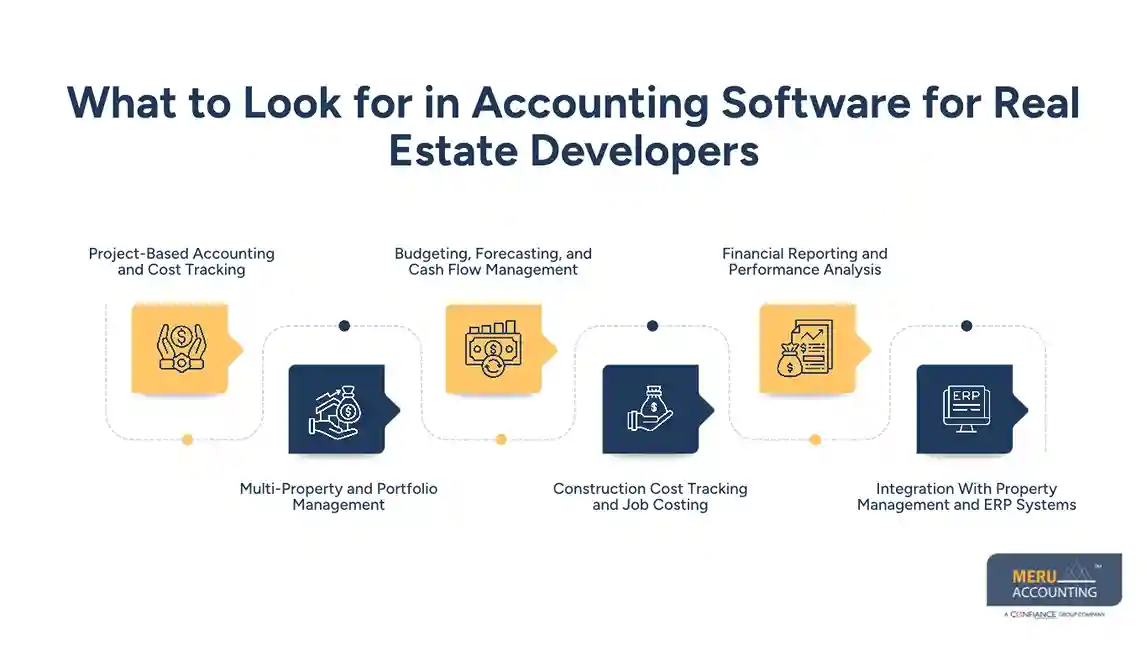
Construction Cost Tracking and Job Costing
Job costing breaks expenses into work phases, contractors, or cost codes. Real estate accounting solutions with these features let managers compare bids with actual costs and review the effect of extra work.
Financial Reporting and Performance Analysis
Check for profit and loss statements, balance sheets, cash flow reports, and project cost summaries. Accounting software for real estate developers should make it easy to compare sites and reporting periods while keeping records consistent with applicable accounting rules.
Integration With Property Management and ERP Systems
Growing firms may need links between accounting, leasing, purchasing, payroll, and construction tools. Before choosing accounting software for real estate developers, check which data transfers, how often it syncs, and how errors are handled.
Best Accounting Software For Real Estate Developers: Top Options Compared
The right choice depends on your budget, project size, and reporting needs. Compare these options as potential real estate accounting solutions, and confirm current features with each vendor.
QuickBooks Online
QuickBooks Online may suit small developers who need bank feeds, bill tracking, reconciliation, and standard reports. Its project tracking features can group costs, depending on the plan and setup.
For basic accounting software for real estate developers, it may be a practical starting point. Firms with complex construction costs or several legal entities should test its reporting limits before buying.
Xero
Xero offers cloud-based bookkeeping, bank reconciliation, supplier bill tracking, and links to business apps. It may suit smaller firms that want clear financial records without a complex system.
When comparing Xero with other real estate accounting solutions, check whether its built-in tools and connected apps can track project costs in enough detail. Include extra app fees in your budget.
Sage Intacct
Sage Intacct offers advanced financial management, multi-entity accounting, and detailed reporting. It may suit developers that own several companies or need group-level financial reports.
Ask for a demo of project costs, intercompany entries, approval controls, and group reports. Confirm whether you need another tool for construction management.
NetSuite
NetSuite combines financial management with wider business tools. It may suit firms that have outgrown separate systems for accounts, purchasing, and other core tasks.
However, setup, training, and licensing can add to the cost. Compare these expenses with other real estate accounting solutions before deciding whether NetSuite fits your current portfolio.
Yardi
Yardi offers software for property and real estate operations. It may suit developers that also own rental assets and need finance records linked with property data.
Before choosing Yardi as accounting software for real estate developers, confirm which product and modules cover your project budgets, cost reports, and property needs.
MRI Software
MRI Software offers systems for different property and business needs. It may suit firms that want property data and finance tasks to work together across a larger portfolio.
Ask the vendor to demonstrate your actual reporting needs and data links. Compare module fees, setup work, and ongoing service costs with other real estate accounting solutions.
How to Choose Real Estate Accounting Solutions Based on Portfolio Size
Small Portfolio: One to Three Projects
QuickBooks Online or Xero may suit firms that need basic bookkeeping, bank reconciliation, and project cost reports. Start with accounting software for real estate developers that meets current needs without costly add-ons.
Growing Portfolio: Several Active Projects
When several sites run at once, managers need separate budgets and cash reports. Compare real estate accounting solutions based on reporting detail, staff time saved, and the cost of extra tools.
Large Portfolio: Multiple Properties and Entities
Firms with several legal entities may need consolidated reports, intercompany entries, and approval controls. Sage Intacct or NetSuite may suit these needs, while Yardi or MRI may fit wider property operations.
Firms With Complex Construction Needs
If your team tracks contractors, work phases, and change orders each week, look for detailed job costing. Accounting software for real estate developers may also need to connect with a construction management system.
Firms With Plans to Expand
Choose a system that can add users, sites, and entities without a costly replacement soon after setup. Review data export options and future module fees before committing.
Common Mistakes to Avoid When Selecting Real Estate Accounting Software
Choosing Based Only on Price
A low monthly fee may exclude setup, training, extra users, and advanced reports. Compare the full three-year cost of real estate accounting solutions, including the time spent on manual tasks.
Ignoring Project-Level Reporting
Standard financial statements may not show why a site is over budget. Test accounting software for real estate developers with sample land costs, contractor bills, and revised estimates before signing a contract.
Overlooking Data Migration
Moving from spreadsheets takes more than copying totals. Plan the transfer of balances, supplier details, project codes, and past transactions, then check the records before going live.
Assuming Every Feature Comes in the Base Plan
Advanced reports, integrations, and multi-entity tools may cost extra. Ask vendors to list included features, setup fees, and ongoing charges in writing.
Failing to Check Access and Data Security
Financial records may include bank details, payroll data, and investor reports. Check user permissions, multi-factor login, audit logs, backups, and recovery plans before granting access.
When Should Real Estate Developers Upgrade Their Accounting Systems?
Reports Take too Long to Prepare
If staff spend days joining spreadsheets, the current system may no longer fit the workload. Accounting software for real estate developers can reduce repeated tasks and make project reports easier to prepare.
Costs are Often Missing or Misclassified
Bills assigned to the wrong site can distort project results. Review coding and approval rules first; if the software cannot meet your reporting needs, compare other real estate accounting solutions.
The Business Adds New Entities or Sites
More properties mean more accounts, bills, and reports. A system with stronger group reporting may be needed when staff can no longer prepare accurate results without extensive manual work.
Cash Flow Forecasts are No Longer Reliable
If your team cannot see loan payments, contractor bills, and expected sales receipts together, review your finance setup. New software can bring the figures into one view, provided staff enter accurate data.
Audits and Reviews Take More Work
Missing bills and unclear approvals can make reviews slow. Real estate accounting solutions with audit trails and approval controls can make records easier to check, but staff still need sound processes.
Why Real Estate Developers Choose Meru Accounting?
Accurate Project and Transaction Records
Meru Accounting provides bookkeeping services that keep income, supplier bills, project expenses, and payments organized for clear financial reviews. Our team maintains consistent records so developers can review project costs and make informed business decisions.
Better Control Over Payables and Receivables
Meru provides accounts payable and receivable services to track supplier payments, customer dues, and payment deadlines. Our team gives developers a clearer view of cash flow and outstanding balances across their business.
Reliable Payroll and Financial Reporting
Meru provides payroll and financial reporting services that give developers a clear view of staff costs, operating expenses, and financial results. Our reporting process gives business owners useful figures to assess costs and plan budgets.
Accounting Software Expertise for Growing Portfolios
Meru works with QuickBooks, Xero, Zoho Books, NetSuite, and Odoo to match accounting processes with each business’s needs. Our software knowledge and accounting expertise make Meru a strong choice for developers seeking consistent financial records as their portfolios grow.
Our Expert Perspective
A software demo should show how the system handles real work, not just list features. Ask the vendor to enter a contractor bill, assign it to a project, and show how the cost affects the budget and cash forecast. This test can reveal whether accounting software for real estate developers gives managers a clear view of project costs or leaves too much work to spreadsheets.
Key Takeaways
- Choose accounting software for real estate developers based on project count, reporting needs, and growth plans.
- Use real estate accounting solutions that track costs under clear project codes.
- Compare QuickBooks Online, Xero, Sage Intacct, NetSuite, Yardi, and MRI Software.
- Check setup fees, training, add-ons, and data migration costs.
- Test real project reports before buying.
- Upgrade when manual work or weak cost tracking affects decisions.
FAQs
QuickBooks Online and Xero suit smaller developers, while NetSuite, Sage Intacct, Yardi, and MRI Software may fit firms with larger portfolios.
Accounting software for real estate developers should include project cost tracking, construction job costing, budget forecasts, cash flow reports, multi-property management, and financial reporting.
Real estate accounting solutions track land purchases, contractor bills, labor, materials, and other project expenses against budgets to identify cost overruns.
Developers should compare project volume, legal entities, reporting needs, integration options, and total software costs before selecting a system.
Developers should consider an upgrade when reports take too long, project costs become hard to track, or existing software cannot manage new properties.
optional anymore
on running the business