

Choosing the right accounting software for small business is one of the most important decisions for business owners. Every business needs accurate financial records, timely reports, and an organized way to manage daily transactions. The right software also makes it easier to work with an outsourced accounting team and share financial information without delays.
Many businesses now prefer cloud accounting software because it allows secure access to financial records from any location. Business owners, accountants, and bookkeepers can work together using the same data, which reduces manual work and improves accuracy. A well-planned software selection also prepares businesses for future growth, changing reporting needs, and better financial control.
This guide explains how to choose accounting software for small business, the features to compare, and why the right system works well with outsourced accounting services.
What You Will Learn From This Blog
- Why selecting the right accounting software matters for small businesses.
- How cloud-based systems work with outsourced accounting.
- Features every business should compare before buying software.
- Steps to choose software that fits business goals.
- Benefits of combining outsourced accounting with modern software.
- Common mistakes businesses should avoid before making a decision.
What is Accounting Software?
Accounting software for small businesses is a digital solution that manages daily financial activities such as recording sales, expenses, invoices, payments, and bank transactions in one place. It automates routine accounting tasks, creates financial reports, and keeps records organized with greater accuracy.
Many businesses choose cloud accounting software because it stores financial data securely online, allowing business owners and outsourced accountants to access the same information from any location.
As business needs grow, accounting software for small businesses can handle higher transaction volumes, additional users, and more detailed reporting, making it a practical choice for businesses planning long-term growth.
Why Choosing the Right Accounting Software for Small Business Matters
Better Financial Accuracy
The right accounting software for small businesses records income, expenses, invoices, and payments correctly. Accurate records reduce reporting errors and make financial reviews easier throughout the year.
Easier Business Growth
Business needs often change as sales increase. A flexible accounting software for small business can handle more customers, transactions, and reports without creating extra work.
Faster Financial Reporting
Business owners need reports to understand cash flow and profitability. Good software creates financial statements quickly, making decision-making easier and more reliable.
Better Compliance
Tax reporting and financial regulations require organized records. Reliable software keeps financial data structured and ready for accountants during tax preparation and audits.
Better Team Collaboration
Many businesses work with internal staff and outsourced accountants. The right system allows everyone to access updated financial information without sending multiple files through email.
Reduced Manual Work
Automation features reduce repetitive tasks such as invoice creation, bank reconciliation, and recurring transactions. This saves valuable business time while reducing data entry mistakes.
optional anymore
on running the business
How Cloud Accounting Software Supports Outsourced Accounting
Provides Real-Time Financial Access
Cloud accounting software stores financial information online. Outsourced accountants can securely access updated records whenever they need them without waiting for file transfers.
Makes Team Collaboration Simple
Business owners and accounting professionals can review the same financial data together. Everyone works from one source, reducing confusion caused by different spreadsheet versions.
Keeps Financial Data Secure
Most cloud accounting software providers use encryption, secure login systems, automatic backups, and permission-based access. These features protect sensitive financial information.
Allows Automatic Data Updates
Modern software connects with banks, payment systems, and business applications. Transactions appear automatically, making bookkeeping faster and reducing manual entry.
Supports Business Expansion
As businesses grow, outsourced accountants often manage larger transaction volumes. Cloud accounting software makes this process easier without requiring major software changes.
Reduces Administrative Work
Since information stays updated automatically, business owners spend less time collecting documents before sending them to their outsourced accounting provider.
Key Features to Look for in Accounting Software for Small Business
Easy Dashboard
A clear dashboard allows business owners to view sales, expenses, invoices, and cash flow in one place. Easy navigation also reduces employee training time.
Bank Reconciliation
Automatic bank reconciliation compares business records with bank statements. This feature reduces mistakes while keeping financial records accurate.
Invoice Management
Good accounting software for small businesses should create professional invoices, monitor payments, and send reminders for unpaid balances.
Financial Reporting
Businesses should review profit and loss statements, balance sheets, cash flow reports, and expense summaries regularly. Strong reporting tools make financial analysis easier.
Third-Party Integration
The software should connect with payroll systems, payment gateways, inventory software, customer management tools, and banking platforms. Better integration reduces duplicate work.
User Permissions
Businesses often have multiple users. Permission settings allow owners to control which financial information employees or outsourced accountants can access.
How to Choose Accounting Software for Small Business
Understand Business Requirements
Every business has different accounting needs. Some require inventory management, while others mainly need invoicing and expense tracking. List business requirements before comparing software options.
Compare Cloud Features
Review how each cloud accounting software option stores data, creates backups, manages security, and allows remote access. These features become important when working with outsourced accountants.
Check Software Scalability
Choose software that continues to meet business requirements as operations grow. Future expansion should not require changing accounting systems every few years.
Review Reporting Options
Financial reports should be easy to generate and understand. Business owners should compare available reports before selecting accounting software for small businesses.
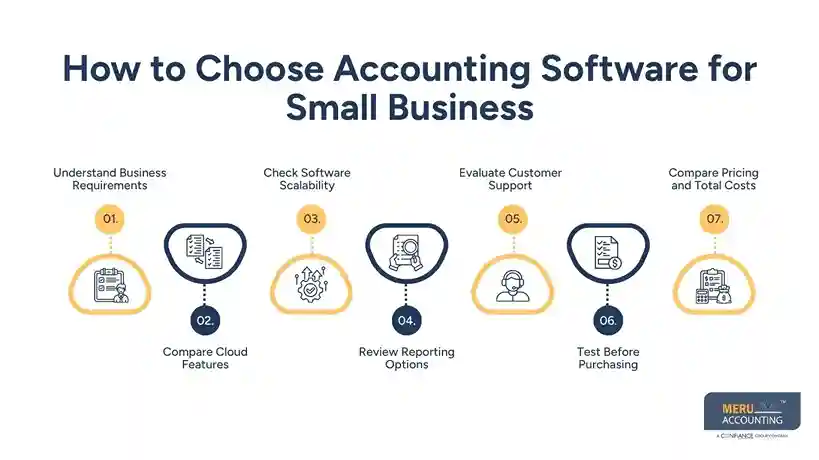
Evaluate Customer Support
Reliable technical support becomes valuable during software setup and daily use. Businesses should check available training resources, documentation, and customer service options.
Test Before Purchasing
Most software providers offer free trials or demonstrations. Testing the software allows businesses to understand daily workflows before making a long-term investment.
Compare Pricing and Total Costs
Compare monthly or annual subscription costs, per-user pricing, and charges for additional features before choosing accounting software for small business. Understanding the total cost helps businesses select software that fits their budget and avoids unexpected expenses.
Benefits of Using Cloud Accounting Software With Outsourced Accounting
Better Access to Financial Information
Using cloud accounting software allows business owners and outsourced accountants to access the same financial records at any time. Real-time access reduces delays and keeps everyone working with current information.
Lower Operating Costs
Purchasing servers, maintaining local systems, and hiring a full in-house accounting team can increase business expenses. Combining accounting software for small businesses with outsourced accounting reduces these costs while providing access to experienced accounting professionals.
Faster Financial Processes
Daily bookkeeping tasks such as invoice recording, bank reconciliation, and expense tracking become more efficient with automation. Outsourced accountants can review transactions regularly and prepare reports without waiting for manual updates.
Better Data Security
Reliable cloud accounting software providers use secure data centers, encryption, multi-factor authentication, and automatic backups. These security measures reduce the risk of losing financial records because of hardware failure or accidental deletion.
Simple Collaboration
Business owners, managers, and outsourced accounting teams can review reports, approve transactions, and answer accounting questions from different locations. Shared access reduces unnecessary emails and file exchanges.
Easy Business Expansion
As transaction volumes increase, businesses need accounting systems that continue working without major changes. A scalable accounting software for small businesses allows outsourced accounting teams to manage higher workloads while maintaining consistent reporting.
Common Mistakes to Avoid When Choosing Accounting Software for Small Business
Choosing Software Based Only on Price
Lower-cost software may not include features required for long-term business operations. Businesses should compare functionality, reporting, security, and future requirements instead of selecting only the least expensive option.
Ignoring Outsourced Accounting Requirements
Some businesses purchase software without discussing it with their accounting provider. Before selecting accounting software for small business, confirm that outsourced accountants are familiar with the platform and can use all required features.
Overlooking Integration Options
Accounting software should connect with payroll systems, inventory applications, payment gateways, and banking platforms. Limited integration often creates duplicate work and increases manual data entry.
Not Planning for Business Growth
Business needs often change over time. Choosing software that cannot handle additional users, customers, or transactions may require another software migration in the future.
Ignoring Data Security
Financial information contains sensitive business data. Businesses should review encryption methods, backup systems, access controls, and compliance standards before selecting cloud accounting software.
Skipping Software Training
Even simple software requires basic training. Business owners and employees should understand daily workflows to reduce errors and improve reporting accuracy.
Why Businesses Choose Meru Accounting?
Experienced Accounting Professionals
Meru Accounting works with businesses across different industries by providing outsourced bookkeeping and accounting solutions. Our experienced team understands financial reporting, compliance requirements, and daily accounting processes.
Expertise in Leading Accounting Software
Our professionals work with accounting software for small businesses such as QuickBooks Online, Xero, Zoho Books, FreshBooks, Sage, and other widely used accounting platforms. We recommend software based on business size, reporting needs, and future plans.
Cloud-Based Accounting Services
Meru Accounting uses cloud accounting software to provide timely bookkeeping, financial reporting, bank reconciliation, payroll support, and management reporting. Business owners receive updated financial information without unnecessary delays.
Flexible Outsourced Accounting Solutions
Every business has different accounting requirements. Our outsourced accounting services allow businesses to receive professional accounting support without maintaining a large in-house accounting department.
Standardized Accounting Process
Our structured accounting process includes document collection, bookkeeping, account reconciliation, financial review, reporting, and quality checks. A consistent workflow keeps financial records organized and accurate.
Focus on Long-Term Business Success
Meru Accounting works closely with businesses to maintain reliable financial records and provide meaningful reports that support informed business decisions. Our team also assists businesses during software migration and accounting system implementation.
Our Expert Perspective
Choosing the right accounting software for small business is not only about comparing software features. Businesses should also evaluate how well the software works with their outsourced accounting provider. A platform that allows secure access, strong reporting, and easy collaboration creates a smoother accounting process throughout the year.
Based on our experience working with businesses across multiple industries, companies often receive better value when they choose cloud accounting software that integrates with banking systems, payroll applications, and inventory tools. Planning software selection carefully at the beginning reduces future migration costs and minimizes operational disruptions.
Key Takeaways
- Choosing the right accounting software for small business creates a stronger financial management system.
- Cloud accounting software allows business owners and outsourced accountants to work with the same financial information.
- Compare reporting, security, automation, integrations, and scalability before purchasing software.
- Select software that matches both current operations and future business growth.
- Work with an experienced outsourced accounting provider that understands your chosen accounting platform.
- Regular software training and proper implementation reduce accounting errors and improve financial reporting.
FAQs
The best accounting software for small business depends on your business size, budget, and accounting needs. Many businesses choose QuickBooks Online, Xero, Zoho Books, or FreshBooks because they offer reporting, invoicing, and bank integration.
Cloud accounting software allows business owners and outsourced accountants to access the same financial records from different locations. This keeps reports updated and reduces delays in bookkeeping.
Yes. Most businesses can move from one accounting platform to another. However, planning the migration carefully reduces data loss and avoids interruptions in daily accounting work.
Look for bank reconciliation, invoicing, financial reporting, security, user permissions, integrations, automation, and scalability. These features make daily accounting easier and prepare your business for future growth.
Yes. Meru Accounting works with many popular accounting platforms, including QuickBooks Online, Xero, Zoho Books, FreshBooks, Sage, and other leading accounting software for small business solutions. Our team can also assist with software selection and migration when required.



