A supplier sends a bill, the buying team checks the order, and the accounts team enters the bill into its software. A few days later, someone checks the bank to confirm the payment. When these tasks take place in separate tools, staff may do the same work twice. Accounting Software Integrations link the systems that hold a firm’s money records and help cut this extra work.
As a business grows, small gaps between systems can cause bigger issues. A missed bill can affect cash plans, while a late sales entry can leave reports out of date. Staff may spend more time fixing records than checking costs, sales, and cash flow.
The right Accounting Software Integrations link tasks that rely on each other. These accounting integration solutions can link supplier bills, customer payments, payroll, stock, and bank records.
For firms with many branches or legal entities, an accounting platform integration can bring key figures into one report. The aim is not to add more software, but to make daily work easy to track and check.
What You Will Learn From This Blog
- How Accounting Software Integrations link the tools used by finance and other teams.
- Which links matter most as a firm adds more sales, staff, and suppliers.
- How AP automation can cut repeat work and flag bills that need review.
- How an accounting software integration can bring data from many entities into one report.
- What to check before setup and how to measure the return on cost.
What are Accounting Software Integrations and Why Do Growing Businesses Need Them?
Think of a firm that records sales in a CRM, pays staff through a payroll tool, and keeps its books in accounting software. Without links between these tools, staff must move data by hand or upload files at set times. Accounting Software Integrations let these systems share data based on rules set by the firm.
One Record Across Business Systems
When a customer pays a bill, the sales tool and accounting system should show the same result. A link can send payment details to the books, so staff do not need to enter them twice or check two records.
Less Manual Work
Copying bill numbers, payment dates, and account codes may seem easy, but the work adds up across many records. Accounting Software Integrations can move data on their own and let staff check odd entries, fix gaps, and review costs.
Better Access to Financial Data
A sales report is less useful if it leaves out new orders or payments. When data moves on time, managers can check income, unpaid bills, and cash needs sooner. They must still check the figures before making a choice.
A Clear View as the Firm Grows
A firm with new branches or sales channels may find that its old process no longer works well. Accounting integration solutions can bring records into one report while keeping each team’s tasks and access rights clear.
Common Signs Your Business Needs Better Accounting Software Integrations
Growth can expose gaps that were easy to manage when a firm was small. These signs show where accounting integration solutions may be worth the cost.
Manual Data Entry Across Business Systems
If staff enter the same order in a sales tool and an accounting system, they spend time on repeat work. A link can send approved data between the two and cut the risk of errors in either record.
Delays in Invoice Processing and Payment Tracking
A bill may reach an inbox but stay unpaid because no one knows who must approve it. AP links can send bills to the right person and show which bills are waiting, approved, or due for payment.
Errors in Financial Reports and Account Balances
A sale may show in one system but not in the ledger, leaving reports out of line. Better links can cut such gaps, but staff must still check failed transfers, missing entries, and unmatched balances.
Limited Visibility Across Teams and Business Entities
If each branch sends a spreadsheet at month-end, the finance team may spend days checking formats and fixing errors. A well-planned accounting software integration can bring this data into one report. Accounting Software Integrations can also keep records in line across business entities.
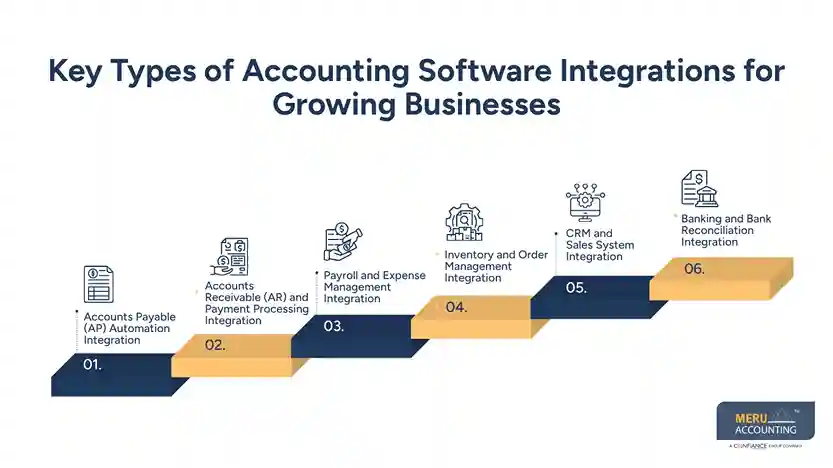
Key Types of Accounting Software Integrations for Growing Businesses
Not every firm needs every link. The right accounting software integrations depend on where staff repeat work, where errors occur, and which records managers need to see sooner.
Accounts Payable (AP) Automation Integration
Accounting integration solutions for AP can send supplier bill details to the accounting system and route bills for approval. They can also track due dates and flag bills that may have been entered twice.
Accounts Receivable (AR) and Payment Processing Integration
A link between billing and payment tools can record customer payments and update unpaid balances. The accounts team can see which clients have paid and which bills still need follow-up.
Payroll and Expense Management Integration
Payroll links can send wage costs, tax amounts, and benefit entries to the books. Expense tools can send staff claims and receipt details for review under the firm’s approval rules.
Inventory and Order Management Integration
Accounting integration solutions can link stock systems with accounting software to share order, sales, and stock data. This matters for firms that need to track stock value and the cost of goods sold, not just the cash from sales.
CRM and Sales System Integration
A CRM holds customer details, leads, and sales deals. A link with accounting software can send approved customer and sales data, while access rules limit who can view private money records.
Banking and Bank Reconciliation Integration
Bank feeds bring transactions into accounting software so staff can match them with bills, receipts, and ledger entries. A bank feed does not prove that each entry is right, so staff must still check items that do not match.
How Accounting Software Integrations Improve AP Automation
AP work involves more than paying a bill. Staff must check the supplier, confirm what was ordered, get approval, record the cost, and pay the right amount. Accounting Software Integrations can link these steps and make each bill’s status easy to track.
Automating Invoice Capture and Approval Workflows
Invoice tools can read the supplier name, bill date, amount, and due date from a file. Staff should check these details before approval, as poor scans or unusual bill formats may lead to errors.
Matching Supplier Invoices With Purchase Orders
A three-way match checks the supplier bill against the purchase order and proof that the goods or services were received. If the price or amount does not match, the bill can be held for review before payment.
Tracking Payment Schedules and Outstanding Bills
AP tools can show due dates, approval status, and planned payment dates in one place. This gives the finance team a clear view of cash needs and makes it easy to spot bills that may fall due soon.
Reducing Duplicate Entries and Payment Errors
A system can flag bills with the same supplier, bill number, or amount. Staff should check each alert before acting, as two valid bills may share some details but still need separate payments.
optional anymore
on running the business
Accounting Platform Integration for Multi-Entity Reporting
A firm with three legal entities may use different banks, staff, and account codes for each one. The main task comes at month-end, when leaders need to see both the results of each entity and the group as a whole. A well-planned accounting platform integration can bring these records into one report.
Consolidating Financial Data Across Business Entities
Each entity may close its books at a different time or use a different currency. The team must set clear rules for dates, currency changes, and missing data before joining the group figures.
Managing Intercompany Transactions and Balances
If one entity charges another for staff or services, both sides must record the matching entry. Accounting software integrations should let the finance team compare these balances and find gaps before the group report is made.
Standardizing Charts of Accounts and Reporting Rules
One entity may record travel costs under one account, while another uses a different code. A shared mapping table can link both codes to the same group account without removing records needed for local tax or legal reports.
Tracking Entity-Level and Consolidated Performance
Leaders need to know which entity earns a profit, which has high costs, and how the full group is doing. Accounting software integrations should combine each entity’s results with group totals. Sales between group entities must be removed where needed for the final report.
Best Practices for Implementing Accounting Software Integrations
Accounting integration solutions work best when the data and rules behind each link are clear. A sound plan can prevent costly fixes after the new process starts.
Map Data Flows Before Connecting Systems
List where each record starts, where it must go, who checks it, and how often it moves. This can show repeat tasks and help the team pick which link to set up first.
Clean and Standardize Financial Records
Check supplier names, customer details, account codes, and tax settings before moving data. If the source records contain errors, the new link may pass those errors into other systems.
Test Integrations Before Full Deployment
When testing accounting integration solutions, start with a small set of records and compare the results in both systems. Test refunds, tax entries, failed transfers, and duplicate bills before staff use the link for daily work.
Set Clear Ownership for Errors and Updates
Name the person who must check failed transfers and unmatched records. Keep a record of changes to account codes, approval rules, and access rights so staff can trace the cause of an issue.
Review Integration Performance Regularly
Check for missing entries, failed transfers, duplicate records, and data delays each month. An accounting platform integration may need changes when the firm adds a new bank, entity, or sales channel.
How to Calculate the ROI of Accounting Software Integrations
Measure the value of an integration by what changes in daily work, not just by the features listed by the software vendor. Track the current cost first, then compare it with the cost and results after setup.
Time Saved on Manual Accounting Tasks
Record how many hours staff spend on data entry and checks before and after setup. For example, saving 12 hours a month at a staff cost of $25 per hour saves $300 a month.
Faster Month-End Close and Reconciliation
Compare how many days the team needs to close the books and match bank records. A faster close gives managers earlier access to reports, but the team should not skip checks just to finish sooner.
Lower Invoice Processing Costs
Add staff time and other direct costs linked to bill handling before setup. Compare this with the new cost, including software fees, setup, training, and ongoing checks.
Improved Reporting Accuracy and Visibility
Track errors, late reports, and unmatched balances each month. These figures can show whether accounting integration solutions improve reports, cut errors, and save time. Base any estimate of savings on actual records.
Use this formula to estimate ROI:
ROI (%) = (Annual Benefits − Annual Costs) ÷ Annual Costs × 100
Include setup fees, software plans, staff training, and upkeep in the cost figure. Treat forecasts as estimates and update them when real results are available.
Why Choose Meru Accounting for Accounting Software Integrations?
- We provide accounting and bookkeeping services using tools such as QuickBooks, Xero, Zoho Books, NetSuite, and Odoo.
- Our team follows clear accounting rules, with proper account codes, approval steps, and regular checks.
- We review AP and AR tasks to find repeated data entry, late approvals, and errors in bill and payment records.
- We prepare clear reports that show costs, cash flow, and results across business entities.
- Our team checks financial records to find gaps, unmatched entries, and issues that may affect report accuracy.
- We follow a clear process for bookkeeping and reporting based on each firm’s needs.
- Before choosing a service, review the work covered, fees, data access, setup needs, and ongoing checks to ensure the plan fits your business.
Our Expert Perspective
The main risk with Accounting Software Integrations is to assume that data is right just because it moves on its own. A wrong account code or missed bill can pass from one system to another without being seen. Start with one task that takes up a lot of staff time, such as bill entry or bank matching. Check the results, fix gaps, and then link the next system. For firms with many entities, account mapping and checks on entries between entities should come early, as errors can affect the full group report.
Key Takeaways
- Accounting Software Integrations link money records with sales, payroll, stock, bank, and payment tools.
- The right links can cut repeat entry and reduce delays in bill processing.
- AP automation can route bills, match purchase orders, and flag possible duplicate entries.
- An accounting platform integration can bring data from many entities into one report.
- Good accounting integration solutions rely on clean records, clear roles, and regular checks to keep data right.
- ROI should count time saved and lower process costs, less setup and upkeep fees.
- Test each link before full use and check for errors as the business grows.
FAQs
Accounting Software Integrations link accounting software with tools such as payroll, banking, sales, stock, and invoice systems so selected data can pass between them.
They can cut repeat data entry, speed up bill processing, and give owners a clear view of payments, costs, and cash flow.
Links between accounting software, invoice capture, purchase orders, approval tools, and payment systems are often useful for AP automation.
It brings data from many entities into one report, with clear account codes, checks on entries between entities, and rules for each entity.
A business can compare time saved and lower work costs with setup fees, software costs, training, and upkeep to work out the return.
optional anymore
on running the business