Every dollar a nonprofit receives has a purpose, but keeping track of that purpose is not always easy. A grant may fund a new program, a donor may sponsor a specific cause, and a fundraising event may bring in money for daily needs. With so many sources of income and different spending rules, accounting software for nonprofit organizations needs to do more than keep a record of transactions.
The real value lies in knowing how much money is available, where it has gone, and what remains for each program. The right system can help nonprofit teams track grants, record donations, manage expenses, and prepare reports without losing sight of the bigger picture. Let’s look at the features that matter and how nonprofits can use them to keep their finances clear and under control.
What You Will Learn From This Blog
- Why nonprofits need tools built for their finance needs.
- Which features to look for in accounting software for nonprofit organizations.
- How to track grants, gifts, and costs with care.
- How to keep fund records and reports in good shape.
- When to seek help from an outside accounting team.
Why Do Nonprofit Organizations Need Specialized Accounting Software?
Nonprofit groups face finance tasks that can be hard to manage with basic books or a simple spreadsheet. They may get funds from grants, gifts, member fees, and events. Each source may have its own rules, limits, and use terms.
For example, a donor may give $20,000 to fund a food aid program. That money cannot be used to pay for an unrelated project or cover office costs unless the gift terms allow it. The team must track that sum apart from funds that have no such limits.
The right accounting software for nonprofit organizations can help teams:
- Track funds based on donor and grant terms.
- Record gifts from many sources.
- Link costs to the right fund or program.
- Check funds left in each grant budget.
- Build reports for board members and donors.
- Keep a clear record of each finance entry.
It can also help staff cut down on manual work and spot errors sooner. But teams must set up the tool with the right chart of accounts, fund codes, and rules. Poor setup can lead to wrong reports, even when the software has strong features.
How Can Accounting Software Improve Donation Tracking and Reporting?
Donations may come from online gifts, checks, bank transfers, events, or monthly giving plans. If these gifts are not logged and checked in a clear way, the books may not match the bank.
The right accounting software for nonprofit organizations can help your team build a sound record of each gift.
Record All Types of Donations
Log gifts by date, amount, source, and fund. This helps your team track both one-time and repeat gifts. It also helps match online gift data with bank deposits.
Track Donor Restrictions
Some donors give money for a set cause, while others let the nonprofit use the funds where they are most needed. These gifts must be tracked in the right way.
For example, a $5,000 gift for a school meal program should be linked to that fund. It should not be shown as free cash for all costs.
Reconcile Donation Records
Compare gift records with bank deposits on a set schedule. Check for fees, refunds, missed entries, or gifts that have not yet reached the bank. This helps keep income records in line with cash received.
Build Clear Donation Reports
Reports can show total gifts, gift trends, fund balances, and the use of donor funds. These details help board members review income and give donors a clear view of how their gifts support the work.
optional anymore
on running the business
What Features Should You Look for in Accounting Software for Nonprofit Organizations?
Not all tools offer the same features. Before you pick one, think about the size of your group, the number of funds you manage, and the type of reports you need.
Here are the key features to check.
1. Fund Accounting
Fund accounting lets you track money based on its source and use. It helps keep donor-restricted funds apart from funds that your group can use for any valid need.
Look for a tool that lets you set up funds, link income and costs to each fund, and view the balance with ease.
2. Grant Tracking
Your software should let you track each grant as a separate source of funds. It should also help you set grant budgets, record costs, and check how much of the award has been spent.
This makes it easier to spot budget gaps and prepare reports for grant makers.
3. Donation Records
A good tool should let you log one-time and repeat gifts, record donor details, and match gifts to bank deposits. It should also help you track gifts made for a set cause or program.
4. Expense Tracking
The tool should let you sort costs by fund, program, and type. This helps your team see how much it spends on each task and whether costs fit the approved budget.
5. Financial Reports
Look for tools that can build reports such as:
- Statement of Financial Position.
- Statement of Activities.
- Statement of Cash Flows.
- Budget-to-actual reports.
- Functional expense reports.
These reports help board members, donors, and grant makers see how funds are used.
6. Access Controls and Audit Trails
Not every staff member needs access to all finance data. Role-based access lets you set who can view, add, or approve entries. An audit trail also shows who made a change and when it took place.
When you compare accounting software for nonprofit organizations, check that these features fit your team’s needs and the level of review your books require.
How Does Nonprofit Accounting Software Help Manage Grants?
Grants often come with strict terms. A grant maker may set limits on staff pay, travel, supplies, or program costs. Your team must show that each cost meets those terms.
Accounting software for nonprofit organizations can make this task easier when it is set up to track each grant as a separate fund or project.
Track Grant Income and Spending
Record each grant award in the right fund. When your team pays for a cost linked to that grant, assign the cost to the same fund. This helps show how much of the grant has been used and how much is left.
Monitor Grant Budgets
Set up a budget for each grant and check actual costs against it. For example, if a grant allows $8,000 for staff costs and your team has spent $6,500, the report can show the amount left.
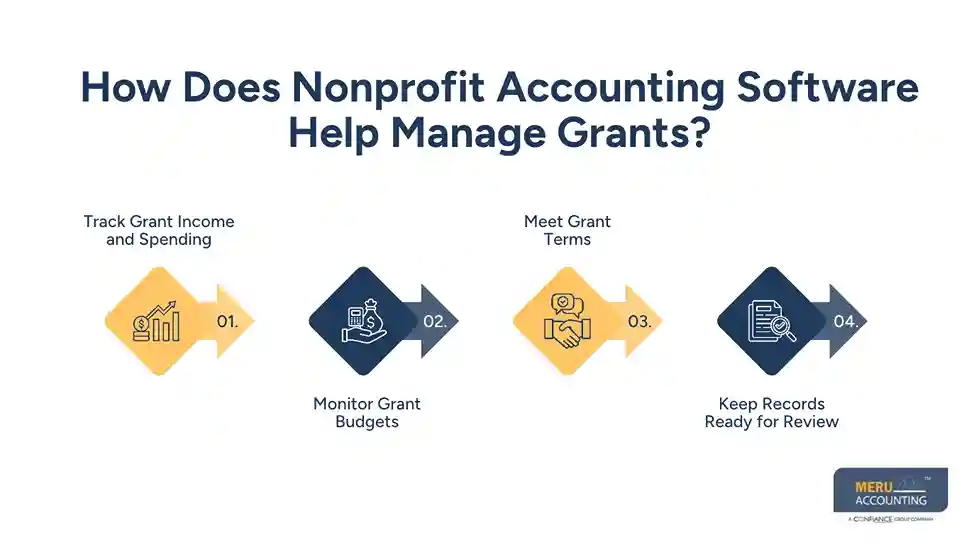
Meet Grant Terms
Some grants have rules on how funds can be used, when costs can be claimed, and what reports must be sent. Your software can help sort costs and keep the records needed for these reports.
Still, staff must review each cost to make sure it meets the grant terms. A software tag does not prove that an expense is valid.
Keep Records Ready for Review
Save grant letters, bills, payroll records, and proof of payment with the related entries where the tool allows it. This gives your team a clear record when a grant maker asks for proof of how funds were used.
How Can Accounting Software Improve Donation Tracking and Reporting?
Donations may come from online gifts, checks, bank transfers, events, or monthly giving plans. If these gifts are not logged and checked in a clear way, the books may not match the bank.
The right accounting software for nonprofit organizations can help your team build a sound record of each gift.
Record All Types of Donations
Log gifts by date, amount, source, and fund. This helps your team track both one-time and repeat gifts. It also helps match online gift data with bank deposits.
Track Donor Restrictions
Some donors give money for a set cause, while others let the nonprofit use the funds where they are most needed. These gifts must be tracked in the right way.
For example, a $5,000 gift for a school meal program should be linked to that fund. It should not be shown as free cash for all costs.
Reconcile Donation Records
Compare gift records with bank deposits on a set schedule. Check for fees, refunds, missed entries, or gifts that have not yet reached the bank. This helps keep income records in line with cash received.
Build Clear Donation Reports
Reports can show total gifts, gift trends, fund balances, and the use of donor funds. These details help board members review income and give donors a clear view of how their gifts support the work.
How to Track and Control Nonprofit Expenses Using Accounting Software
Good expense control helps nonprofits make the most of the funds they have. It also helps them spot waste, avoid overspending, and plan for future needs.
Accounting software for nonprofit organizations can help teams track costs from the time a bill is received to the time it is paid.
Set Budgets by Program
Set a budget for each program, team, or fund. Then link each cost to the right area. This helps staff see where money goes and whether a program is on track.
Sort Costs by Type
Use clear cost groups, such as staff pay, rent, travel, food, supplies, and IT. You can also split costs by program, admin work, and fundraising.
Review Spending Against Budgets
Check actual costs against the budget each month. If a program is close to its limit, the team can act before costs rise too far.
Keep Proof of Each Cost
Save bills, receipts, pay slips, and approval notes. Set rules for who can approve a cost and who can make a payment. This helps cut errors and keeps a clear trail for each entry.
Best Practices for Getting Accurate Financial Reports from Nonprofit Accounting Software
Even the best accounting software for nonprofit organizations needs sound data and regular checks. Use these steps to keep your reports in good shape:
- Use a clear chart of accounts: Set up income, costs, assets, and debts in a way that fits your work.
- Reconcile bank accounts each month: Match book records with bank records and check all gaps.
- Review fund balances: Make sure restricted funds are used only for valid costs.
- Check grant costs: Review costs against grant terms before you add them to a grant report.
- Keep proof of each entry: Save bills, gift records, bank slips, and approval notes.
- Review key reports: Share budget-to-actual and fund reports with the board on a set schedule.
- Set access rules: Limit who can add, edit, approve, and pay bills.
These steps help your team use software as a tool for sound financial work, not just as a place to store data.
Meru Accounting's Outsourced Nonprofit Accounting Services
A nonprofit’s books need to show more than its total income and expenses. They should help the finance team see how grant funds are used, whether donor restrictions are met, how much each program costs, and what funds remain available. Getting these details right takes consistent bookkeeping and a clear understanding of nonprofit financial records.
At Meru Accounting, we provide outsourced nonprofit accounting services that support these needs. Our team can work with your existing accounting software and help maintain the records behind your grant, donation, and expense reports.
Our nonprofit accounting support includes:
- Fund and Grant Accounting: Record grant income, track fund balances, and assign eligible expenses to the right grants and programs.
- Donation Accounting: Maintain gift records, track donor-restricted contributions, and reconcile donation income with bank deposits.
- Program and Expense Tracking: Classify costs by program, administrative activity, and fundraising so your team can review where funds are spent.
- Bookkeeping and Bank Reconciliation: Maintain transaction records, review account balances, and resolve differences between bank statements and books.
- Accounts Payable and Payroll: Track vendor bills, payment schedules, payroll entries, and related expenses.
- Financial Reporting: Prepare income and expense reports, budget-to-actual comparisons, and fund-level reports for management and board review.
- Bookkeeping Cleanup: Review past entries, correct account classifications, and bring incomplete or outdated records up to date.
Whether you need help maintaining monthly books or managing more detailed grant and fund records, Meru Accounting can provide a dedicated accounting team to support your requirements. You retain your existing software and financial oversight while our team helps keep the records accurate, organized, and ready for review.
Our Expert Insight
A high bank balance does not always mean a nonprofit has money available to spend. Some funds may be restricted by donors, while others may already be committed to payroll, vendor bills, or ongoing programs. Treating all cash as available can lead to poor budget decisions.
We recommend reviewing bank balances alongside outstanding bills, grant budgets, and net assets with donor restrictions. For example, a nonprofit with $80,000 in the bank may have only $25,000 available for general use after accounting for restricted funds and pending obligations.
Our advice: Don’t rely on the bank balance alone when planning new programs or approving large expenses. Use accurate financial reports to understand what your organization can spend and what it needs to set aside.
Key Takeaways
- Accounting software for nonprofit organizations helps track grants, gifts, costs, and fund balances.
- Fund accounting is key to keeping donor-restricted and free-use funds apart.
- Grant records should show income, costs, budget limits, and funds left.
- Donation data must match bank deposits and donor terms.
- Monthly bank checks and budget reviews help keep reports sound.
- Software needs the right setup and regular human review.
- Outsourced nonprofit accounting services can help teams keep books, track costs, and build clear reports.
FAQs
The best option depends on your nonprofit’s size, budget, and reporting needs. Look for fund accounting, grant tracking, donation records, and budget reports. Also, make sure the software can grow with your organization.
Nonprofit accounting software supports fund tracking, donor restrictions, grant budgets, and program expenses. These features help organizations track how funds are used and meet reporting requirements.
Yes. It helps organize financial records, bank reconciliations, grant expenses, and supporting documents. However, accurate coding and regular reviews are still needed to keep records audit-ready.
Nonprofits use separate fund records to track donations with specific use restrictions and funds available for general operations. This helps prevent restricted money from being used for unrelated expenses.
Consider outside accounting support when your team struggles to keep up with bookkeeping, grant reports, reconciliations, or financial statements. Outsourced nonprofit accounting services can provide ongoing accounting support without the cost of hiring a full-time team.
optional anymore
on running the business