
Accounts payable are the amount a company owes to its suppliers and vendors. So, it is a liability to the business that you need to clear off as soon as possible. However, the accounts payable processing is not an easy job. However, if not done correctly, it can easily and adversely affect the business. But thanks to the technology these days, there is various software available in the market for accounts payable processing in Xero with Receipt Bank.
What You Will Learn From This Blog
By reading this blog, you will learn:
- What accounts payable processing is and why it is important for every business.
- How the Procedure-to-Pay (P2P) cycle works from purchase request to supplier payment.
- How Receipt Bank simplifies invoice capture, data entry, and payment workflows.
- The common challenges businesses face in accounts payable, and how automation solves them.
- Best practices to improve accuracy, reduce paperwork, and strengthen vendor relationships.
- The key benefits of using Receipt Bank for cash flow management, budgeting, and efficient financial operations.
Working On Accounts Payable Processing
We cannot manage accounts payable processing in one or two steps. Rather, it has its own set of processing cycles. We call this cycle the ‘Accounts Payable Cycle’. We also know this accounts payable cycle as ‘Procedure to Pay’. Let’s learn more about this ‘Procedure To Pay’ cycle.
What Is ‘Procedure to Pay’?
The ‘Procedure To Play’ or P2P cycle belongs to the expenditure cycle of the company. It involves all the steps from the order of purchase to receiving the order and processing final payments. It includes 12 steps:
Determination of Goods Required: The production departments detect the need for stock and the goods required.
Procurement Process: The purchase order is generated by the purchasing department if we have made no similar orders.
Search for Suppliers: Potential Suppliers are short-listed, or we contact the already tied vendors.
Request for Proposal: To receive a quotation from the supplier, a proposal is sent to them.
Review Received Quotation: Review the quotation received from the suppliers, that include price and quality of the product.
Negotiation: The company makes negotiations with the selected suppliers to lower the prices.
Purchase Order: The purchase order is sent to the supplier after having fixed everything.
Supplier Confirmation: The supplier sends confirmation that their order has been placed.
Supplier’s Duty: It is the duty of the supplier to send quality and non-damaged goods promptly.
On Final Delivery Of Goods: The goods received are further checked that everything has been sent from the supplier that was ordered.
Invoice Entry: The entry of the invoice in the books of accounts that further starts the process of payments.
Payment: It processes payments in favour of suppliers on the due date.
Using Receipt Bank for Accounts Payable Processing:
One of the software that holds great goodwill amongst its users is Receipt Bank. It is an easy-to-use software that eliminates the paperwork. It also helps in managing accounts payable easily and hassle-free. This software extracts the data from accounts payables like the amount or the due date for payments, and automatically exports to your accounting software. Moreover, it uses OCR technology to extract data that helps avoid manual entry of the data. This further adds up to accuracy, as it involves nominal mistakes.
Credit Of Direct Taxes With Documents from Receipt Banks:
When Making Tax Digital was introduced, it became necessary to have software that could help businesses file taxes. With the help of the Receipt Bank, you can scan and update all the documents required to process tax payments to the tax portals. It will also increase efficiency and save a lot of time for the company.
Common Challenges in Accounts Payable Processing
Even with a good process, many businesses face common issues during accounts payable processing. These challenges can slow down payments and affect vendor relationships.
- Manual Data Entry: Entering invoice details by hand takes time and increases the risk of errors.
- Lost or Missing Documents: Paper invoices and receipts can be misplaced, making it hard to verify payments.
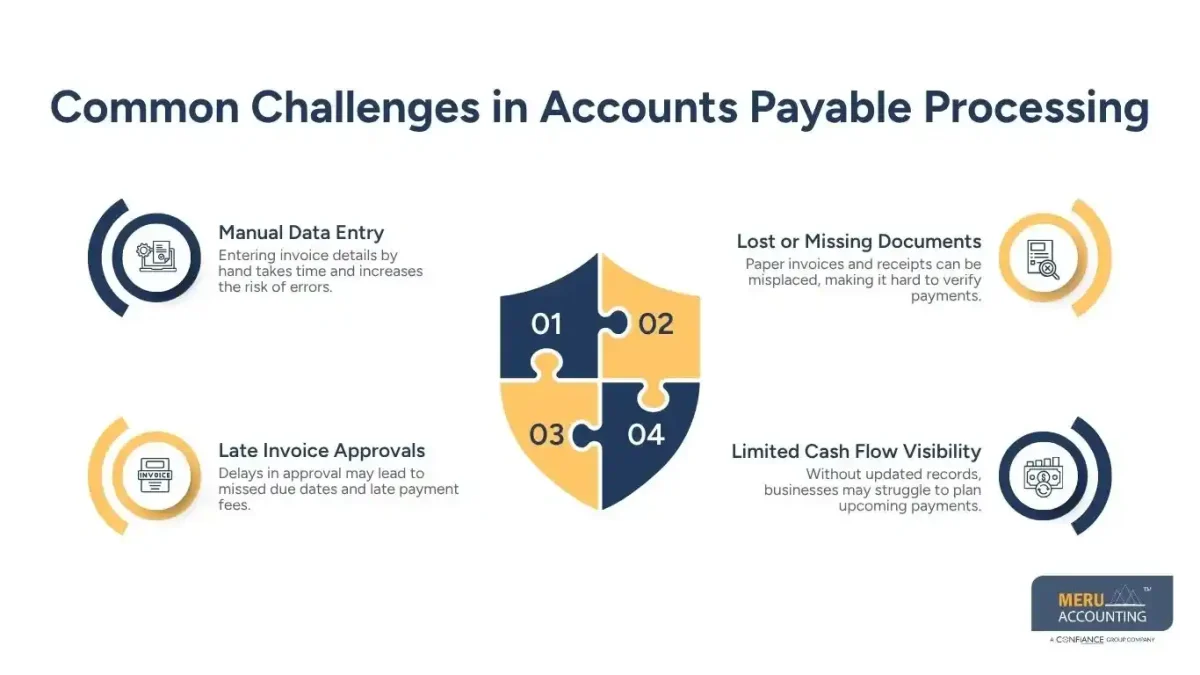
- Late Invoice Approvals: Delays in approval may lead to missed due dates and late payment fees.
- Limited Cash Flow Visibility: Without updated records, businesses may struggle to plan upcoming payments.
Using Receipt Bank helps reduce these issues by storing documents digitally, extracting invoice data, and sending it directly to your accounting software.
Best Practices for Efficient Accounts Payable Processing
Following a few simple practices can make accounts payable processing faster and more reliable.
- Process Invoices Promptly: Review and record invoices as soon as they are received to avoid delays.
- Keep Digital Records: Store invoices and receipts in one secure location for quick access during reviews or audits.
- Track Payment Due Dates: Monitor payment schedules to avoid penalties and maintain strong vendor relationships.
- Automate Routine Tasks: Using Receipt Bank helps reduce manual work, improves accuracy, and keeps financial records up to date.
Why Receipt Bank Is a Good Choice for Businesses
Many businesses use Receipt Bank because it simplifies daily accounting work and supports better accounts payable processing.
Saves Time
It captures invoice data automatically, reducing the need for manual entry.
Improves Accuracy
OCR technology helps extract key information with fewer errors.
Supports Better Organization
Digital storage keeps invoices and receipts easy to find whenever needed.
Works with Accounting Software
Receipt Bank connects with accounting systems, making it easy to transfer financial data and manage supplier payments efficiently.
Benefits of Using Receipt Banks:
Using Receipt Bank offers you many benefits apart from automatically fetching invoice data and import them to your accounting software. They are:
- Paying vendors timely: Paying your vendors timely will not only prevent you from future chaos of payments, but will also earn you good points as a timely payer from them. It will also help build trust between you and your supplier.
- Cash management: Its feature of automated entry and import of data, timely and accurate, helps you have an overview of cash flow in the business.
- Forecasts: With that overview of cash-flow in the business, you can easily forecast the future requirements of the business based on past transactions.
- Budgeting: Cash management and forecasts will eventually help you during the times of budget formation.
- Accrual accounting: It gets a bit complicated when accruals involve accounting. But with the help of the Receipt Bank, you will be able to make records from the invoices even if the payments are due. So, there will be less confusion.
optional anymore
on running the business
Simplify Accounts Payable Processing with Meru Accounting
Managing accounts payable processing takes time and close attention to detail. At Meru Accounting, we help businesses streamline this work with the right tools and proven processes. Our team uses Receipt Bank and leading accounting software to automate invoice capture, reduce manual entry, and keep supplier payments on track. We also help organize financial records, improve cash flow visibility, and support timely payment approvals. With Meru Accounting handling your accounts payable process, you can reduce errors, save time, and focus more on growing your business.
Our Expert Insight
Efficient accounts payable processing is more than paying invoices on time. It helps businesses maintain healthy cash flow, improve supplier trust, and reduce costly errors. While manual processes often lead to delays and duplicate work, automation tools like Receipt Bank simplify invoice management through OCR technology and seamless accounting software integration. Businesses that adopt digital accounts payable workflows can save time, improve accuracy, and gain better visibility into their financial commitments.
Key Takeaways
- Accounts payable processing follows a structured Procedure-to-Pay (P2P) cycle that manages purchases through final payment.
- Receipt Bank automates invoice capture and data extraction, reducing manual work and improving accuracy.
- Digital document storage minimizes the risk of lost invoices and simplifies record management.
- Following best practices, such as prompt invoice processing and payment tracking, helps avoid delays and late fees.
- Better accounts payable management supports stronger cash flow, more accurate budgeting, and improved vendor relationships.
- Using Receipt Bank with accounting software creates a faster, more organized, and more reliable accounts payable process.
FAQs
Receipt Bank scans invoices, pulls key data with OCR, and sends it to your accounting software. This cuts manual work, reduces errors, and speeds up accounts payable processing.
Yes. It connects with Xero and moves invoice data into your books, making payment tracking and record-keeping much easier.
Automation saves time, improves data accuracy, reduces paper records, helps avoid late payments, and gives better control of cash flow.
Yes. Small businesses can use it to manage invoices, organize receipts, and simplify daily accounting tasks without adding extra manual work.
Businesses can reduce errors by using digital records, reviewing invoices early, tracking due dates, and using tools like Receipt Bank to automate data capture and invoice entry.



