Meru Accounting

How Accounts Payable Software for Small Business Can Improve Bill Management

Contents
Want to learn more?

Subscribe for business tips, tax updates, financial fundamental and more


    How Accounts Payable Software for Small Business Can Improve Bill Management

    A stack of unpaid bills is easy to ignore until a payment deadline is right around the corner. For a growing company, accounts payable software for small business can make it easier to track invoices, due dates, approvals, and payments without relying on scattered emails or spreadsheets.

    Good bill management is about more than paying vendors on time. Your team also needs to know which bills are approved, what is still outstanding, and how much cash is committed to upcoming payments. Without a clear process, duplicate payments, missed bills, and data entry errors can slip through.

    The right AP software can bring these tasks into one place and give your team a clearer view of what the business owes. In this blog, we’ll look at how it works, which features matter, and when a small business may benefit from using it.

    What You Will Learn From This Blog

    In this guide, you will learn:

    • What AP software does for a small firm
    • How it can make billing work faster and neater
    • Which tools are worth a look
    • How it can help cut common AP errors
    • When a small firm may need AP software
    • How AR tools fit with the AP side of the books

    What Is Accounts Payable Software for Small Business?

    Accounts payable, or AP, is the part of a firm’s books that tracks what it owes to its vendors. This can range from rent and ad spend to stock, tools, and pro fees.

    Accounts payable software for small business helps track these bills from the time they come in to the time they are paid. In many cases, a bill can be sent to the tool, checked, coded, sent for sign-off, and marked as paid in one workflow.

    This can be a big step up from a sheet or a set of email notes. A sheet may show what is due, but it may not give the team a full bill trail. AP software can keep the bill, key data, notes, and pay log in one spot.

    For a small firm, the goal is not to add more tech. The goal is to make bill work less hard and less prone to error.

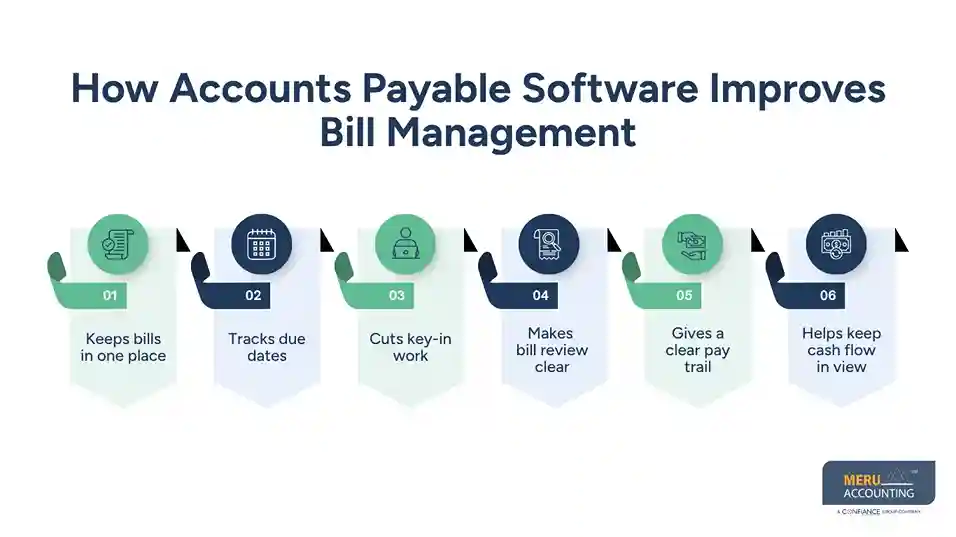
    How Accounts Payable Software Improves Bill Management

    1. Keeps bills in one place

    Bills can come in by email, mail, or an online portal. When each bill is kept in a new spot, it can be hard to find the right file.

    AP tools can pull bill data into one work queue. Staff can then see what is new, what needs review, and what is due soon.

    2. Tracks due dates

    A late bill can lead to a late fee or a lost vendor perk. It may also harm a good vendor tie.

    With accounts payable software for small business, due dates can be shown in a clear list. The team can sort bills by due date and see which ones need action first.

    This does not mean the tool should make all pay calls on its own. A team still needs to check each bill and make sure the charge is valid.

    3. Cuts key-in work

    Typing the same bill data by hand can take time. It can also lead to a wrong date, wrong amount, or wrong vendor name.

    Many AP tools can read data from a bill and fill key fields. A staff member can then check the data before it is posted.

    This mix of tech and human review is often a good fit for a small firm.
    How Accounts Payable Software Improves Bill Management

    4. Makes bill review clear

    Some bills need a check from an owner or team lead before they can be paid. This is hard to track when sign-off takes place in email or chat.

    An AP tool can set a clear path for bill review. The bill can move from new to review, then to ready to pay, based on the firm’s rules.

    5. Gives a clear pay trail

    A good bill trail can help the firm know when a bill came in, who checked it, and when it was paid.

    That trail can also help when a vendor asks, “Has this bill been paid?” The team can check the bill record rather than search through old email.

    6. Helps keep cash flow in view

    Bills are cash out. If a firm does not know what is due and when, it can be hard to plan cash.

    AP software can give the owner a view of open bills and near-term pay needs. This can help the firm plan when cash will leave the bank.
    Key Features to Look for in Accounts Payable Software

    The right tool will vary by firm. A small firm with 20 bills a month may not need the same setup as one with 500.

    When you review accounts payable software for small business, look for these key tools:

    • Bill capture: A way to bring bills in with less key-in work.
    • Due-date tracking: A clear view of open bills and pay dates.
    • Bill coding: Tools to tag bills to the right cost or account.
    • Approval flow: A way to send bills to the right person for review.
    • Vendor records: A place to keep key vendor data.
    • Pay status: A view of bills that are new, due, paid, or on hold.
    • Audit trail: A record of key steps and edits.
    • Book sync: A link with the firm’s book system.
    • Reports: Views of open bills, past-due bills, and pay trends.

    The tool should also fit the firm’s size and workflow. More tools do not always mean a better fit.

    Good financial management isn't
    optional anymore
    Meru Accounting handles the accuracy, so you can focus
    on running the business

    How AP Software Helps Prevent Common Bill Management Errors

    AP errors can start with small gaps. A bill may be keyed twice. A payment may go to the wrong vendor. A bill may be paid before it is checked.

    Accounts payable software for small business can help reduce these risks with set steps and clear records.

    For example, a bill can have one record from start to finish. This makes it less likely that two staff members will enter the same bill as two new items.

    A set review flow can also help make sure bills are checked before payment. Vendor data can be kept in one place, which can help cut errors in vendor names and pay data.

    Still, software is not a full fix for bad data or weak controls. The firm should set rules for who can add vendors, who can sign off on bills, and who can send funds.

    It is also wise to match AP data to the bank and the general ledger on a set cycle. This helps find gaps that a tool alone may not catch.

    When Should a Small Business Start Using AP Software?

    There is no set sales level at which a firm must use AP software. The need often shows up in the work.

    You may be ready if:

    • Bills are kept in many email inboxes.
    • Staff use a sheet to track due dates.
    • Bills are often paid late.
    • The same bill has been paid more than once.
    • Owners lack a clear view of what is due.
    • Bill review takes too much staff time.
    • Vendor calls take time to sort out.
    • AP data does not match the books with ease.

    A small firm can also look at accounts payable software for small business as it grows. The goal is to set a workflow that can scale with the firm, not add a tool just for the sake of it.

    Meru Accounting’s Accounts Receivable Software for Small Business

    At Meru Accounting, we look beyond an overdue invoice. We review the full AR cycle to make sure invoices, customer payments, bank activity, and account balances tie back to the books. Our accounts receivable software for small business support combines the right tools with hands-on accounting review.

    Our AR services include:

    • Invoice and payment tracking
    • Customer balance and aging review
    • Overdue payment follow-up
    • Payment and bank reconciliation
    • DSO and outstanding balance review
    • AR cleanup and catch-up
    • Monthly account review
    • Tax-ready records

    We can also work with your existing AR management software and accounting system. Our team adapts to your current workflow, checks the numbers behind the system, and helps keep your AR records accurate and up to date.

    Our Expert Insight

    When we review AP records, we do not assume that every old balance is an unpaid bill. A bill may have been paid but not matched, entered twice, or left open after a vendor credit. We first compare the open balance with the vendor statement, payments, and bank activity before deciding what needs to be paid.

    We take the same approach with accounts receivable software for small business. An aging report is only useful when the customer balances behind it are accurate. Reviewing invoices, payments, credits, and account balances helps us spot issues that a software report may not show on its own.

    Key Takeaways

    • AP software can bring bills, due dates, and pay data into one place.
    • It can cut key-in work and help lower common AP errors.
    • A clear approval flow can help stop bills from being paid too soon.
    • Bank and ledger checks are still needed after bills are paid.
    • The best accounts payable software for small business should fit the firm’s size, bill count, and workflow.
    • AP and AR both affect cash flow, so both need clean and timely data.
    • AR management software can help firms track open customer balances and past-due bills.

    FAQs

    It can be, especially when bills are growing, payments are hard to track, or AP takes too much staff time. For a low bill volume, a simple process may still be enough.

    Many AP tools can connect with QuickBooks, but the type of sync can vary. Check whether bills, payments, vendors, and account data sync the way your bookkeeping process requires.

    Pricing can range from low monthly fees to higher costs based on users, bills, features, or payment volume. Compare the total cost with the time and errors the software may help reduce.

    Look at bill volume, approval needs, payment options, accounting integrations, user access, reporting, and ease of use. The best choice is one that fits your current AP process without adding needless steps.

    Not always. Software can automate much of the routine work, but an accountant may still be needed for reconciliations, unusual entries, vendor credits, cleanup, and month-end review.

    Good financial management isn't
    optional anymore
    Meru Accounting handles the accuracy, so you can focus
    on running the business