
CRM is an acronym that stands for Customer Relationship Management. Even Commerce today has recognized the psychology behind the importance of customers in commerce, that their interaction requires management. Managing customer relationships and financial records becomes easier when businesses use the right CRM options with Xero CRM.
A well-integrated CRM helps organize customer data, automate invoicing, reduce manual work, and improve collaboration between sales and finance teams.
Choosing the right solution can streamline daily operations, improve reporting, and support better financial management. This blog explores the best CRM options that integrate with Xero CRM, their key features, and how to select the right one for your business.
CRM helps companies to stay connected with customers, maintain sales revenue, improve profitability, record service issues, and ensure social marketing. There are wide-ranging options for the best CRM, but using Xero as your CRM proves to be beneficial for any company.
What You Will Learn From This Blog
- Understand what CRM options are and their role in business management.
- Learn how CRM software works with Xero for better financial management.
- Explore popular CRM options that integrate with Xero.
- Explore the key features to consider when choosing a CRM.
- Understand the advantages and limitations of using Xero as a CRM.
- Learn how to choose the right CRM software for your business.
- Identify common challenges when integrating CRM options with Xero.
- Explore best practices for using CRM software with Xero effectively.
What are CRM Options?
CRM options refer to different customer relationship management software solutions that help businesses manage customer interactions throughout the sales cycle. These platforms store customer information, monitor sales opportunities, manage communication, and improve customer service.
Different CRM options offer different capabilities. Some focus on sales automation, while others include marketing, customer support, reporting, and accounting integrations.
Common functions include:
- Contact management
- Lead tracking
- Sales pipeline management
- Email integration
- Task automation
- Customer communication history
- Reporting and analytics
Selecting suitable CRM options depends on business size, industry, budget, and integration requirements.
CRM options and Use of Xero
Some CRM solutions integrate with Xero to improve customer management, sales tracking, and financial workflows.
InfusionSoft
Combines email marketing, CRM, and automation tools in one platform. It helps businesses nurture leads, automate follow-ups, and connect customer data with Xero for better financial tracking.
Zendesk
Integrates online social networking apps and websites into one platform while supporting a ticket management system. It is a web-based customer service solution. It helps support teams manage customer requests efficiently and keeps service records connected with business operations.
Nimble
A social relationship management platform that connects emails and social accounts to maintain relationships with potential customers.
It provides a unified customer profile, making it easier to track conversations and improve client engagement alongside Xero.
HubSpot
Tracks deals, lead flow, marketing campaigns, and customer support tickets.
It also offers sales automation and reporting features that help businesses manage customer relationships while syncing financial information with Xero.
Salesforce
Mainly used for account database management, sales processes, and customer service.
Its powerful reporting, workflow automation, and Xero integration help businesses manage customer data and financial records more effectively.
Oracle CRM
Provides strong scalability, product configuration, lead management, and customer data management.
It supports large organizations with advanced analytics, workflow automation, and seamless integration with Xero for improved business management.
Zoho CRM
Uses sales signals, gamification, lead prediction, and visitor alerts to strengthen customer engagement.
It also automates sales activities, tracks customer interactions, and integrates with Xero to simplify invoicing and financial management.
Which CRM to choose?
A company should choose a CRM that determines the requirement of the company, improves its association, allows robustness in data organization, boosts up sales, accounting, and transactions. The most systematic way to figure out which CRM is the right fit for your company is going through an intensive analysis of the features it provides:
- Management of Contacts and Accounts database
- Acceleration of Sales and Analytics forecasting
- Determining leads and Scalability
- Automation in Marketing
- E-commerce and email tracking
- Deployment Type (On-premise or Cloud-based)
- Synchronization of content and data files
- Reports and Dashboards
- The workflow of Customer Service and Approval through Call Centre Automation
Using Xero as Your CRM Option
Xero provides automated cloud-based software that delivers high-integrity accounting, secure database protection, agile bookkeeping services, beneficial e-commerce, and insightful reports on the dashboard. It involves most of the features one requires for a CRM option, considering its feasibility, structure, and configuration of data. These are the pros and cons of using Xero as your CRM.
Pros of Using Xero
- Stores an accurate database
- Provides invoicing and Payroll options with a simpler, streamlined interface
- Provides Bank Reconciliation and a check on the flow
- Allows tracking and critical analysis of sales team performance based on statistics on the dashboard
- Better feedback mechanism and customer interactions
- Comparison of performance analytics and integration with various apps
- Compatibility with age groups ranging from young students to adults
Cons of using Xero
- Organization of contacts is difficult, as it includes all the vendors and clients in one list
- Poor customer service
- Limit on the customer sales report
- Provides a weak financial platform
- Issues regarding accounting functionality and allocation of payments
- Does not specify missing details in ‘1099’ reporting or missing track of transaction details
How to Choose the Right CRM Options for Your Business
Selecting the right CRM options depends on your business goals and operational needs. A solution that works well for one company may not suit another.
Business Size
Small businesses often need simple customer relationship management software with essential contact management and sales tracking features. Larger organizations may require advanced automation, detailed reporting, and greater customization to support complex operations.
Industry Requirements
Different industries have unique workflows and operational needs. Choose a solution that supports your specific sales process, customer interactions, compliance requirements, and financial management goals.
Budget
Evaluate both initial costs and ongoing subscription fees. Many CRM options offer multiple pricing plans that suit businesses of different sizes.
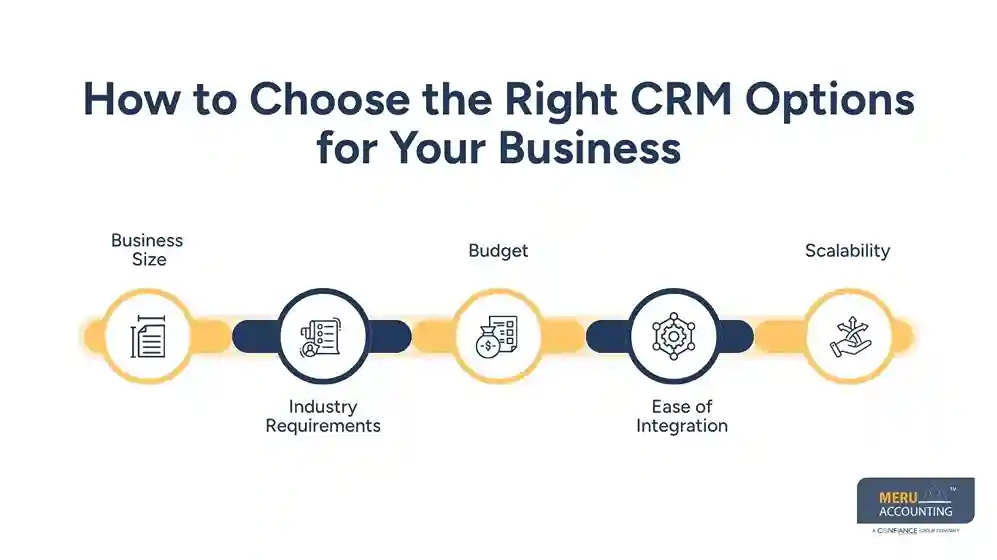
Ease of Integration
Choose software that integrates smoothly with Xero CRM. A reliable integration reduces manual work and keeps customer and financial data synchronized.
Scalability
Your CRM should support future business growth. Look for CRM options that allow additional users, features, and integrations as your company expands.
Common Challenges When Integrating CRM Options with Xero CRM
Although integration offers many advantages, businesses may face several implementation challenges.
Data Migration
Moving customer and financial data from older systems requires careful planning. Inaccurate migration may lead to duplicate records or missing information.
User Training
Employees need proper training to use integrated systems effectively. Without adequate guidance, businesses may not achieve the full benefits of their chosen CRM options.
Integration Compatibility
Not every CRM platform supports direct integration with Xero CRM. Some require third-party connectors or custom development.
Data Security
Businesses should ensure that both CRM and accounting systems follow strong security practices. Protecting customer and financial information is essential for maintaining trust and compliance.
Best Practices for Using CRM Options with Xero CRM
Integrating CRM options with Xero CRM is only the first step. Businesses should follow best practices to improve efficiency, maintain accurate records, and get the most value from both systems.
Keep Customer Data Updated
Accurate customer information helps both sales and finance teams work efficiently. Regularly review contact details, billing information, and customer records to avoid duplicate or outdated data.
Automate Repetitive Tasks
Many CRM options offer automation features for routine activities such as invoice creation, payment reminders, follow-up emails, and task assignments. Using automation reduces manual work and improves consistency.
Monitor Financial Reports Regularly
Review reports generated through Xero CRM and your CRM platform to track revenue, outstanding invoices, customer payments, and sales performance. Regular monitoring helps identify trends and supports better financial planning.
Train Your Team
Employees should understand how to use both the CRM and accounting systems. Proper training helps teams follow consistent processes and reduces errors during daily operations.
Review CRM Performance
Business needs change over time. Evaluate your chosen CRM system regularly to ensure they continue to support your sales, customer service, and financial management goals. Update workflows and integrations whenever necessary.
Why Choose Meru Accounting?
Choosing the right CRM options is only one part of building an efficient financial management system. Successful implementation also requires proper accounting expertise, accurate bookkeeping, and seamless integration between business applications.
At Meru Accounting, we help businesses integrate Xero with suitable CRM solutions to improve customer management and financial reporting. Our experienced accounting professionals assist with Xero setup, bookkeeping, bank reconciliation, payroll, invoicing, financial reporting, and ongoing accounting support.
We evaluate your business requirements and recommend CRM options that align with your workflows, industry, and future growth plans. Our team ensures accurate financial data synchronization, minimizes manual work, and helps businesses maintain reliable accounting records.
Whether you are a startup, small business, or growing enterprise, Meru Accounting helps you use Xero and CRM software together for better operational efficiency and informed financial decisions.
Our Expert Perspective
At Meru Accounting, we believe the right CRM integrated with Xero helps businesses improve customer management, automate financial processes, and maintain accurate records.
Choosing a CRM that aligns with your business needs supports better efficiency, informed decision-making, and long-term growth. Our team helps businesses implement integrated solutions that simplify accounting workflows and improve overall financial management.
Key Takeaways
- CRM options help businesses organize customer information and improve sales management.
- Xero integrates with many leading CRM platforms to simplify financial management.
- Choosing the right CRM depends on business size, budget, industry, and scalability.
- Integration reduces manual data entry and improves collaboration between finance and sales teams.
- Businesses should regularly maintain customer data and monitor financial reports.
- Employee training and secure integration improve long-term CRM performance.
- Meru Accounting helps businesses integrate Xero with suitable CRM solutions for efficient accounting and financial management.
FAQs
CRM options are customer relationship management software solutions that help businesses manage customer information, sales activities, communication, and customer support.
Yes. Xero integrates with many CRM platforms, including HubSpot, Salesforce, Zoho CRM, Oracle CRM, Zendesk, Nimble, and InfusionSoft.
Integration helps automate invoicing, synchronize customer data, reduce manual work, improve reporting, and strengthen financial management.
Yes. CRM integration provides accurate customer and financial information, helping businesses manage invoices, payments, cash flow, and reporting more efficiently.
Consider your business size, industry requirements, budget, integration capability, scalability, and required automation features before selecting a CRM.
optional anymore
on running the business



