Tax software for CPA firms plays a major role in tax return preparation, client record management, and tax planning. The right system can reduce manual data entry, flag errors, and keep filing work on track. However, each firm has different needs, so the best choice depends on client volume, return types, team size, and budget.
Some firms prepare individual tax returns, while others handle partnerships, corporations, trusts, and multi-state filings. Tax software for CPA firms should match these needs without adding costs for tools that staff rarely use. Firms that offer year-round advice should also compare the best tax planning solutions for CPAs to review projections, estimated payments, and possible tax outcomes.
This blog also compares six popular products, explains pricing models, and shows how to select software that fits your firm’s daily work.
What You Will Learn From This Blog
- How tax software for CPA firms differs across six popular products.
- Which features matter most for tax preparation, review, and planning.
- How subscription fees, state returns, and add-ons affect total costs.
- Which options suit solo CPAs, small practices, and large firms.
- What to check before choosing the best tax planning solutions for CPAs.
- How to avoid common software selection and setup mistakes.
Introduction to Tax Software for CPA Firms
Tax software for CPA firms combines tax forms, calculations, filing tools, and client records in one system. Depending on the product, it may also offer data imports, error checks, workflow controls, and tax research features.
The best tax planning solutions for CPAs go beyond preparing annual returns. They can include tax projections, estimated payment calculations, and scenario analysis for business decisions. For example, a CPA may compare the likely tax effect of higher income or a planned equipment purchase before advising a client.
Best Tax Software for CPA Firms: Top Options Compared
Drake Tax
Drake Tax is worth considering for firms that prepare individual and business returns in high volumes. It offers professional tax preparation features and may suit practices that want a broad set of forms and a consistent filing process.
When comparing tax software for CPA firms, review Drake’s current packages, state coverage, e-filing terms, and support options before buying.
Intuit ProConnect Tax
Intuit ProConnect Tax is a cloud-based product that allows tax professionals to prepare returns online. Its connection with other Intuit products may suit firms that already use QuickBooks for client bookkeeping.
Firms should compare its current pricing, supported forms, team access, and data import options with their daily needs.
Thomson Reuters UltraTax CS
UltraTax CS offers professional tax preparation tools for firms with varied client needs and complex returns. It may suit practices that need detailed review processes and links with other tax or accounting products.
Before selecting this tax software for CPA firms, ask about the required modules, implementation costs, and training for your staff.
Wolters Kluwer CCH Axcess Tax
CCH Axcess Tax is a cloud-based option for firms that need team access and tools for complex tax work. Its wider product range may suit practices that want tax preparation to connect with other firm operations.
Check the features included in your quote, user permissions, data transfer options, and any extra module fees.
Lacerte Tax
Lacerte Tax is a professional tax preparation product from Intuit. It may suit firms that handle detailed individual and business returns and need a structured process for entering and reviewing tax data.
Compare its current form coverage, state return charges, and available integrations before deciding whether it fits your budget.
TaxSlayer Pro
TaxSlayer Pro offers professional tax preparation products with different pricing options. It may suit firms that want to compare return-based costs with other plans.
Check the supported return types, state coverage, e-filing terms, and available features. Test common client cases before making a final choice.
Key Features to Compare When Choosing Tax Software for CPA Firms
Tax Form Coverage and Filing Capabilities
Check whether the software covers the federal, state, and business returns your clients require. Firms with partnerships, corporations, trusts, or nonresident clients should confirm the exact forms and schedules available.
Multi-Client Management and Workflow Automation
Tax software for CPA firms should make it easy to track client files, assign tasks, and review return status. Clear work steps can reduce delays and missed filing tasks during busy periods.
Tax Research, Planning, and Scenario Analysis
The best tax planning solutions for CPAs should offer tools to estimate tax outcomes and compare possible decisions. For example, a projection can show how a change in business income may affect a client’s expected tax bill.
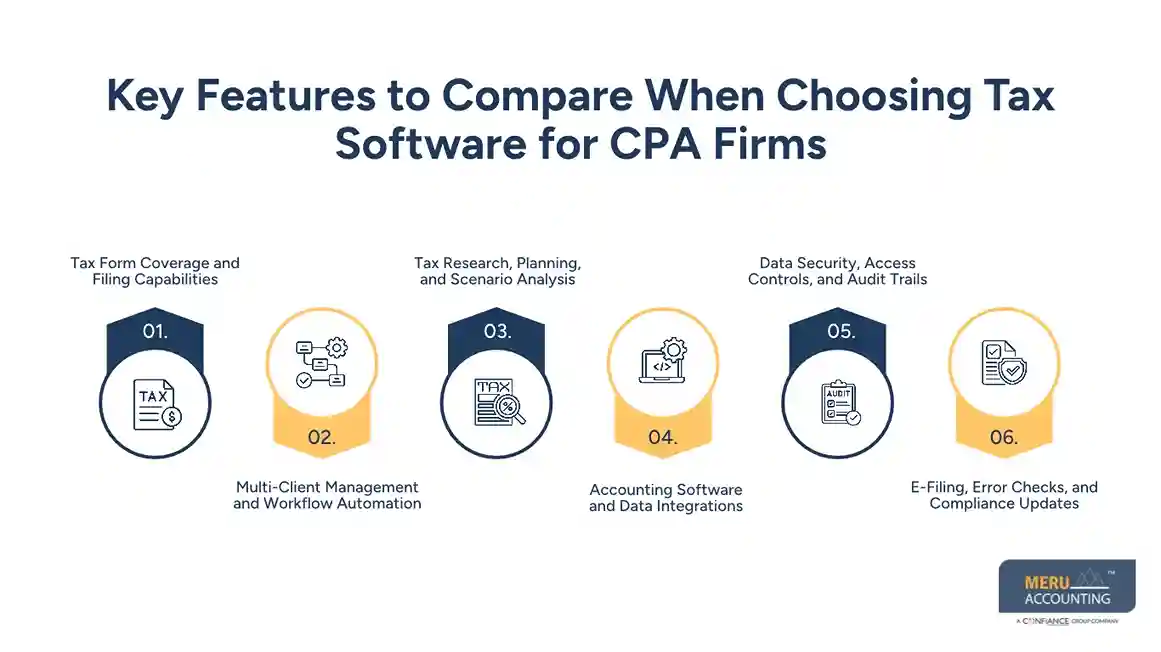
Accounting Software and Data Integrations
Connections with QuickBooks, Xero, and other accounting tools can reduce repeated data entry. Check which records transfer, how errors are handled, and whether staff must review imported figures.
Data Security, Access Controls, and Audit Trails
Tax records contain sensitive personal and financial details. Review encryption, multi-factor authentication, access permissions, backups, and activity logs before storing client data in a new system.
E-Filing, Error Checks, and Compliance Updates
Check that the software offers the required e-filing options and flags common errors before submission. Confirm how the vendor provides updates and how your team checks returns against current tax rules.
optional anymore
on running the business
Tax Software Pricing: Plans, Fees, and Hidden Costs
Per-Return vs. Per-User Pricing
Per-return plans charge based on the number of returns prepared, while per-user plans base some costs on staff access. Compare both models using your expected return volume and team size.
Annual Subscriptions and Pay-Per-Return Plans
Annual subscriptions may suit firms with steady tax work, while pay-per-return plans may suit seasonal practices. Tax software for CPA firms should fit both your current workload and likely growth.
Additional Fees for State Returns, E-Filing, and Add-On Tools
Some vendors charge extra for state returns, additional forms, research features, or other services. Ask for a full price list instead of relying only on the advertised starting price.
How to Calculate the Total Cost of Ownership
Add subscription fees, return charges, state products, user costs, training, and data migration. A plan with a low base fee may cost more once you include the extra services your firm needs.
Best Tax Software for CPA Firms by Firm Size
Best Tax Software for Solo CPAs and Independent Practitioners
Solo CPAs may compare Drake Tax, ProConnect Tax, and TaxSlayer Pro based on their client mix and filing volume. The best option should offer the required forms without unnecessary costs.
Best Options for Small CPA Firms
Small firms may consider Drake Tax, ProConnect Tax, Lacerte Tax, and TaxSlayer Pro. Tax software for CPA firms at this level should balance price, team access, filing needs, and ease of use.
Best Solutions for Mid-Sized Accounting Firms
Mid-sized practices may need detailed review steps, shared client records, and links to accounting systems. UltraTax CS and CCH Axcess Tax are worth comparing with other products that meet these needs.
Best Enterprise Tax Software for Large CPA Firms
Large firms may require advanced access controls, complex return coverage, multi-state filing, and firm-wide reporting. CCH Axcess Tax and UltraTax CS are candidates to assess based on the firm’s systems and budget.
Best Tax Planning Solutions for CPAs: Tools and Capabilities to Consider
Tax Projection and Scenario Modeling
The best tax planning solutions for CPAs should let firms compare possible tax outcomes under different income and expense levels. CPAs must check the data and assumptions before sharing projections with clients.
Estimated Tax Calculations and Payment Planning
Estimated tax tools can help calculate expected payments and flag due dates for review. CPAs should confirm the client’s income, payment history, and applicable tax rules before recommending an amount.
Entity-Level and Multi-State Tax Planning
Business clients may need advice on entity choices and income earned across several states. Check whether the software covers the relevant entities and jurisdictions before relying on its calculations.
Year-Round Tax Planning and Client Advisory
Tax software for CPA firms can be more useful when planning continues beyond filing season. Regular income reviews and forecasts can give clients a clearer view of expected tax costs and planned business changes.
Tax Research and Regulatory Updates
The best tax planning solutions for CPAs should offer current research resources and timely rule updates. Verify important findings against official tax guidance before making recommendations or filing returns.
How to Choose the Right Tax Software for Your CPA Firm
Assess Your Client Base and Return Complexity
List your main client types, return forms, state requirements, and common tax issues. Select tax software for CPA firms based on actual client work rather than features you may never use.
Match Features to Your Tax Preparation Workflow
Map the steps from receiving client records to review, approval, filing, and record storage. Choose a system that fits these steps and reduces repeated work.
Compare Pricing Against Expected Return Volume
When evaluating tax software for cpa firms, estimate annual return volume, including federal and state filings, and compare the full cost at normal and peak volume to avoid unexpected charges during filing season.
Evaluate Training, Customer Support, and Scalability
Ask how the vendor trains new users and handles urgent filing issues. Check whether you can add users, forms, or modules as your practice grows.
Test Software Through Demos or Trial Access
Use a demo or trial to test common returns, data imports, review notes, and filing steps. Ask staff to record problems and compare results before signing a contract.
Common Mistakes to Avoid When Selecting Tax Software
Choosing Based on Price Alone
The lowest-priced plan may lack key forms, research tools, or integrations. Compare total cost with the work your team must do outside the system.
Overlooking State and Multi-State Tax Requirements
Clients may earn income or run businesses in several states. Confirm that your chosen tax software for cpa firms covers each required state and return type before purchase.
Ignoring Integration and Data Migration Needs
Old client records may not transfer correctly into a new system. Check supported formats, data quality, import limits, and migration costs before switching.
Underestimating Training and Implementation Costs
Staff needs time to learn new processes and check transferred records. Include training, setup, testing, and time away from regular client work in your budget.
Why Choose Meru Accounting for Accounting and Tax-Related Services
Meru Accounting provides accounting, bookkeeping, payroll, accounts payable, accounts receivable, tax-related, and financial reporting services for businesses across multiple industries. Our team works with QuickBooks, Xero, Zoho Books, NetSuite, and Odoo to manage financial records and routine accounting tasks for businesses using tax software for cpa firms.
- Accurate Financial Records: We manage bookkeeping, account reconciliation, and financial reporting to keep business records organized and ready for review.
- Accounts Payable and Receivable: Our team records vendor bills, tracks customer invoices, and maintains payment records to keep outstanding balances clear.
- Payroll and Tax-Related Records: We manage payroll records and related accounting tasks to keep employee pay data and financial entries organized.
- Accounting Software Expertise: We work with leading accounting platforms, including QuickBooks, Xero, Zoho Books, NetSuite, and Odoo, based on business requirements.
- Dedicated Accounting Services: Meru Accounting provides outsourced accounting services that let businesses assign routine financial tasks to an experienced team instead of managing every task in-house.
Businesses choose Meru Accounting for its range of accounting services, software expertise, and ability to manage recurring financial tasks under an agreed scope of work. Our services give business owners and CPA firms organized financial records for reporting, review, and tax preparation.
Our Expert Perspective
The right tax software for CPA firms should match the firm’s real work, not just its budget. A solo CPA may value simple pricing, while a large practice may need advanced review controls and links across several systems.
The best tax planning solutions for CPAs should also fit the firm’s advisory services. Before choosing a product, test common returns, check sample calculations, review security controls, and get a full quote in writing. Software can aid tax work, but it cannot replace professional judgment or a review of current tax rules.
Key Takeaways
- Compare tax software for CPA firms based on client needs, return volume, and budget.
- Review Drake Tax, ProConnect Tax, UltraTax CS, CCH Axcess Tax, Lacerte Tax, and TaxSlayer Pro.
- Check form coverage, state filing, e-filing, data security, and accounting links.
- Calculate the full cost, including add-ons, training, and data transfer.
- Choose the best tax planning solutions for CPAs based on projections, research, and client advisory needs.
- Test the software before signing a contract and confirm key tax results against official guidance.
FAQs
Pricing varies by subscription type, return volume, user count, state filings, and add-on features, so firms should compare the total annual cost before choosing a plan.
CPA firms should evaluate tax projections, estimated payment calculations, scenario analysis, tax research, multi-state tax coverage, and regulatory updates.
Yes, many tax products offer data links with accounting platforms, but firms should confirm compatibility with tools such as QuickBooks, Xero, and their current workflow.
Tax preparation software focuses on calculating and filing returns, while tax planning software focuses on projections, estimated payments, and comparing possible tax outcomes.
CPA firms should compare subscription fees, per-return charges, state filing costs, user fees, training, and add-on tools to estimate the total annual cost.
optional anymore
on running the business