

Choosing the best tax software for realtors is not just about finding a tool that can fill out tax forms. Real estate agents and brokers often deal with 1099 income, commissions, mileage, marketing costs, client meals, office costs, and other business expenses. Those who also work with commercial real estate may have more complex records tied to properties, deals, assets, and business use.
The right realtor tax software should make it easier to sort income, track expenses, keep tax records, and move clean data into the tax return process. For commercial real estate, it should also support records that may affect depreciation, property costs, and the tax basis of assets. The IRS notes that real estate rental activity can include expenses such as mortgage interest, property tax, repairs, operating costs, and depreciation, so the quality of the records behind the return matters.
What You Will Learn From This Blog
- What makes commercial real estate tax accounting different
- Features to look for in the best tax software for realtors
- How realtor tax software can track income and business costs
- What to check for real estate deductions and depreciation
- Common mistakes when choosing tax software
- When software may not be enough and tax help may be useful
Why Commercial Real Estate Tax Accounting Is Different
Not every realtor has the same tax needs. A residential agent who earns commissions from home sales may have a fairly simple business record. A commercial real estate professional may deal with larger deals, more travel, property-related costs, leasing work, investment activity, or several business entities.
That means the best tax software for realtors needs to do more than sort basic income and expenses.
For example, a commercial real estate professional may need to keep clear records for:
- Commission and fee income
- Marketing and lead costs
- Business travel and mileage
- Professional fees
- Office and software costs
- Property-related expenses
- Business equipment
- Asset purchases and improvements
- 1099 forms and other tax records
Depreciation can also matter when a taxpayer owns or uses qualifying property for business or income-producing activity. The IRS says most tangible property, other than land, may be depreciable when it meets the required rules.
This is why realtor tax software should be judged by the full tax workflow, not just by how easy it is to enter numbers.
Key Features to Look for in Realtor Tax Software
Income and Commission Tracking
Commission income is a key part of many real estate businesses. Good realtor tax software should make it easy to record income by source and keep supporting records.
This can help you match deposits to commission statements, 1099 forms, and your books. It can also make it easier to spot income that was recorded in your books but is missing from your tax records.
Business Expense Tracking
The best tax software for realtors should let you sort common business costs without making the process hard.
Look for support for expenses such as:
- Advertising
- MLS and association dues
- Business software
- Office costs
- Professional fees
- Travel
- Supplies
- Business insurance
- Vehicle costs
The key is not just storing receipts. Your records should make it clear what the cost was, when it was paid, and why it was tied to the business.
Mileage and Vehicle Records
Real estate work can involve a lot of driving. Property tours, client meetings, inspections, showings, and other work trips can create a large set of mileage records.
A useful tax tool should let you track business miles and keep the date, purpose, and trip details needed to support the record. It should also make it easy to retain the data for tax time.
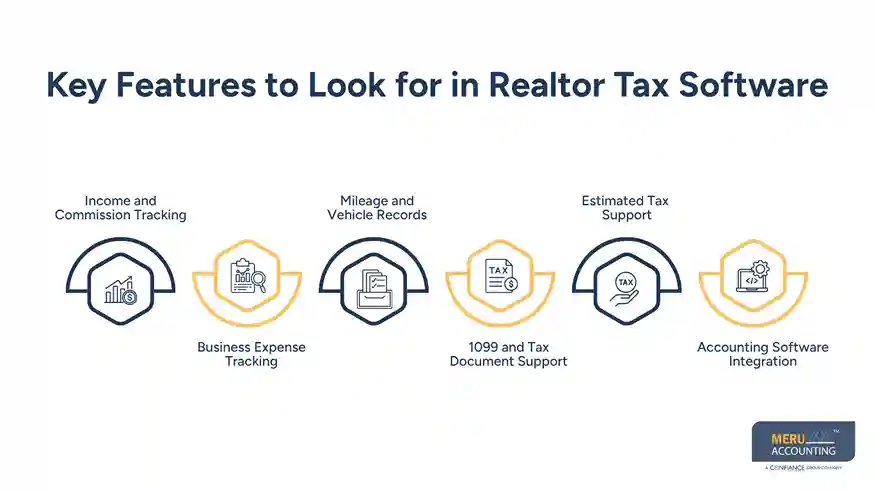
1099 and Tax Document Support
Many realtors receive Form 1099 income. Your software should make it simple to record these forms and compare them with the income in your books.
A good workflow can help you find differences before you file. It also helps keep tax documents in one place rather than spread across email, paper files, and different apps.
Estimated Tax Support
Many self-employed realtors need to plan for tax payments during the year. The best tax software for realtors should give you a clear view of taxable income and help you prepare the data needed for estimated tax planning.
The exact tax due can depend on your income, deductions, filing status, and other factors, so software should support the process rather than replace tax review.
Accounting Software Integration
Tax work starts with clean books. Look for realtor tax software that can work with your bookkeeping or accounting system.
A strong link between bookkeeping and tax work can reduce duplicate data entry. It can also help your tax preparer work from records that have already been checked and matched.
optional anymore
on running the business
Does Tax Software Support Real Estate-Specific Tax Deductions?
This is one of the most useful questions to ask when comparing the best tax software for realtors.
Tax software may support many common business deductions, but a deduction is not valid simply because a program has a field for it. The expense must meet the tax rules that apply to the taxpayer and the activity.
For example, the IRS allows certain business-use-of-home expenses when the taxpayer meets the required rules. These can include the business share of items such as utilities, insurance, repairs, and depreciation.
Real estate activity can also involve property taxes, repairs, advertising, insurance, management fees, interest, and depreciation. But improvements are generally treated differently from routine repairs because the cost of improvements may need to be recovered through depreciation.
So, when reviewing realtor tax software, check whether it helps you:
- Identify common real estate business expenses
- Separate business and personal costs
- Track property-related costs
- Keep records for tax support
- Handle depreciation data
- Flag missing or unusual information
Software can help organize the data, but it cannot decide whether every expense qualifies under your specific tax facts.
How Realtor Tax Software Handles Depreciation and Property Expenses
Depreciation is one area where commercial real estate tax work can become more complex.
The IRS treats depreciation as a way to recover the cost of qualifying property over time. Land itself is not depreciable, while qualifying buildings, equipment, furniture, and other assets may be.
This means the best tax software for realtors should have a clear way to enter and track assets. Useful features may include:
- Asset purchase date
- Date placed in service
- Cost or adjusted basis
- Asset type
- Recovery period
- Depreciation method
- Prior depreciation
- Improvements and additions
For rental real estate, the IRS notes that depreciation can apply to property and certain improvements, with Form 4562 used in applicable cases.
For commercial real estate professionals, this matters because a simple expense list may not tell the full story. A cost that looks like a normal expense may need to be treated as an asset and recovered over time.
A tax tool can help track these details, but complex property or entity structures may call for review by a qualified tax professional.
Common Mistakes When Choosing Realtor Tax Software
Choosing Software Based Only on Price
A low monthly fee does not mean the tool will fit your tax workflow. Check the features, form support, integrations, record storage, and level of tax help before making a choice.
Treating Tax Software as a Tax Advisor
Even the best tax software for realtors cannot know every fact about your business. Software can guide data entry and calculations, but tax treatment can depend on how an expense was used and why it was paid.
Ignoring Bookkeeping Quality
Tax software works best when the records going into it are clean. If bank activity, commissions, expenses, and assets are not properly recorded, a tax tool cannot fix the whole problem.
Failing to Track Assets
Buying equipment or making property improvements without keeping proper asset records can create issues later. Keep purchase details, dates, invoices, and other records that support the cost and use of the asset.
Mixing Business and Personal Expenses
Separate business and personal spending as much as you can. Clear records make it easier to support business deductions and reduce confusion at tax time.
Meru Accounting’s Tax Services for Realtors
Tax software can help with forms and records, but many real estate professionals also need help keeping the books tax-ready throughout the year. That is where Meru Accounting can help.
We support realtors and real estate professionals with accounting and tax work built around their business activity. Our team can help keep income, expenses, reconciliations, and financial reports in order so tax work does not start with a pile of uncategorized transactions.
Our tax services for realtors include:
- Real estate bookkeeping and account reconciliation
- Commission and income tracking
- Business expense tracking
- Accounts payable and accounts receivable support
- Tax-ready financial reports
- Property-related income and expense records
- Asset and depreciation records
- Tax preparation support
- Year-round accounting and tax support
For real estate professionals, the goal is not just to file a return. It is to keep the records behind the return clear, current, and ready for review.
Our Expert Insight
When we review tax records for realtors, we look beyond whether software can track income and expenses. We check whether transactions are properly classified and supported by clear records.
For example, a large property-related payment may be a current expense, an asset, or an improvement that must be depreciated. That distinction matters at tax time. We also compare commissions, 1099s, bank deposits, and expense records to catch gaps before the return is prepared.
In our experience, the best tax software for realtors is most useful when it is backed by clean bookkeeping and regular review. Software can organize the data, but it cannot replace professional judgment when the tax treatment is not straightforward.
Key Takeaways
- The best tax software for realtors should support income, expenses, mileage, 1099s, and tax records.
- Commercial real estate can require more detailed tracking for property costs and assets.
- Depreciation should be tracked with care because qualifying property costs are generally recovered over time.
- Realtor tax software can organize data, but it does not replace tax judgment.
- Clean bookkeeping makes tax preparation easier and can reduce errors.
- Complex commercial real estate activity may benefit from professional tax and accounting support.
FAQs
Yes. Most self-employed realtors can use standard tax software that supports 1099 income, business expenses, mileage, and applicable tax forms.
Not always. Some realtor tax software includes features better suited to commission income, mileage, and real estate expenses.
Yes. Most tax software can report 1099 income, but you should still compare it with your commission and bank records.
Some programs can calculate depreciation for qualifying property. The correct treatment depends on the property and how it is used.
Look for support for 1099 income, business expenses, mileage, estimated taxes, asset tracking, and the tax forms you need.
optional anymore
on running the business



