Managing business cash flow is essential for long-term success. Many small business owners face challenges when it comes to planning and monitoring their finances. Float app offers a practical solution designed to improve visibility and control over financial movements. This cash flow budget software enables users to track spending, forecast income, and prepare for upcoming financial needs with greater accuracy.
This blog outlines how to use the Float app effectively to manage your finances and explains why it serves as a valuable tool for businesses seeking better financial control. Whether implementing a new system or refining an existing one, the insights here will help you prepare a smarter cash flow budget.
What You Will Learn from This Blog
- Learn how the Float app helps you build an accurate cash flow budget for your business.
- Understand the key features of Float, including live data sync, scenario planning, and forecasting.
- Follow a step-by-step process to set up and use Float with your accounting software.
- Discover how better cash flow forecasting supports smarter financial decisions and business growth.
- Learn practical tips to improve cash flow management and get the most value from Float.
What Is Float Cash Flow and How Does It Work?
Float Cash Flow is a tool that helps you track and forecast your business’s income and expenses. It links with your accounting software and updates your data in real time. You can see how much cash you have now and how much you will have in the future.
Key Benefits of Float App:
- Shows clear and easy-to-read reports
- Links with tools like Xero, QuickBooks, and FreeAgent
- Helps you see cash shortfalls before they happen
- Offers a visual calendar for future planning
- Keeps all your financial data in one place
- Create an organized cash flow budget
By using Float, you can see what’s coming in and what’s going out. It gives you the power to make smart choices before a problem shows up.
Key Features of Float Cash Flow Budget Software
Float offers instant clarity on your money. It updates in real time and tracks both income and spending. This cash flow budget software gives a clear view of future shortfalls and business trends.
Live Data Sync
Float app links with tools like Xero and QuickBooks. The software pulls data daily to keep reports accurate. You get updated cash flow insights without spending hours on manual entries.
Scenario Planning
With Float, test different business cases before making changes. Adjust payment dates, income levels, or costs. This software reveals how each shift affects your overall cash flow.
Drag and Drop Forecasting
Float’s simple drag-and-drop feature helps you build forecasts fast. You can plan your future income and expenses without complex formulas. The cash flow view adjusts instantly, giving you more control.
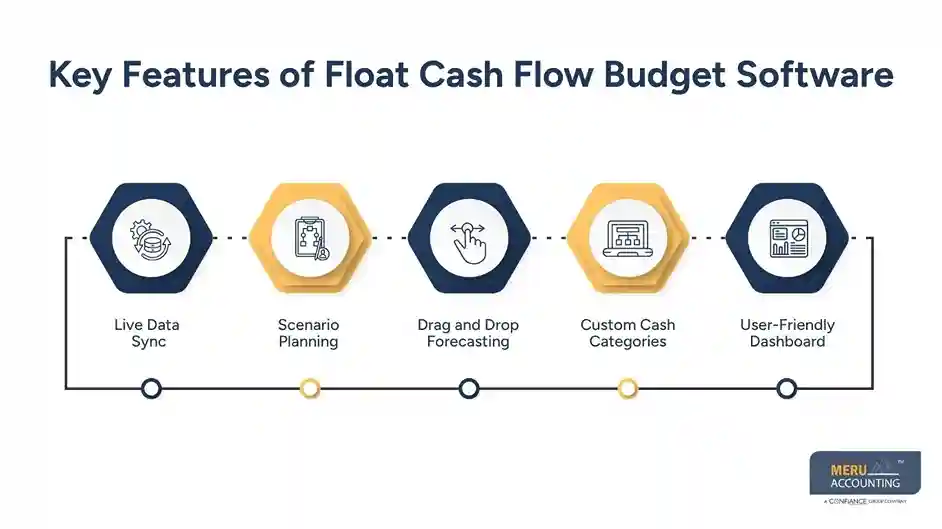
Custom Cash Categories
Cash flow budget software allows custom labels. You can group entries into specific types, making reports easier to read. This improves clarity and supports smarter cash flow analysis for decision-making.
User-Friendly Dashboard
The Float dashboard is clean and easy to use. It shows current trends and forecasts in simple charts. Even non-finance users can use the Float app with confidence.
Step-by-Step Guide to Using Float App for Cash Flow Budgeting
Let’s go over how to set up and use the Float app for your cash flow budget.
Step 1: Connect Your Accounting Software
Link your accounting tool to Float. This software pulls records for fast setup. Once linked, the float process begins with accurate, real-time data.
Step 2: Review the Imported Data
After the connection, check each entry for accuracy. Float cash flow sorts these into categories, preparing your dashboard. This step ensures your cash flow data stays clean and error-free.
Step 3: Build Your First Forecast
Start with a simple monthly plan. Enter expected sales and spending. Float will then create a forecast. This step sets the base for using the cash flow float effectively.
Step 4: Add Scenarios
Use this feature to test different plans. Whether you’re adding staff or cutting costs, Float shows the impact. Scenarios help make smarter, data-driven decisions using the float tool.
Step 5: Share with Your Team
You can give team access to the Float dashboard. This improves teamwork and planning. With shared float views, departments stay aligned using the same cash flow budget software insights
Step 6: Monitor Weekly
Check Float weekly for updated reports. Frequent reviews help catch issues early. By using Float, cash flow updates automatically, keeping the cash flow view current and accurate for smart budgeting.
By following these steps, Float can give you clear answers to money-related questions.
How Float Cash Flow Helps with Financial Forecasting
A good cash flow tool gives you a clear picture of your financial future. The Float app lets you forecast your money flow so you can make smart decisions.
Real-Time Forecasts
Float pulls live data from your accounting software. This keeps forecasts accurate and up to date. It helps you plan better by adjusting your float based on real-time figures.
Better Planning
Float allows you to create flexible forecasts. You can plan expenses, sales, and staff needs more clearly. The float view gives you more confidence in your business strategy.
Avoid Trouble
With early alerts, Float helps you act before issues grow. The software shows low points in your cash flow. This allows timely decisions and prevents financial stress.
Investor Confidence
Float builds trust with investors. Clean, accurate forecasts make your business look strong. When using this software, you show control over finances and future cash flow.
Float makes forecasting simple. You don’t need a finance degree to understand your future cash flow.
Tips to Maximize the Use of Float Cash Flow Software
To get the most from Float, here are some quick tips:
Keep Your Data Clean
Accurate input is vital. Float depends on clean records from your accounting tool. Fix errors quickly to keep your cash flow forecasts clear, trusted, and ready for smart action.
Set a Forecasting Routine
Review your Float dashboard weekly. Frequent updates help you stay aware of trends. This routine keeps your cash flow fresh, allowing the cash flow software to support better business planning.
Use Scenarios Often
Test ideas with Float’s scenario tool. See how changes affect your budget. This helps make informed choices using the app, turning the cash flow into a powerful planning guide.
Train Your Team
Give your team access to cash flow tools. A trained team understands spending patterns and forecasts. Shared use of the cash flow improves planning across all departments.
Connect Other Tools
Float works well with Xero, QuickBooks, and more. When combined with the right apps, the cash flow view becomes clearer. Use integration to unlock full cash flow software value.
Float is a powerful tool, and its effectiveness increases when guided by professionals with experience in financial systems. Meru Accounting offers expert support to ensure the software is configured and used to its full potential. Our team ensures a smooth setup process and accurate integration with your accounting software. We create customized financial forecasts and cash flow budgets using Float that align with your business goals.
optional anymore
on running the business
Our Expert Insight
Many businesses create a cash flow budget once and rarely update it, which can lead to poor financial decisions when business conditions change. At Meru Accounting, we recommend using the Float app with regular forecast reviews and accurate accounting data to maintain a reliable cash flow plan. Combining automated forecasting with expert accounting support helps businesses improve cash flow visibility, reduce financial risks, and make confident decisions based on current financial information rather than assumptions.
Key Takeaways
- A cash flow budget helps businesses plan income, expenses, and future cash needs more accurately.
- The Float app provides real-time cash flow forecasting by connecting with accounting software like Xero and QuickBooks.
- Features such as scenario planning, live data sync, and drag-and-drop forecasting improve financial planning.
- Reviewing and updating your cash flow forecast every week keeps budgeting accurate and supports better decisions.
- Keeping accounting records clean improves the accuracy of Float forecasts and financial reports.
FAQs
Float is a software that connects to your accounting tools and updates your financial data in real time. It gives clear insights into your income, expenses, and future cash flow.
You should update your cash flow forecast weekly. This keeps your cash flow accurate and helps spot trends early. Regular checks make your cash flow budgeting software more useful for planning.
Yes, Float works with QuickBooks, Xero, and other tools. It pulls live data from your system to keep your cash flow updated. This improves your overall cash flow budgeting software use.
Float cash flow is ideal for small businesses. It simplifies forecasting, shows cash gaps early, and improves planning. Even non-finance users can use this app for cash flow budgeting.
Yes. Float uses live financial data from your accounting software to create more accurate forecasts. It helps you build a reliable cash flow budget, identify future cash gaps, and make better financial decisions with up-to-date information.