Cloud accounts receivable software gives businesses a simple way to create invoices, track payments, send reminders, and manage customer dues online. It keeps billing records in one place and gives finance teams a clear view of unpaid invoices without relying on spreadsheets or repeated manual checks.
For U.S. businesses, late payments can affect cash flow, payroll, vendor bills, and daily expenses. The right cloud accounts receivable software can reduce billing delays and make collection work easier to manage. When linked with accounts receivable accounting software, it also keeps invoice and payment records aligned with the main books. This blog covers leading tools, key features, business benefits, setup steps, and ways to measure results.
What You Will Learn From This Blog
- What cloud accounts receivable software is and how it works.
- Which tools suit small, mid-sized, and large businesses.
- Which features matter in accounts receivable accounting software.
- How to set up the system and avoid common issues.
- Which AR metrics show how well your team collects payments.
What is Cloud Accounts Receivable Software?
Cloud accounts receivable software is an online system that manages money customers owe a business. It records invoices, tracks due dates, sends payment notices, and shows unpaid balances through a secure online account.
Unlike a basic spreadsheet, accounts receivable automation software can handle routine tasks and keep records in one place. For example, a consulting firm can send monthly bills, track payments, and flag overdue accounts without checking each invoice by hand.
Many businesses use accounts receivable accounting software with built-in cloud features, while others choose a separate AR platform. The right option depends on invoice volume, payment terms, reporting needs, and the accounting system already in use.
How Does Cloud Accounts Receivable Software Work?
Cloud accounts receivable software manages the steps between sending an invoice and recording the payment. It can connect billing, payment tracking, and financial reports in one system.
- Invoice Creation: Staff create invoices using approved customer and sales data.
- Invoice Delivery: The system sends invoices by email or through a customer portal.
- Payment Tracking: Users can see paid, open, and overdue invoices.
- Payment Reminders: Set rules to send notices before or after due dates.
- Payment Reconciliation: Staff match bank receipts with open invoices.
- Financial Reporting: Managers review unpaid bills and expected cash receipts.
For example, accounts receivable accounting software can flag a $2,000 invoice that remains unpaid 15 days after its due date. The finance team can check the account, contact the customer, and record the next action.
Key Features to Look for in Cloud Accounts Receivable Software
Automated Invoice Creation and Delivery
Choose accounts receivable automation tools that can create invoices from approved sales or service records. Templates, recurring billing, and email delivery reduce data entry and help prevent missed billing dates.
Payment Tracking and Reconciliation
Good accounts receivable accounting software shows payment dates, amounts due, and open balances. Bank feeds can reduce manual work, but staff must still check unmatched receipts, fees, and unusual entries.
Automated Payment Reminders
Look for rules that send notices before and after invoice due dates. Cloud accounts receivable software should let staff change reminder timing and pause notices when a customer disputes a bill.
Customer Account Management
A central customer record should show contact details, credit terms, past payments, open invoices, and disputes. This gives staff the facts they need before following up on an overdue balance.
Accounts Receivable Reporting and Analytics
Useful reports include invoice aging, overdue balances, collection trends, and days sales outstanding. The system should let managers sort data by customer, date, invoice status, and amount due.
Integration With Accounting and ERP Systems
Check whether the platform connects with your accounting software, ERP system, bank, and payment provider. Good links between cloud accounts receivable software and the main ledger reduce duplicate entries and keep records aligned.
Top Cloud Accounts Receivable Software Tools for Businesses
The best tool depends on company size, invoice volume, payment methods, and reporting needs. Compare the current plans and test real billing tasks before choosing a system.
QuickBooks Online
QuickBooks Online suits many small and mid-sized firms that need invoicing, payment tracking, bank feeds, and AR reports. It is worth considering if you want accounts receivable accounting software within your main bookkeeping system.
Xero
Xero offers online invoicing, payment tracking, bank reconciliation, and financial reports. Businesses can review unpaid customer bills and share accounting records with authorized users.
Zoho Books
Zoho Books includes invoicing, payment reminders, customer records, and AR reports. It may suit small firms that want cloud accounts receivable software with wider accounting features in one system.
BILL
BILL offers financial workflow tools, including accounts receivable features in its product range. It may suit firms that want to manage billing, payment tasks, and customer transactions through defined workflows. Check the current plan details before purchase.
HighRadius
HighRadius offers AR automation tools for larger firms with complex collection needs. Depending on the product, features may include cash application, credit management, collection workflows, and reporting.
Versapay
Versapay focuses on AR automation and customer payment collaboration. It may suit firms with high invoice volumes that want customers to view bills, raise queries, and make payments through a shared portal.
Sage Intacct
Sage Intacct offers cloud financial management and accounting features, including AR functions. It may suit growing firms that need detailed reports, multi-entity accounting, and links between receivables and wider finance records.
Before choosing, compare total cost, payment fees, integrations, access controls, support, and reporting limits. The right cloud accounts receivable software should fit your current process without adding needless steps.
optional anymore
on running the business
Benefits of Using Cloud-Based Accounts Receivable Accounting Software
Faster Invoice Processing and Payments
Automated billing and timely reminders reduce delays between completing work and asking for payment. Cloud accounts receivable software also gives customers clear invoice details and a simple way to review what they owe.
Better Cash Flow Visibility
A current view of open invoices gives managers a better idea of when cash may arrive. Accounts receivable accounting software can show overdue balances and upcoming due dates, although expected receipts are not the same as cash in the bank.
Fewer Manual Errors
Templates and approved customer records reduce mistakes in invoice amounts, names, and dates. Staff must still review prices, tax details, duplicate bills, and unmatched payments before closing the books.
Improved Customer Payment Experience
Online payment options, clear invoices, and timely notices make it easier for customers to pay. A shared record also cuts repeated emails about payment status and missing bills.
Easier Access to Financial Data
Authorized staff can view current records from different locations. Cloud accounts receivable software should include secure sign-in and role-based access to protect customer and financial data.
Reduced Administrative Work
Automated notices, invoice delivery, and routine reports reduce repetitive tasks. Staff can spend more time resolving disputes, reviewing overdue accounts, and speaking with customers about payment plans.
How to Implement Cloud Accounts Receivable Software: Step-by-Step
Review Your Existing AR Process
Map how your team creates invoices, records receipts, sends reminders, and handles disputes. Note delays and errors so the new system addresses real problems rather than copying old habits.
Define Business Requirements
Set clear goals, such as reducing overdue bills or cutting manual data entry. List required reports, user roles, payment methods, security rules, and budget limits before comparing tools.
Select the Right Software
Compare features, cost, ease of use, integrations, and invoice limits. Test cloud accounts receivable software with actual billing examples to see whether it fits your team’s needs.
Prepare Customer and Invoice Data
Check customer names, billing addresses, contact details, payment terms, and open balances before migration. Remove duplicate records and confirm outstanding amounts to avoid carrying old errors into the new system.
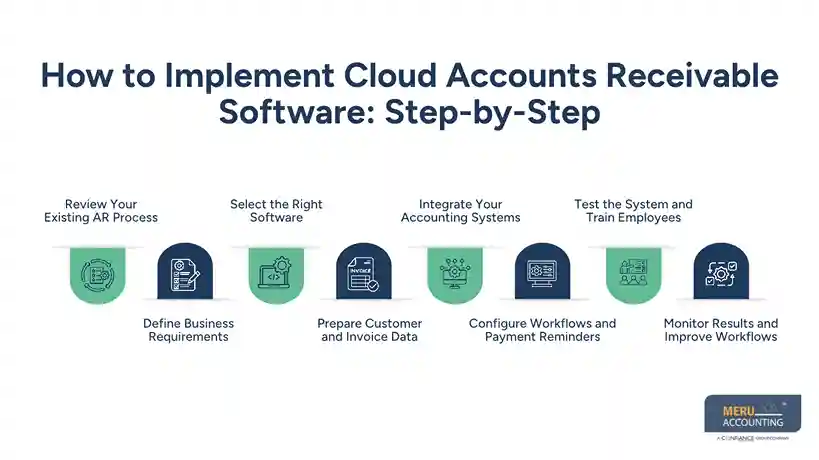
Integrate Your Accounting Systems
Connect the AR platform with your accounting system, ERP, bank feeds, or payment provider. Test invoices, receipts, credit notes, and fees to confirm that data moves correctly between systems.
Configure Workflows and Payment Reminders
Set invoice templates, approval rules, due dates, and reminder schedules. Accounts receivable accounting software should also allow staff to pause collection notices when a bill is under review.
Test the System and Train Employees
Test full payments, partial payments, refunds, reconciliation, and overdue notices before launch. Train staff on daily tasks, access rules, error reporting, and cases that need manager approval.
Monitor Results and Improve Workflows
Compare results with your starting figures during the first few weeks. Review overdue balances, staff feedback, and system errors, then adjust rules where needed.
Common Challenges in Cloud AR Software Implementation and How to Address Them
Poor Data Quality
Wrong customer details and opening balances can lead to failed notices and poor reports. Clean the records before migration and check a sample after the transfer.
Integration Problems
Different systems may use different account codes or payment rules. When implementing cloud accounts receivable software, map the fields in advance, test key transactions, and assign a person to review sync errors.
Employee Resistance
Staff may prefer spreadsheets and familiar manual steps. Explain the reason for the change, provide hands-on training, and set a clear date for the move.
Customer Disputes
Automated reminders can cause problems if a customer questions an invoice. Set a dispute status that pauses notices until the team reviews the issue.
Security Risks
Financial records need careful access control. Use multi-factor authentication, role-based permissions, secure data transfer, and regular access reviews. Check vendor backup and incident response terms before signing up.
Best Practices for Managing Accounts Receivable With Cloud Software
Set Clear Credit and Payment Terms
State due dates, payment methods, and dispute rules in customer agreements. Apply approved terms consistently and check the rules that apply before charging late fees.
Send Accurate Invoices on Time
Check prices, quantities, tax details, and customer data before sending each bill. Prompt, correct invoices reduce avoidable questions and give customers time to pay.
Review Overdue Accounts Often
Use aging reports to sort unpaid bills by age and value. Give priority to large or long-overdue balances and record each customer contact.
Keep a Clear Audit Trail
Record invoice edits, credit notes, payment changes, and approvals. Cloud accounts receivable software should make it easy to review these records when checking errors or preparing for an audit.
Protect Customer Financial Data
Limit access to staff who need it and remove access when roles change. Review system logs and confirm how the vendor stores, backs up, and deletes data.
Key Metrics to Measure Accounts Receivable Performance
Days Sales Outstanding (DSO)
DSO estimates the average number of days needed to collect credit sales. A lower figure may show faster collection, but compare it with payment terms, sales patterns, and past results.
Average Days Delinquent (ADD)
ADD estimates how far customer payments fall behind their due dates. Track the figure over time to see whether overdue accounts are being cleared sooner.
Collection Effectiveness Index (CEI)
CEI measures how well a business collects the amount available for collection during a set period. A higher result generally signals stronger collection, but it should be reviewed alongside other AR measures.
Invoice Aging and Overdue Balances
Aging reports group unpaid bills by age, such as current, 1–30, 31–60, 61–90, and over 90 days. Use these figures to find collection risks and set follow-up priorities.
How Meru Accounting Provides Accounts Receivable Services
- Meru Accounting provides accounts receivable services for U.S. businesses, covering invoice records, payment tracking, account reconciliation, and regular financial reports.
- Our services include overdue payment follow-ups, invoice aging reports, and updates on outstanding balances, based on each business’s needs.
- We work with QuickBooks Online, Xero, and Zoho Books to manage receivable records and fit your existing accounting processes.
- Our team reviews open invoices and payment records to identify overdue accounts and keep receivable data up to date.
- Meru Accounting maintains clear records of customer payments, pending invoices, and outstanding dues for easier review and follow-up.
- Regular AR reports give business owners a clear view of unpaid invoices, collection progress, and customer balances.
- We assess your invoice volume, current AR process, and reporting needs to define a service plan that fits your business.
- By assigning routine AR tasks to Meru Accounting, you can reduce manual work and give your in-house team more time for core finance activities.
Our Expert Perspective
Cloud accounts receivable software works best when the process behind it is clear. Automation cannot fix wrong invoices, unclear payment terms, or poor customer records on its own. Start with clean data, set clear rules, and review overdue invoices and collection trends each month to spot delays, refine follow-up plans, and maintain better control over cash flow.
Key Takeaways
- Cloud accounts receivable software brings invoicing, payment tracking, reminders, and reports into one online system.
- The best tool depends on business size, invoice volume, budget, and current accounting systems.
- Accounts receivable accounting software can cut manual work, but staff must still review errors and disputes.
- Clean data, tested integrations, and employee training are key to a sound setup.
- DSO, ADD, CEI, and invoice aging show how well the business collects payments.
- Review costs, security, access controls, and plan limits before choosing a vendor.
FAQs
Cloud accounts receivable software manages invoices, tracks customer payments, sends reminders, and records outstanding balances online.
QuickBooks Online, Xero, Zoho Books, BILL, HighRadius, Versapay, and Sage Intacct are options for businesses of different sizes.
Key features include automated invoicing, payment tracking, payment reminders, customer account management, AR reports, and accounting system integrations.
Cloud-based accounts receivable accounting software can speed up billing, reduce manual errors, track overdue invoices, and improve cash flow visibility.
Implement cloud accounts receivable software by reviewing current processes, selecting a suitable tool, cleaning data, setting up integrations, training staff, and tracking results.
optional anymore
on running the business