Three invoices arrive on Monday morning. One is buried in an email, another has the wrong purchase order number, and the third is waiting for a manager who is out of the office. By Friday, a supplier is asking why the payment has not arrived. For many finance teams, small delays like these turn into a monthly problem. Cloud-based accounts payable solutions bring invoices, approval requests, and payment records into one online system. But moving bills to the cloud does not fix every issue on its own.
Old data, unclear rules, and poor staff training can still cause errors. A clear implementation plan gives businesses a way to address these gaps before they affect payments, cash flow, or supplier ties.
What You Will Learn From This Blog
- How cloud-based accounts payable solutions work in daily finance tasks.
- Which benefits matter most when a business moves away from manual AP work.
- How to plan and carry out implementation in 10 clear steps.
- Which data, system, staff, and security issues need close attention.
- How to track results after launch and keep AP records in good order.
- When Meru Accounting’s outsourced accounts payable services may fit your needs.
What are Cloud-Based Accounts Payable Solutions?
Cloud-based accounts payable solutions let a finance team handle supplier bills through an online platform instead of relying on paper files, long email chains, or local records. Staff can capture invoice details, check amounts, send bills for approval, and track due dates from one place.
Consider a firm that buys goods from 80 suppliers. Without a shared system, staff may check several inboxes to find one bill or ask the same manager for approval more than once. The right tool gives each invoice a clear status and keeps its records in one place, even when used alongside outsourced accounts payable services.
Some systems use optical character recognition (OCR) to read invoice data, while others offer payment tracking, audit logs, and links to accounting software. The exact features depend on the tool and the firm’s needs.
Benefits of Implementing Cloud-Based Accounts Payable Solutions
Faster Invoice Processing
A bill should not sit in an inbox for days because no one knows who must review it. Cloud-based accounts payable solutions route invoices to the right person and show which tasks are still pending.
Fewer Data Entry Errors
Typing the same invoice details into more than one system raises the risk of wrong amounts and dates. Automated data capture can cut repeat entry, though staff must still check key fields before approval.
Better Cash Flow Planning
A list of unpaid bills is more useful when it shows due dates and approval status. Finance teams can use this view to plan cash needs and avoid paying late fees on bills that were simply missed.
Clear Approval Records
When a supplier questions a bill, the finance team needs more than an old email to explain what happened. Cloud-based accounts payable solutions can record who reviewed, changed, or approved each invoice.
Easier Remote Access
Managers do not need to be in the same office to review a bill. They can use secure access to check requests while working at another site, as long as their role allows it.
optional anymore
on running the business
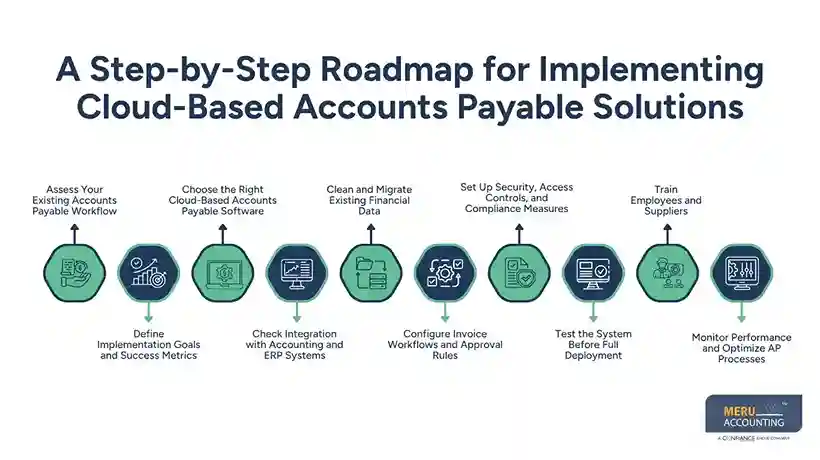
A Step-by-Step Roadmap for Implementing Cloud-Based Accounts Payable Solutions
Assess Your Existing Accounts Payable Workflow
Start by following one invoice from the moment it arrives until its payment is recorded. Note every handoff, delay, manual entry, and check that staff must complete.
Ask the team which tasks cause the most trouble. If bills often wait two days for approval, changing the approval path or using outsourced accounts payable services may matter more than buying a tool with extra features.
Define Implementation Goals and Success Metrics
A goal such as “make AP faster” is too broad to measure. Set a clear target, such as cutting the average approval time from four days to two within three months.
Record current figures for processing time, late payments, duplicate bills, and cost per invoice. These figures give the team a fair way to judge whether the new system delivers the expected results.
Choose the Right Cloud-Based Accounts Payable Software
The tool with the most features is not always the right choice. Match cloud-based accounts payable solutions to your invoice volume, budget, approval rules, supplier needs, and staff skills.
Ask vendors to show how their systems handle a real case, such as a bill with a missing purchase order or an invoice that needs two approvals. Check setup fees, user charges, training costs, and the terms for ending the service.
Check Integration with Accounting and ERP Systems
An invoice may pass through the AP tool but still fail to reach the general ledger. That gap can leave payment records and account balances out of sync.
Check how the new system shares supplier data, account codes, tax details, and payment status with your current software. Test failed transfers and duplicate entries before staff rely on the link for daily work.
Clean and Migrate Existing Financial Data
Moving messy records to a new system only gives old problems a new home. Remove duplicate suppliers, fix missing details, and check unpaid bills before moving the data.
Keep a backup and compare migrated records with the original books. Pay close attention to opening balances, credit notes, due dates, and supplier bank details, as errors in these fields can affect payments and reports.
Configure Invoice Workflows and Approval Rules
Configure cloud-based accounts payable solutions with rules that match the way your business spends money. A small office bill may need one approval, while a large purchase may require a budget owner and a senior manager.
Plan for staff leave, disputed bills, and urgent payments. Keep supplier record changes separate from payment approval wherever possible, so one person cannot change bank details and release funds without a check.
Set Up Security, Access Controls, and Compliance Measures
Not every employee needs access to every financial record. Give users only the permissions required for their work, and use multi-factor authentication to reduce the risk of unauthorised access.
Check how the provider stores data, backs up records, reports security incidents, and handles record retention. Review these terms against the laws and rules that apply to your business before you approve the setup.
Test the System Before Full Deployment
Do not wait until month-end to find out that a bill has been posted twice. Test cloud-based accounts payable solutions with routine invoices, credit notes, disputed bills, repeat invoices, and requests that need more than one approval.
Compare the results with the source documents and accounting records. Fix any errors in data capture, approval routing, or system links before moving all invoices to the new process.
Train Employees and Suppliers
A new tool can fail in practice when staff do not know what to do with an invoice that gets rejected. Give users short guides and practice tasks for entering bills, checking data, approving requests, and reporting faults.
Tell suppliers about changes to invoice submission or document formats before the new process begins. A clear contact point for queries, including those related to outsourced accounts payable services, can prevent missed bills and reduce payment disputes.
Monitor Performance and Optimize AP Processes
The first month after launch will show where the plan works and where it needs changes. Review approval delays, duplicate bills, late payments, and failed system transfers on a regular schedule.
If invoices still wait too long, check whether the cause is a slow approval rule, poor data, or a lack of staff cover. Use the findings to refine the process rather than assuming the software will fix every delay.
Common Challenges When Implementing Cloud-Based Accounts Payable Solutions
Data Migration Errors and Duplicate Records
A supplier listed twice can lead to split records or repeat payments. Clean the source files, match records before migration, and check a sample against the old books before approving the transfer.
Integration Issues with Existing Accounting Systems
Different systems may use different account codes or data formats. Test each data link and assign a clear owner to review failed transfers and correct errors.
Employee Resistance and Training Gaps
Staff may continue using email or spreadsheets if cloud-based accounts payable solutions seem harder to use than the old process. Explain what will change, offer hands-on training, and act on common concerns during the pilot.
Security Risks and Regulatory Requirements
Fake supplier emails and unauthorised bank detail changes can lead to financial loss. Verify such changes through a separate known contact method, limit access rights, and keep a record of key actions.
Best Practices for Managing Cloud-Based Accounts Payable Solutions
Standardize Invoice Processing and Approval Workflows
Use the same clear steps for invoice entry, review, approval, and payment. Set rules for unusual cases so staff do not have to guess what to do when a bill is incomplete or disputed.
Maintain Strong Internal Controls and Audit Trails
Use cloud-based accounts payable solutions to keep records of invoice edits, approvals, supplier changes, and payment releases. Separate key duties and review unusual transactions before funds leave the business.
Track AP Automation KPIs and Vendor Payment Performance
Review average processing time, cost per invoice, late payments, and error rates each month. Check the reasons behind poor results so the team can fix the source of a delay instead of just tracking it.
Review System Integrations and Access Permissions Regularly
A system link that worked at launch may fail after a software update or change in account settings. Check transfer errors and user access on a set schedule, and remove permissions when staff change roles or leave.
How Meru Accounting Provides Outsourced Accounts Payable Services
- Meru Accounting provides outsourced accounts payable services covering invoice entry, bill review, supplier records, payment schedules, and account reconciliation.
- We work with existing cloud-based accounts payable solutions and agreed workflows to keep AP records organized.
- We follow defined procedures for data access, invoice approval, payment release, and record checks.
- Our services give internal finance teams more time for financial reviews and planning.
- We establish a clear scope of work and assign responsibilities for each step in the accounts payable process.
- We review invoice records and account balances to identify discrepancies and maintain accurate AP records.
- We coordinate supplier payment schedules and invoice status updates to help businesses manage their accounts payable obligations.
Our Expert Perspective
A good AP rollout starts with the bills that cause the most trouble, not with a long list of software features. Fix the approval path, check the supplier data, and test the accounting link before moving every invoice at once. This approach gives the finance team a chance to find errors early and judge the new process against actual results.
Key Takeaways
- Review the current AP process before choosing a new tool.
- Set measurable goals for speed, cost, and payment accuracy.
- Compare software based on real business needs and total cost.
- Clean supplier records and check migrated data before launch.
- Set clear approval rules and limit access to sensitive records.
- Test invoice cases and accounting links before full rollout.
- Track results after launch and fix the causes of delays.
- Consider outsourced accounts payable services when routine AP work takes up too much internal time.
FAQs
Cloud-based accounts payable solutions capture invoices, route them for approval, track due dates, and record payments in one online system.
Key features include invoice capture, approval workflows, duplicate invoice checks, accounting software integration, payment tracking, and user access controls.
Assess your current process, set goals, choose software, clean data, configure approval rules, test the system, train users, and track results.
Costs depend on invoice volume, user count, software features, setup needs, system integrations, and payment fees.
Yes, outsourced accounts payable services can manage invoice entry, approval tracking, supplier records, and account checks through cloud-based AP software.
optional anymore
on running the business