Businesses today need clear financial records to manage daily operations without confusion. Many companies use QuickBooks accounting software to record transactions, track expenses, and prepare reports in a structured way. With growing reliance on digital systems, working in a cloud environment has also become common for financial management and remote access.
This accounting tool is widely used because it reduces manual effort and improves control over financial data. When operated in a cloud-based setup, it allows business owners and accountants to access financial information securely from anywhere, across multiple devices, and in real time. This makes collaboration easier for teams working from different locations and supports flexible, modern work environments.
What You Will Learn From This Blog
- In this blog, you will learn the basic understanding of the QuickBooks system and how it is used in business accounting.
- You will also understand the main benefits it offers for managing financial records in businesses.
- The blog explains how cloud access changes the way financial work is handled in daily operations.
- The blog also covers the key reasons why small businesses prefer using this system for accounting tasks.
- You will learn about the role of cloud hosting in improving accounting processes and accessibility.
- The content highlights common mistakes businesses should avoid while using the system.
Introduction to QuickBooks Accounting Software
QuickBooks Accounting Software is a financial tool designed to manage business transactions in one system. It records income, expenses, invoices, and reports in a structured way, which helps businesses maintain clear and organized financial data for daily operations.
The main purpose of this accounting system is to simplify bookkeeping work and reduce manual calculations in routine financial tasks. Developed by Intuit, it is widely used by both startups and established companies across different industries.
In modern business practices, digital records are preferred over paper-based systems, and the tool fits this need effectively. Online access allows users to view financial data from different locations. This setup also improves accuracy, as multiple users can update and review records in real time without data mismatch.
Key Benefits of QuickBooks Accounting Software
Better Financial Clarity
This system provides a clear and detailed view of income and expenses on a regular basis. QuickBooks accounting software helps businesses understand financial movement without confusion in daily operations.
Time Efficiency In Work
Routine tasks like invoicing and financial reporting take significantly less time to complete. In a cloud environment, updates are reflected instantly across all users working on the system.
Reduced Calculation Errors
Manual entry mistakes are greatly minimized during daily accounting work. QuickBooks accounting software uses automated calculations that improve accuracy in financial reporting and records.
Simple Report Creation
Financial statements can be generated quickly for review, analysis, and planning purposes. These reports help management understand overall business performance more clearly.
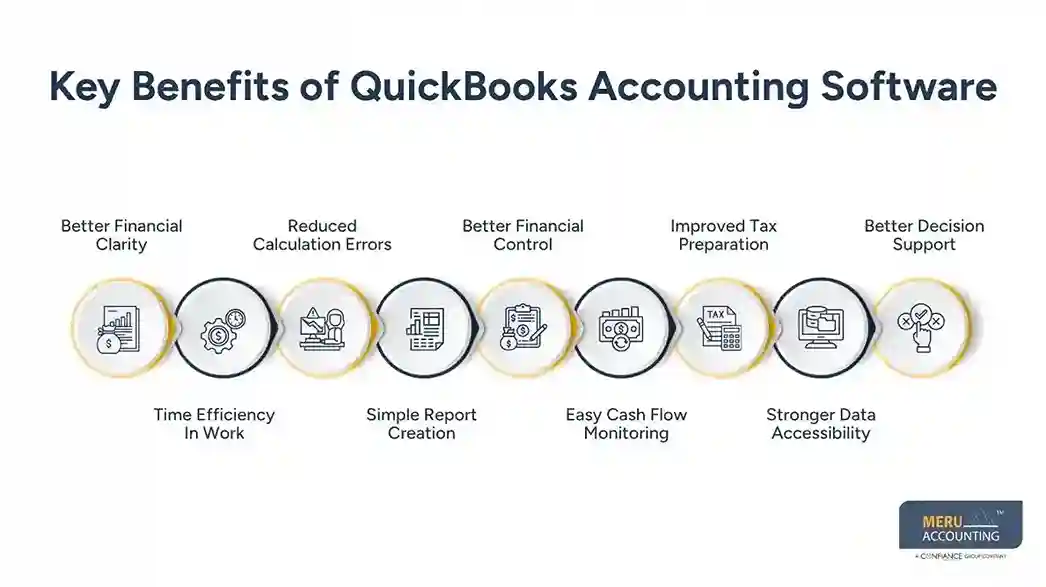
Better Financial Control
Business owners gain stronger control over cash flow and budgeting decisions using structured financial reports. This supports more stable and informed financial planning.
Easy Cash Flow Monitoring
The system allows businesses to track money coming in and going out in a clear manner. It gives a better view of liquidity and helps avoid cash shortages in daily operations.
Improved Tax Preparation
Tax-related data is organized in one place, making filing work simpler and less stressful. Records are updated regularly, which reduces last-minute confusion during tax season.
Stronger Data Accessibility
Financial information can be accessed anytime from different devices in a cloud environment. This helps owners and accountants stay updated even while working remotely.
Better Decision Support
Accurate financial data helps management make informed decisions about spending and growth. Reports generated through the system provide a clear picture of business health.
How QuickBooks Accounting Software Works in a Cloud Environment
Online Data Storage
The system stores financial records online instead of on local devices, making access easier through the internet. This ensures data remains available even if the local system is not in use.
Real-Time Updates
Changes made in records are updated instantly for all users working in the same system. This keeps financial information consistent across all departments.
Secure Information Handling
Data is encrypted and stored safely in online systems, reducing the risk of local data loss. Regular security checks further protect sensitive financial information.
Multi-User Access
Different users, such as accountants and managers, can work on the same data at the same time. This allows better coordination between teams handling financial tasks.
Easy System Maintenance
QuickBooks accounting software updates and upgrades are handled automatically in a cloud environment without manual installation. Users always work on the latest version without system downtime or extra effort.
Why Small and Medium Businesses Prefer QuickBooks
Cost Friendly Setup
Small firms choose QuickBooks accounting software because it reduces infrastructure costs in a cloud environment. This makes it suitable for businesses with limited budgets and resources.
Easy-to-understand Interface
Even non-accounting users can manage basic financial tasks easily. The simple design reduces training time for new users.
Flexible Growth Option
As the business grows, the system can handle more transactions without major changes. This allows companies to scale operations without switching platforms.
Remote Work Support
Teams can manage accounts from different locations without being tied to a single office system. This makes collaboration between office staff and remote users more flexible and organized.
Reliable Record Keeping
Businesses trust it for maintaining stable and structured financial records. It ensures data remains organized and easy to access during audits or reviews.
How QuickBooks Cloud Hosting Boosts Output
Device Flexibility
The system can be accessed from laptops, tablets, and mobile devices. Access from multiple devices allows users to manage financial tasks without location limits.
Better Team Coordination
Teams using QuickBooks accounting software in a cloud-based setup can share updates quickly, reducing delays. Faster information flow keeps accountants and managers aligned with current records.
Reduced System Load
Local systems are not overloaded since data is stored online. Lower system usage improves speed and reduces hardware pressure during heavy tasks.
Continuous Access
Financial data remains available even during system updates. Business operations continue without interruption during maintenance activities.
Smooth Workflow Management
Cloud hosting allows smoother task handling across teams. Consistent access to shared data keeps accounting work organized and steady.
Integration of QuickBooks With Other Cloud-Based Tools
Banking System Connection
Bank transactions can be linked directly for automatic updates. Account balances and transaction details remain updated without manual entry work.
Payment Platform Integration
Online payments are recorded instantly within the system. Payment status updates reflect quickly, reducing reconciliation delays.
Customer Management Tools
QuickBooks accounting software connects sales and customer data for better tracking. Customer activity records become easier to review for sales planning.
Payroll Processing Systems
Salary management becomes easier through connected tools. Employee payment records stay organized and accessible for accounting teams.
Reporting And Analytics Tools
Financial insights can be generated using integrated reporting systems. Business performance trends become easier to identify through structured reports.
optional anymore
on running the business
Common Mistakes Businesses Make While Using QuickBooks
Incorrect Data Entry
Wrong entries can lead to reporting issues and financial mismatches. Small errors in numbers or categories can affect overall financial reports significantly.
Delayed Updates
Not updating records regularly affects financial accuracy and record flow. Late entries often create confusion during month-end closing and reporting cycles.
Weak Backup Practice
Even in a cloud environment, proper backup checks are important for safety. Missing backups may create risk during unexpected data issues or system errors.
Poor Access Control
Allowing too many users in QuickBooks accounting software without control may lead to confusion and errors. Limited access based on roles improves data safety, clarity, and accountability.
Lack of Regular Review
Financial reports in QuickBooks accounting software should be checked frequently for accuracy and completeness. Regular review helps identify issues before they affect business decisions and planning.
Why Choose Meru Accounting for QuickBooks Support and Cloud Bookkeeping Services
Meru Accounting provides professional support for businesses using QuickBooks to manage their financial operations efficiently. Our team assists with system setup, configuration, and day-to-day bookkeeping activities, helping businesses maintain accurate and organized records in a cloud-based environment.
We also support seamless data migration and maintenance of financial records in QuickBooks accounting software, along with correction of accounting errors. Many businesses struggle with proper system setup and workflow alignment, and Meru Accounting ensures that the software is structured correctly to match business requirements and accounting standards.
From our practical experience, businesses achieve better financial clarity and control when expert guidance is combined with the structured use of QuickBooks in a cloud environment. Meru Accounting focuses on reducing errors, improving efficiency, and enabling businesses to make more informed financial decisions.
Our Expert Perspective
From our expert perspective, most financial challenges in real business operations are not caused by a lack of tools but by inconsistent record handling and weak data discipline. In our experience working with different clients, QuickBooks accounting software delivers strong results only when businesses maintain accurate data entry and follow a regular review system.
We also observe that in a cloud environment, success depends less on complex accounting methods and more on consistency in daily bookkeeping practices. Businesses that follow simple, structured, and disciplined accounting routines are able to maintain clearer financial records and achieve stronger control over their financial position over time.
Key Takeaways
- QuickBooks is widely used by modern businesses to manage financial records in a structured and organized way.
- Working in a cloud-based setup allows teams to access financial data from different locations without limitations.
- Automation in the system reduces manual work and helps in lowering common calculation and entry errors.
- Small and medium businesses prefer this tool because it is simple to operate and cost-efficient for daily accounting needs.
- Regular review of financial data is important to maintain accuracy and support better business decisions.
- Professional guidance can improve system setup and ensure more effective use of the software in daily operations.
FAQs
QuickBooks is used for managing daily financial records such as income, expenses, invoices, and bank transactions. Small businesses rely on it to keep accounting work organized and easy to track.
Yes, QuickBooks can be used in a cloud environment where financial data is accessed through the internet. This allows users to view and manage accounts from different locations.
QuickBooks automates key bookkeeping tasks like recording transactions, generating invoices, and preparing reports. This reduces manual work and improves record accuracy.
Remote teams can use QuickBooks easily since multiple users can access the same financial data from different locations at the same time.
Using cloud-based QuickBooks allows real-time access to financial data, automatic system updates, secure storage, and easier collaboration between team members.