When an accountant can’t access a client file, a team member misses a task update, or a deadline gets held up by a slow process, even a small issue can affect the firm’s workflow. Cloud solutions for accounting firms help address these gaps by bringing key tools, files, and team workflows into one connected work environment.
With cloud technology, accountants can access records, share files, work with clients, and manage tasks from different locations. But getting the most out of these tools takes more than moving data online. Firms need the right software, secure access, and a setup that fits their day-to-day work.
This blog explores how cloud technology can improve practice management, which features to look for, and what accounting firms should consider before making the switch.
What You Will Learn From This Blog
- What cloud solutions for accounting firms include and how they work.
- Key benefits of using cloud tools for daily accounting work.
- How cloud technology can improve team and client management.
- What to look for in accounting firm management software.
- Common cloud adoption issues and ways to deal with them.
- How outsourced and white label accounting support can help firms grow.
What Are Cloud Solutions for Accounting Firms?
Cloud solutions for accounting firms are online tools and systems that let teams store, view, and manage data over the internet. Instead of keeping all files and apps on one office server, firms can use cloud-based tools from a web browser or a secure app.
These solutions can support many parts of firm operations, such as:
- Accounting and bookkeeping: Track income, costs, bank records, and reports through cloud-based accounting tools.
- File storage: Store client records, tax files, and work papers in a shared online space.
- Client portals: Let clients share files, view updates, and send key data through a secure login.
- Teamwork: Assign tasks, track due dates, and share work across staff.
- Data backup: Keep copies of key files to help restore data if a device fails or files are lost.
For example, an accountant can review a client’s books in QuickBooks Online or Xero without being at the client’s office. A team member can then check the same records, post updates, or prepare reports based on their access rights.
Many cloud solutions for accounting firms also connect with other apps through built-in integrations. This helps firms reduce duplicate data entry and keep key records in sync. Still, firms should check how each tool shares data before linking their systems.
optional anymore
on running the business
Key Benefits of Cloud Solutions for Accounting Firms
The right cloud setup can improve how a firm handles work, serves clients, and plans for growth. Here are some key benefits of using cloud solutions for accounting firms.
1. Access Data From Any Location
Cloud tools let staff view files and apps from any place with a secure internet connection. This helps firms with remote teams, staff who work in the field, or clients in other cities. Team members can review records, check task status, and work on reports without being tied to one office computer.
2. Improve Team and Client Work
When staff use shared cloud tools, they can view the latest files and updates in one place. This cuts down on long email chains and the risk of working from old files. Client portals also make it easier to ask for bank records, bills, tax forms, and other data.
3. Lower IT Costs
Cloud apps can reduce the need to buy and maintain local servers, storage units, and other office hardware. Many cloud solutions for accounting firms run on a monthly or yearly plan, so firms can pick a setup that fits their needs. But costs can rise as the team adds users, storage, or extra apps, so firms should review the full cost before signing up.
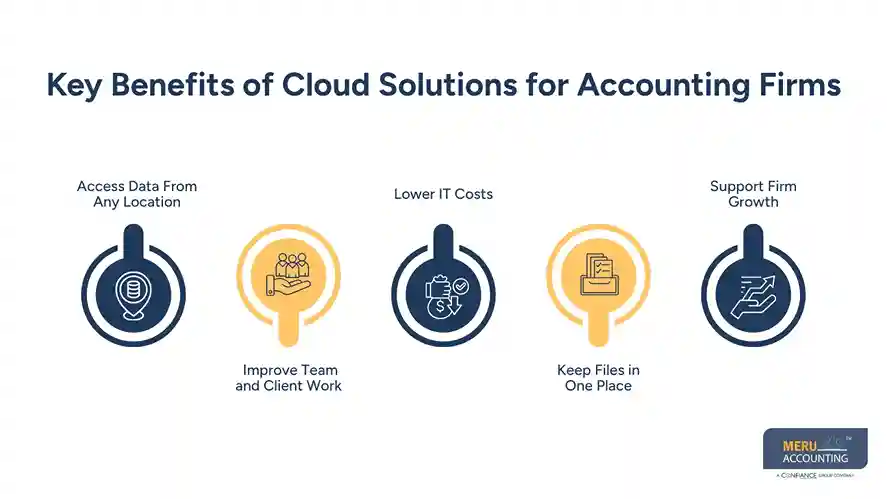
4. Keep Files in One Place
A cloud file system can help firms sort client records by name, year, service, or file type. Staff can find the right files with less effort, while set access rules help keep private data away from people who do not need it.
5. Support Firm Growth
Cloud systems can grow as a firm adds clients, staff, and new services. A firm may add users or tools as its needs change, rather than buy more office hardware each time it grows. This makes cloud solutions for accounting firms useful for practices that serve clients across regions or plan to expand their teams.
How Cloud Technology Modernizes Accounting Firm Management
Cloud tools do more than store files. They can also help firms manage daily work, track team output, and keep client tasks on time. When linked with the right practice tools, cloud solutions for accounting firms can improve several areas of firm management.
Automating Routine Tasks
Many cloud apps can handle tasks such as sending payment alerts, matching bank feeds, and setting due date alerts. This cuts down on repeat work and gives staff more time for tasks that need care and review.
Managing Client Records
A shared client record can hold contact details, service needs, key dates, and file links. This helps staff find the right data when they need it and gives the team a clear view of each client.
Tracking Tasks and Deadlines
Cloud workflow tools let managers assign work, set due dates, and check task status. For example, a tax return may move through set steps, from data intake to review and final filing. Each team member can see what needs to be done next.
Improving Team Workloads
Managers can use task and time data to see who has too much work and where delays occur. They can then shift tasks across the team to keep work on track. This is useful during busy tax periods or month-end close.
Making Better Business Choices
Cloud reports can show data such as hours spent per client, work in progress, billable time, and task status. Firm owners can use these details to review costs, set fees, and plan staff needs. The value of these reports depends on clean data and regular updates.
Essential Features to Look for in Accounting Firm Management Software
Choosing the right accounting firm management software is key to getting value from cloud tools. The best fit should match your firm’s size, workflow, client base, and service needs. When comparing cloud solutions for accounting firms, look for these core features:
1. Client and Contact Management
The tool should let you store client details, service notes, key dates, and contact records in one place. This helps staff keep client data clear and up to date.
2. Workflow and Task Management
Look for tools that let you set tasks, assign staff, track due dates, and view work status. You should also be able to build repeat workflows for monthly books, payroll, and tax tasks.
3. Time Tracking and Billing
Time tracking helps firms see how many hours go into each client task. Billing tools can use this data to prepare invoices, track payments, and review the value of each service.
4. Document Storage and File Sharing
Choose a tool with safe file storage, clear folder rules, version history, and secure client file sharing. Staff should be able to find the right file without having to search through long email chains.
5. Reports and Team Insights
Useful reports may show task status, staff hours, client fees, and work delays. These details can help managers spot gaps and make better plans.
6. Software Links and App Support
Your firm may use tools such as QuickBooks, Xero, tax apps, payroll tools, and payment systems. Check that the new tool can link with the apps you already use. Also review what data syncs, how often it syncs, and how errors are handled.
Common Challenges of Adopting Cloud Technology in Accounting Firms
Although cloud solutions for accounting firms can improve daily operations, the shift may bring some issues. Knowing what to expect can help you plan a smooth move.
1. Moving Old Data
Moving years of client records from local drives to a cloud system takes care. Firms should sort files, remove old copies, check data, and test the move before switching over fully.
2. Staff Training
A new tool may change how staff store files, track work, and share data. Give your team clear steps, short training sessions, and time to learn the new system. Start with key tasks before moving all work to the new setup.
3. Data Safety and Access
Cloud use does not remove the need for strong data safety rules. Firms should use multi-factor authentication, role-based access, data encryption, and regular access reviews. They should also check the provider’s backup, data recovery, and breach response plans.
4. App and System Links
Some apps may not share data well, even when they claim to offer an easy link. Test key links before you rely on them. Check if data moves both ways, if updates happen in real time, and who handles errors.
5. Internet and Service Downtime
Cloud tools need a stable internet connection. A weak connection or service outage can stop staff from viewing files or doing key tasks. Firms should have a backup internet plan and know how to reach the provider if a service goes down.
Grow Your Accounting Firm With Meru Accounting's White Label Accounting Solutions
Managing more clients does not always mean hiring more in-house staff. With the right support, accounting firms can take on more work, meet client needs, and keep their own brand at the front.
Meru Accounting offers white label accounting solutions that let accounting firms outsource day-to-day accounting and bookkeeping work under their own brand. Our team works as an extension of your firm, while you retain control of client relationships and service delivery.
Our support can cover:
- Bookkeeping: Daily or monthly entries, bank and card checks, and ledger upkeep.
- Accounts payable and receivable: Bill entry, payment tracking, invoice follow-up, and balance checks.
- Account cleanup: Catch-up work, old record fixes, and account review.
- Payroll accounting support: Payroll entries, wage records, and related account checks.
- Financial reports: Monthly statements and reports that help you review client accounts.
- Software support: Work with tools such as QuickBooks, Xero, and Zoho Books.
We follow your firm’s workflow, file rules, and review steps to help keep work in line with your service model. You can use our support for a set task or add help as your client list grows.
By combining your firm’s client management process with our back-office support, you can focus on client relationships, tax work, and growth while our team handles the agreed accounting tasks behind the scenes.
Our Expert Insight
We recommend that accounting firms use cloud tools to track more than task status. Reviewing staff hours against client fees can reveal which accounts take more time than expected. For example, if a fixed-fee bookkeeping client regularly needs extra review work, it may be time to revisit the service fee or scope.
Another point to consider is the audit trail. Firms should be able to see who changed a financial record, when it was changed, and what was updated. This can make account reviews easier and help resolve client questions.
The value of cloud solutions for accounting firms goes beyond file access. They can give firm owners better insight into client profitability, work quality, and team performance.
Key Takeaways
- Cloud solutions for accounting firms let teams access files and apps from any place with a secure internet connection.
- They can improve client work, task tracking, file sharing, and team output.
- The right accounting firm management software should fit your workflow and link with your key apps.
- Data safety, staff training, and data migration need a clear plan.
- White label accounting support can help firms manage more client work without adding a full in-house team.
FAQs
Yes. QuickBooks Desktop can be hosted on a cloud server, allowing authorized users to access company files remotely.
Check data transfer options, backup policies, user permissions, and audit trail features before migrating client records.
Yes. Many platforms support multiple client accounts with separate records, workspaces, and user access.
Data ownership depends on the provider’s terms. Firms should confirm their rights to access and export client records.
Yes. Export and verify prior-year records, reports, and supporting files before closing the old system.
optional anymore
on running the business