Construction accounts receivable can make or break a contractor’s cash flow. A firm may finish a job, send the bill, and still wait weeks or months for payment. During that time, wages, material costs, fuel, and new job costs do not stop. Owners must find ways to pay these bills while they wait for money that they have already earned.
The issue is not always a late-paying client. A bill may be held up due to missing job records, a slow sign-off, a dispute over work, or a gap in the contract terms. When teams track bills in spreadsheets or follow up through scattered emails, it becomes hard to know which payment needs action first. Construction accounts receivable software gives firms a clear view of bills, due dates, and unpaid sums so they can take the right steps at the right time.
What You Will Learn From This Blog
- What construction accounts receivable means and why it matters to cash flow.
- Why contractors face late payments, billing gaps, and slow approvals.
- Which features to look for in construction accounts receivable software.
- How to set up better billing and follow-up steps.
- How to choose a tool that fits your trade, team, and job size.
- How sound accounting records can give owners a clearer view of unpaid bills.
What is Construction Accounts Receivable and Why Does It Matter?
Construction accounts receivable is the money a contractor is due for work, goods, or services already billed to a client. It may include claims for work done, supply costs, approved change orders, and sums held back as retainage. These amounts stay open until the client pays them.
Money Earned but Not Yet Received
When a contractor sends an invoice, the amount due is recorded as a receivable. The job may be done, but the cash is not yet in the bank, so the firm must plan for the gap.
A Clear View of Cash Flow
A firm needs cash to pay staff, buy supplies, hire trades, and meet loan or rent costs. Clear construction accounts receivable records show how much cash is due and when it may arrive.
Control Over Unpaid Bills
Open invoices can pile up when no one checks their status. A regular review lets the team spot overdue bills, find the cause, and act before the balance grows too large.
Better Job-Level Records
A contractor may run many jobs at once, each with its own client, terms, and bill dates. Tracking receivables by job shows which projects bring in cash and which still have sums due.
Less Guesswork in Business Plans
Owners need sound data before they hire staff, buy gear, or bid on a new job. A current receivables report gives them a better basis for these choices than a rough estimate.
Why Contractors Struggle to Collect Payments on Time
Late payment is not always due to a client who refuses to pay. In many cases, a gap in the billing process holds up the whole chain.
Delayed Approvals and Unpaid Invoices
A bill may need review by a site manager, project owner, architect, or main contractor before it can be paid. If the team does not track each approval step, an invoice can sit in an inbox with no clear owner.
Retainage and Contract Payment Terms
Many construction contracts allow a client to hold back part of a payment until a set stage or final sign-off. This is called retainage, and the sum may remain unpaid even when most of the work is done.
Missing Documents and Billing Errors
A client may reject a bill if it lacks signed work records, a change order, a lien waiver, or other required proof. Wrong job codes, rates, or bill amounts can also lead to delays and rework.
Poor Follow-Up on Overdue Accounts
When staff relies on memory or scattered notes, a late bill may not get a prompt follow-up. A set review plan makes it clear who must contact the client and when.
Disputes Over Work or Scope
A client may question the work done, the amount billed, or a change that was not approved in writing. The team needs clear job records and a prompt way to resolve the issue, rather than sending the same bill again.
What is Construction Accounts Receivable Software?
Construction accounts receivable software is a tool that records invoices, tracks amounts due, and shows the status of client payments. Depending on the product, it may also manage progress bills, retainage, payment alerts, and reports by job or client.
One Place for Invoice Records
The tool keeps key bill details in one place, such as the client name, job number, invoice date, due date, and amount due. Staff can check these records without searching through many files.
A View of Each Payment Stage
Teams can see if a bill is in draft, sent, under review, approved, partly paid, or overdue. This makes it easier to find where a payment has stalled.
Clear Records for Each Job
A contractor can link bills and payments to the right project and contract. This gives the owner a clearer view of the money due from each client.
Fewer Manual Tasks
Some tools can send bills, set reminders, and update payment records with less manual work. Staff can then spend more time fixing billing gaps and dealing with payment issues.
Better Links With Accounting Data
When the tool links with the firm’s accounting system, invoice and payment data can flow into the books with less duplicate entry. The team should still check that each entry is correct.
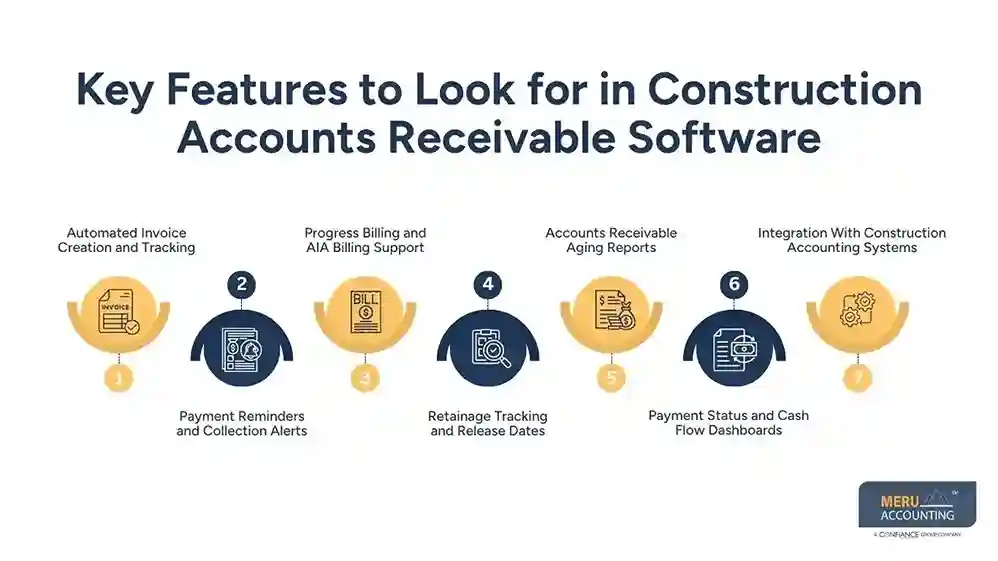
Key Features to Look for in Construction Accounts Receivable Software
The right construction accounts receivable system should match the way your firm bills clients and tracks jobs. Before you buy, check whether it can handle the contract terms and records your team uses each day.
Automated Invoice Creation and Tracking
Look for tools that let staff build bills from job data, set due dates, and track sent invoices. Check if the system can flag missing details before a bill goes to the client.
Payment Reminders and Collection Alerts
Alerts can tell staff when a due date is near or a bill becomes late. Some tools can send set reminders, but staff should review the tone and timing to keep client ties in good shape.
Progress Billing and AIA Billing Support
Contractors often bill based on the share of work done, rather than waiting until the whole job ends. For firms that use AIA-style forms, check whether the tool handles the forms and schedules they need; do not assume every product does.
Retainage Tracking and Release Dates
The tool should record the sum held back, the terms for its release, and any key dates. This makes it less likely that a firm will forget to claim retainage when the contract allows it.
Accounts Receivable Aging Reports
An aging report groups unpaid bills by how long they have been open, such as current, 1–30 days late, 31–60 days late, and over 60 days late. These bands can vary by firm, so set them to suit your review process.
Payment Status and Cash Flow Dashboards
A clear dashboard can show total open bills, late sums, recent receipts, and expected payments. It should let owners sort data by client, job, or due date without complex steps.
Integration With Construction Accounting Systems
Check whether the tool works with your current accounting system and job-cost records. Ask how it handles part payments, credit notes, tax entries, and data updates so that the same amount is not recorded twice.
optional anymore
on running the business
How Construction Accounts Receivable Software Helps Contractors Get Paid Faster
Construction accounts receivable software cannot force a client to pay, but it can cut avoidable delays and give staff a clear plan for each open bill.
Bills Go Out on Time
Templates and links to job data can reduce the time spent on manual bill entry. A bill sent soon after work is approved gives the client less reason to hold it up due to a late claim.
Staff Can Act Before Bills Become Late
Due-date alerts make it easier to check in with a client before a bill falls overdue. A polite note can confirm that the bill was received and ask if any record is still needed.
Billing Gaps Come to Light Sooner
A status view can show bills held up by missing sign-offs or records. Staff can then ask the right person for the missing item instead of waiting without a clear next step.
Retainage Does Not Get Lost in the Books
A record of each holdback and release term gives the team a list of sums to claim when due. This matters when a firm has many jobs that reach key stages at different times.
Owners Can Set Better Priorities
Aging reports show which unpaid sums need urgent action. Owners can focus first on large, old, or disputed bills while keeping a record of each call, email, and promise to pay.
Best Practices for Reducing Overdue Construction Payments
Good software works best when the firm has clear billing rules, and someone is in charge of each step. These habits can cut errors and make payment delays easier to trace.
Set Clear Payment Terms Before Work Starts
Write down when bills will be sent, when payment is due, what proof is needed, and how retainage will be released. Review the terms with the client before work begins.
Bill as Soon as the Work Is Ready
Do not wait until month-end if the contract allows bills at set job stages. Send the claim with all required records and keep a copy of what was sent.
Check Each Invoice Before Sending It
Match the bill to the contract, approved changes, work records, and agreed rates. A short review can prevent a rejection that would push payment back by days or weeks.
Assign One Person to Track Open Bills
Give each invoice a clear owner who checks its status and follows up when needed. A shared list also lets other team members see the latest action if that person is away.
Review Aging Reports Each Week
Regular reviews of construction accounts receivable help teams check current and late bills at a fixed time each week. Record the reason for each delay, the next step, the person in charge, and the date for follow-up.
Keep Proof of Work and Client Messages
Store signed records, change approvals, bills, and payment notes with the right job. Good records make it easier to answer a query and resolve a dispute without long searches.
How to Choose Construction Accounts Receivable Software for Your Business
The best tool is one your team can use with ease, and that fits your contracts, job size, and budget. Do not pay for features you will not use.
Match the Tool to Your Type of Work
A small trade firm may need simple invoice tracking and reminders, while a large general contractor may need progress billing, retainage, and job-level reports. List your key tasks before comparing products.
Check Ease of Use
Ask staff who send bills and chase payments to test the tool. If routine tasks take too many steps, the team may fall back on old spreadsheets.
Review Cost and Setup Needs
Check the monthly or yearly fee, setup cost, user limits, and any extra charge for links or reports. Also ask how much time your team will need to move old invoice data into the new system.
Confirm Key Features in a Demo
Use a real example from your firm, such as a progress bill with retainage and a part payment. Ask the vendor to show how the bill moves from draft to payment and how the report changes at each stage.
Check Data Access and Security
Ask who can view or edit invoices, how the vendor backs up records, and how data can be exported if you change tools. Keep access limited to the people who need it and use strong login rules.
Plan for Staff Training
Choose a tool with clear guides and useful help from the vendor. Set a start date, name the staff who will use it, and check the first few billing cycles to catch errors early.
Why Choose Meru Accounting for Construction Accounts Receivable?
Software records bills and payments, but the books still need regular checks and clear rules. Meru Accounting provides accounting and bookkeeping services for firms that need sound records of income, costs, invoices, and payments.
Clear Records of Money Due
Our team can review invoice entries and payment records so owners have a clearer view of open balances. This gives the firm a sound base for its next collection step.
Regular Review of Receivables
We can help firms review open bills, spot old balances, and flag entries that need more detail. A regular review can bring gaps to light before they affect cash plans.
Job Cost and Income Records
Good job records show what the firm billed, what it received, and what costs it incurred. Meru Accounting provides bookkeeping services that keep these figures in order for review.
Help With Month-End Books
A month-end review can check unpaid bills, part payments, and account balances. This gives owners a clearer picture of their books before they plan the next month.
Reports That Aid Business Decisions
Clear reports let owners see which clients have large open balances and which jobs need closer review. We can keep financial records in a form that makes these checks easier.
A Process That Fits Your Firm
Each contractor has its own billing rules, client needs, and job size. Our team can discuss your accounting needs and the records you want to track, so the work fits your business.
Our Expert Perspective
In our view, late payments often start well before an invoice becomes overdue. A missing sign-off, an unclear change order, or a bill sent to the wrong person can delay cash for weeks. Contractors should treat construction accounts receivable as a routine part of job control, not just a task for month-end. A clear process, timely bills, sound records, and steady follow-up can reduce avoidable delays, though payment still depends on the contract and the client’s ability to pay.
Key Takeaways
- Construction accounts receivable is money due for work already billed, but not yet paid.
- Late payments can stem from slow approvals, missing records, billing errors, or unclear contract terms.
- Construction accounts receivable software can track bills, due dates, retainage, and payment status in one place.
- Pick a tool that fits your trade, billing method, accounting system, and budget.
- Review aging reports each week and assign a clear owner to each overdue bill.
- Keep proof of work, signed changes, and client messages with the right job.
- Software can cut manual work, but good billing habits and clear records still matter.
- Meru Accounting provides bookkeeping and accounting services to keep invoice, payment, and job records in order.
FAQs
Construction accounts receivable software tracks invoices, sends payment reminders, and flags overdue bills so contractors can follow up on time.
Contractors should look for invoice tracking, payment alerts, progress billing, retainage tracking, aging reports, and accounting system links.
Contractors can reduce overdue construction accounts receivable by sending accurate bills on time, keeping proof of work, and following up on unpaid invoices.
Yes, some tools track retainage, release dates, and progress bills, based on the features offered by the software.
Contractors should compare billing features, ease of use, cost, reports, data security, and integration with their current accounting system.
optional anymore
on running the business