A construction project can seem profitable until the bills start coming in. Higher material costs, extra labor hours, and delayed client payments can quickly eat into the expected profit. Without a clear record of each expense, contractors may not know which jobs are staying on budget and which are costing more than planned. The right construction bookkeeping software can help track these costs and keep project finances in check.
But not every accounting tool is built for construction work. Some offer basic expense tracking, while others support job costing, progress billing, retainage, and cash flow reports. In this guide, we’ll look at the best options, their key features, and how to choose the right fit for your construction business.
What You Will Learn From This Blog
- What construction bookkeeping software does and how it differs from regular accounting tools.
- Why contractors need job-level cost tracking and cash flow reports.
- Which key features to check before choosing a software tool.
- Seven popular software options for construction firms.
- How to choose a tool that fits your projects and budget.
- When outsourced bookkeeping support can help keep your records in order.
What Is Construction Bookkeeping Software?
Construction bookkeeping software helps contractors record and track the money tied to their business and each project. It can track income, labor costs, material costs, equipment expenses, vendor bills, client payments, and other job-related costs.
Unlike basic accounting tools, many construction-focused systems let users assign costs to a job, phase, or cost code. This helps a contractor see how much a project has spent and compare it with the planned budget.
For example, a contractor may set a $40,000 budget for labor on a project. As payroll costs come in, the software can show how much of that budget has been used. The same process can apply to materials, equipment, and subcontractor costs.
The goal is to keep both business-wide accounts and project-level records clear. This makes it easier to review job profit, spot cost overruns, and plan future work.
optional anymore
on running the business
Why Do Construction Companies Need Specialized Bookkeeping Software?
Construction work has costs that change from one job to the next. A single firm may handle many projects at once, each with its own budget, crew, vendors, payment terms, and timeline.
Basic bookkeeping may show total income and expenses, but it may not show which job caused a cost increase or why a project is earning less than planned.
Here is why specialized tools can help:
- Track job costs: Assign labor, material, equipment, and subcontractor costs to each project.
- Control budgets: Compare actual costs with estimates and spot overspending early.
- Manage cash flow: Track when client payments are due and when vendor bills must be paid.
- Handle progress billing: Create bills based on work done or set stages of a project.
- Track retainage: Record funds held back until a job or set work stage is complete.
- Review job profit: Compare project income with all costs tied to the work.
- Keep records ready for tax time: Store clear records of income, bills, payroll, and other costs.
The best bookkeeping software for construction companies should fit the way the firm works. A small contractor may need simple job costing and bank feeds, while a large firm may need detailed cost codes, change orders, and links to project management tools.
Key Features to Look for in Construction Bookkeeping Software
Before you choose a tool, list the tasks you need it to handle. A long feature list does not always mean a better fit. Focus on the features that help you track costs and keep cash flow under control.
1. Job Costing and Project Expense Tracking
Job costing is one of the most useful features for a construction firm. It lets you assign costs to each job and track them by type, such as labor, materials, equipment, and subcontractors.
Look for tools that let you set up cost codes and compare actual costs with your estimate. This helps you see which part of a job is using more money than planned.
2. Budget and Cost-to-Complete Tracking
A project budget should show more than the amount spent so far. It should also help you judge how much more money you may need to finish the work.
Some tools let you compare the budget, actual costs, and estimated costs to complete. This can help you spot a likely cost overrun before the job ends.
3. Cash Flow Tracking and Forecasting
Cash flow can become a problem when client payments come in late but payroll, rent, and vendor bills still need to be paid.
Choose software that gives you a clear view of cash in and cash out. Useful tools may include cash flow reports, bill due dates, payment tracking, and accounts receivable aging.
4. Accounts Payable and Accounts Receivable
Accounts payable (A/P) helps you track what you owe vendors and subcontractors. Accounts receivable (A/R) helps you track what clients owe you.
Good software should help you record bills, send invoices, post payments, and follow up on overdue balances. This can reduce missed bills and late client payments.
5. Payroll and Subcontractor Cost Tracking
Labor is a major cost for many construction firms. Look for tools that can track employee hours, wages, payroll costs, and labor by job.
You may also need to record subcontractor bills, payments, and job costs. Check whether the software supports these tasks or needs a separate payroll or contractor payment tool.
6. Financial Reports and Job Profitability
Reports help you see how the business and each project are doing. Useful reports include profit and loss, balance sheet, cash flow, job cost reports, and A/R aging.
Some construction systems also offer work-in-progress (WIP) reports. These help firms review job costs, billings, and earned revenue for projects that are still open.
7. Progress Billing and Retainage Tracking
Many construction contracts use progress billing, where a client pays based on work done or set project stages. Some contracts also hold back a share of each payment as retainage.
If your firm uses these terms, check that the software can track progress invoices, payment status, and retainage balances. This can help you avoid gaps in billing records.
7 Best Construction Bookkeeping Software Options for Contractors
There is no single tool that fits every construction firm. The options below serve different needs, from basic accounting to full project and job cost control. Check current plans and features before you buy, as access may vary by plan and setup.
1. QuickBooks Online
QuickBooks Online is a popular accounting tool for small and mid-sized firms. It helps track income, bills, bank activity, invoices, payroll through supported services, and financial reports.
Contractors can use projects and cost tracking features to review income and expenses by job. It may work well for firms that need core accounting with some job-level tracking.
Best for: Small contractors that need general accounting and basic project cost tracking.
Consider: Firms with complex job costing or detailed construction reports may need add-ons or a more focused construction tool.
2. Sage 100 Contractor
Sage 100 Contractor is built for construction firms that need more control over job costs and financial work. It offers tools for accounting, estimating, job costing, payroll, and project reports.
It can help contractors track costs across jobs and review how actual results compare with estimates. Its range of features may suit firms with more involved accounting needs.
Best for: Small and mid-sized construction firms that need construction-focused accounting.
Consider: Setup and training may take time, so review the needs of your team before moving to the system.
3. FOUNDATION Software
FOUNDATION is a construction accounting system with tools for job costing, payroll, accounts payable, accounts receivable, and project reports.
It can help firms track costs by job and cost code, manage payroll, and review financial data. It may be a good fit for contractors who need more than a basic accounting tool.
Best for: Contractors that need detailed job cost and payroll tracking.
Consider: Review the features, setup, and support options that match your type of construction work.
4. Buildertrend
Buildertrend is a construction project management platform with tools for budgets, schedules, client updates, and project work. It also offers financial features that help teams manage project costs and payments.
It may suit builders who want to connect office and field work in one system. Its project tools can help teams keep track of tasks and budgets as work moves ahead.
Best for: Home builders and remodelers that need project management with financial tools.
Consider: Review its accounting features and integrations if you need full bookkeeping and tax reports.
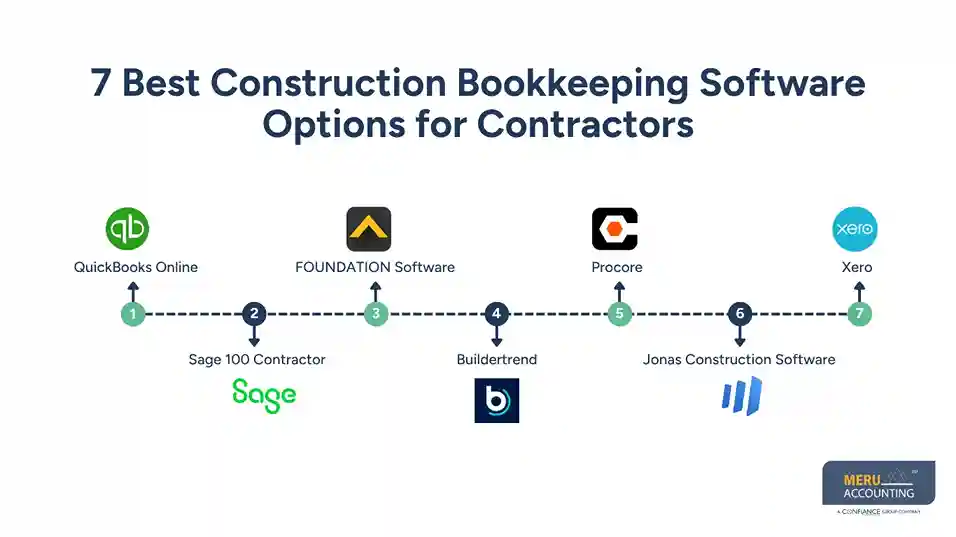
5. Procore
Procore is a construction management platform used to manage project work, costs, documents, and teams. Its financial tools can help firms track budgets, commitments, change events, and project costs.
It is not a basic bookkeeping tool. Firms may use it with a separate accounting system to manage the full set of books.
Best for: Mid-sized and large contractors that need project and cost control across teams.
Consider: Check the cost, features, and accounting links before you choose it for your firm.
6. Jonas Construction Software
Jonas offers construction-focused software with accounting, job costing, service management, and project tools. It can help firms track costs, manage bills, and review job results.
Its range of tools may suit firms with many jobs, service work, or more complex accounting needs.
Best for: Contractors that need a broad system for accounting and project operations.
Consider: Ask for a demo based on your real job cost and reporting needs.
7. Xero
Xero is cloud-based accounting software that helps small firms manage invoices, bills, bank feeds, and financial reports. It also connects with third-party apps that can add project and job cost features.
For contractors with simple needs, Xero can help keep day-to-day books in order. Firms with more complex construction work may need extra tools for job costing, payroll, or progress billing.
Best for: Small contractors that want cloud accounting and app links.
Consider: Check which add-ons are needed to track costs and manage construction billing.
How Meru Accounting Helps Construction Companies Manage Their Books
Construction accounting takes more than keeping track of bills and payments. Job costs, subcontractor expenses, labor, and project revenue must all be recorded correctly to give contractors a clear picture of their finances.
At Meru Accounting, we bring hands-on bookkeeping and accounting experience to construction businesses. We support contractors with:
- Job Costing: Track labor, materials, equipment, and subcontractor costs by project.
- Accounts Payable and Receivable: Manage vendor bills, client invoices, and outstanding payments.
- Bank Reconciliation: Match bank and credit card transactions with your books.
- Payroll Accounting: Record payroll expenses and track labor costs.
- Financial Reporting: Prepare monthly financial statements and cash flow reports.
- Bookkeeping Cleanup: Correct past errors and bring incomplete records up to date.
- Tax-Ready Books: Organize financial records for tax preparation.
Our team works with QuickBooks, Xero, and Zoho Books, so you don’t have to switch platforms to work with us. Whether you need ongoing bookkeeping or broader accounting support, we can tailor our services to your business and help you manage your finances at a fraction of the cost of an in-house team.
Our Expert Insight
One area contractors should watch is work-in-progress (WIP) accounting. A project may be 60% complete but only 40% billed. If costs and revenue aren’t recorded in the right period, the financial reports may not show the project’s true performance.
WIP reports help compare project costs, work completed, and client billings. We recommend reviewing them regularly, especially for long-term projects. This can help spot billing gaps, cost overruns, and changes in expected profit before they affect your financial results.
Key Takeaways
- Construction bookkeeping software helps track income, expenses, and costs by job.
- Job costing is key to seeing if each project is on budget.
- Cash flow tools help firms plan client payments and vendor bills.
- QuickBooks Online and Xero may suit smaller firms, while Sage, FOUNDATION, and Jonas offer more construction-focused tools.
- Buildertrend and Procore focus more on project management and cost control.
- The right software should match your job size, team, budget, and reporting needs.
- Regular bookkeeping checks are just as important as the software you use.
FAQs
Excel may work for contractors with a few projects. As the business grows, dedicated accounting software makes it easier to track job costs, payments, and financial records.
Construction companies generally use cash or accrual accounting. The right method depends on the business and its tax and reporting requirements.
A work-in-progress (WIP) report shows project costs, billings, and estimated costs to complete. It helps contractors assess job performance and spot billing gaps.
Monthly reviews are a good starting point. Contractors with multiple active projects may benefit from weekly reviews to catch cost overruns early.
Keep contracts, change orders, vendor invoices, subcontractor agreements, payroll records, receipts, and client payment records for accurate reporting and tax preparation.
optional anymore
on running the business