Ecommerce CRM integration connects an online store with a customer relationship management system so teams can use sales, order, payment, and customer data in one place.
A well-planned ecommerce CRM integration gives teams a clear view of each buyer, cuts manual data entry, and sets up tasks that run when key events take place.
For example, when a shopper places an order, the system can update the buyer’s record, send an order alert, and create a follow-up task for the sales or service team.
The value of this process depends on more than linking two apps. Teams must map data fields, set rules for updates, check data quality, and test each workflow before launch.
Poor setup can lead to duplicate records, wrong order details, or messages sent to the wrong people. A clear plan keeps customer data accurate and makes daily work easier to track.
What You Will Learn From This Blog
- What ecommerce CRM integration means and why online stores need it.
- Which data sources to connect with a CRM and how to map key fields.
- How to set up automated workflows for orders, sales, and customer care.
- Common setup issues, ways to fix them, and steps to keep data safe.
- How to track results and assess the value of the integration.
What is Ecommerce CRM Integration?
Meaning and Purpose
Ecommerce CRM integration links an online store with a CRM system to share useful customer and sales data. It can bring buyer details, order history, support cases, and sales activity into one record.
How the Data Flows
When a customer places an order, the store sends the approved data to the CRM through an app connector, an API, or a third-party integration tool. The CRM then updates the customer record or starts a set task based on the rules in place.
Why Online Stores Need It
Online sellers often use ecommerce CRM solutions to connect separate tools for sales, stock, email, payments, and customer care. Ecommerce CRM integration reduces the need to copy data by hand and gives teams a more complete view of each buyer.
A Simple Business Example
A customer buys a pair of shoes from an online store. The CRM records the order, updates the buyer’s purchase history, and sets a follow-up task after delivery, subject to the store’s chosen rules and customer consent.
Integration vs. Manual Data Entry
Manual entry requires staff to copy details from one system to another, which can cause delays and errors. An integrated setup moves agreed data between systems under set rules, while staff still review exceptions and key changes.
Key Data Sources to Connect With an Ecommerce CRM
Online Store Platform
The store is the main source of buyer profiles, product details, order IDs, order status, and refund records for ecommerce CRM integration. Connect the fields that the CRM needs for sales, service, and customer follow-up.
Payment and Refund Systems
Payment tools provide transaction status, refund details, and payment references. Share only the data needed for the business task, and do not send full card details or security codes to the CRM.
Email and Marketing Tools
Email platforms can share consent status, campaign activity, and message results. Set clear rules so the system does not send marketing emails to people who have opted out or have not given the required consent.
Stock and Shipping Systems
Stock tools show item availability, while shipping apps provide dispatch and delivery updates. Ecommerce CRM integration gives service staff a better view of linked records when buyers ask about an order.
Customer Service Platforms
Help desk tools hold tickets, complaints, and past service notes. A link with the CRM lets staff review the order and support history before they reply, which can reduce repeat questions.
Ecommerce CRM Integration: A Step-by-Step Process
Set Clear Goals
Decide what the business needs from ecommerce CRM integration before choosing tools or changing data flows. Goals may include fewer manual entries, faster service replies, better order follow-up, or more accurate sales reports.
Review Current Systems
When evaluating ecommerce CRM solutions, list each app that stores customer or order data and check whether it offers a built-in connector, API, or approved integration tool. Note data gaps, system limits, access needs, and any extra costs.
Choose the Data to Share
Select the fields that each team needs, such as customer ID, order number, purchase date, order value, and consent status. Avoid moving every available field when some data has no clear business use.
Map and Clean the Data
Match fields in the store to their correct fields in the CRM. Remove test records, check email formats, standardize dates, and set rules for duplicate customer profiles before the first full sync.
Build and Test Workflows
Set the event that starts each workflow, the conditions it must meet, and the task that follows. Test new orders, refunds, failed payments, repeat buyers, and opt-outs with sample records before launch.
Monitor the Live Setup
Review sync logs, error reports, and workflow results after launch. Assign an owner to fix failed transfers, check changes to connected apps, and review the setup when business needs change.
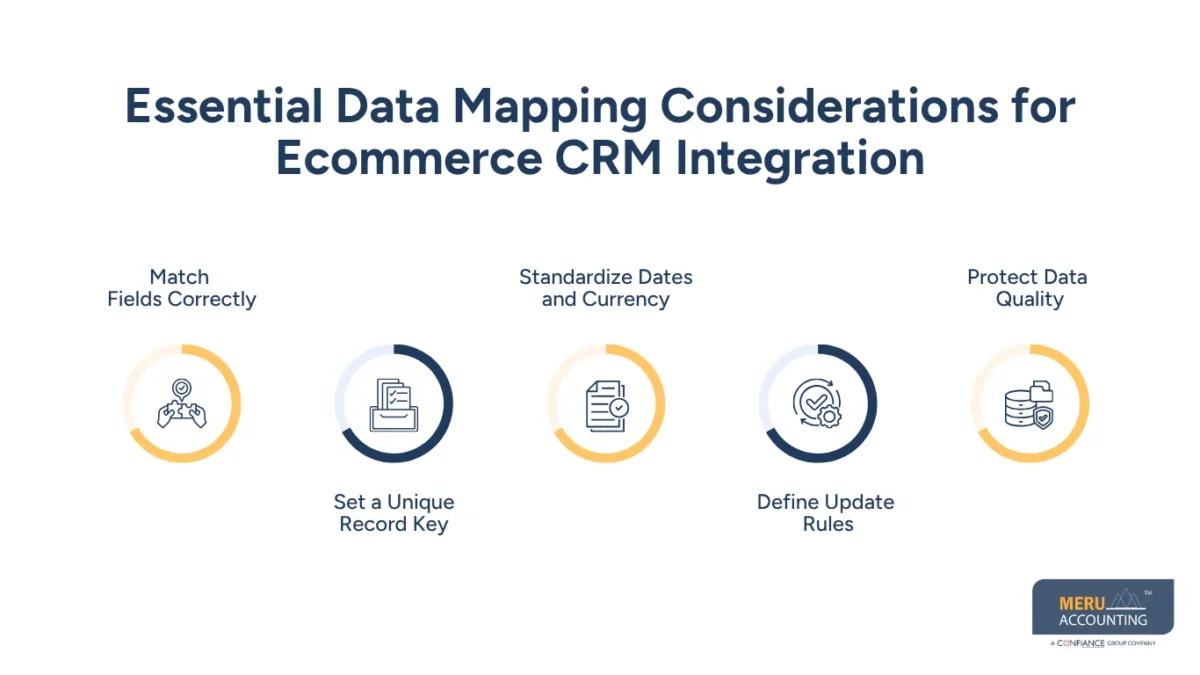
Essential Data Mapping Considerations for Ecommerce CRM Integration
Match Fields Correctly
A field called “Customer ID” in one app may not match a field with the same name in another app. For ecommerce CRM solutions, confirm what each field means, its format, and how the receiving system will use it.
Set a Unique Record Key
Use a stable customer ID or another suitable key to link records. Email addresses alone may not work in every case because buyers can change them or use different addresses for separate orders.
Standardize Dates and Currency
Set a common format for dates, time zones, and currency values. For example, a store that records order time in one time zone must not cause the CRM to show a different business day without a clear reason.
Define Update Rules
Decide which system controls each field when records change during ecommerce CRM integration. The store may control order status, while the CRM may control sales notes; clear rules prevent one system from overwriting valid data from another.
Protect Data Quality
Check required fields, valid formats, missing values, and duplicate records during each transfer. Keep a record of rejected entries so staff can fix errors instead of allowing bad data to spread.
optional anymore
on running the business
How Ecommerce CRM Solutions Support Automated Workflows
Order Confirmation and Follow-Up
Ecommerce CRM solutions can start a workflow when an order reaches a set status. The system may create a service task, update the buyer’s record, or send an approved message through the correct tool.
Cart Abandonment Messages
When a shopper leaves items in a cart without buying, a workflow can set a reminder after a chosen delay. The system must follow consent rules, message limits, and opt-out requests before sending marketing content.
Customer Care Alerts
A refund request, failed payment, or delayed delivery can create a task for the right team. Clear priority rules help staff deal with urgent cases first instead of relying on manual checks.
Repeat Purchase Campaigns
A CRM can group buyers by past orders, product type, or time since their last purchase. Marketing staff can then plan relevant offers, while checking consent and avoiding messages that do not fit the buyer’s needs.
Sales and Service Handoffs
When a high-value buyer raises a support case, the workflow can alert the assigned account owner. The team can review the order and ticket history before taking action, with access limited to staff who need it.
Common Ecommerce CRM Integration Challenges and How to Resolve Them
Duplicate Customer Records
Separate systems may create more than one record for the same buyer. Set matching rules, use stable IDs where possible, and review duplicate reports before merging records.
Missing or Incorrect Data
A field may be blank, use the wrong format, or fail to transfer. Add checks for key fields, review sync logs, and send failed records to a queue for repair.
Delayed Data Sync
When evaluating ecommerce CRM solutions, check whether the available integrations support real-time or scheduled synchronization based on your order processing and customer service needs.
Broken Workflows
An ecommerce CRM integration workflow may stop after an app update or a change to a field. Test key paths after changes, set alerts for failed tasks, and keep a clear process for restarting or correcting missed actions.
Privacy and Access Risks
A connected system may expose more customer data than a team needs. Limit access by role, use secure connections, review permissions, and follow the privacy and marketing rules that apply to the business.
Best Practices for Successful Ecommerce CRM Integration
Start With a Small Scope
Connect the most useful systems first, such as the online store and CRM. Test core order and customer flows before adding email, stock, shipping, and other tools.
Keep Data Rules Clear
Before configuring ecommerce CRM solutions, define which system owns each field, how duplicates are handled, and what happens when a sync fails. Clear rules make it easier for staff to fix issues without creating new errors.
Use Access Controls
Give each team only the access it needs to perform its tasks. Review staff permissions on a set schedule and remove access when a role changes or a person leaves.
Test Common and Rare Cases
Test normal orders as well as refunds, cancellations, failed payments, and customer opt-outs. These cases can reveal gaps that a simple test order may not show.
Assign Ongoing Ownership
Name a person or team to review sync health, error reports, and workflow results. Record changes to the setup so staff can trace issues and restore a known working version when needed.
How to Measure Ecommerce CRM Integration Performance
Data Sync Success Rate
Track the share of records that transfer without errors. When evaluating ecommerce CRM solutions, review how well they sync customer, order, and payment data across connected systems.
Manual Work Time
Measure how much staff time goes into copying data and fixing records before and after launch. Compare the same type of work over similar periods for a fair view of the change.
Customer Response Time
Check how long the team takes to respond to order questions, refund requests, and service tickets. Faster alerts may reduce delays, but staff workload and case type also affect results.
Workflow Completion Rate
Measure how often ecommerce CRM integration workflows start and finish as planned. Review failed steps, duplicate messages, and tasks that remain open beyond the set time limit.
Sales and Customer Results
Review repeat purchase rates, campaign conversions, order issue rates, and customer satisfaction where suitable. Compare results against a clear baseline, and avoid crediting the integration alone when other changes may have affected sales.
Why Choose Meru Accounting for Ecommerce Accounting and CRM Data Needs
Meru Accounting provides accounting, bookkeeping, accounts payable and receivable, payroll, and financial reporting services for businesses across industries. Our services give ecommerce businesses clear financial records, accurate reports, and better control over sales and expenses.
Ecommerce Accounting Expertise
At Meru Accounting, we provide accounting and bookkeeping services to record sales, expenses, and business transactions. Our services give ecommerce businesses a clear view of their financial position.
Accurate Sales and Payment Reconciliation
Our team of certified experts reviews payment reports, gateway fees, bank deposits, and sales entries to identify differences. Accurate reconciliation gives business owners a clearer view of received payments and outstanding amounts.
Refund and Expense Tracking
Meru Accounting records and reviews refunds, chargebacks, shipping costs, and platform fees. Clear expense records help ecommerce businesses track costs and assess their profit margins.
Financial Reporting for Business Decisions
Meru Accounting provides financial reports that show revenue, expenses, cash flow, and business performance. These reports give ecommerce owners useful data for budget planning and business decisions.
Accounting Services That Fit Your Needs
Meru Accounting provides accounting and bookkeeping services based on business requirements and operational needs. Our services allow ecommerce owners to spend more time on sales, customer relations, and business growth.
Our Expert Perspective
The most common mistake in ecommerce CRM integration is starting with automation before agreeing on the data rules. Even well-configured ecommerce CRM solutions can produce poor results if customer IDs, order statuses, or consent fields contain incorrect data.
Start with one key flow, such as sending order details to the CRM and creating a service task after a refund request. Check the records against the source system, test failure cases, and measure the time saved. Add more workflows only after the first flow gives reliable results.
Key Takeaways
- Ecommerce CRM integration connects store, customer, order, payment, and service data.
- Set clear goals before choosing a connector or building workflows.
- Map fields carefully and define which system controls each record.
- Test refunds, cancellations, failed payments, and opt-outs before launch.
- Use ecommerce CRM solutions to automate tasks only when data and consent rules are clear.
- Track sync errors, staff time, response time, workflow completion, and customer results.
- Review access, data quality, and workflow rules on a regular basis.
- Keep CRM records aligned with accounting reports through clear checks and reconciliation.
FAQs
Ecommerce CRM integration involves reviewing data sources, mapping fields, cleaning records, connecting systems, testing workflows, and tracking results.
Map customer IDs, contact details, order numbers, and consent fields between systems, then check formats, duplicates, and update rules.
An ecommerce CRM should connect with the online store, payment gateway, email platform, shipping tools, inventory system, and customer service software as needed.
Ecommerce CRM integration can trigger order updates, refund alerts, cart reminders, and customer follow-ups when set events and conditions are met.
Common challenges include duplicate records, data sync errors, broken workflows, and privacy risks, which businesses can address through data checks, testing, access controls, and regular monitoring.
optional anymore
on running the business