Ecommerce integration connects an online store with accounting software, payment tools, stock systems, and other business apps. It lets sales, fees, tax, and order data move between systems with less manual work. A good ecommerce integration setup also gives owners a clear view of sales, costs, cash flow, and profit.
For example, a store that sells on Shopify and Amazon may receive payments on different dates and pay different fees. If each sale is entered by hand, errors and missing records can affect reports. With the right apps linked to an accounting system, the business can record sales and fees in an organized way.
This blog explains how ecommerce integration works, which apps to consider, and how to set up accounting records step by step.
What You Will Learn From This Blog
- What ecommerce integration means and how it works.
- The main benefits and types of store integrations.
- The best third-party integrations for ecommerce businesses.
- How to connect sales channels with accounting software.
- Ways to check records, match payouts, and manage tax data.
- Common setup errors and ways to avoid them.
What is Ecommerce Integration?
Ecommerce integration is the process of connecting an online store with other business systems, such as accounting software, payment gateways, inventory tools, shipping apps, and customer management platforms. These systems share key data, including orders, sales, refunds, payment fees, stock levels, and tax details.
For example, when a customer places an order, ecommerce integration can send the order details to the accounting system, reducing manual entry and keeping business records organized.
Ecommerce integration connects different apps so that sales and payment data can move between them. An online store records orders, a payment gateway tracks customer payments and fees, and accounting software records income, expenses, and tax amounts.
For example, if a store makes a sale of $1,000 and pays $30 in payment fees, the payment provider may send $970 to the bank. The accounting records should show $1,000 in sales, $30 in fees, and $970 received in cash. This makes it easier to match sales reports with bank deposits and review business costs.
An online store may need ecommerce integration when it adds more sales channels, receives more orders, or spends too much time matching sales with bank deposits. It is also useful when stock levels differ across platforms or when refunds, payment fees, and tax records are hard to track.
By connecting compatible apps and setting the right data rules, a business can reduce repeated work, keep accurate records, and prepare reliable financial reports. However, regular checks are still needed to find missing data, duplicate entries, and incorrect tax or account settings.
optional anymore
on running the business
How Does Ecommerce Integration Work?
Ecommerce integration uses an app, connector, or direct link to pass data between systems. The exact process depends on the apps, the plan in use, and the settings chosen by the business.
Data Transfer Between Apps
When a customer places an order, the store may send the order details to an accounting system. The data can include the order date, item value, tax, discount, and payment status.
Rules for Data Mapping
Each field must match the right account or category. For example, sales tax collected from a buyer should not be treated as sales income because it may be due to a tax agency.
Scheduled or Real-Time Updates
Some apps send data soon after an order is placed, while others sync at set times or in batches. Owners should check the sync schedule and know how failed updates are reported.
Checks Before Data is Posted
A connector may flag missing fields or failed records, but it cannot always spot a poor account mapping choice. Regular checks remain important even when most entries are automated.
Key Benefits of Ecommerce Integration for Online Businesses
Less Manual Data Entry
Ecommerce integration can reduce the need to copy order data into several systems. Staff can spend less time on routine entry and more time checking unusual sales, refunds, and costs.
Clearer Cash Flow Records
Sales reports and bank deposits often differ because of payment fees, refunds, reserves, and payout dates. Linked records make it easier to explain these gaps and plan for bills.
Better Stock Control
When store and inventory data stay in sync, businesses can track stock levels across sales channels. This lowers the risk of selling goods that are no longer in stock.
Faster Financial Reports
With sales, fees, and expenses recorded in the right accounts, owners can review income and costs with less delay. They can also compare results by channel or month.
Fewer Repeated Errors
A well-tested setup cuts repeated entry mistakes, though it does not remove the need for review. Wrong tax rates or account rules can still affect many records if left unchecked.
Types of Ecommerce Integrations for Business Operations
Accounting Software Integration
This link sends sales, refunds, fees, and other records to accounting software such as Xero or QuickBooks. It gives the bookkeeper a central place to review income and expenses.
Payment Gateway Integration
Payment apps such as Stripe and PayPal record card payments, refunds, and fees. Their reports can be matched with store orders and bank payouts.
Inventory and Order Management Integration
These apps track stock, order status, and product details across sales channels. They are useful for stores that sell the same items on more than one platform.
Shipping and Fulfillment Integration
Shipping apps pass order and delivery details to carriers or fulfillment teams. Depending on the setup, they may also record shipping charges and related costs.
CRM and Marketing Integration
Customer relationship management (CRM) and marketing apps store customer details, email activity, and campaign results. Linking this data with sales records can help owners assess which channels bring in orders.
Best Third-Party Integrations for Ecommerce Businesses
The best third-party integrations for ecommerce depend on the store platform, order volume, sales regions, and reporting needs. Before choosing an app, check its sync features, fees, data limits, and ability to handle refunds and tax records.
Shopify and Xero Integration
Shopify and Xero can be linked through a suitable connector to send sales data into the accounts. The setup should account for discounts, refunds, payment fees, tax, and payouts rather than recording every deposit as sales income.
Shopify and QuickBooks Integration
A Shopify and QuickBooks link can bring order and payment data into the books. Check how the selected app handles sales by date, payment processor fees, gift cards, and refunds before syncing live orders.
WooCommerce and Accounting Software Integration
WooCommerce stores can connect with accounting systems through plugins or third-party apps. The chosen tool should fit the store’s payment methods, tax rules, order volume, and version of the accounting software.
Amazon and Accounting Software Integration
Amazon sellers may need to account for marketplace fees, refunds, reserves, and settlement periods. The best third-party integrations for ecommerce sellers on Amazon should show how settlement data is grouped and mapped into the books.
Payment Apps, Inventory Tools, and Sales Tax Solutions
Stripe, PayPal, stock tools, and tax apps can connect parts of the order process. The best third-party integrations for ecommerce are those that fit the full workflow, not just the first sale, and allow the owner to check fees, stock, and tax records.
Step-by-Step Accounting Setup for Ecommerce Integration
Review Your Ecommerce Sales Channels
List every store, marketplace, and payment provider used by the business. Note the currency, sales region, payout schedule, and reports available from each platform.
Choose Compatible Accounting Software
Compare Xero, QuickBooks, or another suitable system based on business size and reporting needs. Check whether the required connector works with the chosen plan and can handle all sales channels.
Connect Your Store to the Accounting System
Install or authorize the selected connector and grant only the access it needs. Set the sync date carefully to avoid importing old orders twice.
Map Sales, Fees, Taxes, and Expenses to Accounts
Assign sales, discounts, refunds, payment fees, shipping costs, and tax amounts to suitable accounts. Ask a qualified accountant about complex tax treatment or cross-border sales before finalizing the setup.
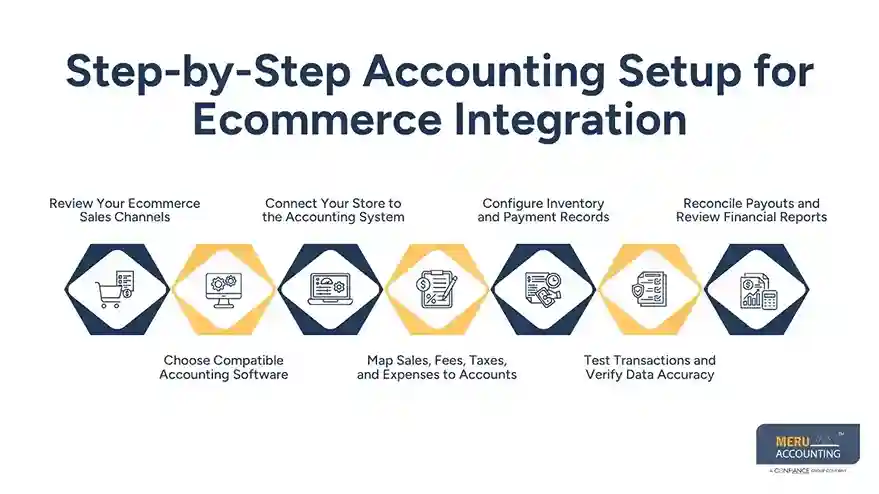
Configure Inventory and Payment Records
Choose how stock, product costs, payment methods, and clearing accounts will be recorded. If the store uses more than one payment provider, keep each provider’s records easy to identify.
Test Transactions and Verify Data Accuracy
Run test orders that include a discount, refund, tax, and shipping charge. Compare the store report, connector data, and accounting entries before allowing the full sync.
Reconcile Payouts and Review Financial Reports
Match each payment provider’s settlement report with the bank deposit and recorded fees. Review the profit and loss report, balance sheet, tax balances, and stock records at regular intervals.
Common Ecommerce Integration Challenges and How to Avoid Them
Duplicate Sales Records
Duplicate entries may occur when two apps send the same order data. Use one clear sync method for each data type and check the first batch before adding more channels.
Missing Fees and Refunds
Some connectors do not bring in every payment detail in the same way. Compare monthly settlement reports with the books and post any missing costs or refunds.
Incorrect Tax Mapping
Wrong tax codes can lead to inaccurate reports or filings. Review the rules for each sales region and seek qualified tax advice when the business sells across state or country borders.
Stock and Order Mismatches
Delayed updates can cause stock counts to differ between systems. Set a suitable sync schedule and check failed updates, cancelled orders, and returns.
Best Practices for Managing Ecommerce Accounting Integrations
Review Sync Errors Often
Check error logs and failed transactions each week. Fix the cause instead of repeatedly importing the same data without review.
Keep a Clear Account Structure
Use separate accounts or tracking categories for sales, fees, refunds, and other key costs. This makes it easier to compare channels and spot changes in profit.
Limit Access to Business Data
Give app access only to staff who need it and review permissions when roles change. Use strong passwords and multi-factor authentication where available.
Set a Regular Reconciliation Schedule
Match sales, payment settlements, bank deposits, and tax balances each month. Keep reports and supporting records so unusual differences can be traced later.
How Ecommerce Integration Improves Financial Reporting and Tax Compliance
More Reliable Sales Reports
When sales and refunds are recorded in the right period, monthly reports give a clearer view of business activity. Owners can compare channels without relying only on gross sales figures.
Better Records for Tax Review
A clear record of sales tax, refunds, fees, and expenses gives the accountant useful evidence when preparing reports or returns. The connector itself does not decide which tax rules apply.
Stronger Audit Trails
Order IDs, settlement reports, and bank records make it easier to trace a figure back to its source. Keep copies of key reports and follow the record retention rules that apply to the business.
Better Decisions Based on Profit
Gross sales alone do not show how much a store earns. Reviewing product costs, marketplace fees, shipping, refunds, and ad spend gives owners a more useful view of profit by channel.
Ecommerce Accounting Services From Meru Accounting
- Meru Accounting records online sales, discounts, refunds, and cancellations to maintain accurate revenue records across different sales channels.
- We reconcile payment gateway reports from providers such as Stripe and PayPal with bank deposits, recording payment fees, refunds, and other deductions.
- Our bookkeeping services cover marketplace fees, shipping charges, advertising costs, supplier payments, and other operating expenses, keeping business costs organized.
- Meru Accounting provides accounting software setup for ecommerce businesses using platforms such as Xero and QuickBooks, including account mapping for sales, fees, taxes, and payment clearing accounts.
- We review inventory records and product costs to track the cost of goods sold and give business owners a clearer view of product profitability.
- Our team organizes sales and tax records so business owners and their tax advisers can review tax obligations and prepare the required filings.
- We prepare financial reports covering revenue, expenses, cash flow, and profit, giving ecommerce business owners a clear view of their financial position.
- Our accounting team reviews transaction records and reconciliation reports to identify missing entries, duplicate transactions, and differences between store sales and bank receipts.
Our Expert Perspective
In our experience, ecommerce accounting errors often arise not from sales entries but from the way payment fees, refunds, and marketplace payouts are recorded. We recommend checking these items first when setting up ecommerce integration, as even small differences can affect monthly profit reports.
Our view is that automation should save time without reducing control over the books. A monthly review of sales, fees, and bank deposits gives business owners a more reliable picture of their actual earnings.
Key Takeaways
- Ecommerce integration links an online store with accounting, payment, stock, and other business apps.
- The right setup reduces manual entry and gives owners a clearer view of sales and costs.
- Choose apps based on platform fit, sync features, fees, and reporting needs.
- Test sales, refunds, tax, and payment fees before syncing all orders.
- Reconcile payment payouts with bank deposits on a set schedule.
- Review account mapping and tax treatment with a qualified accountant where needed.
- The best third-party integrations for ecommerce fit the store’s full sales and accounting process.
FAQs
Ecommerce integration connects an online store with accounting software, payment gateways, inventory tools, and shipping apps to keep sales and business records in sync.
The best third-party integrations for ecommerce include Shopify with Xero or QuickBooks, WooCommerce with accounting software, Amazon accounting tools, payment apps, and sales tax solutions.
To integrate ecommerce sales with accounting software, connect your store through a compatible app, map sales and fees to the right accounts, test transactions, and match payouts with bank deposits.
Shopify, WooCommerce, and Amazon can connect with accounting tools such as Xero and QuickBooks through compatible apps or connectors, depending on the platform, plan, and features required.
Ecommerce integration can sync stock levels, record sales and tax data, and organize payment fees, giving business owners clearer financial reports when the connected apps are set up and reviewed correctly.
optional anymore
on running the business